AI Agent Monitoring in Production: A Guide to Agent Analytics

How do you monitor AI agents in production?
Track operational health such as volume, latency and cost, but also measure whether users actually got the help they needed. Agent analytics adds customer experience metrics like completion rate, sentiment, helpfulness and user effort. Together they show not just that your agent is working, but whether it is working well.
Your AI chatbot is live on your website and social media channels, handling hundreds of customer questions daily. The numbers look great—high engagement, fast responses, lots of conversations. But here's what those numbers don't tell you: Are your customers actually getting the help they need?
Why aren't basic metrics enough to monitor AI agents?
Most teams focus on getting their agents live—and rightfully so. Building agents with quality data, integrating them across multiple touchpoints, and ensuring they can handle traffic are significant achievements.
However, deployment is just the beginning of your agent's journey.
Once your agent is live on websites, social media, or other customer-facing channels, traditional monitoring only tells part of the story:
Basic Performance Numbers (What most teams track):
- Conversation Volume: Number of interactions handled
- Response Latency: How quickly the agent responds
- Session Duration: Average length of user engagement with the Agent
- API Costs: Resource consumption and operational expenses
These metrics are essential for operational health, but they miss the most important question: Is your agent actually helping users achieve their goals?
What is agent analytics?
Traditional monitoring tells you if your AI agent is working. But is it working well?
Agent analytics shifts focus from system performance to user experience. It measures not just what happens, but how customers actually feel about their interactions. In an agent harness, this is the observability layer: a record of what the agent did, and how well it went.
At AvestaLabs, we've developed the Metric Sense—a comprehensive platform that works with all major AI models (OpenAI GPT, Claude, Gemini, LLaMA, and custom models) to analyze agent interactions across four critical dimensions:
The Four Pillars of Metric Sense
1. Completion Rate
- Did the agent successfully resolve the user's request?
- Did the conversation reach a satisfactory conclusion?
2. Sentiment Analysis
- What was the tone of the conversation?
- Did user sentiment improve or decline during the interaction?
- How did the agent's responses affect user mood?
See how one product manager used sentiment analysis to find frustrated users behind green KPIs.
3. Helpfulness Score
- Did users find the agent's responses genuinely useful?
- Were the answers relevant and actionable?
4. Effort Score
- How much work did users have to put in to get their needs met?
- Did they have to repeat themselves or clarify multiple times?
- Was the conversation path efficient?
These scores work both independently and as a combined index. This gives you granular insights into specific areas plus an overall health assessment of your agent's performance.
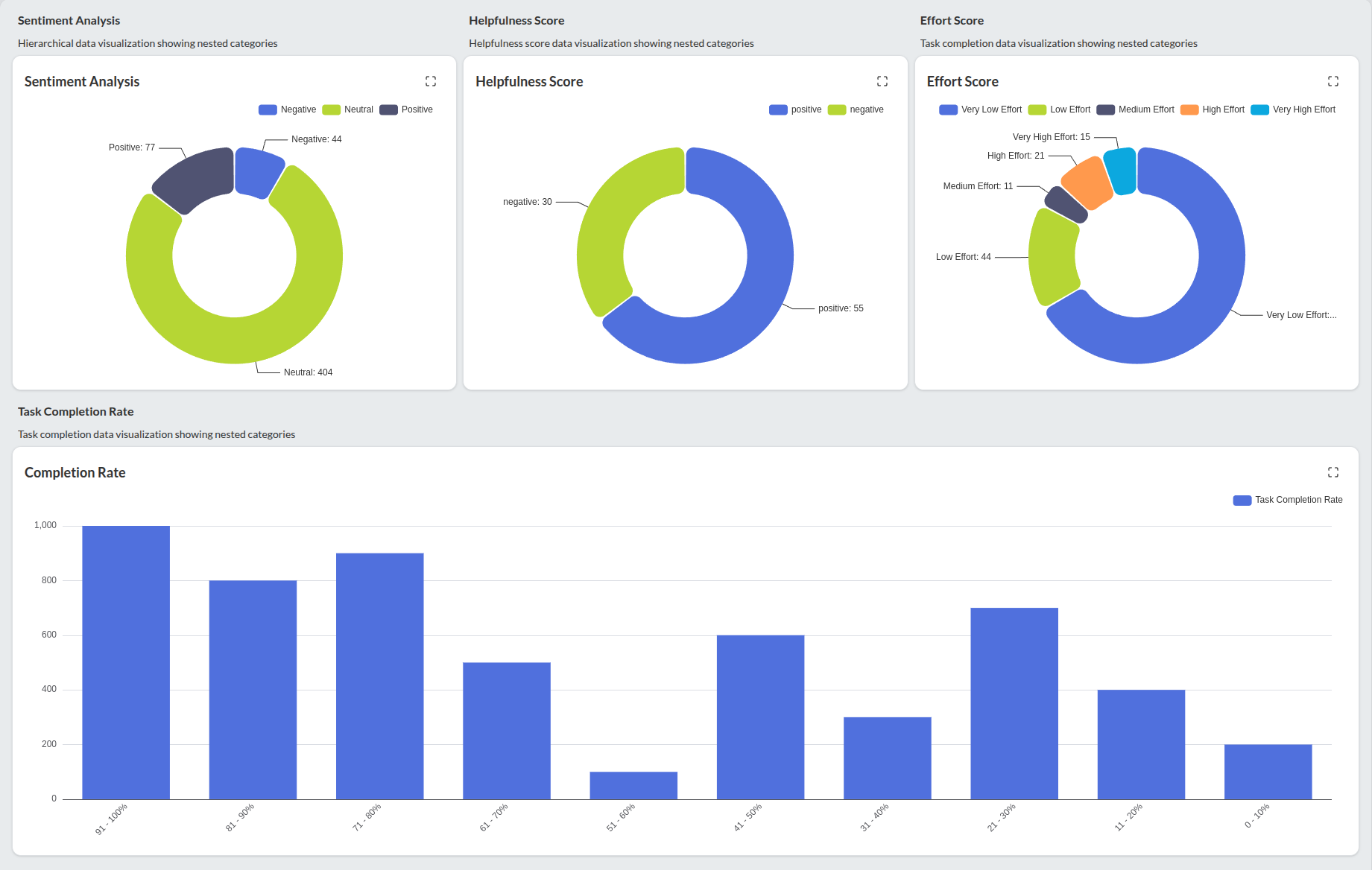
Real-World Impact: What Agent Analytics Reveals
When teams implement comprehensive monitoring, they often discover critical issues that basic performance numbers completely miss:
Hidden Performance Problems
Frequent Hallucinations: Your agent tells customers about a return policy that doesn't exist, creating confusion and potential legal issues.
Off-Brand Interactions: Responses that don't align with company voice, including inappropriate suggestions like telling customers to "switch providers" or claiming to be "overworked."
High User Effort: Customers struggled to resolve simple issues, leading to frustration.
Inconsistent Behavior: The model's escalation patterns were unpredictable and unreliable.
The Business Impact
These issues directly affect business outcomes:
- Customer Satisfaction: Poor agent experiences drive negative sentiment
- Brand Trust: Inconsistent or incorrect responses erode confidence
- Operational Efficiency: Failed conversations often escalate to human support
- Revenue Impact: Frustrated users may abandon purchases or services
From Insights to Action: Making Analytics Actionable
The true value of these insights lies not just in identifying problems, but in providing clear pathways to solutions.
Visual Intelligence Tools
Topic Analysis: Visual dashboards showing which subjects your agent handles well versus problem areas, making it easy to spot knowledge gaps and prioritize improvements.
Conversation Flow Analysis: User journey revealing exactly where users get confused or abandon conversations, enabling you to optimize dialogue paths and reduce friction.
Request Pattern Analysis: Automatically groups similar user questions to identify trends, helping you improve response consistency and discover new use cases.
Tactical Improvements
Rewriting inaccurate or flawed conversational replies to immediately improve quality.
Adding new guardrails to prevent brand-damaging interactions.
Strategic Enhancements
Knowledge Gap Analysis: Use conversation data to identify recurring questions your agent can't answer, then prioritize knowledge base updates
Feature Development: Discover unmet user needs that could drive new agent capabilities
User Journey Optimization: Redesign conversation flows based on actual user behavior patterns
Who needs an agent analytics platform?
This monitoring approach is essential for any organization that deploys AI agents across multiple channels, particularly in customer-facing roles. Here's how different teams benefit:
CX Leaders - Track customer satisfaction scores, identify friction points, and prove ROI of AI investments with concrete metrics
Product Managers - Discover feature gaps, prioritize roadmap items based on real user needs, and optimize conversation flows
Engineering Teams - Debug AI agent behavior, monitor model performance across deployments, and identify technical issues early
Marketing Teams - Ensure brand voice consistency, track sentiment impact of messaging, and optimize customer journey touchpoints
Operations Teams - Reduce escalation rates, and streamline support workflows
What's Next?
Smart monitoring isn't just about tracking performance—it's about evolution. By implementing comprehensive analytics from day one of deployment, you create a foundation for a continuous improvement loop that keeps your AI performing at peak effectiveness.
Monitoring is one part of running agents safely. Safe AgentOps is our operating layer for production agents, covering evals, guardrails, audits, testing and monitoring.
Ready to see what your AI agents are really doing?
Start your FREE 1-month trial of Metric Sense:
- Full access to all analytics features
- Complete audit of your current agent performance
- Implementation support from our technical team
- No credit card required
Get started in 5 minutes: hello@avestalabs.ai
Frequently asked questions
- What is agent analytics?
- Agent analytics measures how well an AI agent actually serves its users, not just whether it is running. It combines operational metrics like latency and cost with customer experience metrics like completion rate, sentiment, helpfulness and effort.
- Which metrics should I track for AI agents in production?
- Start with operational health: conversation volume, response latency, session duration and API costs. Then add experience metrics: did the agent resolve the request, how did the user feel, were the answers useful, and how much effort did the user need. Looking at both together shows whether the agent is busy or actually helpful.
- Why are latency and conversation volume not enough?
- They confirm the agent is online and fast, but not that it helps. A long session can mean a happy user or a user stuck rephrasing the same question. Experience metrics tell those two cases apart.
- What problems can agent analytics catch that basic metrics miss?
- Common ones are hallucinations, such as describing a return policy that does not exist, off-brand replies, high user effort on simple issues, and unpredictable escalation behavior. None of these show up in volume or latency numbers.
- How do you act on agent analytics insights?
- Quick fixes include rewriting flawed replies and adding guardrails to block brand-damaging answers. Longer term, use recurring unanswered questions to update the knowledge base, find unmet user needs, and redesign conversation flows where users get stuck.
Share this article