
How to Keep Knowledge When Employees Leave, Step by Step
Find the jobs only one person knows, capture that knowledge during the notice period, and keep it where your team can search for it.
 Dharmik Gohil8 min read
Key takeaways
- Most loss of institutional knowledge starts before anyone resigns: it builds up wherever one person is the only one who knows how a job is done.
- Find those jobs now. List the jobs that repeat every week, month or year, write everyone who could do each one, and treat every job with only one name as a risk.
- A knowledge transfer plan for the notice period works best as four steps: map the jobs, record the person doing them, document and gather, then test by asking.
- Captured knowledge only helps if staff can find it. Keep it in one place, named by the job, where people can search and see the file each answer came from.
- No tool can recover knowledge that was never written down, recorded or shown to someone. The handover is the last chance to capture it.
A resignation often comes with a few weeks' notice. Nobody has worked out how long it would take to write down what that person knows.
Often it's the person who has been there longest, like the office manager. They know which supplier invoices need a phone call before they're paid, and why the Friday report is run twice. None of it is in a manual. Most of it is in their head, their inbox and a few folders only they open.
You can keep most of that knowledge, but not by asking for "handover notes" in the last week. It takes a short plan that starts on the day they resign. Better still, start before anyone resigns.
How to keep knowledge when employees leave: what comes first?
How to keep knowledge when employees leave: find the jobs only one person knows how to do, and capture those first. During the notice period, record that person doing each job, turn the recordings into written steps, and gather their files in one shared place. Then make it searchable, with the file each answer came from.
Capture the jobs only one person can do, while that person is still there to show you.
Why does institutional knowledge leave with one person?
Institutional knowledge is what your business knows how to do, and in a small business most of it sits in people's heads. A job gets done by whoever did it last. Over a few years, that person adds shortcuts, fixes and exceptions that nobody else sees.
People do leave, even as fewer Australians change jobs. In the year to February 2026, 7.2% of employed Australians changed their employer or business, just over 1.0 million people (Australian Bureau of Statistics).
Few organisations capture what their most experienced people know before they retire. In a 2025 global survey of 1,000 organisations, only 8% said they consistently capture knowledge from departing retirees, and 16% don't try at all (APQC). Many said they lacked the time, resources or technology to do it.
How do you spot the jobs only one person knows before an employee leaves?
Start from the work itself: list jobs, then the people who can do them. For a small team this takes roughly an hour, and it works best before anyone resigns.
- List the jobs that repeat. Weekly, monthly and yearly: paying suppliers, the month-end report, renewing insurance, ordering stock, fixing the booking system when it jams.
- Write everyone who could do each one. Count only people who could actually do it tomorrow without help, whoever is responsible on paper.
- Mark every job that has only one name beside it. Each one is a single point of failure: if that person leaves or falls ill, the job stops or goes wrong.
A typical result for a ten-person office looks something like this (a made-up example):
| Job | How often | Who can do it today | Risk |
|---|---|---|---|
| Paying supplier invoices | Weekly | Office manager only | High: money goes out late or wrong |
| Month-end report for the bank | Monthly | Office manager only | High: a deadline someone else can't meet |
| Ordering stock | Weekly | Two staff | Low |
| Renewing insurance and licences | Yearly | Owner, from memory | High: easy to miss once |
| Answering "Do you deliver on weekends?" | Daily | Everyone | None |
The yearly jobs are the easiest to miss. Nobody remembers how a job is done when it only happens once a year.
For each high-risk job, train a second person now, or at least record the job the next time it's done. That way a resignation becomes a planned handover instead of an emergency.
What should a knowledge transfer plan cover in the notice period?
A knowledge transfer plan is a short schedule for moving what one person knows to the people who stay. In a small business it fits on one page, and it follows four steps.
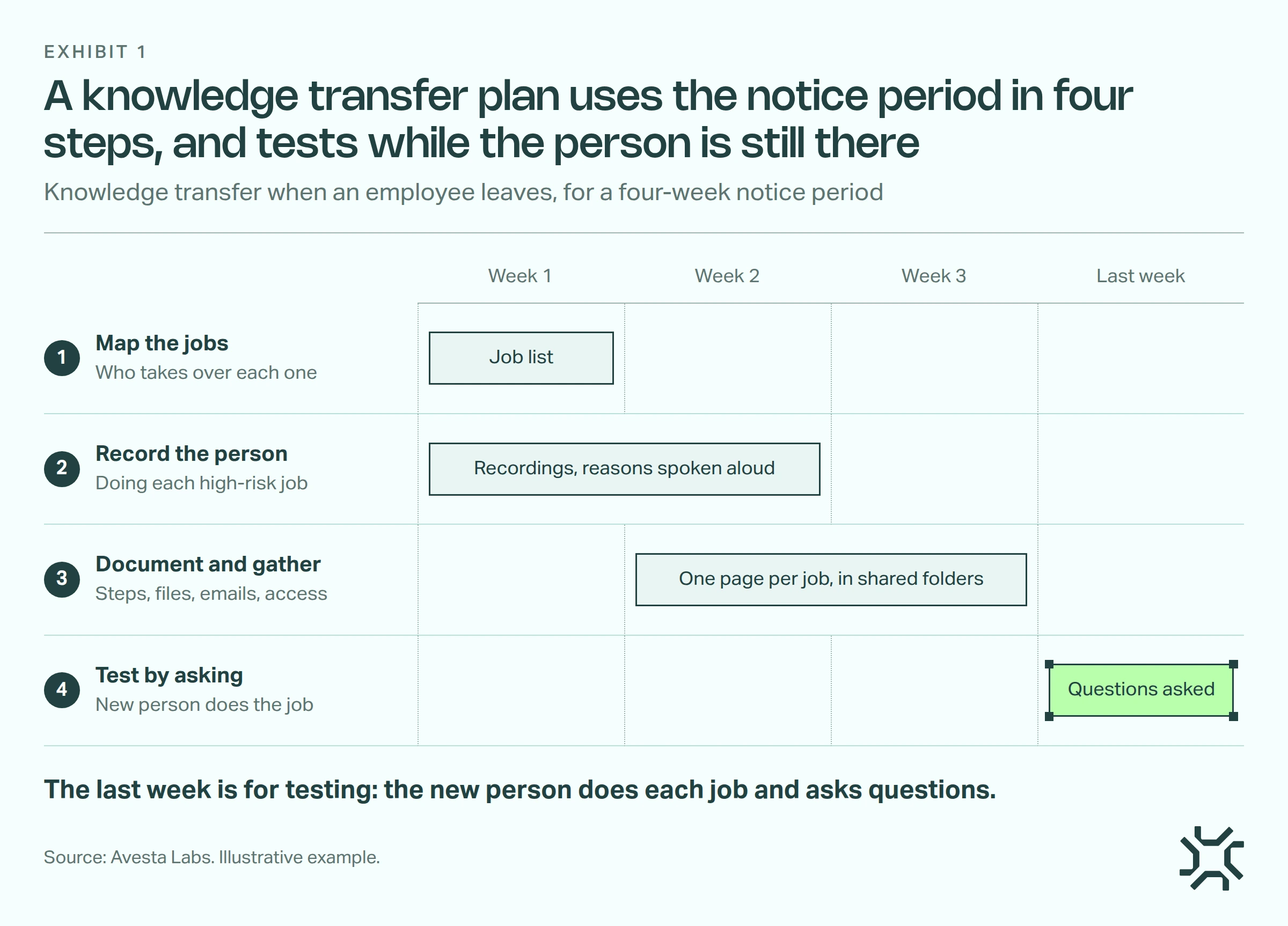
- Map the jobs (week one). List every job the person does, using the single-point-of-failure list above. Name who will take over each one.
- Record the person doing the job (weeks one and two). Screen recordings or phone video, with the person talking through what they're doing and why.
- Document and gather (weeks two and three). Turn each recording into short written steps. Move their key files and important email threads into shared folders the business owns. Give the person taking over their own access to each system.
- Test by asking (last week). The person taking over does each job while the leaving employee watches, and asks every question they can think of.
Record the job, not an interview
Recording someone doing the actual job beats asking them to describe it. People forget steps they do without thinking. On a recording, you see the extra click, the second spreadsheet and the phone call in the middle.
Ask one question throughout: "Why do you do it that way?" The reasons are what usually get lost, and they're what the next person needs when something unusual happens.
Document it where the next person will look
A good written step is short and specific. "Check the supplier's bank details against last month's before paying" is better than "verify payment details".
For each job, keep one page. This is the knowledge transfer checklist for that job. Here's what one filled-in page might look like:
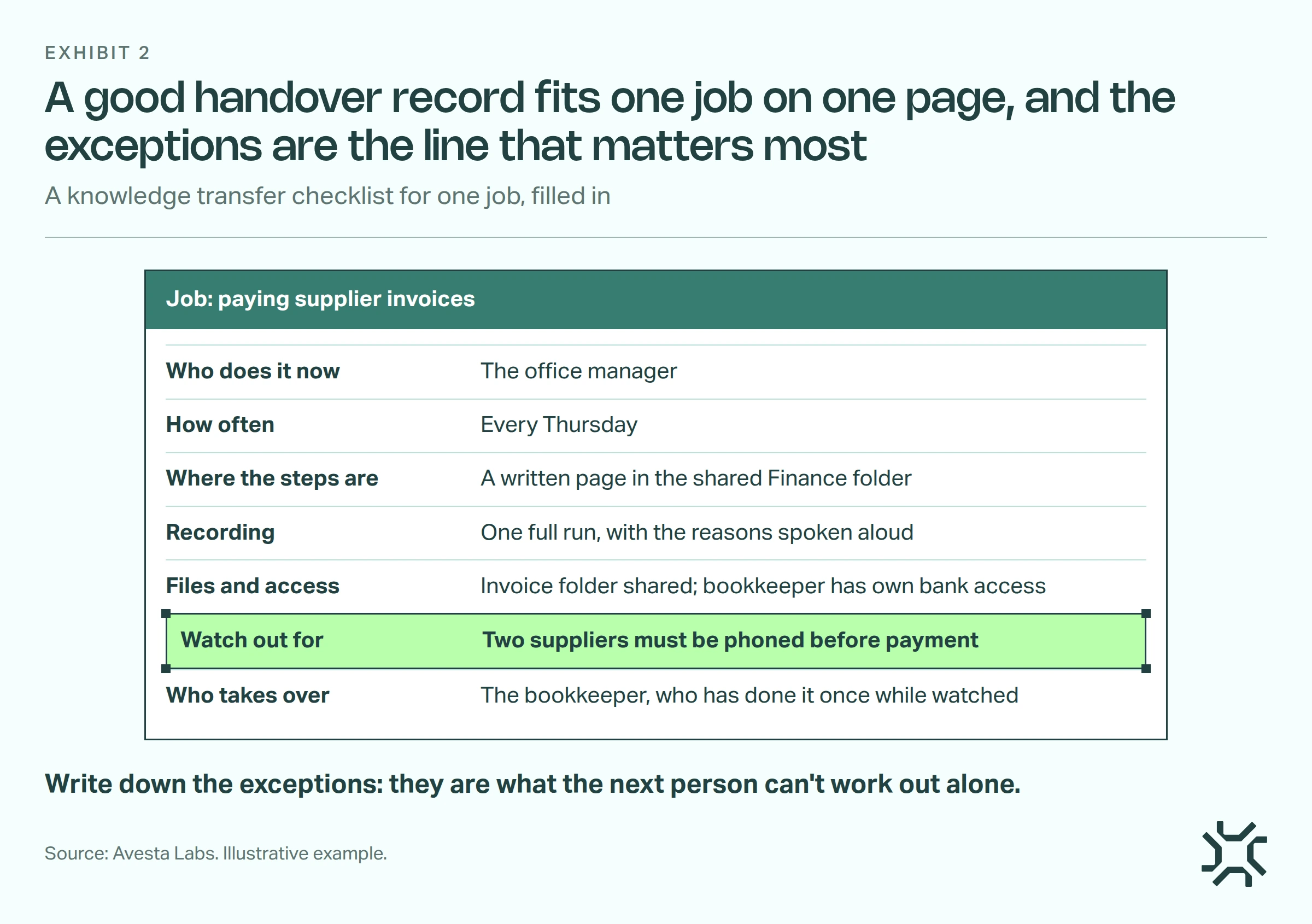
- Who does it now.
- How often it happens.
- Where the steps are: the written page.
- Recording: one full run, with the reasons spoken aloud.
- Files and access. Files sit in shared folders, and the person taking over has their own login. Never put passwords in the handover document.
- Watch out for: the exceptions, like the two suppliers who must be phoned first. This is the line that saves you later.
- Who takes over, and whether they've done the job once with the leaving employee watching.
How do you make captured knowledge easy to find?
A folder of forty videos with names like "screen recording 3" is not a handover. Keep everything for a job in one place, and name files after the job ("Paying supplier invoices: steps") instead of the person. Then make it something people can ask.
This is where an AI assistant helps. An assistant that reads your own files can answer "how do we pay the Thursday invoices?" from the handover page and the recording. It should show the file and page the answer came from, so the new person can check it. If you haven't set one up before, our guide to getting AI to answer from your business's own information covers what to gather first.
A handover only works if the next person can find the answer when they need it.
What knowledge can't be recovered after an employee leaves?
Be honest about the limits. Knowledge that was never written down, recorded or shown to anyone can't be recovered by any tool. An AI assistant answers from what you give it. It can't know why a former employee gave one client a special price.
After they leave, you can still ask a friendly former employee the odd question, but you can't rely on it.
When is a one-page checklist enough?
A full recording-and-assistant setup is more than some jobs need. If a job is simple and two people already do it, a one-page checklist is enough. Save the effort for the high-risk jobs on your list.
How we keep handover knowledge searchable in Avesta AgentOS
In Avesta AgentOS, IngestIQ is the knowledge layer: the part that reads a business's information and makes it searchable. Three parts of it matter for a handover, and each is worth asking any tool about.
Recordings become searchable text. IngestIQ takes uploaded audio and video files, or links to videos, and turns the speech into text that can be searched alongside your documents. A walkthrough recorded in the notice period becomes text staff can search alongside the written steps. The recording needs sound: a silent screen capture has nothing to turn into text.
Shared folders can be re-read after the person leaves. IngestIQ reads Google Drive and SharePoint folders where they are. When a folder is re-read, it picks up new and changed files and removes ones that were deleted, so the handover folder can keep up after their last day.
Every result shows its source. When someone searches it, each result shows the document's name and, where there is one, the page number. The person taking over can open the document and check it.
The bottom line
You can't stop good people leaving. You can stop the business depending on one person's memory.
For a wider look at what changes when AI takes on repeat tasks, read our guide on whether AI will replace your employees.
List the jobs that repeat in your business and write beside each everyone who could do it tomorrow. Any job with a single name is where your handover starts.
Want your team's handover notes, recordings and shared folders searchable, with the source of every result?
See how Avesta AgentOS connects your business information
Get started: hello@avestalabs.ai
Frequently asked questions
- What should you do if an employee leaves a company?
- Start the handover on the day they resign, not in their last week. Agree which jobs they will show someone, book time for recordings, and collect their key files into one shared place. Give the person taking over their own access to each system, and remove the leaver's on their last day. Ask the person what they wish they had been told when they started.
- What is process knowledge?
- Process knowledge is knowing how a job actually gets done in your business: the steps, the order, the exceptions and the reasons behind them. Some of it sits in documents. Much of it lives in people's heads, such as which supplier needs a phone call or why a report is run twice. That second kind is what leaves with them.
- How do I keep knowledge when an employee leaves suddenly?
- Work from what they left behind. Go through their shared folders and work email account, list the jobs they did, and ask the colleagues who worked closest to them what they relied on that person for. A short, polite call with the former employee often fills a few gaps. Then run the single-name check across the rest of the team, so the next departure has a plan.
- Should I stop staff using AI tools to write up their handover notes?
- Not necessarily. AI tools can turn a rough recording or a page of notes into clear steps quickly. Set two rules first: keep client and staff details out of public tools, and have the leaving employee read and correct the result. A handover note they haven't checked can be confidently wrong.
Share this article