
Will AI Replace Your Employees? A Small Business Guide
In one large survey, owners who use AI regularly trained staff far more often than they cut jobs. How to split tasks between AI and your staff.
 Dharmik Gohil7 min read
Key takeaways
- AI replaces tasks before it replaces jobs. In a 2025 survey of small businesses that use AI regularly, 34% trained their staff and 5% cut jobs.
- Some owners do cut: in another 2025 survey, 20% of small-business owners who use AI said it had already reduced their number of employees.
- Sort each task, not each job: automate the repeat tasks, keep judgement with a human, and in the middle let AI draft while a person approves.
- Tell your staff what AI is for before you start, and what will happen to the time it frees up.
- Decide in advance which cases are always handed over to a human: complaints, refunds above a limit, and questions asking for advice on health, money or the law.
Two surveys of small-business owners were reported in July 2025, and they seem to disagree. In one, owners who use AI regularly were far more likely to train their staff than to cut anyone. In the other, one in five owners who use AI said it had already reduced their number of employees.
Both are true. The surveys asked different questions, and the owners made different choices about the time AI freed up. Those choices are yours to make too.
Will AI replace your employees?
Will AI replace your employees? For most small businesses, it replaces tasks before it replaces jobs. In one large survey, owners who use AI regularly were far more likely to train staff or hire than to cut jobs. Some do cut, though. Which way it goes depends on which tasks you give to AI and which you keep with people.
AI takes the repeat tasks, and you decide what your staff do with the time.
What do small businesses report?
The best evidence comes from owners, not from forecasts about the whole economy.
| Survey | Who was asked | What they found |
|---|---|---|
| Gusto, reported July 2025 | 1,480 owners; figures for those who use AI regularly | 34% trained (upskilled) staff, 9% hired more, 5% cut jobs (CPA Practice Advisor) |
| CNBC and SurveyMonkey, July 2025 | 1,900 owners; figures for those who use AI | 20% said AI had already reduced their number of employees; 35% said it may in future (SurveyMonkey) |
| Justworks, May 2026 | Its own small-business customers (sample size not given) | 57% expect AI to raise output with the team they already have (Justworks) |
Read together, cutting jobs is the minority choice, but it isn't rare: one in five owners who use AI say it has already reduced their staff.
The numbers also differ because the questions differ. "Did you cut jobs?" and "Did AI reduce how many people you need?" are not the same question. A business that stops replacing people who leave may answer yes to the second and no to the first.
Which jobs will AI replace, and which will it not?
Roles made almost entirely of repeat tasks are the most exposed: data entry, answering the same few questions, copying details between systems. Roles built on judgement and relationships are the least exposed: handling complaints, managing key clients, signing off quotes.
Most roles mix both, so look at tasks, not job titles. Repeat tasks mean the same steps and the same answers, again and again. Judgement means deciding what to do when the case is unusual, the customer is upset or money is at stake outside the rules.
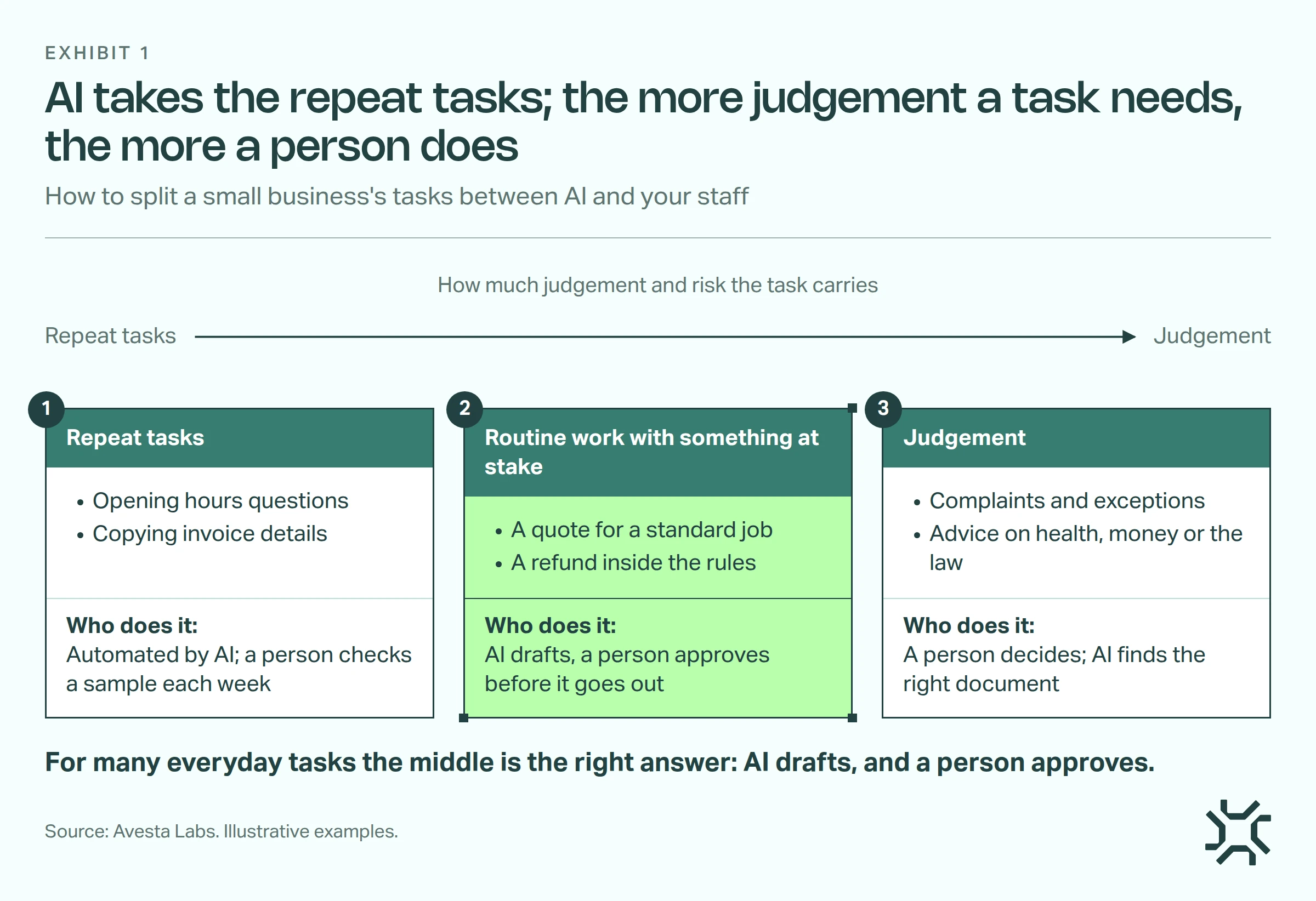
- Repeat tasks: automate them. Same question, same answer: opening hours, delivery areas, copying invoice details into a system. A person checks a sample each week.
- Routine work with something at stake: AI drafts, a person approves. A quote, a booking change, a refund inside the rules. AI prepares it; a person approves it before it goes out.
- Judgement: a person decides. Complaints, exceptions, and questions asking for advice on health, money or the law. AI can find the right document, but a person decides.
A quick way to sort your own team's tasks
Pick one role and list what that person did last week. Mark each task 1, 2 or 3. A typical front-desk role looks something like this:
| Task | Level | Who does it after |
|---|---|---|
| Answering "Are you open on Saturday?" | 1 | Automated, with a weekly check |
| Copying booking details into the diary | 1 | Automated, with a weekly check |
| Sending a quote for a standard job | 2 | AI drafts, staff member approves |
| Moving a booking inside the rules | 2 | AI drafts, staff member approves |
| Handling a customer who wants a refund outside the policy | 3 | Staff member |
| Spotting that a regular client sounds unhappy | 3 | Staff member |
If most of a role is level 2 or 3, AI gives that person time back rather than taking their place.
How do I tell my staff we're using AI?
Tell them before you start, and say what it's for. When owners say nothing, people tend to expect the worst. Few businesses have written rules either: Gusto's 2025 survey found that only 15% of businesses using AI had guidelines or policies for it.
A short team meeting covers it. Say four things:
- What AI will do. Name the tasks, using the sort above. "It'll answer the Saturday-hours questions and draft standard quotes."
- What stays with people. "Complaints, refunds outside the policy and anything unusual stay with you."
- What happens to the time. Be specific and honest. If you plan to grow without hiring, say that. If a role will shrink, say that too, early.
- Who to ask. One named person who answers questions about the tools and the rules.
Then ask your staff which of their tasks they'd hand over first. The people doing the work know where the repeat tasks are.
Which cases should always be handed over to a human?
Decide this before AI talks to a single customer, and write it down. A good starting list has four kinds of case.
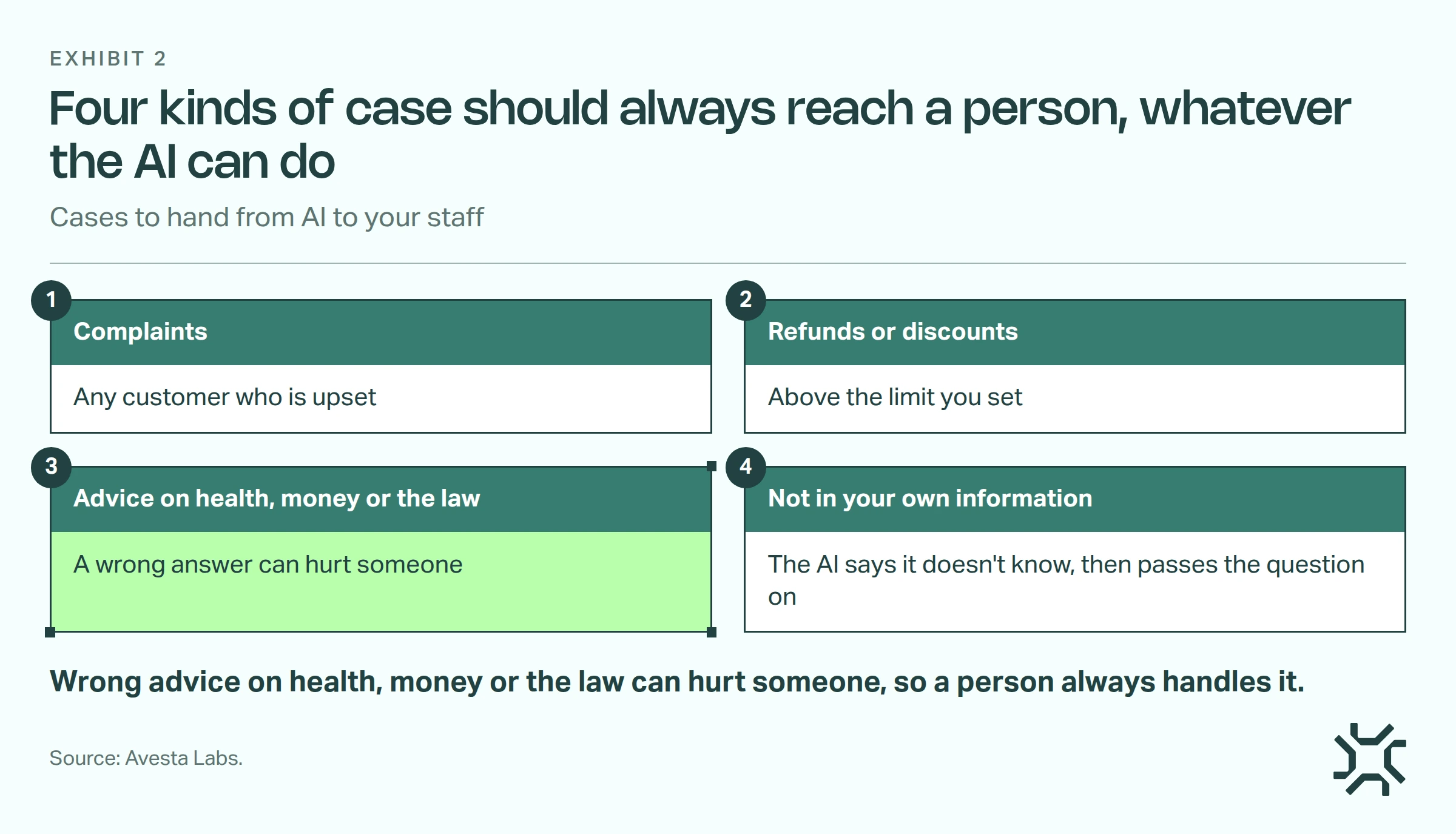
- Complaints, and any customer who is upset.
- Refunds or discounts above a limit you set.
- Questions asking for advice on health, money or the law, such as a dose, a tax question or a legal right, where a wrong answer can hurt someone. Prices and quotes stay at level 2.
- Anything the AI can't find in your own information. It should say it doesn't know, then pass the question on.
The rule matters because AI answers can carry legal weight. In February 2024, a Canadian tribunal held Air Canada responsible for wrong advice its website chatbot gave a customer about a fare (American Bar Association).
If a wrong answer could hurt someone, a person answers it, not AI.
How human approval and handover work in Avesta AgentOS
We build AI co-workers on Avesta AgentOS. Two of its controls handle the human approval and the handover described above.
Approval before an action runs. In Avesta AgentOS, any action an AI co-worker can take, such as issuing a refund, can carry a review policy. It can apply always, or only when the action's details meet a condition, such as an amount above a limit. The action waits until a named person approves it, rejects it or changes it first, so a reviewer can fix a refund amount instead of only saying no.
If nobody decides in time, the request is rejected by default, or passed to the next reviewer if you set it up that way. That default means an action nobody approved never runs. Ask any vendor: what happens to a waiting action when nobody answers?
Human handover to your team. For example, when an action the AI takes marks a conversation as a complaint, a second kind of policy passes it to a named person in your team. It works by watching the result of an action for a value you set. Today that handover works on WhatsApp. Ask: who gets the conversation, and does the customer know a person has it?
We wrote more on which actions need human approval, and the same thinking applies to a five-person business as to a large one.
When will AI cut jobs in a small business?
Sometimes it will. In our view, roles that are almost all level 1 tasks are the most exposed. The CNBC and SurveyMonkey poll shows a real share of owners who use AI already reducing staff.
Another pattern is quieter. When someone leaves, the owner doesn't replace them, and the rest of the team takes the remaining level 2 and 3 work. If that's your plan, tell the team now, not when the role disappears.
AI also isn't worth it for every task. If a job happens a few times a month, or the information behind it is a mess, it's usually cheaper to keep doing it by hand. Our guide to getting AI to answer from your business information covers what to tidy first.
The bottom line
AI is far more likely to change your employees' jobs than to remove them, but you make that choice, not the software. Sort the tasks, tell your staff early, and keep the hard cases with a human.
For the bigger picture on oversight, read how to keep humans in control of AI agents.
Who in your team does the most level 1 tasks, and what have they heard from you about AI so far?
Want help deciding which of your team's tasks to hand to AI, and which to keep?
Get started: hello@avestalabs.ai
Frequently asked questions
- Will AI replace my employees, or just some of their tasks?
- Mostly some of their tasks. AI is good at repeat tasks with a clear right answer, like copying details between systems or answering the same questions. Most roles in a small business mix those with judgement and relationships, so the role changes shape. A role that is almost all repeat tasks can disappear, and owners should say so early.
- What jobs will AI not replace?
- The hardest roles to replace are built on judgement and relationships: the person who handles complaints, manages your key clients, signs off quotes and exceptions, trains new staff, or does hands-on work with customers in the room. AI can help each of them find information faster. It can't take responsibility for the decision.
- Should I ban my staff from using AI tools at work?
- A ban can push AI use out of sight, because staff who find it useful may keep using it on their own phones. A short written policy usually works better: which tools are allowed, what must never be pasted in (client details, staff records, health information) and who to ask. This isn't legal advice, so check the policy with an adviser.
- How long before AI saves my team time?
- It depends on the task, so be wary of anyone who promises a date. A useful check is to pick one task, time it for a week by hand, then time it with AI for a week, counting the time spent checking and fixing the AI's work. If the second number isn't smaller, change the task, not the team.
Share this article