Train AI on Your Business Data: What It Really Means
An AI assistant doesn't memorise your business. It looks up your own information each time someone asks.
 Dharmik Gohil9 min read
Key takeaways
- To train AI on your business data, you usually don't change the AI. You give an AI assistant your own information, and it looks up the right passage each time someone asks.
- Start with the information customers and staff ask about most: website pages, FAQs, price lists and policies. Give each one an owner.
- Three rules matter more than the tool: answer only from your business information, show the source, and say "I don't know" when the answer isn't there.
- Before customers see it, test the assistant with 30 real questions. Check every answer for the right content and a source, and fix the information behind every wrong one.
On the forums of Shopify, the online store platform, a store owner asked for a chatbot that answers customers "only using the content I provide". They wanted control over every answer, and none of the bots they had tried came "close to that level of control or reliability".
That's what most owners mean by AI that knows their business. Getting there is mostly about your information, not the AI.
What does it mean to train AI on your business data?
"Train AI on your business data" usually means giving an AI assistant or chatbot your own business information, not changing the AI itself. You hand over website pages, FAQs, price lists and policies. Each time someone asks, the assistant looks up the right passage (the few sentences that answer the question) and writes the answer from it. A well-set-up one also shows where the answer came from.
The AI doesn't memorise your business. It looks your business up, every time.
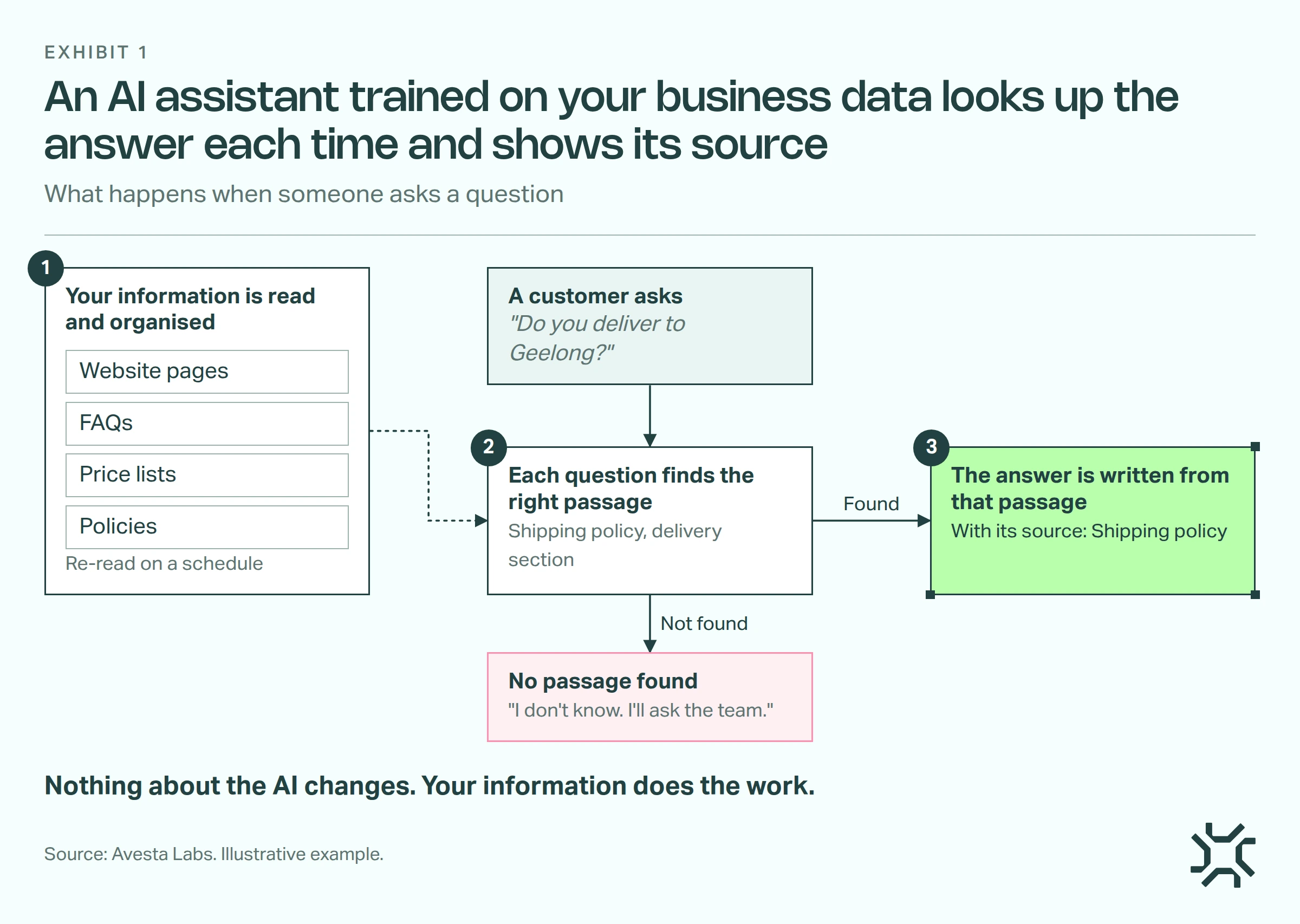
- Your information is read and organised. Website pages, FAQs, price lists and policies are read once, then re-read on a schedule so they stay current.
- Each question finds the right passage. A question like "Do you deliver to Geelong?" finds the delivery section of your shipping policy.
- The answer is written from that passage. It should name its source. If no passage fits, the assistant should say it doesn't know.
Why doesn't ChatGPT already know my business?
ChatGPT learned from public text up to a cut-off date. It has never seen the price list in your spreadsheet, the refund policy in your shared drive or the rule your staff follow for late bookings.
So when you ask about them, it fills the gap with something that sounds right. An MIT study of business AI projects, reported by Fortune, found that generic AI tools "don't learn from or adapt to workflows", meaning the way your team actually works. Knowing your business takes your own information.
Do I need to build or retrain my own AI model?
Almost never. Retraining, usually called fine-tuning, means changing the AI model itself by showing it a set of examples. It takes specialist work, and on its own it doesn't show which document an answer came from.
The other way leaves the AI alone. A look-up assistant searches your information each time and answers from what it finds.
| Look-up assistant | Fine-tuning (retraining the model) | |
|---|---|---|
| What changes | Nothing in the AI. It reads your information | The AI model itself, from examples |
| When prices change | Re-read the price list | Retrain with new examples |
| Shows where an answer came from | Can, when it's set up to | Not on its own |
| Who can set it up | Most businesses, once their information is tidy | A specialist team |
| Best for | Customer and staff questions about your business | A new writing style or a narrow skill |
What business information should I gather first?
Start with what people actually ask about, not everything on the shared drive.
Pull the last month of customer emails, chat messages and staff questions, and sort them by topic. The topics that come up most tell you which documents to gather first.
| Information | What it answers | Who usually owns it | How often it changes |
|---|---|---|---|
| Website pages | Services, locations, opening hours | The owner or whoever runs the site | Monthly |
| FAQs | The questions you answer every day | Whoever answers customers | When a new question repeats |
| Price lists | What things cost, what's included | Whoever sets prices | Whenever prices move |
| Policies | Returns, refunds, delivery, bookings | The owner or a manager | A few times a year |
| Product sheets and brochures | Features, sizes, specifications | Whoever buys or sells the product | Each new product |
| Key spreadsheets | Stock lists, service areas, rates | Whoever updates them | Weekly or daily |
In a five-person business, one person may own most of these rows. That's fine. What matters is one named owner per document and one current copy of each, so the assistant never reads last year's price list beside this year's.
Australia's privacy regulator, the OAIC (Office of the Australian Information Commissioner), says privacy obligations apply to any personal information put into an AI system. It also recommends that organisations don't enter personal or sensitive information into publicly available AI tools.
Our own practice is to leave client files, staff records and health details out of an assistant's information at the start. This isn't legal advice, so check your own obligations.
What rules should an AI chatbot follow?
Not every assistant does these by default. Write them down before you choose a tool, and ask any vendor to show you each one working.
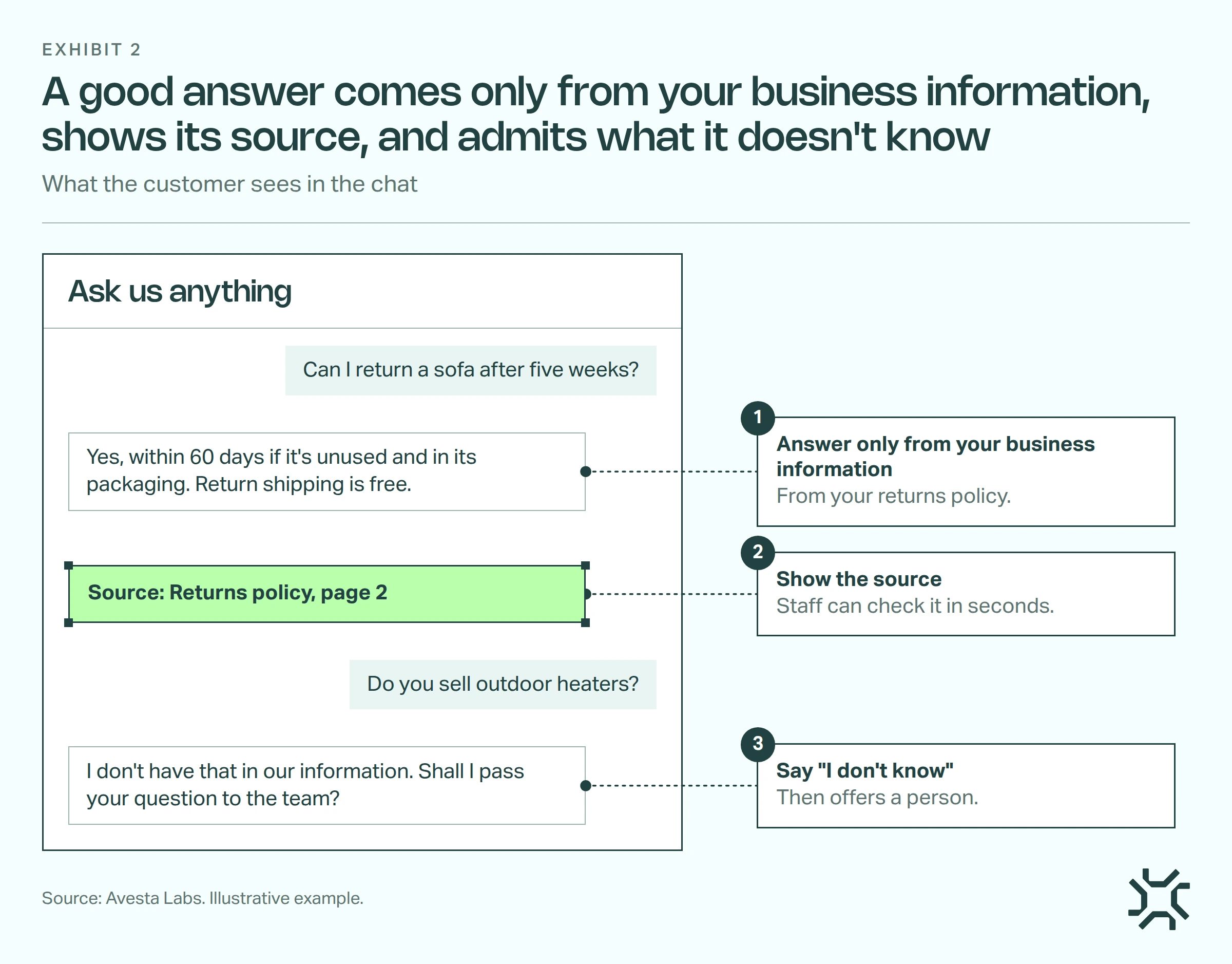
- Answer only from your business information. If the answer isn't in what you gave it, the assistant doesn't fill the gap from general knowledge.
- Show the source. Every answer names the document it came from, and the page where it can. Your staff can check it in seconds.
- Say "I don't know". When nothing matches, it says so and offers to pass the question to a person. We wrote more on why an AI that says "I don't know" is worth more.
An answer without a source is a guess you can't check.
How do I test an AI chatbot before customers see it?
Collect 30 real questions from your inbox, chat history and front desk. Make most of them the common ones, add a few awkward ones, and include some the assistant should decline, like a product you don't sell.
Have the person who knows the answers write the right answer to each one first. Then ask the assistant every question and mark each reply on two things:
- Is it right? Correct, wrong, or a correct "I don't know" for a question it should decline.
- Does it show its source? Yes or no.
Our rule: don't launch while any answer about prices, policies or bookings is wrong. Often the cause is a missing document or an old copy, so fix the information and run all 30 again. Keep the list for every future price or policy change. Our guide on testing an AI chatbot with real questions and expected answers goes deeper.
How we connect business information in Avesta AgentOS
In Avesta AgentOS, IngestIQ is the knowledge layer: the part that reads and organises a business's information so it can be searched. Here's what we built, and the question each part answers for any tool you look at.
It reads information where it already lives. IngestIQ reads files, spreadsheets, images, audio and video recordings, website pages (found through the site's list of pages, called a sitemap), and folders in Google Drive and SharePoint. Ask any vendor: can it read our information where it is, or do we have to move it?
It re-reads on a schedule. Each source can be set to refresh daily, weekly or monthly, and a single document can be re-read on demand. With a daily refresh, a price change is in the information by the next day. Ask: how often does it re-read, and can we force a re-read after a price change?
Every search result shows where it came from. When a team searches its information in IngestIQ, each result shows the document's name, a preview of the passage and the page number when there is one. Ask: when it answers, can we see which document and page it used?
Do you need an AI chatbot at all?
Not always. Some businesses get a handful of questions a week, and they're the same five each time. There, a clear FAQ page and a good contact form do the job for far less effort.
It's also too early if your information isn't ready. If prices live in three spreadsheets that disagree, an assistant will repeat the disagreement faster. Tidy the information first.
The bottom line
The AI is the easy part to buy. Whether customers get correct answers depends on the documents you hand over, who keeps them current, and the test you run before launch.
When you're ready for the technical side of how assistants find the right passage, read our comparison of hybrid search and content search.
How many of your last 30 customer questions could be answered from documents you already have?
Want help gathering your business information and testing an AI assistant before launch?
Get started: hello@avestalabs.ai
Frequently asked questions
- How do I train AI on my own data?
- For most businesses, you set up an AI chatbot or assistant that reads your documents, rather than training a model. That can be a chatbot tool or a partner who sets one up. Gather the documents people ask about, connect them, set three rules (answer only from your information, show the source, say "I don't know"), then test with 30 real questions. Fine-tuning a model is a separate job, worth it mainly for a new writing style or a narrow skill.
- Can I train ChatGPT on my business website?
- Not by chatting with it: that doesn't retrain ChatGPT itself. As of November 2026 you can paste pages into a chat and ask about them, but that copy doesn't update when your site changes. For an assistant customers use every day, you want one that reads your whole website itself, re-reads it on a schedule, and shows which page each answer came from.
- Is my business data used to train the AI model itself?
- It depends on the product and the plan, so read the vendor's data-use terms before you upload anything. With an assistant that looks up your information, your documents are stored and searched for you, and the AI reads them when it answers. Leave out personal and sensitive customer details until you know how they're protected.
- What happens when my prices or policies change?
- The assistant only knows the copy of your information it last read. Keep one up-to-date document for each price list and policy, have the assistant re-read it on a schedule, and re-read it straight away after a big change. Then ask the assistant about the exact item that changed.
Share this article