How to Test a RAG Chatbot: Real Questions, Expected Answers
Test it with the questions your customers ask, and let the person who knows the right answer mark each one.
 Jeet Adeshara12 min read
Key takeaways
- To test a RAG chatbot, collect real customer questions, have a subject expert write the expected answer for each, and mark every chatbot answer right or wrong with a reason.
- Check more than the words: did the search find the right document, does the figure match it, is the source linked, and does the chatbot refuse what it should refuse?
- An LLM judge gives you speed and volume, but only after you have checked that it agrees with your expert's marks.
- Run the same test questions on every change: a prompt edit, new documents or a new model. That is what turns a one-off test into regression testing.
- India Avenue's assistant passed 50 real questions that India Avenue supplied and marked, and every change still runs against them (as of 21 Oct 2026).
Say an investor asks a fund's chatbot for last year's return. The chatbot answers in a clear, confident sentence. The number is wrong. The chatbot copied a nearby sentence instead of the figure the investor asked for.
Nobody notices in the demo, because the demo used five questions the builder chose. The investor notices. For a licensed fund manager, a wrong figure can mislead an investor.
This post explains how we test a RAG chatbot (a chatbot that answers from your own documents) before and after it goes live. A RAG chatbot works in two steps: it first finds the right passages, then writes an answer from them. The method is simple. Real questions, expected answers, and a person who knows the answer doing the marking.
How do you test a RAG chatbot?
To test a RAG chatbot, collect real questions your users ask and have a subject expert write the expected answer for each. Run the chatbot on every question. Mark each answer right or wrong, with a reason. Check the source and the refusals too. Use an LLM judge for volume, check it against the expert, and rerun on every change.
Put simply:
Real questions in. Expert marks out. Same questions again after every change.
LangChain's documentation describes the same core loop. A typical RAG evaluation has three steps: build a set of questions and expected answers, run the application on them, then score the results. The hard parts sit inside those steps. Whose questions? Who writes the answers? Who marks them?
Why isn't a demo enough to test a RAG chatbot?
A demo shows the chatbot on its best day, with questions the builder knows it can answer. Real users ask in their own words, about the documents the builder didn't open.
Two things make RAG chatbots fail quietly:
- The search step misses. The answer is in your documents, but the chatbot doesn't find it. It writes a fluent answer from whatever it did find.
- Things drift. Someone edits an instruction, adds new documents or switches the model. An answer that was right last month is now wrong, and nothing tells you.
A RAG chatbot rarely fails loudly. It fails with a confident sentence and no warning.
A test set catches both. It is a fixed list of questions with known good answers that you can run again at any time.
What should a RAG chatbot test check for accuracy?
More than whether the words sound right. A good test looks at the answer, where it came from, and what the chatbot refused to do.
| What to check | Example question | How to check it | Who marks it |
|---|---|---|---|
| Right passage found | "What are the fees on this fund?" | The search returned the document that holds the answer | A written rule |
| Right answer | The same question | Compare with the expert's expected answer | Expert, then an LLM judge |
| True to the source | Any question with a figure | The figure matches the source document, allowing only harmless rounding | A written rule or the judge |
| Source linked | Any factual answer | The answer links to the document it used | A written rule |
| Stays in scope | "Should I invest now?" | No advice and no forecasts; points to the right person | Expert, then an LLM judge |
| Honest about gaps | A figure that isn't in the documents | Says it doesn't have it and hands over to a person | Expert |
| Format | "Show me the sector weights" | One chart, not two; no repeated numbers | A written rule |
A written rule is a fixed check that needs no judgement, such as "the answer contains a source link".
The first three rows cover the two halves of the chatbot. RAG stands for retrieval-augmented generation. The first row checks retrieval, the search step: did it find the right passage? LangChain's documentation scores this step as retrieval relevance.
Rows two and three check the writing step: is the answer right, and did it stay true to that passage? The Ragas toolkit calls the second check faithfulness. An answer is faithful when every claim in it can be supported by the passages it was given.
Keep those two apart when you test. A wrong answer from the right passage is a writing problem. A wrong answer from the wrong passage is a search problem, and a better prompt alone won't fix it.
Who should write the RAG chatbot test questions?
The people who answer those questions today. Pull them from the support inbox, the call notes and the FAQ page. Then ask the subject expert to write the expected answer for each.
Anthropic's guide to building evaluations says to design evals that mirror your real-world task distribution, and not to forget the edge cases. Include these on purpose:
- Questions with no answer in the documents. The right result is "I don't have that", not a guess.
- Questions it must refuse. Advice, forecasts, anything a licence forbids.
- Badly worded questions. Typos, half sentences, two questions in one.
- Questions about figures in charts and tables. In our India Avenue work, these tripped the search step.
Don't let the builder write the expected answers alone. The builder knows how the chatbot works. The expert knows what is true.
How do you evaluate the answers, and when does LLM as a judge help?
Mark each answer right or wrong, with a reason. Skip the sliding scores. A reason like "used the old fee, not the current one" tells the builder exactly what to fix.
People are slow, though. So you can add an LLM judge, an approach known as LLM as a judge. A second AI model reads the question, the expected answer and the chatbot's answer. Then it decides pass or fail and says why.
The judge is only useful if it agrees with your expert. OpenAI's evaluation guide puts it plainly: use human feedback to calibrate automated scoring, and scale up only once the judge "consistently agrees with human annotations".
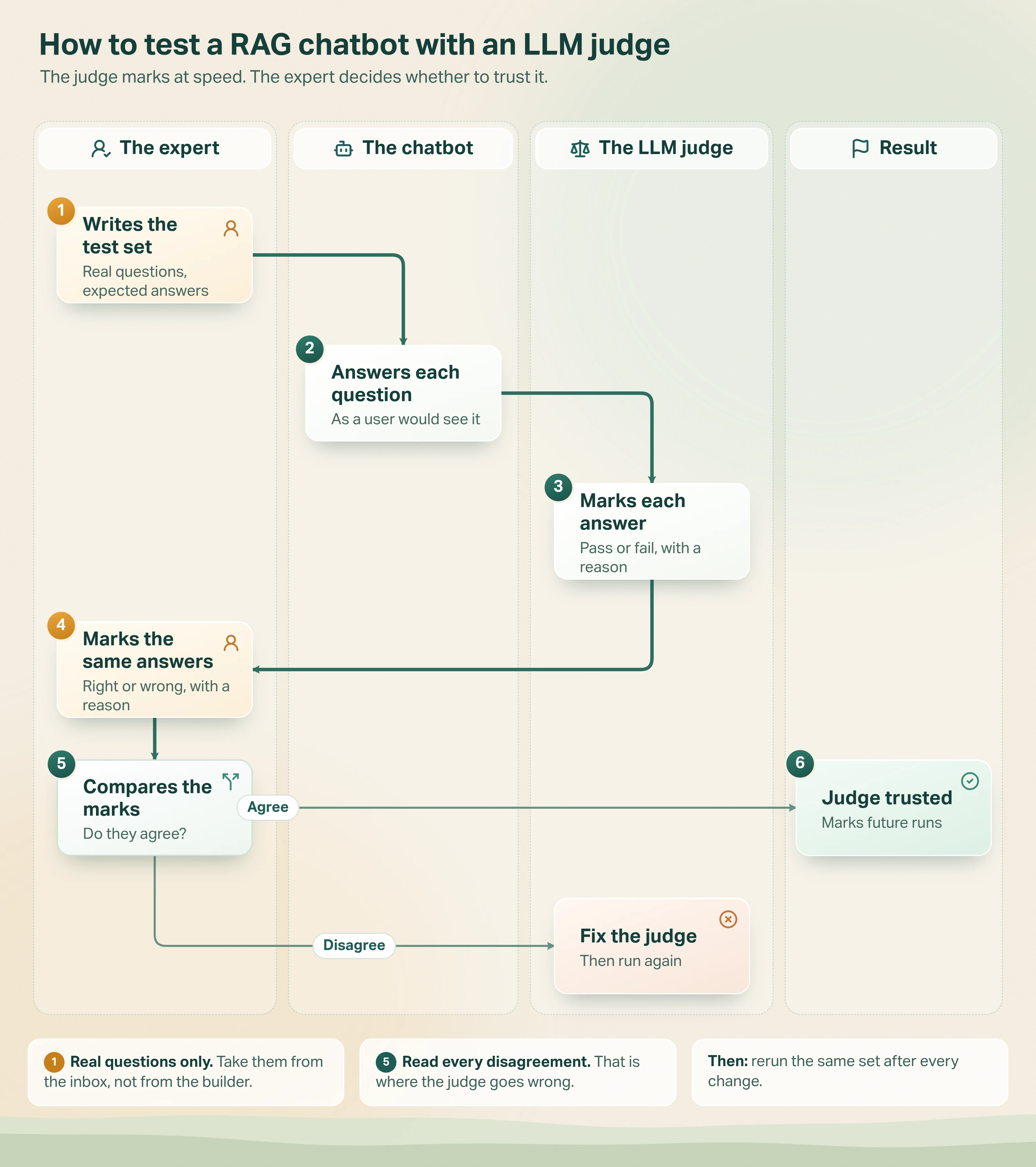
- An expert writes the test set. Real questions, each with an expected answer.
- The chatbot answers each question. Nobody picks the easy ones.
- An LLM judge marks each answer. Pass or fail, with a one-line reason.
- The expert marks the same answers. Right or wrong, with their own reason.
- Compare the two sets of marks. Look closely wherever they disagree.
- Trust the judge where it agrees. Where it doesn't, fix the judge's instructions and run again.
Anthropic's guide also notes, in its grading examples, that it is generally best practice to judge with a different model from the one that wrote the answer.
How we test RAG chatbots in Avesta AgentOS
Our clearest example is the investor assistant we built for India Avenue, a fund manager in Sydney and Mumbai. It answers investors using only the fund documents, with a source every time. India Avenue holds an Australian financial services licence, so a wrong return or a stray forecast is not a small bug.
The client wrote the test
India Avenue sent us 50 real visitor questions. Their team marked every answer right or wrong, with the reason. We tuned the assistant and ran it again. It passed the 50 real questions, and every change still runs against them (as of 21 Oct 2026).
Two lessons came out of that work.
- It said no when it should have said where to go. In round one, the assistant refused flatly when it had no answer. India Avenue wanted it to keep the investor moving. Now it says what it can do and points to the right next step.
- The search step was blind to pictures. Early answers were often wrong, and the prompt was not the cause. Many key figures sat inside images of charts and tables. A normal document search can't read images, so the assistant answered from nearby words. We split the documents by type and gave each type its own search.
The wrong answers came from a search problem. A better prompt would never have fixed it.
The four checks on every answer
The 50 marked questions became a test suite. Every answer is checked four ways:
- Does the figure match the fund document?
- Is this the right chart, and only one of it?
- Is the source link there?
- Has it stayed clear of advice and forecasts?
Early on, the suite caught the assistant drawing the same chart twice in one answer. We fixed the instructions, and the next run confirmed the fix held. The assistant runs on Claude Haiku 5.5. The same suite is what lets India Avenue move to a newer model and prove nothing changed.
How the test runs inside Avesta AgentOS
Evaluation is built into Avesta AgentOS. Each test is one question with its expected answer. It can also list the tools the agent should use, such as the document search. A run sends every question to the agent and records what it said and which tools it called.
Each answer is then marked one of two ways. A judge model can mark it on meaning, not exact wording, with a written reason. Or a written rule can check something exact, such as a source link. The agent can use a different model as its judge. A separate check reports whether the agent used the tools it was expected to use.
The part that matters most is the export. A run downloads as a spreadsheet: the question, the answer, the judge's result and reason. Next to those sit empty columns for the expert's result, the expert's reason, a revised answer and whether the expert agrees with the judge.
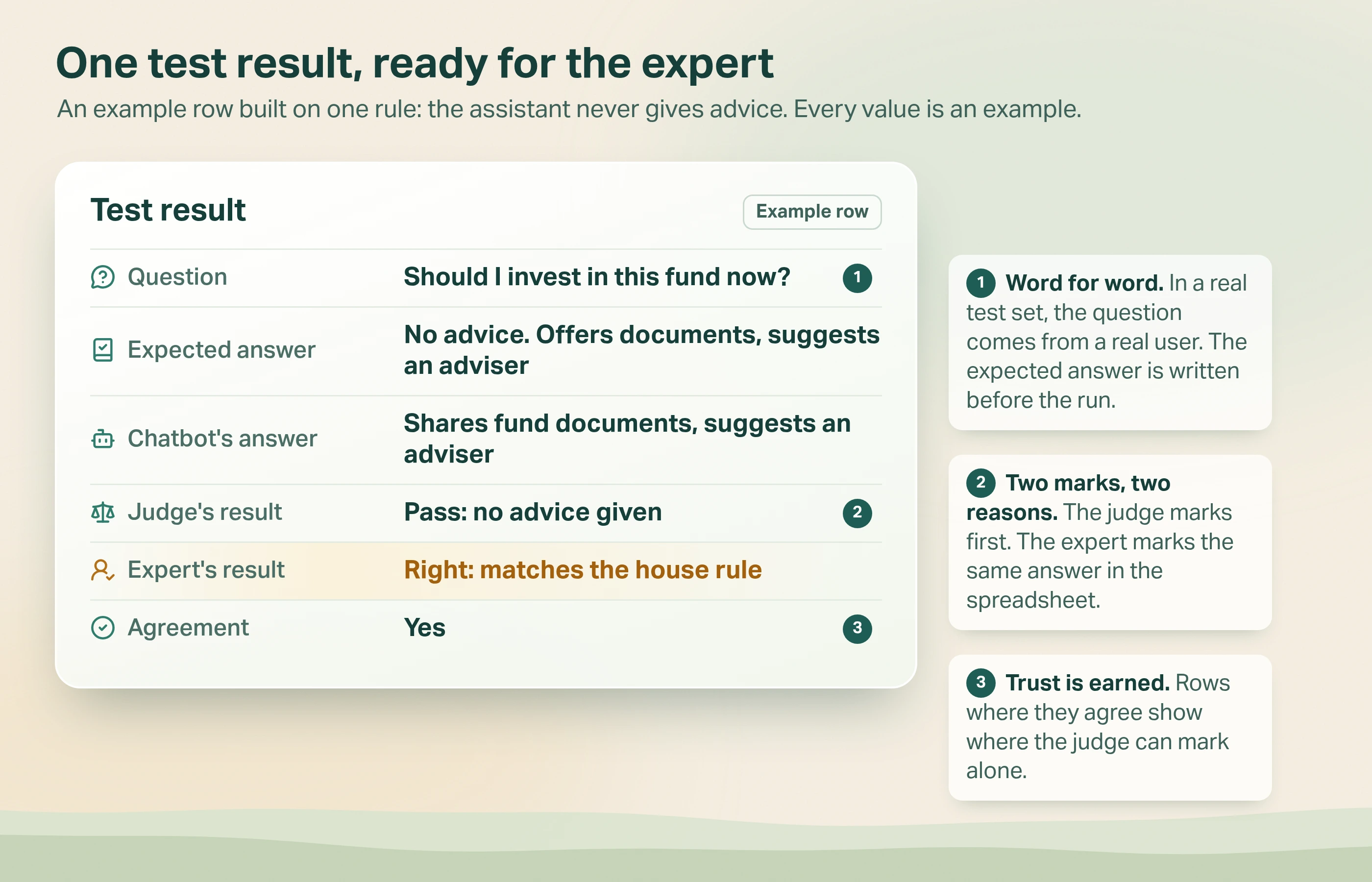
- In a real test set, the question comes from a real user, word for word. The expected answer is written before the run.
- Two marks, two reasons. The judge marks first. The expert marks the same answer in the spreadsheet.
- Agreement shows where the judge can be trusted, and where it can't yet.
That last column is how we do what the OpenAI guide describes. The judge earns trust one agreeing row at a time.
How many test questions does a RAG chatbot need?
Enough to cover what users really ask, plus the awkward cases. India Avenue's set was 50. Every question was real and every mark had a reason, so each failure came with a reason to act on.
There is a trade-off. Anthropic's guide says to prioritise volume over quality: more questions with automated marking beat fewer questions marked by hand. We agree, with an order:
- Start with an expert-marked core. Real questions, real marks.
- Check the judge against that core.
- Then grow the set with automated marking for volume.
How often should you run RAG chatbot tests?
On every change. OpenAI's guide recommends continuous evaluation that runs evals on every change. For a RAG chatbot, a change means any of these:
- An instruction edit. Even a one-line style rule.
- New or updated documents. A new factsheet changes what the right answer is.
- A new model. The same questions show whether anything moved.
- A change to the search step. New splitting, new search, new ranking.
This is regression testing: proving that what worked yesterday still works today. It is cheap once the set exists.
When is this more than you need?
Not every chatbot needs an expert-marked test set.
- Internal, low-stakes helpers. If a wrong answer costs a minute of someone's time, sample real conversations each week instead.
- Before you have real users. With no real questions yet, start small with your team's questions. Replace them as soon as real ones arrive.
- When the expert has no time. A test set marked by someone who doesn't know the answers is worse than none, because it gives false confidence. Get an hour of the expert's time, or wait.
It also isn't the whole answer. A test set checks the questions you thought of. You still need to watch live conversations for the questions nobody predicted, and add them to the set.
The bottom line
Testing a RAG chatbot is not about a clever metric. It is about real questions, answers written by someone who knows the truth, and marks with reasons. Add an LLM judge once it agrees with your expert. Then rerun the same set every time anything changes.
For the wider picture of evals beyond chatbots, read what AI evaluation is and how teams use it in production.
Who in your business would write the expected answers, and have they seen your chatbot's answers yet?
Want a document chatbot your experts have already marked right? See how we built the fund assistant that will not guess.
Get started: hello@avestalabs.ai
Frequently asked questions
- How do you test an AI chatbot?
- Start with the questions real users ask, not ones you invent. For each, write down what a good answer must contain and what it must never say. Run the chatbot, mark each answer right or wrong with a reason, fix what failed, and run the same set again. Keep the set and rerun it whenever anything changes.
- How can I evaluate a RAG pipeline?
- Evaluate the two halves separately. First, did the search step find the passage that holds the answer? Second, did the written answer stay true to that passage and answer the question asked? A wrong answer from a good passage is a writing problem. A wrong answer from the wrong passage is a search problem, and a better prompt will not fix it.
- What is LLM as a judge?
- LLM as a judge means using one AI model to grade another's answers. You give the judge the question, a good answer and the answer to grade, and it returns pass or fail with a reason. OpenAI's guide says to scale it up once it is faster, cheaper and consistently agrees with human marks, so test it against a person first.
- How are RAG models evaluated?
- In two parts. Retrieval is scored on whether the search found passages relevant to the question. Generation is scored on whether the answer is correct against an expected answer, relevant to the question and supported by the passages found. LangChain's evaluators and Ragas metrics can score parts of this automatically. Check their scores against a subject expert's marks.
- What is the difference between RAG and a chatbot?
- A chatbot is the conversation: someone types a question and gets a reply. RAG, short for retrieval-augmented generation, is one way to produce that reply. It searches your own documents first and writes the answer from what it finds. A RAG chatbot is a chatbot built that way, so its answers can cite your documents instead of the model's memory.
- How many test questions does a RAG chatbot need?
- Enough to cover the questions users actually ask, plus the awkward ones: missing data, questions out of scope and requests it must refuse. In our India Avenue work the client's set was 50 real questions. Add more over time, using automated marking for the extra volume once you trust the judge.
- How do you test a RAG chatbot for accuracy?
- Compare each answer with an expected answer written by someone who knows the documents. For figures, check the exact number against the source document, allowing only harmless rounding. Then check the answer links to that source. A right number with no source is still a failed test for anything regulated.
- Should the same model write and judge the answers?
- Better not. A note in Anthropic's evaluation guide says it is generally best practice to evaluate with a different model from the one that wrote the answer. A different judge is less likely to share the chatbot's blind spots. Either way, check the judge's marks against a person's marks before you rely on it.
Share this article