LLM Model Migration: What to Monitor After the Switch
Your tests passed and the AI agent still answers. Some changes from the new model show within hours, some only when you read conversations, and some only over the first week.
 Gaurav Soni12 min read
Key takeaways
- A passing test set says little about tone. OpenAI's April 2025 GPT-4o update passed its offline tests, and was rolled back after two days of watching early use.
- Build the baseline before the switch: record the model name the provider returns with each reply, and score your checks for two ordinary weeks on the old model.
- Monitor in production at three speeds: hard breaks from your logs in the first hours, changed behaviour from scored conversations on day one, and customer outcomes by topic over the week.
- Write the rollback rule before the switch, with a margin sized from the usual week-to-week swing, and plan four weeks before the retirement date.
The model behind your AI agent has a retirement date, and your provider sets it. As of November 2026, OpenAI will shut down dated versions of GPT-4o, GPT-4o mini, GPT-4.1 and GPT-4.1 mini for developers on 14 January 2027 (OpenAI deprecations). Anthropic says plainly that "requests to models past the retirement date will fail" (Anthropic model deprecations).
Your team picks the replacement, runs its test questions, and the agent keeps answering. None of that tells you what customers get on the new model. It may refuse requests it used to handle, or answer at twice the length. It may describe a booking as done when the booking system returned an error.
Those changes don't arrive together. The checks that catch them have to be in place before the switch, because without a baseline from the old model there is nothing to compare with.
What is an LLM model migration, and what changes when the model does?
An LLM model migration moves an AI agent from one large language model (LLM, the AI model that writes its replies) to another. A common trigger is the provider retiring the old one. The prompt, tools and knowledge stay the same, but the new model can read them differently. Tone, length, refusals, format and tool calls (the agent asking another system to act) can all shift.
Microsoft's migration guide names answer length, output format, tool calls, refusals and speed among the things that "all commonly change" (Microsoft Learn, 2026). OpenAI's guide for GPT-4.1 warns that "existing prompts optimized for other models may not immediately work" (OpenAI). Anthropic notes that Claude Sonnet 5.5 "declines in more categories" than the version before (Anthropic).
How do regressions after a model update usually come to light?
A well-documented case came to light through early use and user feedback. On 25 April 2025 OpenAI released an update to GPT-4o in ChatGPT that made the model, in its words, "noticeably more sycophantic". It flattered and agreed with users too readily.
Its offline evaluations (tests run before release) "generally looked good". Some expert testers said the behaviour "felt" slightly off. OpenAI then spent two days "monitoring early usage and internal signals, including user feedback", and on Monday 28 April began a full rollback (OpenAI, 2 May 2025).
That was an update to ChatGPT rather than a team migrating an agent, but two lessons carry over. Test questions check answers, not tone, unless you wrote a question for tone. And the decision came from watching early use. Microsoft's guide says the same of migrations: "Quality regressions that offline evaluation missed appear under production load."
What should you monitor in the first week after an LLM model migration?
Monitor at three speeds, with the baseline built before the switch. Exhibit 1 sets each kind of change against the time it shows up and what to do about it.
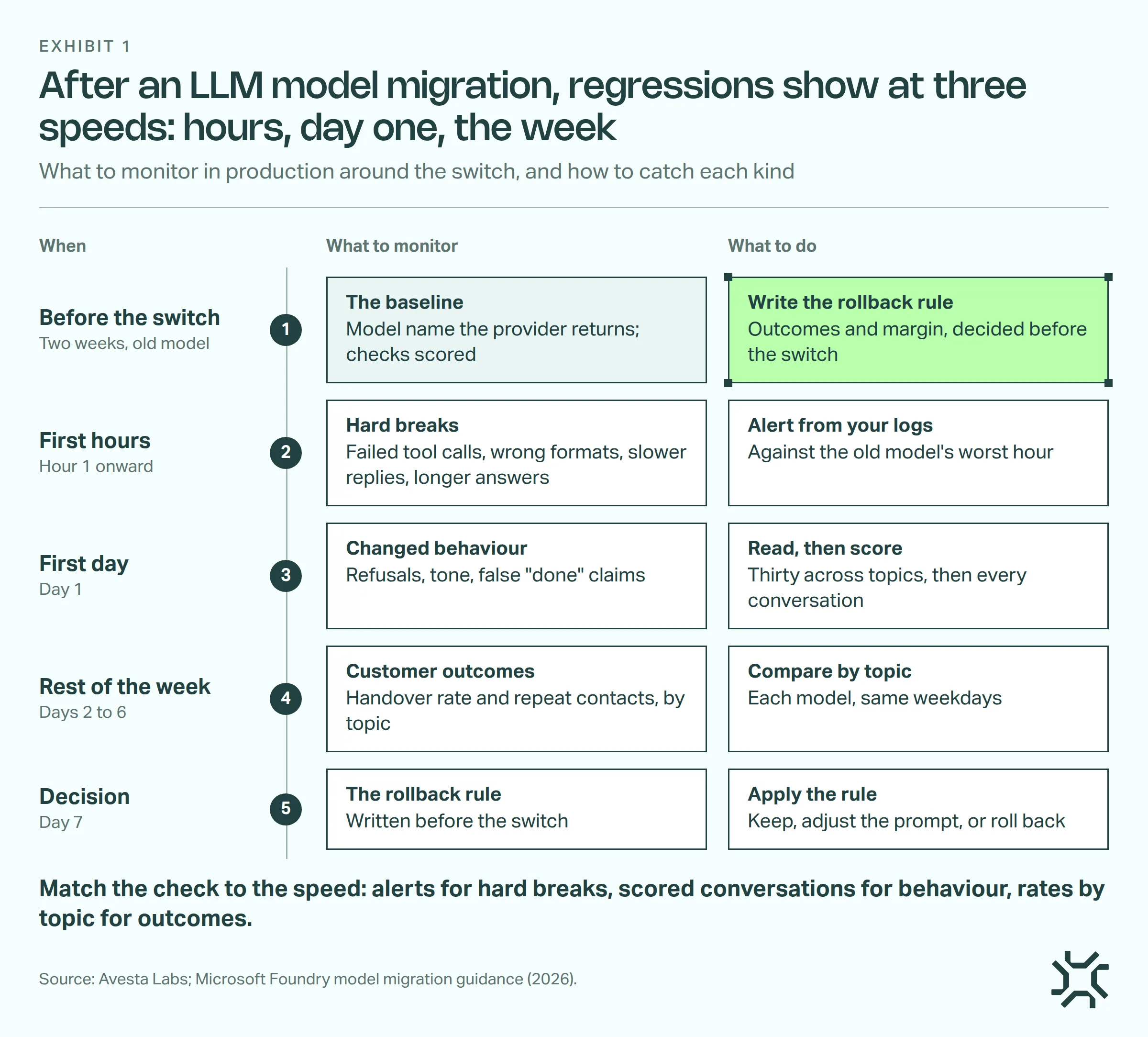
- Two weeks before the switch: record which model answered, score your checks on the old model, and write the rollback rule: which rate, worse by how much, sends you back.
- First hours: alert on hard breaks from your logs.
- First day: read conversations, then score every conversation for what you found.
- Days 2 to 6: compare customer outcomes by topic, model against model.
- Day 7: apply the rollback rule.
1. Two weeks before: build the baseline
Record the model name and version the provider returns with each reply, not the name in your settings. Azure can move pay-as-you-go deployments to a newer version on its own schedule. The name in your settings won't change on the day that happens. The returned version will.
Then write your checks: plain yes-or-no questions asked of every conversation. Start with what the vendor's guide warns about, plus the outcomes you will compare:
- "Did the agent decline a request it normally handles?"
- "Did the agent say an action was done when it failed?"
- "Did the reply sound unlike our usual voice?"
- "Did the customer ask for a person?"
Score them for two ordinary weeks on the old model, per topic. That gives you each topic's rate, and how much it moves between the two weeks: the usual swing.
Already switched without a baseline? Score the checks from today and read thirty conversations a day across your main topics. If the old model is still available, two ordinary weeks back on it give you the rates and the swing.
2. First hours: alert on hard breaks
A hard break is a change your logs can measure in the first hour. Alert on the share of tool calls that fail and the share of replies in the wrong format. Alert too on slower replies and longer answers, using typical reply time and length. Set each threshold from the old model's worst hour in the baseline weeks.
A sudden break needs an alert that fires within the hour.
3. First day: read for changed behaviour, then score
Refusals, tone and false "done" claims need a conversation read. A person reading thirty conversations picked across your main topics finds the common patterns. Rarer ones show only once every conversation is scored against your checks.
4. Days 2 to 6: compare customer outcomes by topic
Track the handover rate (the share of conversations where the customer asks for a person) and repeat contacts, by topic, each model against the other. Compare each weekday with the same weekday before the switch, because Monday's topics are not Friday's. Customers come back days later, so count repeat contacts over the same number of days after each conversation, for both models.
A weekly rate needs a few hundred conversations per topic. Below that, read them all or compare two weeks together.
When should you roll back an LLM model upgrade?
Step 5 is on day 7: apply the rule you wrote two weeks before the switch. It names every outcome and the margin before anyone sees the data: worse by more than the usual swing from step 1.
In this made-up case, billing handed over 11% one week and 13% the next, so the swing is 2 points. Compared with the two-week average of 12%, 16% on the new model is worse; 14% is not.
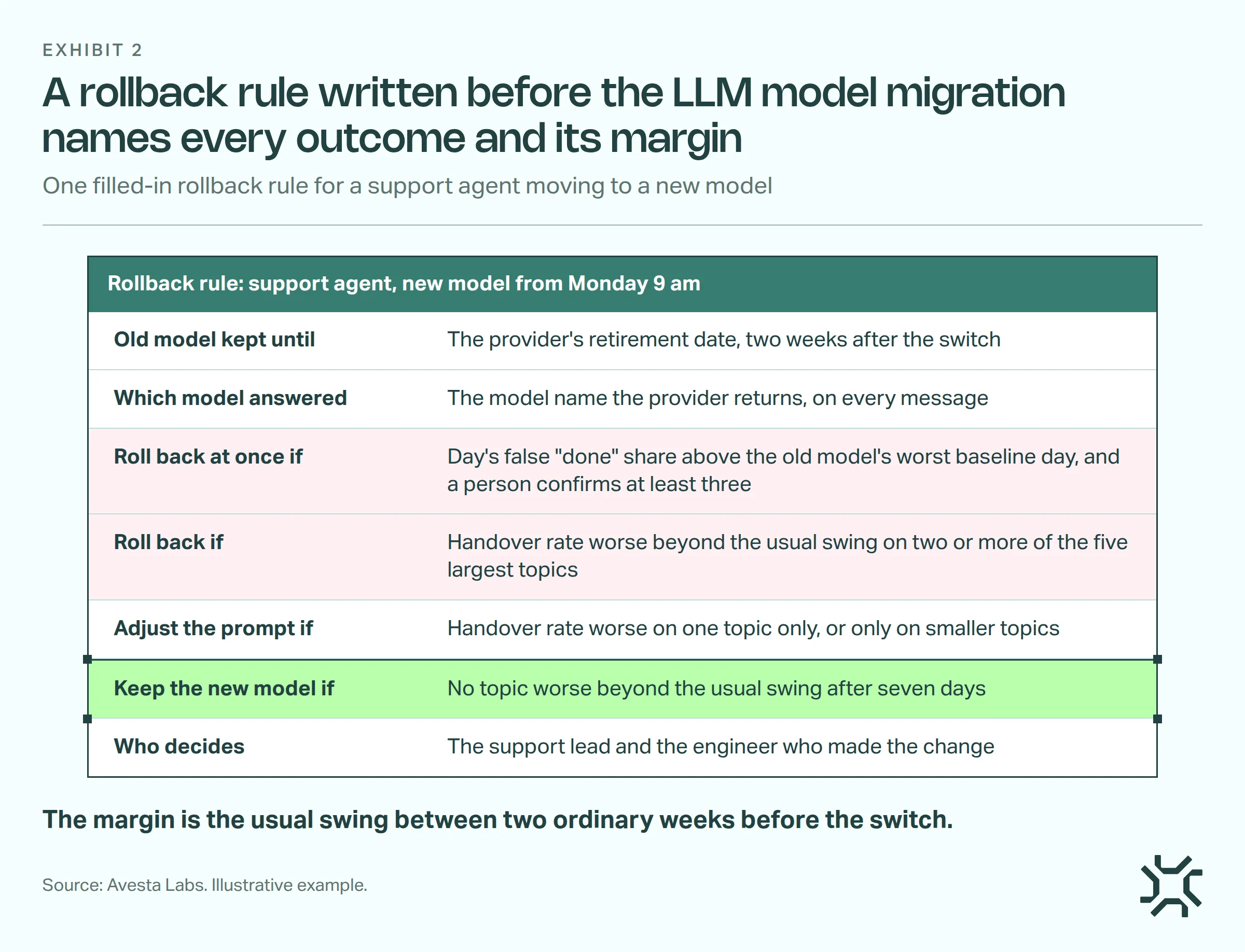
- Keep the old model available until its retirement date, so a rollback is possible.
- Roll back at once when the day's share of false "done" claims is above the old model's worst baseline day. A person must first read the flagged conversations and confirm at least three.
- Roll back when the handover rate is worse beyond the usual swing on two or more of your five largest topics.
- Adjust the prompt when the handover rate is worse on one topic only, or only on smaller topics, and give that change its own week.
- Keep the new model when no topic's handover rate is worse beyond the usual swing.
A rollback buys time until the retirement date. Use it to fix the prompt or test another model. Microsoft calls a rollback "forced by a deprecation deadline instead of by evidence" a sign "you started too late".
Migrate early, so the rollback has somewhere to go.
How do you tell the model from everything else that changed?
Change one thing at a time. Switch the model with the prompt untouched. If the new model fails your tests without a prompt edit, ship both, and read the result as the effect of the two changes together.
Same-weekday comparison removes the weekday pattern, not a launch, price change or holiday in one week only, so note those. A total across topics can also mislead when the topic mix shifts, as our post on prompt version comparison shows.
The fairest comparison runs both models in the same week. If your setup can split traffic, assign customers to each model at random and keep each customer on one model.
How we monitor a model migration in Avesta AgentOS
At Avesta Labs we built Metricsense, the AI agent analytics module of Avesta AgentOS, for this job. It works beside the AI agent you already run: any system with an API can send it conversations. It scores conversations: the hard-break alerts in step 2 come from your own logs, and the rollback decision stays with your team. Its alerts go by email only, and your agent's model costs still come from your provider.
A made-up migration
Here is the support agent from the rollback rule above.
- Which model answered. Two weeks before the switch, your engineer adds the model name the provider returns to each message sent to Metricsense. You set that field up once so charts can split by it.
- The checks. In the same week, you write the four checks from step 1 in plain English, plus a topic question that lists your topics and asks for exactly one. Metricsense scores them on every new conversation, so two ordinary weeks on the old model are scored before the switch. Each finding is pinned to the message where it happened. The false "done" check needs the tool calls and their results sent with the messages.
- The alert. You build a chart showing one number: conversations where the false "done" check is yes, filtered to the new model. You add an email alert at the old model's highest hourly count. It re-checks every 15 minutes, counting conversations that started in the last hour and are already scored, and emails again while the count stays above it. The alert tells you to look; the day's share in the rule decides the rollback.
- The week. Charts count conversations, so your engineer writes the handover rate as a short custom SQL metric, split by topic, with one chart filtered to each model. From a chart you open its conversations and pick the topic to read them.
- Day 7. Billing is worse beyond the swing and no other topic is, so the rule says adjust the prompt. You group billing's conversations into an Action (a named set of conversations) and push a requirements document from it to Jira, for the engineer making the prompt change.
The rollback itself happens where your agent runs: point it back at the old model.
If your agent runs on Avesta AgentOS, each saved version records its model, prompt and tools, and comparing two versions shows whether the prompt or tools changed too. Each channel runs one saved version; pointing it back at the earlier one is the rollback. You can also run test cases against a version before you switch.
When should a new model not meet customers first?
- In regulated flows. Microsoft suggests a shadow run instead: the new model answers copies of real requests offline, and no customer sees its replies.
- When the agent handles a few dozen conversations a week. Rates won't settle anything. Read every conversation from the new model for the first week.
- When the model is fine-tuned (trained further on your own examples). Moving means training again, a project of its own.
The bottom line
A model migration is a release on someone else's schedule. The work that decides how it goes happens before it. For the slower drift that can follow months later, see our post on AI agent performance degradation.
Count back four weeks from your model's retirement date: two to record and score the old model, one to monitor, one to fix or roll back.
Want first-week monitoring set up before your next model migration?
See how we run AI agents safely in production
Get started: hello@avestalabs.ai
Frequently asked questions
- How much notice do providers give before retiring a model?
- As of November 2026, OpenAI states at least six months for generally available models, with exceptions: its January 2027 retirements were announced about three months ahead. Anthropic states at least 60 days on its own platform. Google Vertex AI gives at least 45 days for its shorter-lived models. Check each provider's deprecations page for the real dates.
- Do LLM models degrade over time?
- They can change when the name you call starts pointing to a newer version. Chen, Zaharia and Zou found the same ChatGPT service behaving substantially differently within months in 2023. Your agent can also drift as customers' questions and your own knowledge change, with no model change at all. Our post on AI agent performance degradation covers that slower kind.
- How do you compare different LLM models before you switch?
- Run both models on the same saved test questions and compare the answers side by side, question by question. Include the questions your customers ask most, the ones that call tools, and a few that the agent should refuse. Tests only cover what you thought to ask, so the comparison on real conversations after the switch still matters.
- Is a model upgrade within the same family safer than switching providers?
- Not reliably. Vendor guides for newer versions of the same family describe changes in how literally instructions are read, answer length, refusals and tool calls. Treat any new model version, even a minor one, as a release that needs the same first-week monitoring.
Share this article