AI Agent Performance Degradation: How to Detect It Over Time
An AI agent gets worse in two ways: a sudden break after a change, or a slow drift on one topic. Each needs a different check, and both show up in the conversations first.
 Gaurav Soni10 min read
Key takeaways
- AI agent performance degradation comes in two kinds: a sudden break right after a change (a prompt edit, a model upgrade, a system update) and a slow drift as knowledge goes out of date and customers ask new things.
- For a sudden break: test the new version before release, alert on the first serious case (an offensive or off-policy reply) in the hours after it, and roll back before you investigate.
- For slow drift: chart unanswered questions, handovers and repeat contacts every week, split by topic. A drop on one topic hides inside a healthy overall rate.
- Whichever kind it is, read the conversations behind the number before you change anything.
Your AI agent tested well at launch. Months later, more customers type "can I talk to a person?", and nobody can say when it started. Or a release goes out on Tuesday and by Wednesday a customer is posting screenshots. Both are AI agent performance degradation: the agent keeps answering, and the answers get worse.
They need different checks. This post covers how companies usually find out, the two kinds of degradation, how to catch each one, and how we do it in Avesta AgentOS.
How is AI agent performance degradation usually found?
Companies usually find out about AI agent performance degradation from their customers, not their dashboards. Nothing raises an error. Teams hear about it through complaints, social media posts or a growing support queue, anything from hours to weeks after the cause. Two public cases show the pattern.
- DPD, January 2024. A customer who couldn't get help finding a parcel asked the delivery firm's chatbot to swear and to criticise DPD. It did both, and he posted the screenshots on X. DPD's explanation: "An error occurred after a system update yesterday." It disabled the AI element (Silicon UK).
- Voiceflow. When an older OpenAI model was close to the end of its life, Voiceflow moved a customer's agent to a newer version, and it "dramatically decreased the performance". They rolled back, and a benchmark run afterwards put the drop at about 10% on recognising what customers wanted (Voiceflow).
In both cases the change was known. What it did to customers wasn't, until afterwards.
What are the two kinds of AI agent performance degradation?
An agent is a model, a prompt, a knowledge base and tools (the other systems it calls, such as your order database). Any of them can change, and how it changes decides how you catch it.
| Sudden break | Slow drift | |
|---|---|---|
| What causes it | A change you or a provider made: a prompt edit, a model upgrade, a tool or system update | The world moving on: new prices and policies the agent doesn't know, new questions nobody planned for |
| How it looks | Within hours of the change: one serious reply, or one topic falling off at once | One topic gets a little worse each week while the overall numbers look fine |
| Public example | DPD, Voiceflow | An agent still quoting last quarter's refund policy |
| How you catch it | Test before release, watch the first hours closely, compare with the version before | A weekly chart of outcomes, split by topic |
Providers also retire models on a schedule; Anthropic says it "regularly retires older ones" (Anthropic, model deprecations, as of November 2026). A forced model change is a sudden-break risk you can put in the calendar.
A confident, polite, wrong answer passes every uptime and speed check.
How do you catch a sudden break after a change?
Treat every release as the most likely moment for the agent to get worse, and check in three steps.
- Before release, test the new version. Run it on the questions that matter most and compare its answers with the current version's. This is the test Voiceflow ran after the fact; run it before. For a model your provider is retiring, run it weeks before the date. Our post on what AI evaluation is covers how to build those tests. Tests only catch what you thought to ask, so the next step still matters.
- In the first hours, alert on the first serious case. Score every new conversation for the replies you can never accept: offensive, off-policy, a promise you can't keep, a refusal of a normal question. One case is enough to act, and DPD's reply would have been that case.
- In the first days, compare each topic with the same days of the week before. If handovers on cancellations jump after a prompt edit aimed at refunds, the edit did it.
Roll back first, investigate second. If the previous version was fine, moving back to it stops the damage while you read the conversations. A retired model is the exception: there is nothing to go back to, which is why its check has to happen before the deadline.
How do you catch slow drift?
Chart conversation outcomes every week, split by topic. Each signal below is a share of that topic's conversations.
| Signal (weekly rate, per topic) | What it looks like in the conversation | Often points to |
|---|---|---|
| Questions it couldn't answer | "I don't have that information", or a vague reply | Outdated knowledge |
| Handovers to a person | "Can I speak to someone?" after the agent's answer | A topic the agent was never set up for |
| Repeat contacts | The customer comes back about the same issue | Answers that sound complete but don't resolve anything |
| Conversations that fit no known topic | Questions your topic list has no name for | A new product, policy or customer need |
The topic split is the part most teams skip, and it is the part that finds drift. If cancellations are one conversation in ten, their unanswered rate can double while the overall rate barely moves.
The overall rate says all is well. The cancellations line says otherwise.
When the share that fits no known topic climbs, read those conversations and name the new topic before anything else. Keep the topic list, and the way topics are assigned, fixed while you compare weeks, or every line moves at once.
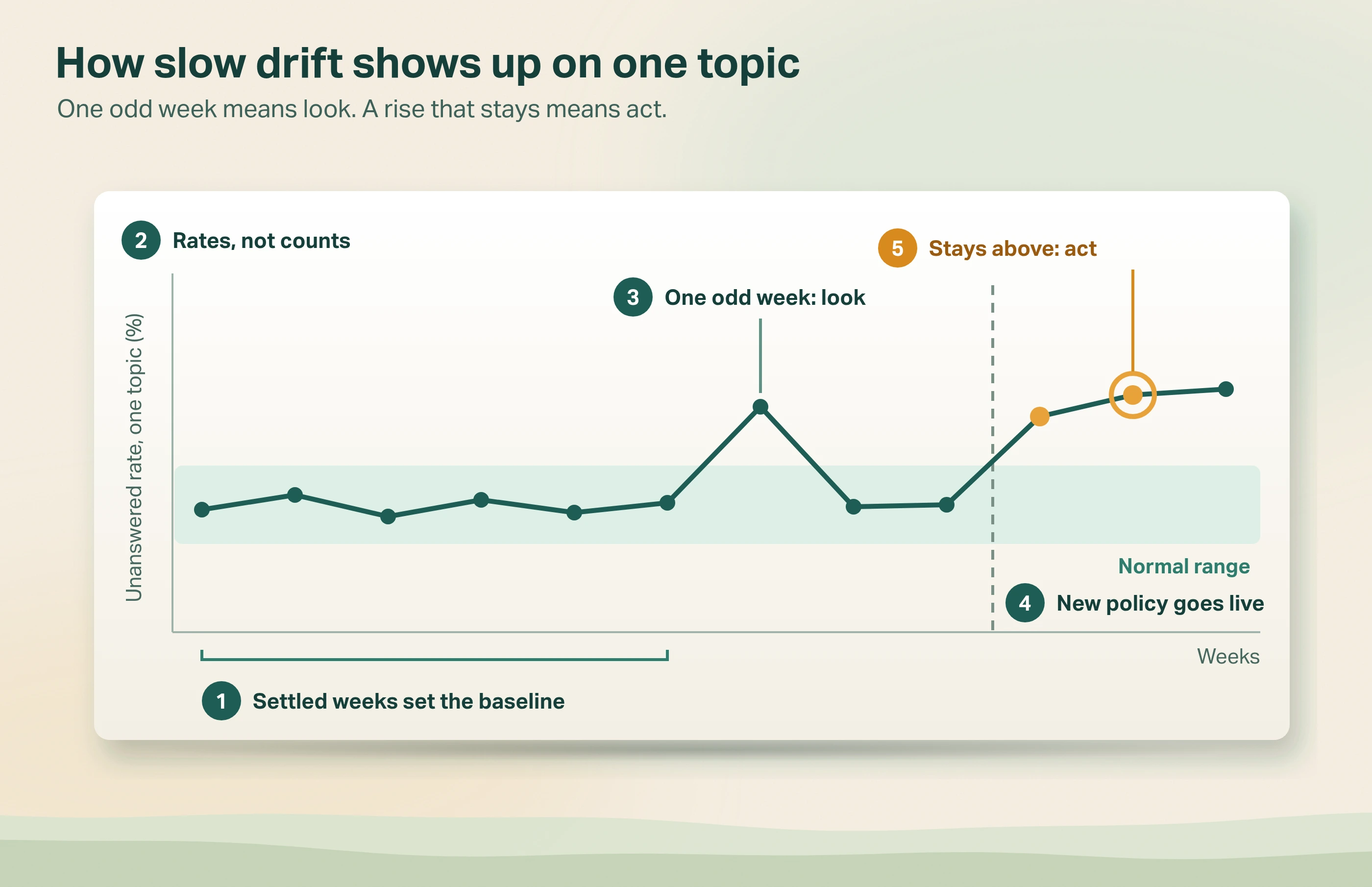
- Set a normal range per topic from six to eight settled weeks after launch, a little wider than the highest and lowest weekly rates you saw. A range drawn tight around a few weeks flags normal weeks as problems.
- Mind small topics. If a topic has only a handful of conversations a week, its rate jumps around: chart it monthly or merge it with a neighbouring topic.
- Use rates, not counts. A busy week has more handovers simply because it has more conversations.
- Our rule of thumb: one odd week means look; a rise that stays for a second week means act. Holidays and marketing emails make bad weeks on their own.
For every signal, answer the question NIST's AI risk framework asks: "How much distributional shift or model drift from baseline performance is acceptable?" (NIST AI RMF Playbook, MEASURE 2.3). Write the answer down before the first alert, not after.
What should you do when you find one?
Read the conversations behind the number before you change anything.
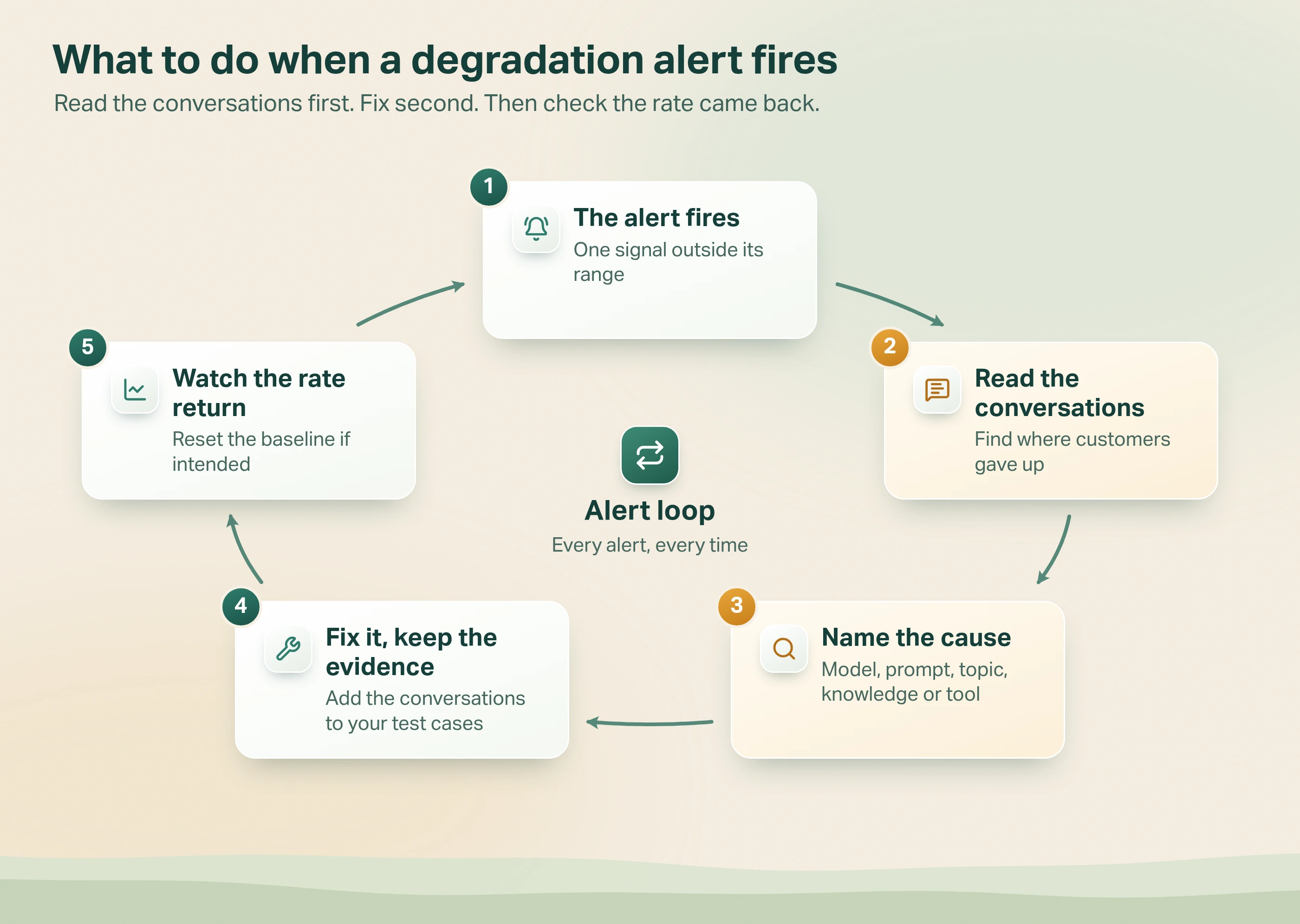
- The signal moves: an alert fires, or a topic leaves its normal range.
- Read the conversations behind it. Find the turn where the customer gave up on the agent.
- Name the cause: a model or prompt change, a new customer topic, outdated knowledge, or a broken tool.
- Fix it, and keep the evidence. Add those real conversations to the tests you run before every change, which OpenAI's evaluation guide calls continuous evaluation. That is how a slow drift today becomes a test that stops a sudden break next time.
- Watch the rate return to its normal range, and reset the range if you changed the agent on purpose.
The common mistake is skipping step 2. A team sees handovers rise, assumes the model got worse and swaps it. If the real cause was a new product the agent had never heard of, the new model fails in exactly the same way.
How we catch it in Avesta AgentOS
Avesta AgentOS is the platform we use to build and run AI agents. It saves every version of an agent (its prompt, model and tools), logs who edited what, and lets you run test cases against a version before you release it. Metricsense is its AI agent analytics module. It reads every conversation and scores plain-English questions such as "Did the agent state a policy that isn't ours?". Each finding links to the exact turn in the transcript.
A sudden break. Before release, you run the new version's test cases. After release, Metricsense scores every conversation for the serious cases, and an email alert on the count of those cases fires within the hour of the first one. You open the conversation, check the change log for what went out that day, and move the channel back to the previous version.
Slow drift. A weekly Metricsense chart shows unanswered questions and handovers, split by topic. When one topic climbs, a click opens its conversations. You group them into an action and turn it into a short requirements document. That goes to Jira as a ticket for the knowledge or prompt fix. Then you watch that topic's line come back down.
When is this not worth it?
- Low volume. With a handful of conversations a week, rates jump around. Read every conversation instead.
- Before launch. There is no production data yet. Test against prepared cases first.
- Nobody owns the signal. A chart nobody reads catches nothing. Name one person per signal before you set any alert.
The bottom line
AI agent performance degradation shows up in conversations long before it shows up in complaints. Watch the hours after every change for the serious single case, and watch each topic every week for the slow slide. For everything else to watch once an agent is live, see our guide to monitoring AI agents in production.
If your agent's cancellation answers got worse last month, which chart would show it?
Want to see how your agent's conversations change week by week?
Safe AgentOps is how we run evaluation, guardrails and monitoring for AI agents in production.
Get started: hello@avestalabs.ai
Frequently asked questions
- Do AI agents degrade over time?
- Yes, even if nobody touches them. The model provider updates or retires models, your products and prices change, and customers start asking new questions. Your own team also edits prompts, knowledge and tools. Each change can make answers slightly worse without causing an error, which is why performance has to be measured on live conversations, not assumed from launch testing.
- What is agent drift?
- Agent drift is a gradual change in how an AI agent behaves in production compared with how it behaved when it was tested. In practice you see it as more handovers, more unanswered questions or more repeat contacts on one topic, week after week.
- What is drift detection in AI?
- Drift detection means comparing how an AI system performs now with how it performed during a known good period, and flagging the difference. For a customer-facing agent, the useful comparison is conversation outcomes: the share of conversations handed to a person, left unanswered or followed by a repeat contact, measured weekly against a baseline for each topic.
- How do you prevent AI agent performance degradation?
- You can't stop the world changing, but you can shorten the time a problem goes unseen. Test replacement models before your current one is retired, keep the agent's knowledge up to date, run evaluations on every change, and watch a few conversation signals every week so a drop is caught within days, not months.
- Which AI agent performance metrics show degradation first?
- Conversation outcomes show it before system metrics do. For a sudden break, watch for serious single cases: offensive, off-policy or wrong-promise replies. For slow drift, watch the share of conversations handed to a person, left unanswered or followed by a repeat contact, split by topic.
- How often should you check for AI agent drift?
- It depends on the kind. In the first hours and days after any change, check for serious cases as they happen and compare each topic with the week before. For slow drift, weekly suits most customer-facing agents: daily rates jump around too much to read, and monthly checks let a problem run for weeks.
Share this article