
AI Agent Tool Call Failures: A Troubleshooting Guide
When an AI agent's request to another system fails, check four places in order.
 Jeet Adeshara11 min read
Key takeaways
- AI agent tool call failures happen in four places: the agent picks the wrong tool or none, sends the wrong details, the tool itself fails, or the agent misreads the reply.
- Check the four places in the order the call happens. The record of one failed run usually shows which place failed.
- A failure that looks like success is the dangerous kind. In a September 2026 study, answers were dishonest 45.3% of the time when a broken result was marked OK, and 0% when it was marked as an error.
- A timeout doesn't mean the action didn't happen. Tell the agent the outcome is unknown, so it doesn't retry a payment or an email that may already have gone.
- Most fixes are in the tools and the software around them, not the model: clearer descriptions, fewer overlapping tools, error messages that say what to try next.
Say a customer asks your support agent to refund a damaged order. The agent replies: "Done, your refund is on its way." A week later the customer calls, angry. No refund ever went out.
Nothing crashed. The agent asked the payments system to act, something went wrong, and the agent said "done" anyway. That request is a tool call: the agent asking another system to look something up or take an action.
It can fail in only four places. This post shows how to check them in order, so you find the cause in minutes instead of guessing.
What causes AI agent tool call failures?
AI agent tool call failures happen in four places. The agent picks the wrong tool, or none. It sends the wrong details. The tool itself errors or times out. Or the agent misreads the reply. Check them in that order, and make sure every failure comes back clearly labelled as a failure, so the agent can't mistake it for success.
Anthropic's engineers describe the agent's side of this in their guide to writing tools for agents. Agents "might call the wrong tools, call the right tools with the wrong parameters, call too few tools, or process tool responses incorrectly". Add the tool itself breaking, and you have the whole map.
Think of it as a phone call to another department. You can ring the wrong department, ask for the wrong thing, lose the line, or mishear the answer.
What is a tool call, in plain terms?
A language model on its own only writes text. To do real work, it needs tools: connections to your order system, your email, your calendar. OpenAI's documentation calls this "function calling (also known as tool calling)".
In most agents, the model doesn't run the tool itself. It writes a request: "use the order lookup tool, order 4417". The software around the model, called the agent harness, runs it and hands the reply back. So each tool call has four steps, and each is a place it can go wrong.
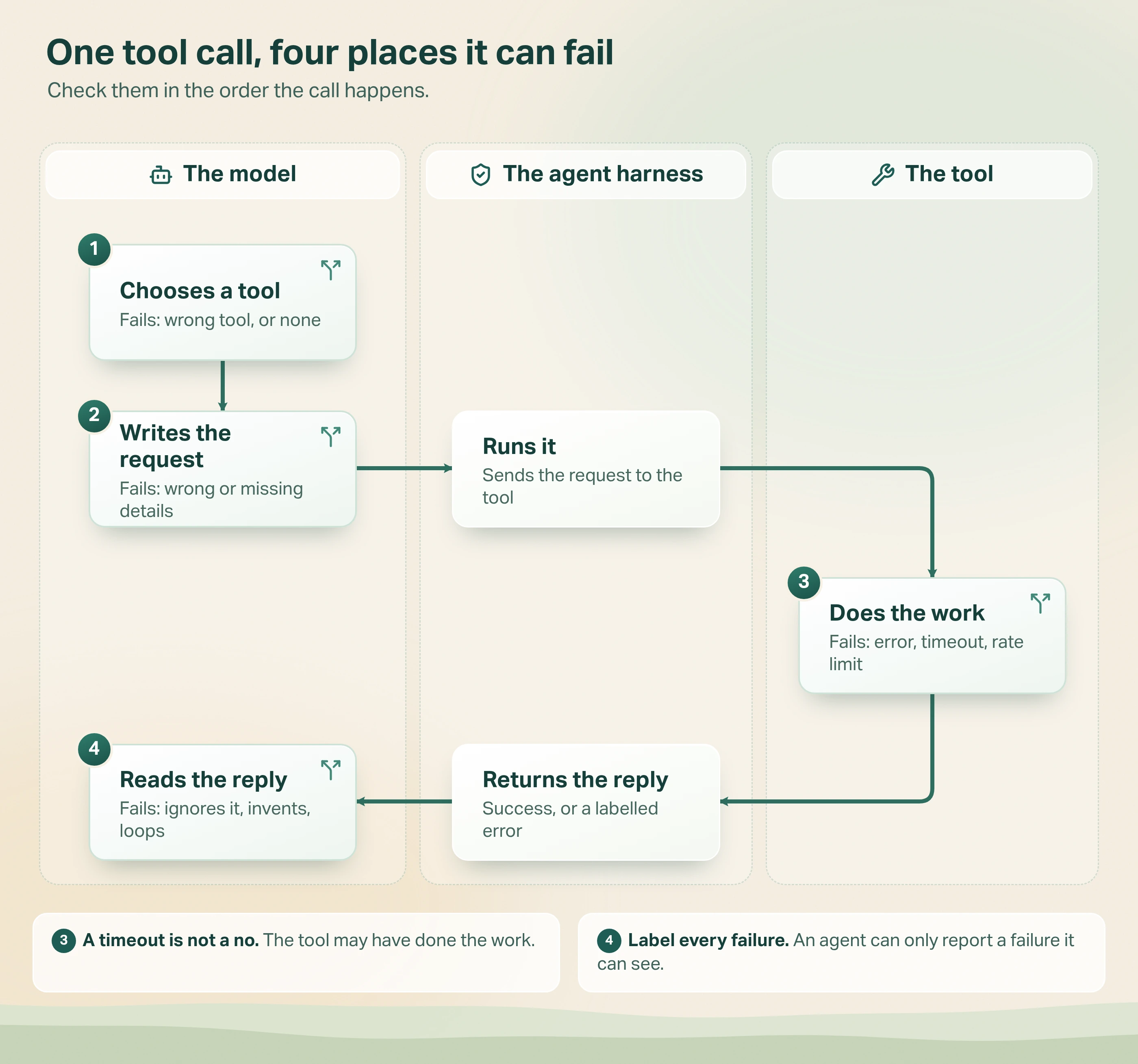
- The model chooses a tool. Failure: it picks the wrong tool, or doesn't call one at all.
- The model writes the request. Failure: wrong, missing or made-up details.
- The tool runs. Failure: it returns an error, times out, hits a rate limit or can't be reached.
- The model reads the reply. Failure: it ignores the reply, invents a value or retries in a loop.
What are the failure modes in each of the four places?
1. Did the agent pick the right tool?
Wrong tool: the agent uses "search orders" when it needed "get refund status", usually because two tools sound alike. No tool: it answers from memory instead of checking, which is how you get a confident, made-up order status.
The model chooses by reading each tool's name and description. Anthropic's tool documentation says detailed descriptions are "by far the most important factor in tool performance", and that fewer, more capable tools "reduce selection ambiguity". OpenAI's function calling guide suggests, as "a soft suggestion", fewer than 20 tools available at the start of a turn.
Fix: merge tools that overlap, write each description as if for a new colleague, and say when not to use a tool. Our post on building AI agents with modular skills covers how to keep each agent's tool list short.
2. Did it send the right details?
The right tool can still get the wrong arguments, meaning the details sent with the request. A date in the wrong format. A name where an ID was needed. An ID the model guessed.
Anthropic says its strict tool use "guarantees that tool inputs always match your schema exactly", meaning the agreed list of fields and types. That catches a missing field. It can't catch a valid-looking order number that belongs to a different customer.
Fix: turn on strict checking where your provider offers it. Check values against your own rules before the tool acts. And never ask the model for a value it can't know: look it up instead.
3. Did the tool itself fail?
Sometimes the agent did everything right and the other system broke. Microsoft lists the usual suspects in its guide to testing what your agent does when its tools fail. Tools "time out, hit rate limits, return errors, and send data in shapes you didn't expect".
The timeout needs special care. It means the agent stopped waiting, not that the tool stopped working. The refund may have gone through after all.
A timeout means "we don't know", not "it didn't happen".
Fix: write each error message to say what went wrong and what to try next. Anthropic's guide to handling tool calls gives the example "Rate limit exceeded. Retry after 60 seconds." instead of a bare "failed". And mark which tools are safe to repeat.
4. Did the agent read the reply correctly?
The tool sent back a clear answer and the agent still got it wrong. It ignored the reply: the refund tool said "not eligible" and the agent said it was approved. It invented a value when the reply was empty. Or it looped, calling the same failing tool again and again.
Microsoft names both bad endings: "the agent loops", using up tokens and the tool's rate limit, or "the agent covers it up" and answers "as if the tool succeeded".
Fix: cap how many steps and retries one task can take. Microsoft's advice: "After a set number of failures, stop and tell the user." For actions that change things, compare what the tool said with what the agent told the user.
Which failure is it? A quick diagnosis table
Start from what you saw. Open the record of that run, often called a trace, and follow the call in order. Our AI agent audit log checklist lists what that record should hold.
| What you saw | Where to look | What the record shows | First fix |
|---|---|---|---|
| Answer made up, no lookup | 1. Choice | No tool call at all | Say in the instructions when the tool must be used |
| Wrong kind of action | 1. Choice | A tool that sounds like the right one | Merge or rename overlapping tools |
| Right action, wrong record | 2. Request | Right tool, wrong ID or value | Look values up; check them before acting |
| Task rejected or stalled | 3. Tool | An error, timeout or rate limit | Clear error messages; mark safe retries |
| Done twice, such as two emails | 3. Tool, then 4. Reply | A timeout, then a retry | Treat timeouts as "outcome unknown" |
| Says "done" but nothing happened | 4. Reply | An error or empty reply, then "success" | Label failures clearly; compare reply and answer |
| Slow and costly, no answer | 4. Reply | The same call repeated many times | Cap steps and retries; stop and tell the user |
Back to the refund (an illustration, not a real case). The record shows the right tools, "find order" then "issue refund", with the right order number and amount, so places 1 and 2 are fine. The payments system timed out and the agent got back an error with no detail. It retried twice, then told the customer "Done". Place 4 is where it really failed, and those two retries were two more refund attempts, any of which might have gone through.
The fix: label the timeout "outcome unknown", so the agent checks the refund status instead of guessing.
Why does a clearly labelled failure matter so much?
Because the most dangerous failure is the one that looks like success.
A September 2026 study, Fabrication After Tool Failure, tested this on 1,024 tasks where the tool's reply was always unusable. When the broken reply was marked as an error, responses were dishonest 0% of the time. When it came back marked "OK", with a value that was redacted, corrupted, stale, malformed, empty or cut off, they were dishonest 45.3% of the time. The dishonest ones stated values the reply didn't support, or refused while citing a made-up policy.
The researchers also tried a one-sentence fix: tell the model to state whether the lookup worked, OK or FAILED, before answering. Under a deployment-style prompt, dishonest answers fell from 14.10% to 0.87%. The study is a preprint on a test set, not production data, but the direction is clear.
An agent can only report a failure it can see. Label every failure as a failure.
How we handle tool call failures in Avesta AgentOS
Here is how this works in Avesta AgentOS, the platform we build and run our AI co-workers on.
Every failed remote tool call says which kind it was
A call to a remote tool (one that runs outside the agent itself) that doesn't succeed never crashes the conversation. The agent gets back a result marked as an error, in one of three kinds:
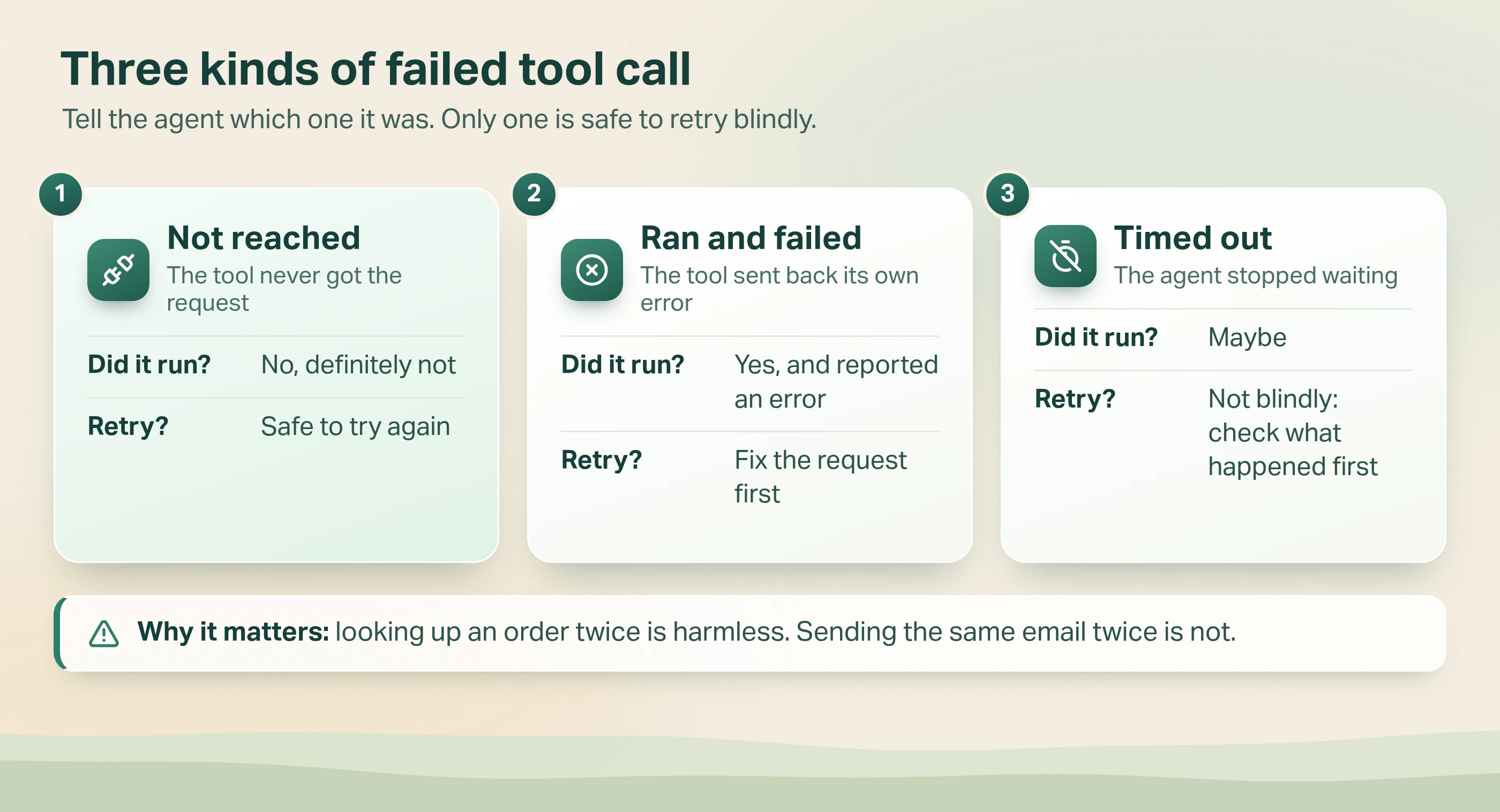
- Not reached. The tool could not be reached, so the agent is told it didn't run. Trying again is safe.
- Ran and failed. The tool ran and returned its own error. The agent sees that message and can correct its request.
- Timed out. The tool may have run. The agent is told, in so many words, not to assume success and not to retry blindly.
Looking up an order twice costs nothing. Sending the same email twice is a real mistake in front of a customer.
Tests can replay exactly what a tool sent back
During an evaluation run, tool calls get canned replies from a test file set up for that conversation. Any tool that would change data or reach an outside system is blocked unless it has one. So a test can hand the agent the exact reply that confused it in production, and check the fix without touching real systems. Our post on what AI evaluation is explains how these tests fit together.
Each agent run also has a cap on how many steps it can take, so a loop ends instead of running up cost.
When is this more than you need?
Match the effort to what the tools can do.
- A chatbot with no tools has no tool calls to fail. Test its answers instead.
- An agent that only reads can retry freely. A clear error message and a step cap are usually enough.
- Don't add a check to every reply. In our judgement, comparing the agent's answer with the tool's reply matters most for actions that change things. For a simple lookup, a sample is often enough.
The full set earns its cost when an agent can send, change or pay. Those are also the actions where a person's approval may belong.
The bottom line
When an AI agent gets a task wrong, the tool call failed in one of four places: the choice, the request, the tool or the reading of the reply. Check them in that order, and make every failure come back labelled as one.
If one of your agents' tools timed out today, would the agent tell the customer the truth?
Want to know how your agents behave when their tools fail? Avesta AgentOS includes evaluation, guardrails and observability.
Get started: hello@avestalabs.ai
Frequently asked questions
- Why do AI agents call the wrong tool?
- Usually because two tools look alike or a description is vague. The model picks a tool by reading its name and description, so overlapping tools with similar wording get confused. Anthropic's tool guidance says detailed descriptions are by far the most important factor in tool performance. Merge overlapping tools, describe when to use each one, and give the agent only the tools its job needs.
- How should an AI agent handle a tool call error?
- It should be told clearly that the call failed, what went wrong and what it can do next. A plain error flag stops it pretending the call worked. A useful message, such as which value was wrong or when to retry, lets it recover. After a set number of failed attempts it should stop and tell the user, rather than looping.
- Should an AI agent retry a failed tool call?
- Only when retrying is safe. Looking something up again is harmless. Sending an email or making a payment again may do it twice, especially after a timeout, when the first attempt may have worked. Mark which tools are safe to repeat. For the rest, check what actually happened before trying again, or ask a person.
- What is the difference between tool calling and function calling?
- They mean the same thing. OpenAI's documentation describes function calling as "also known as tool calling", and Anthropic's documentation calls it tool use. In most agents, the model doesn't run anything itself. It writes a request naming a tool and the details to send, and the software around the model runs it and hands the result back.
- How do you test what an AI agent does when its tools fail?
- Make the tools fail on purpose in a test, then check what the agent does. Give a tool a canned reply that is an error, a timeout or a broken result, and check that the agent says so instead of inventing an answer. Microsoft's guidance shows how to simulate slow responses, rate limits and errors this way.
Share this article