
Prompt Version Comparison: Measure Impact in Production
A new prompt (your agent's written instructions) can be better on every topic and still look worse in total. Here is how to compare two versions in production.
 Gaurav Soni10 min read
Key takeaways
- A prompt version comparison on wording or on a test dataset shows what you changed and what you checked. Only real conversations in production show what customers got from each version.
- To measure the impact of a prompt change, compare one signal, such as the handover rate, for each version and each topic. Pair it with a second signal, so fewer handovers cannot hide customers who did not get what they came for.
- A version can be better on every topic and still look worse in total, because the mix of topics changed. For one fair number, recompute the totals on one shared mix of topics.
- A split test with random assignment and a fixed share comes closest to settling the question. One version after the other gives a hint that the conversations must confirm.
- A mixed result often means the edit reached further than you meant. Narrow the instruction to its topic, release it as a new version and compare again.
Your support agent's prompt (the written instructions it follows) went from version 12 to version 13 last week. The weekly report says customers asked for a person 14% of the time before the change and 17% after. Someone wants version 12 back.
Then you split the same numbers by topic. Version 13 did better on refunds and better on cancellations. This post shows how to measure what that change did in production, and why the total can say the opposite of every topic.
What is a prompt version comparison, and what should it compare?
A prompt version comparison sets two versions of an agent's prompt side by side to decide which one to keep. Many tools compare the wording, or the answers to a saved set of test questions (a test dataset). Only a comparison on real conversations shows what customers got from each version.
Put simply:
A diff shows what you changed. A test dataset shows what you checked. Production shows what customers got.
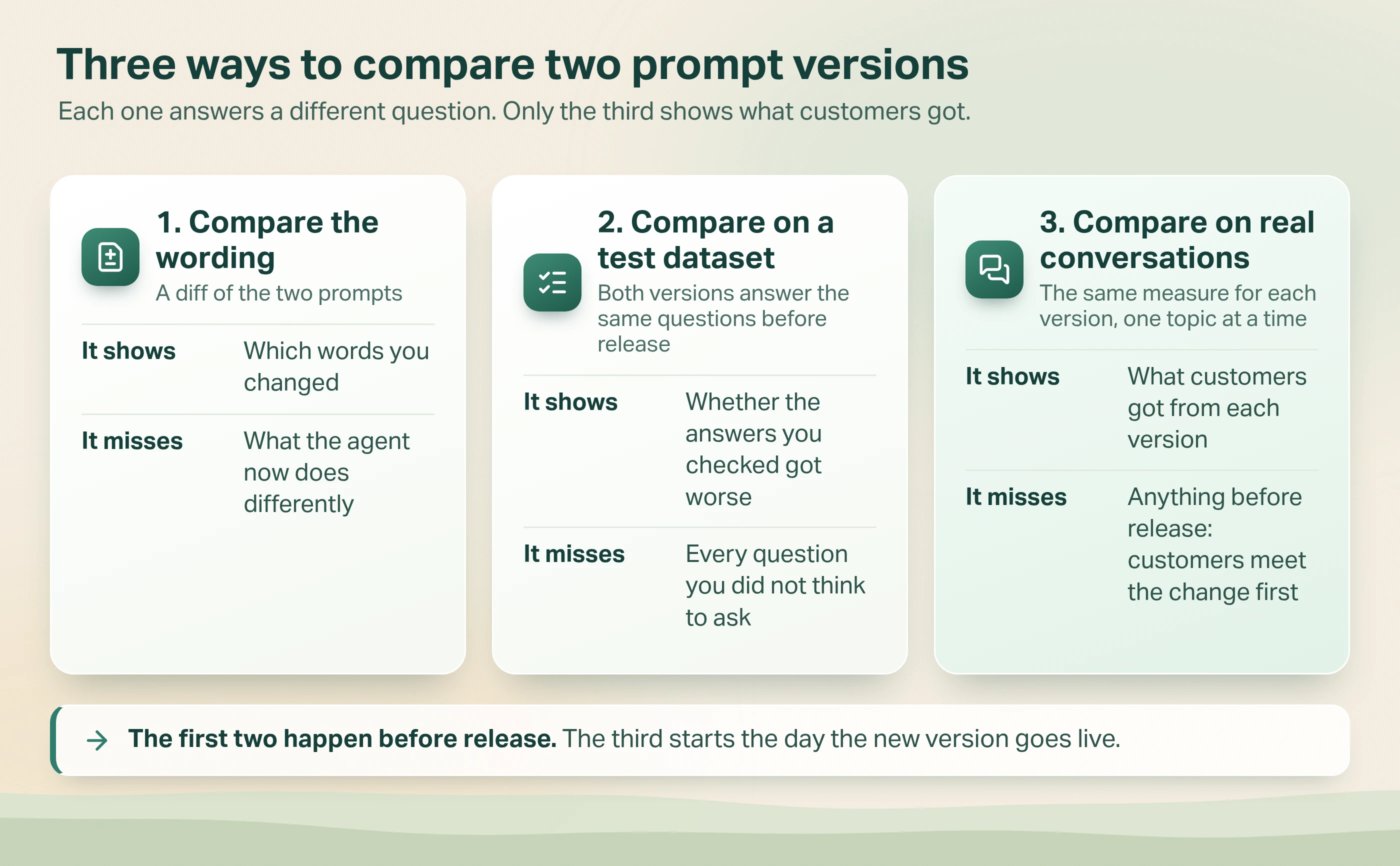
- Compare the wording. A diff highlights the words you changed. It cannot show what the agent now does differently.
- Compare on a test dataset. Both versions answer the same saved questions before release. Our post on prompt regression testing covers that step.
- Compare on real conversations. This starts the day the new version goes live. The rest of this post is about it.
Why isn't a passing test dataset enough?
Because a test dataset only holds the cases you thought of. One public case shows how far that can go.
In March and April 2026, some users of Claude Code, Anthropic's coding assistant, reported that its answers had got worse. Anthropic traced the reports to three separate changes. One was a prompt change: on 16 April it had added an instruction to keep answers short. That instruction had passed "multiple weeks of internal testing and no regressions in the set of evaluations we ran".
Reports from real use started the investigation. Finding the cause took more work, because three changes were involved. Anthropic removed lines from the prompt to see the effect of each one, using a broader set of tests. One test showed a 3% drop. The instruction, which had hurt coding quality in combination with other prompt changes, was removed on 20 April (Anthropic, 23 April 2026).
We take two lessons from it. A passing test dataset says nothing about the cases it does not hold. And production tells you that something moved, but rarely which change moved it. Anthropic's own list of fixes includes "soak periods, a broader eval suite, and gradual rollouts": more time on real use before a change reaches everyone.
Production tells you that something moved. A version comparison shows where it moved, topic by topic.
How do you compare prompt versions in production?
Build one table. Topics go down the side, versions go across the top, and each box holds one signal (something you can count in conversations) with its conversation count.
It needs three things on every conversation: the version that handled it, its topic, and the signal. The topic comes from one question asked of every conversation, with a fixed list of answers that stays the same for both versions. Our post on AI agent performance degradation covers how to get topics and signals from conversations.
A common signal is the handover rate: the share of conversations where the customer asks for a person. A falling handover rate is only good news if customers still got what they came for. So pair it with a second signal that would rise if the agent were just holding people back, such as customers coming back about the same thing.
Then two choices decide how much the table can tell you.
1. How do the two versions meet customers?
| How the versions run | What the table can tell you |
|---|---|
| Same weeks, each on its own share of conversations (an A/B test) | The fairest answer you can get, if customers were assigned at random and the share stayed fixed |
| One after the other | A hint. The weeks changed as well as the prompt |
| On two channels, such as web chat and WhatsApp | A hint. The customers differ as well as the prompt |
If you can only run one version after the other, four habits make the hint stronger.
- Compare whole weeks with whole weeks. The mix of topics differs by day of the week.
- Leave out the conversations in progress when the version switched.
- Check the same version against itself. See how far the rate moves between two weeks with no change. If it moves three points by itself, a three-point gap after a change tells you nothing.
- Write the rule down first. Decide what result means keep, narrow or go back before you open the table.
2. Which version do you compare against?
Compare with the last version you were happy with, as well as the one just before. Say versions 6, 7 and 8 each raise the handover rate on cancellations by one point. A one-point step is lost in the usual week-to-week movement. A three-point gap between version 8 and version 5 has a much better chance of standing out.
Why can the overall rate point the wrong way?
Because two versions that run one after the other rarely serve the same mix of topics. Take the report from the start of this post. Version 13 went live the week prices rose. Cancellation conversations tripled and refund conversations halved.
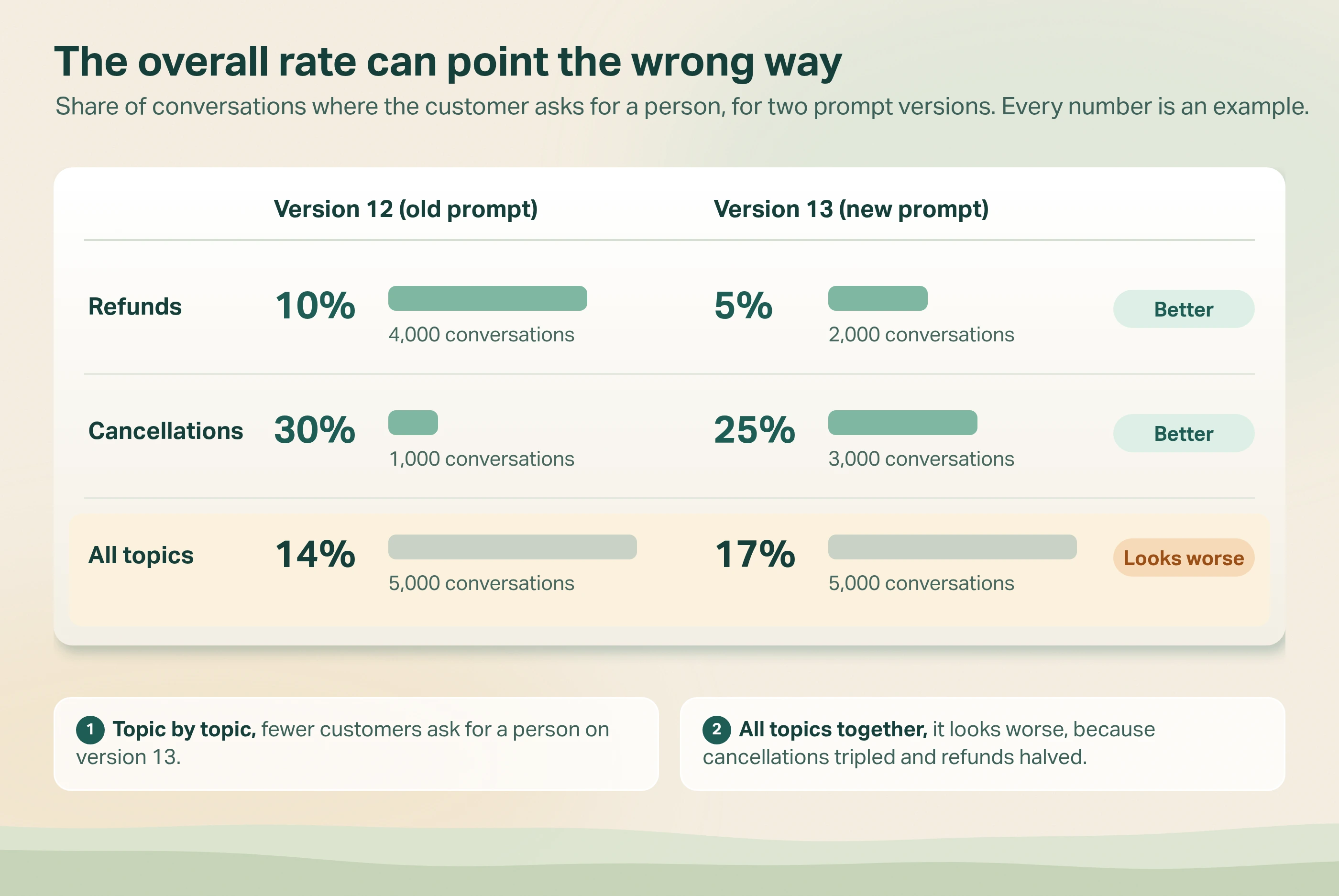
| Handover rate | Version 12 (old prompt) | Version 13 (new prompt) |
|---|---|---|
| Refunds | 10% of 4,000 conversations | 5% of 2,000 conversations |
| Cancellations | 30% of 1,000 conversations | 25% of 3,000 conversations |
| All topics | 14% of 5,000 conversations | 17% of 5,000 conversations |
- Topic by topic, fewer customers ask for a person on version 13, for refunds and for cancellations.
- All topics together, it looks worse. Cancellations are the harder topic, and version 13 got three times as many of them and half as many refunds.
Statisticians call this Simpson's paradox. Microsoft's experimentation team wrote that "it's easy to incorrectly identify the winning Treatment because of Simpson's paradox" (Crook, Frasca, Kohavi and Longbotham, 2009). The Treatment there is the new version. They met the paradox inside split tests, while the new version's share was being raised.
When the mix of topics differs, decide on the topic rows, not the raw total.
The counts matter as much as the rates. At these counts neither gap is likely to be chance, though the weeks still differed. With a tenth of the conversations, the cancellations gap could be chance: in 100 conversations, five customers move the rate by five points.
How do you get one fair number?
If someone needs one number, put both versions on the same mix. Give version 13 the mix that version 12 had, 4,000 refunds and 1,000 cancellations. Its total becomes 9%, against 14% for version 12.
What do you do when a prompt version comparison comes back mixed?
A mixed table often means the edit reached further than you meant. The instruction you wrote for refunds is also being applied to cancellations.
| What the topic rows show | What to do |
|---|---|
| The edited topic is better, the others are unchanged | Keep the new version |
| The edited topic is better, another topic is worse | Narrow the instruction so it only applies to its topic. Release that as the next version and compare all three |
| The edited topic is no better, once it has enough conversations to tell | Go back to the old version. The change bought nothing |
The middle row has a cost. Until the narrower version is live, the other topic stays worse. If that topic matters more to you than the one you edited, go back first and narrow the instruction afterwards.
How we compare prompt versions in Avesta AgentOS
Avesta AgentOS is our AI agent platform, and Metricsense is its AI agent analytics module. Two things in them help with a version comparison.
What changed between two versions. Each release in Avesta AgentOS is saved as a version with its own version number, and you can add a note. Avesta AgentOS lists which of the main settings differ between two versions: the prompt, the model, the tools and a few others. So a comparison starts by confirming that the prompt is the only thing that changed.
One limit: Avesta AgentOS does not split conversations between two versions by percentage today. Each channel runs one version at a time, so a comparison is one version after the other, or one channel against another. We treat the result as a hint until the conversations confirm it.
A table of topics by version, with the conversations behind it. You send the version number as a field with each conversation and set it up once as a field for charts. The topic is a plain-English question you write, which Metricsense answers for each conversation. A Metricsense table then has a row for each topic and version. A click on a row lists those conversations, and each finding links to the exact turn in the transcript.
When is a prompt version comparison in production the wrong tool?
- When one wrong answer is costly. For pricing, legal wording or health advice, do not learn from customers. Test harder, and have a person review the answers first.
- When the version changed more than the prompt. If the model changed in the same release, the table tells you which version is better. It cannot tell you which change did it.
- When the topics themselves changed. A topic that barely existed under the old version has no row to compare. Read its conversations instead.
The bottom line
Before anyone goes back to an old prompt because a total moved, build the topic rows and put both versions on the same mix. Then read the conversations behind the rows that changed. For the wider set of things to watch once an agent is live, see our guide to monitoring AI agents in production.
How many of your last five prompt versions could you compare today, topic by topic?
Want help comparing two versions of your agent on the conversations it has already had?
Get started: hello@avestalabs.ai
Frequently asked questions
- What is prompt versioning?
- Prompt versioning means saving each change to a prompt as its own numbered copy, with who changed it and when. It lets you go back to an earlier version and see what each release contained. Versioning is the record. A prompt version comparison is what you do with that record to decide which version to keep.
- What is a prompt update?
- A prompt update is any change to the written instructions an AI agent follows, from one reworded sentence to a full rewrite. Treat each update as a release: save it as a new version, run your test questions on it, and compare it with the previous version on real conversations once it is live.
- How do I compare prompt versions?
- Before release, run both versions on the same test dataset and compare the answers row by row. After release, compare them on real conversations: pick one signal, such as how often customers ask for a person, and set the two versions side by side for each topic, with the number of conversations behind every rate.
- Can I A/B test prompt versions in production?
- Yes, if your platform can send a share of conversations to each version. Assign each customer to one version at random and keep them on it, so one person does not meet both versions. Start the new version on a small share, because real customers get it untested. If you raise the share later, compare within each stage.
- How many conversations do I need to compare two prompt versions?
- There is no fixed number. A big difference on a busy topic shows quickly, while a small difference on a quiet topic may never be clear. Distrust any rate built on a few dozen conversations. For quiet topics, read every conversation instead of comparing rates.
Share this article