Data-Driven AI Agents: How to Check an Answer
A four-question test for any AI agent that answers questions about your data, and a weekly check to keep it honest.
 Gaurav Soni11 min read
Key takeaways
- A data-driven AI agent answers from a query or a record you can open, not from what the model remembers. If you cannot open the source of an answer, treat it as a guess.
- Four questions check any answer: where did the number come from, is it the right query, can I open the rows or conversations behind it, and does the agent say so when it does not have the data.
- A newsroom found New York City's business chatbot giving wrong legal answers. Checking ten answers a week will not catch everything, but it is likely to catch an agent that is often wrong.
- A good score on tidy test data tells you little about your own data. On Spider 2.0, the authors' code agent solved 21.3% of tasks in 2024, against 91.2% on the older Spider 1.0.
- The check costs time. For a one-off question on a file you already trust, asking a chat tool is fine. Build the answer trail for numbers people will act on.
Say your head of finance asks the team's new AI agent for last quarter's refund rate. It replies in two seconds with a clean number and a confident sentence. Nobody asks where the number came from, and next week it ends up in a board paper.
Was it right? You cannot tell from the answer.
This post gives you a short test for any AI agent that answers questions about your data. Ask where the answer came from, whether it is the right query, what is behind it, and what the agent says when it does not know. Then it gives you a weekly habit that keeps the agent honest after launch.
What are data-driven AI agents, and how do you tell?
Data-driven AI agents answer from your data, not from memory. Each answer is produced by a query (a question put to a database or a record store) or a lookup you can open. Data-driven here means traceable: you can open the source and see how the number was made. If you cannot, treat the answer as a guess, however well it reads.
Put simply:
No source you can open, no answer you can trust.
The test is four questions. Every answer should carry its trail, so the questions can be asked of any of them. A person then opens a sample each week.
| Question | A good answer looks like | Red flag |
|---|---|---|
| Where did this come from? | The query, the filter and the dataset, named | "Based on your data", with nothing more |
| Is it the right query? | The right table, column and date range for the question you asked | A query that runs cleanly, but on the wrong table or the wrong dates |
| Can I open what is behind it? | The rows, or the conversations, that make up the number | A number you can only take or leave |
| What does it say when it does not know? | "We don't hold that" | A confident number for a question your data cannot answer |
Who finds the wrong answer first?
Sometimes a newsroom finds it. In 2024, reporters at The Markup tested New York City's business chatbot and found it telling businesses to break the law. Asked whether landlords must accept tenants on rental assistance, it said no. The reporters note that in New York City it is illegal to turn tenants away over their source of income.
That chatbot answered questions about city rules, not about a database. The lesson carries over: outsiders found the errors by asking questions and checking the replies. That is a bad way for the owner to learn the agent is wrong.
Company data makes this harder than it looks. Spider 2.0 is a benchmark of 632 tasks built from enterprise database use cases. Its authors reported in 2024 that their code agent solved 21.3% of them, against 91.2% on the older and simpler Spider 1.0.
These are long, multi-step tasks, harder than a single question, and models have moved on since. The lesson still holds: a good score on tidy test data tells you little about your own warehouse.
So do not trust the first answer, and do not wait to be told.
How do you check an AI agent's answer?
Check one answer end to end before you trust the agent with more, then ten answers a week. Every answer should leave the same trail.
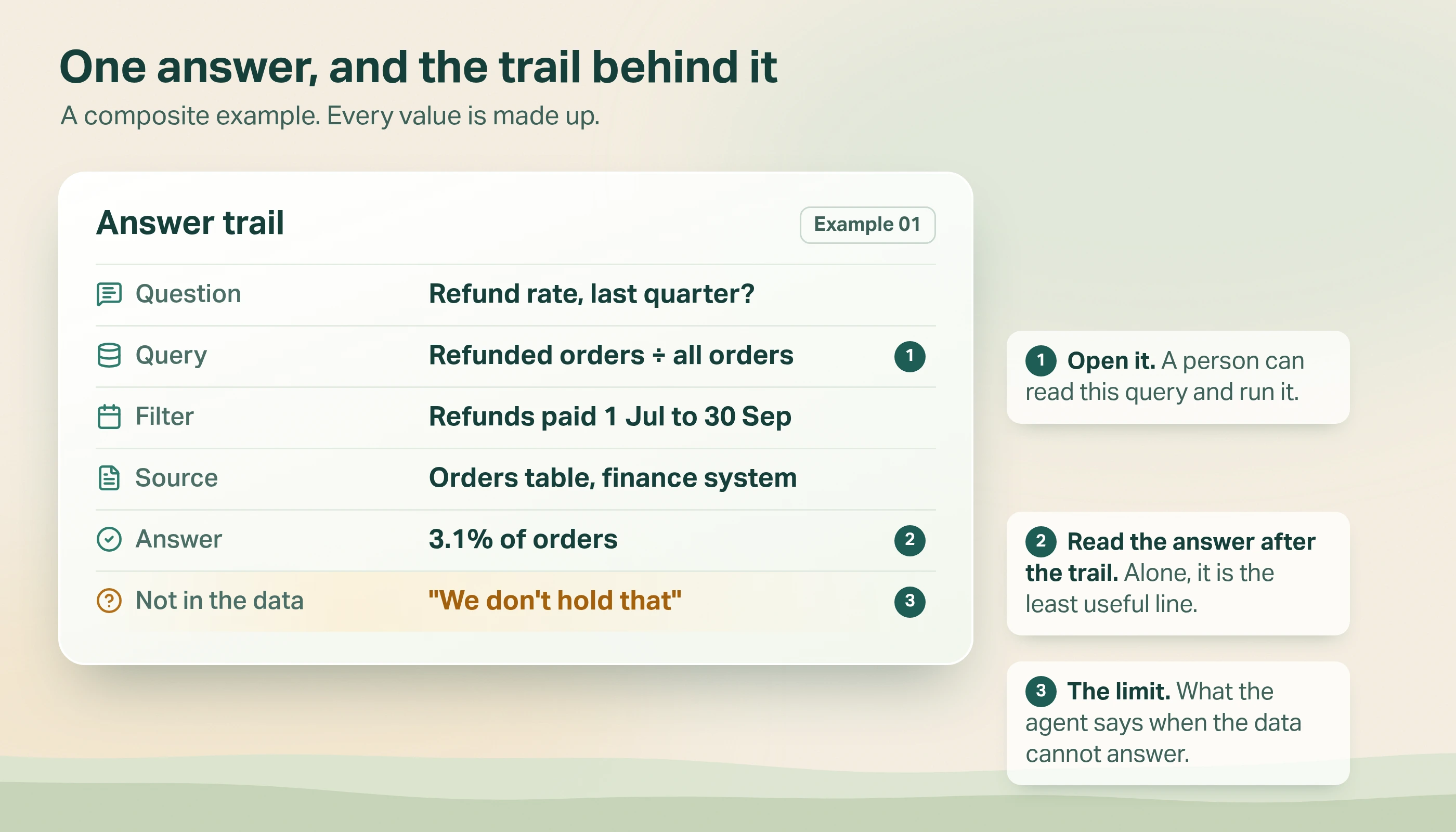
The card has three parts. The four questions are how you read it.
- The query, the filter and the source. What the agent asked, for which dates, of which system. A person can open it and run it.
- The answer. Read it last.
- The limit. What the agent says when the data cannot answer.
Read the query before you run it. Is it the right table, the right column and the right dates for the question you asked?
Check the definition too. Is refund rate a count of refunds over a count of orders, or dollars over dollars? Are refunds counted in the quarter they were paid, or the quarter of the original order? If your team has no written definition, nobody can say whether the agent is right. Write the definition first.
A query can run cleanly and still answer the wrong question.
Only then run it yourself. A match proves one thing: the agent did not invent the number. It does not prove the query is right, because the same wrong query gives the same wrong number twice.
So also compare the answer with a figure built another way, such as a report you already trust or a query an analyst wrote separately. If you cannot run queries yourself, ask the agent for the row count and a few sample rows, and check them against that report.
If the numbers differ, find out why before you blame the agent. The data may have changed between the two runs. The date filter may use a different time zone. You and the agent may have different access. Agree a tolerance first, for example a match to one decimal place on the same day's data. Anything outside it is a mismatch.
Ask something your data cannot answer
Ask three questions you know the data cannot answer: a measure you do not collect, a period before your records start, and a field that does not exist. A data-driven agent says it does not hold that. A guessing agent produces a plausible number. Watch for the middle case too. "Zero" is not the same as "we don't hold that", and a good agent tells you which one it means.
Open the evidence, not only the query
For numbers built from conversations, such as complaints, sentiment or cancellations, a query is not enough. The number is a count of judgements, so you need to read some of the conversations being counted. Open ten.
Say a chart counts cancellation conversations tagged "price complaint" last month. Write down what "price complaint" means first, so two readers would agree.
Then pick ten at random, not the first ten on screen, and read them. If seven are really about a delayed delivery, the tag is unreliable and so is the chart. If all ten look right, that is a good sign, not proof.
And this only tests conversations that got the tag. To look for ones it missed, read ten untagged conversations that mention price. Ten will only show a big gap.
What if your data sits in many tools?
Most teams do not have one clean database. Sales sits in a CRM, support in a ticket tool, usage in a warehouse, and customer calls in a recording system. An AI agent can reach several of these through separate tools, which are ways for the agent to fetch data on request. Model Context Protocol (MCP) is a standard for connecting an agent to tools such as databases.
The risk is that the agent blends them and quietly drops the trail. Each answer should still name which tool it used and what it asked. Say a customer count disagrees between your CRM and your warehouse. A data-driven agent tells you which system each figure came from. A guessing agent gives you one number and no way to explain the gap.
How do you keep it data-driven after launch?
Data changes, instructions get edited and models get swapped. An agent that passed on day one can drift by day thirty.
Run a short loop every week.
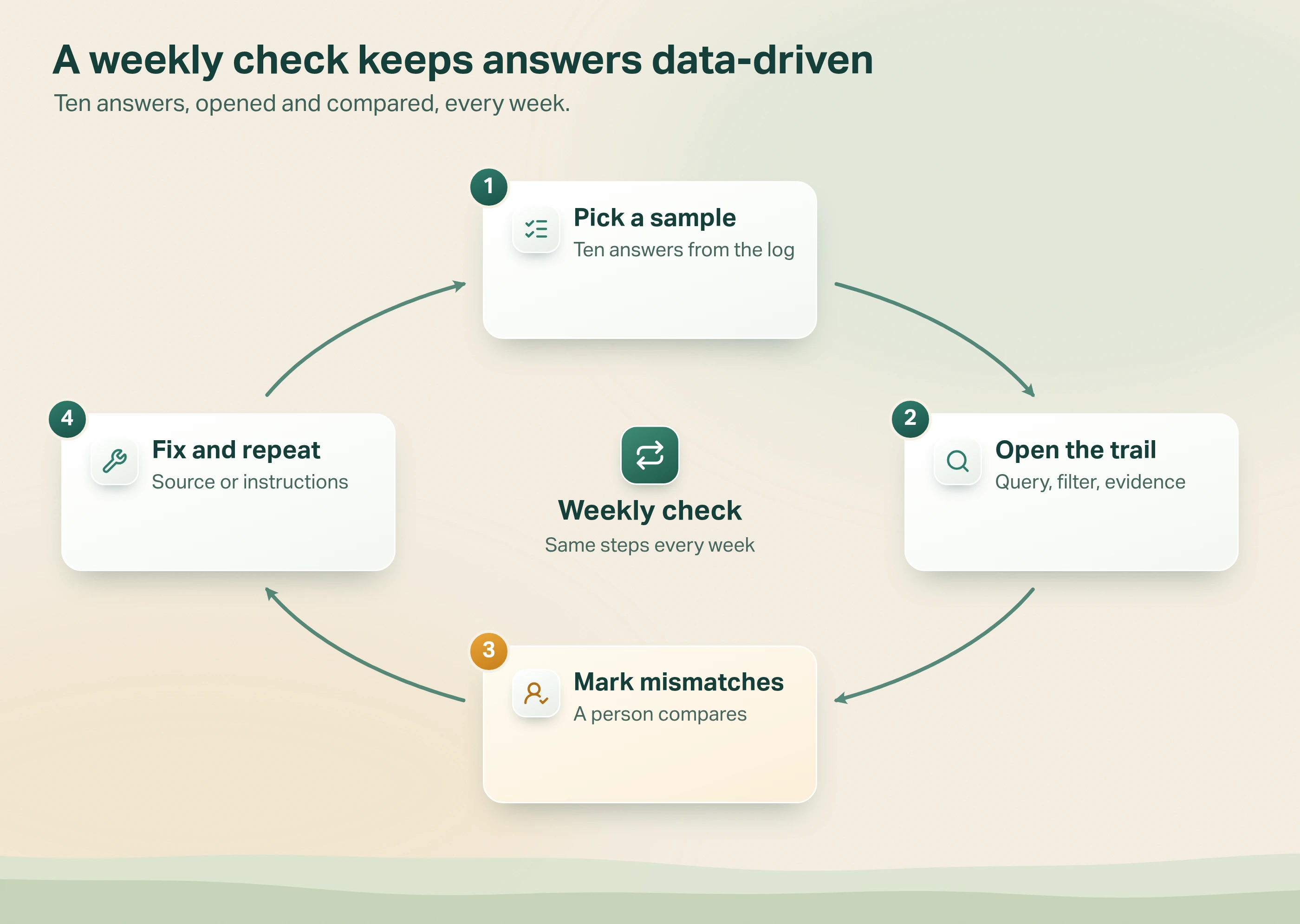
- Pick a sample. Ten answers from the agent's log. Pick most at random. Add a few on purpose: the numbers people act on, and answers from the days anything changed. Keep the two groups apart in your notes.
- Open the trail. The query, the filter, the evidence.
- Mark what did not match. A mismatch is a wrong definition, a wrong filter, or a number outside the tolerance you agreed. Even one is a finding. Write down the cause.
- Fix and repeat. Correct the source, the definition or the instructions, then sample again next week.
Ten clean answers mean nothing obvious broke. They do not prove the agent is right.
Be honest about what ten can do. Ten will catch an agent that is often wrong. An agent that is wrong one time in ten still passes a random ten-answer check about one week in three. The hand-picked ones find problems, but only the random ones tell you how often the agent is wrong.
Two things make this loop work. First, the agent must log every question, query and result, or there is nothing to sample.
Second, keep a short list of questions whose right answers you already know, and re-run it after every change to the instructions, the data source or the model. Ask each one a few times, because the same question can get different answers.
When not to do this. If you are exploring a file you already trust, with no one else relying on the result, ask a chat tool and move on. The trail is for numbers that leave your desk.
How do we do it in Avesta AgentOS?
We build agents on Avesta AgentOS, our AI agent platform, and we built Metricsense, its analytics module, to measure them. Three patterns come from that work.
1. Queried, not recalled
In our OnlyFacts case study, the agents answer climate questions from a live database query, never from the model's memory. Each answer is cited to the dataset and the filter behind the figure, and readers can see the query that produced it. That is the answer trail above.
2. Say what we don't hold
The same agents are built to say they do not hold a piece of data instead of approximating. The case study names being "able to say 'we don't hold that' rather than approximate" as one of four requirements for every output.
3. Every number opens to the conversations behind it
In Metricsense, a chart counts something like complaints or sentiment across conversations. Click a bar, a slice or a scorecard row and you get the conversations behind it. Each one shows the AI's written reason for its label, and you can open the full conversation. Read the conversation, not only the reason, because a well-written reason can still be wrong. That is how you run the "open ten" check without leaving the chart.
For workspace admins, the Metricsense MCP server lets an AI assistant take the same walk. It finds the dataset and the measurable insights, reads the counts, then opens the conversations and transcripts behind them.
The bottom line
The first check only proves the agent on the day you ran it. Keep the weekly check small enough that someone really does it. Give it one owner, such as the analyst who owns the metric, and not the person who built the agent.
For the building side, see what is an agent harness, and for testing a document-based agent, how to test a RAG chatbot. For watching agents live, see agent analytics: monitoring in production.
Which of your numbers would you be unable to explain if someone asked you where they came from?
Want an AI agent whose answers you can trace? Avesta AgentOS includes evaluation, guardrails and observability.
Get started: hello@avestalabs.ai
Frequently asked questions
- What is data-driven AI?
- Data-driven AI means the system's answers and decisions come from your own data rather than from general knowledge the model picked up in training. For an AI agent, that means each answer is produced by a query or a record lookup, and you can open the source to see what it used. If the source cannot be shown, the answer is not data-driven.
- How do you know an AI agent's answer came from your data?
- Ask it to show the query, the filter and the source, then run the query yourself. A match only proves the agent ran the query it showed you. A query on the wrong table still gives a wrong answer. If you cannot run queries yourself, ask the agent for the row count and a few sample rows, and check them against a report you already trust. Then ask something your data cannot answer. An agent that invents a number is guessing.
- Can AI agents analyse data from many tools at once?
- Yes, if each tool is given to the agent as a separate way to fetch data, and each answer still names which one it used. Model Context Protocol is one standard way to connect an agent to tools such as databases. Its specification says a person should be able to deny tool calls.
- How often should you check an AI agent's data answers?
- Weekly, with ten answers, is a sensible start. Give the job to one named person, such as the analyst who owns the metric. Do not shrink the sample after a few clean weeks, because ten is already small. Check again straight after any change to the agent's instructions, its data source or the model underneath it.
- Is a data-driven AI agent the same as a data agent?
- Close, but not the same. A data agent is any agent that works with data, including agents that clean, move or govern it. This post is about the narrower job: an agent that answers questions about your data, and how you check that its answers really come from that data.
Share this article