WhatsApp Order Automation: From Dealer Message to ERP
Your dealers already order on WhatsApp. Here is how to get those orders into your stock and order system without anyone typing each one in.
 Kishan Chandravadia10 min read
Key takeaways
- WhatsApp order automation means an AI agent reads each dealer's message, checks live stock in your ERP, places the sales order and sends back the order number, without anyone retyping it.
- Most of the steps in a WhatsApp order are reading, checking stock and typing. Only a few need judgement. Automate the typing first.
- An ordering app asks dealers to change how they order. An AI agent works with the messages they already send, including long lists and item names the way they say them.
- Keep credit holds, changes to placed orders and custom items with your team. The agent should hand them over with the full chat.
- Before you start, check three things: your ERP lets outside software read stock and create orders, your stock figures are trusted, and your sales rules are written down.
Say your dealers send their orders on WhatsApp. Your sales coordinator reads each message and works out which dealer and which items it means. Then they check stock in the ERP (the software that holds your stock, prices and orders). They reply, wait for the dealer to confirm, and type the order in.
Every order takes a person's time. On a busy day the messages queue up, and orders sent in the evening wait until morning.
Every new dealer adds to the typing. The usual fix is to hire another person. This guide shows how WhatsApp order automation takes that typing off your team. It uses an AI agent: software that reads a message, decides what to do and acts in your ERP, within rules you set.
What is WhatsApp order automation?
WhatsApp order automation means your dealers keep ordering on WhatsApp, but nobody on your team retypes their orders. An AI agent reads each message, works out the dealer and the items, checks live stock in your ERP, places the sales order and replies with the order number. Orders that need a decision go to your team.
Put simply:
Your dealers keep WhatsApp. Your team stops retyping orders.
Where does the time go on a WhatsApp order?
Before you pick a fix, look at where the time goes. A typical dealer order on WhatsApp passes through these hands-on steps:
| Step | What your team does today | Does it need judgement? |
|---|---|---|
| Read | Scroll the groups and spot which messages are orders | No |
| Find the dealer | Work out which account the phone number belongs to | Rarely |
| Find the items | Match a name, a code without its prefix or a label photo to an item | Sometimes |
| Check stock | Open the ERP and see what is free now and what is due | No |
| Reply and confirm | Write back with stock and dates, then wait for the answer | No |
| Enter the order | Type the sales order into the ERP and send the number back | No |
Most of those steps are reading, checking and typing, not judgement. That is why hiring helps, but slowly: every new person takes on the same typing. And the busiest hours, when every dealer writes at once, are exactly when answers slow down.
What are your options for taking orders on WhatsApp faster?
There are four common ways to take orders on WhatsApp faster:
| Option | What changes for dealers | Copes with free-text lists? | Answers after hours? | Fits when |
|---|---|---|---|---|
| Hire more people | Nothing | Yes | Only with shifts | Volume is low or grows slowly |
| Ordering app or portal | They log in and fill forms | No | Yes | Dealers are happy to change how they order |
| WhatsApp menu chatbot | They tap buttons instead of typing | No | Yes | Few products and simple orders |
| AI agent connected to your ERP | They message one business WhatsApp number | Yes | Yes | High volume, dealers write freely, rules are clear |
One textile manufacturer we worked with already had an app, and dealers still ordered on WhatsApp. It is open all day, and dealers don't write the way forms ask. They paste a long list, or type an item's name the way they say it. A menu chatbot has the same limit as the app: it can only place the order its buttons allow.
A form takes the orders it was built for. Your dealers send the rest on WhatsApp.
What does an AI agent do with one dealer order?
Here is the path of one order through an AI agent. Every step reads your ERP live, so the dealer hears the stock you really have.
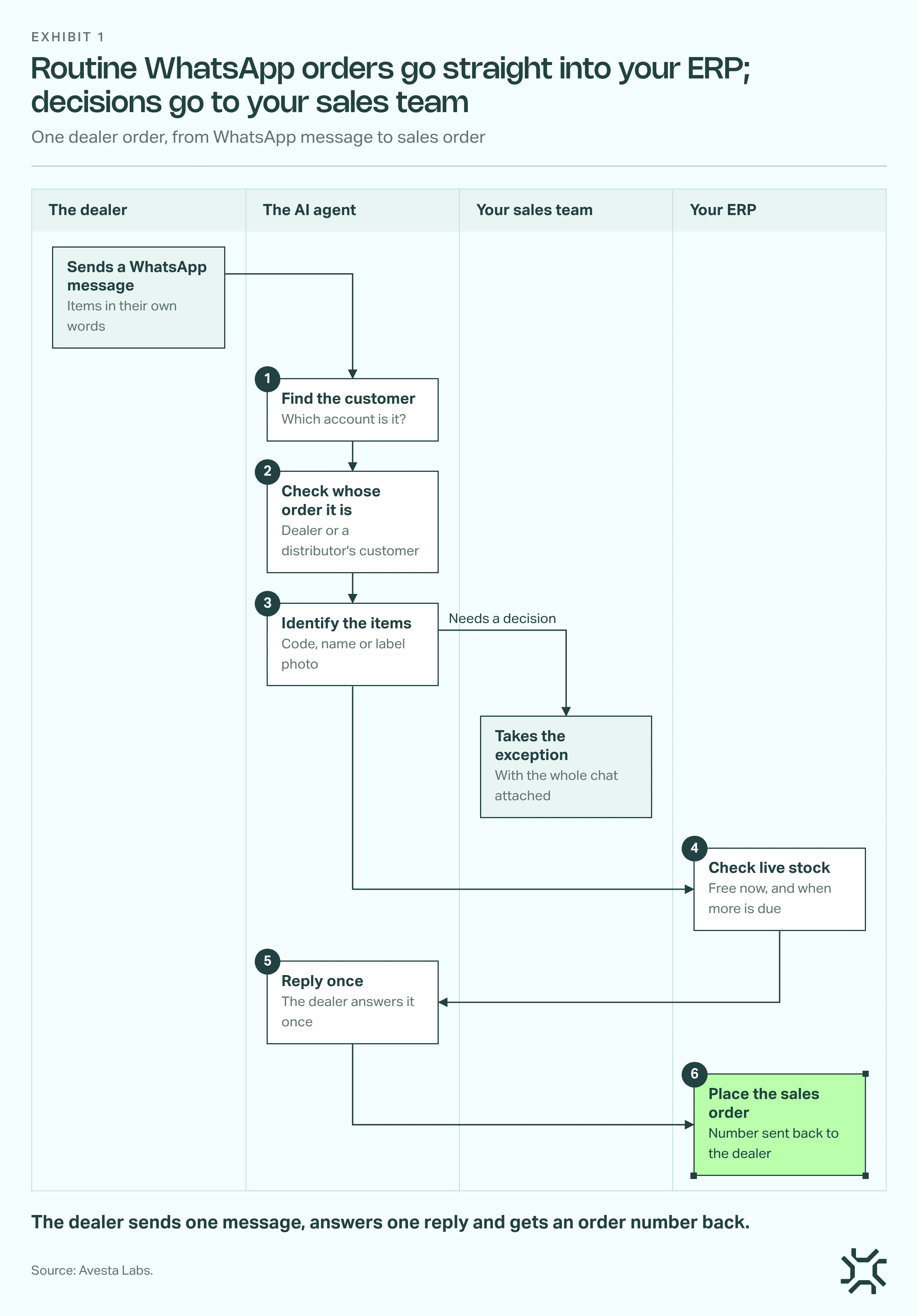
- Find the customer. The agent looks up the sender's phone number in your ERP. If one number belongs to several accounts, it asks which one in the same reply.
- Check whose order it is. If a distributor is ordering for one of their own customers, the agent asks which one. It delivers only to an address already on the distributor's account.
- Identify the items. It searches by code, by name and by the other names on the item's record, and can read the item from a photo of its label. If it can't tell, it asks one short question.
- Check live stock. It reads what is free to sell now, in the way you sell it (lots, batches or sizes), and when more is due. If your ERP already tracks these, the agent reads them there. Business Central, for example, tracks items by lot number. Short stock gets a date, so the order is still taken.
- Reply once. One message lists every item, its stock and anything still needed. The dealer answers that one reply.
- Place the sales order. The agent creates the order in your ERP and sends back the order number and the order document.
How does WhatsApp order to ERP integration work?
On WhatsApp, dealers message one business WhatsApp number instead of their group with your team. That is the only change they see.
On the ERP side, outside software must be able to read your stock and create a sales order. Microsoft Dynamics 365 Business Central, for example, has a sales order interface for this (as of October 2026). WhatsApp order to ERP integration is these two connections, plus your sales rules in between.
Which orders should still reach your team?
Automation should take the typing, not the decisions. These cases go to the right person, with the whole conversation attached, so the dealer never explains it twice.
| Situation | What the agent does | Who decides |
|---|---|---|
| Item found, stock free, account in good standing | Places the sales order, sends the number | The agent |
| Stock short, more is due | Gives the date and takes the order | The agent |
| Account on credit hold | Doesn't release the order; hands it over | Your sales team |
| Change to an order already placed | Writes nothing; hands it over | Your sales team |
| Custom size, colour or design | Asks the details, then hands it over | Your sales team |
| Samples, returns or complaints | Hands it over | Your sales team |
| Item can't be identified | Asks, then hands it over if the dealer has nothing more to give | Your sales team |
| Customer can't be identified | Hands it over | Your sales team |
| Discount request | Never gives one | Your sales team |
How do you roll it out without risking real orders?
The safe way is a loop.
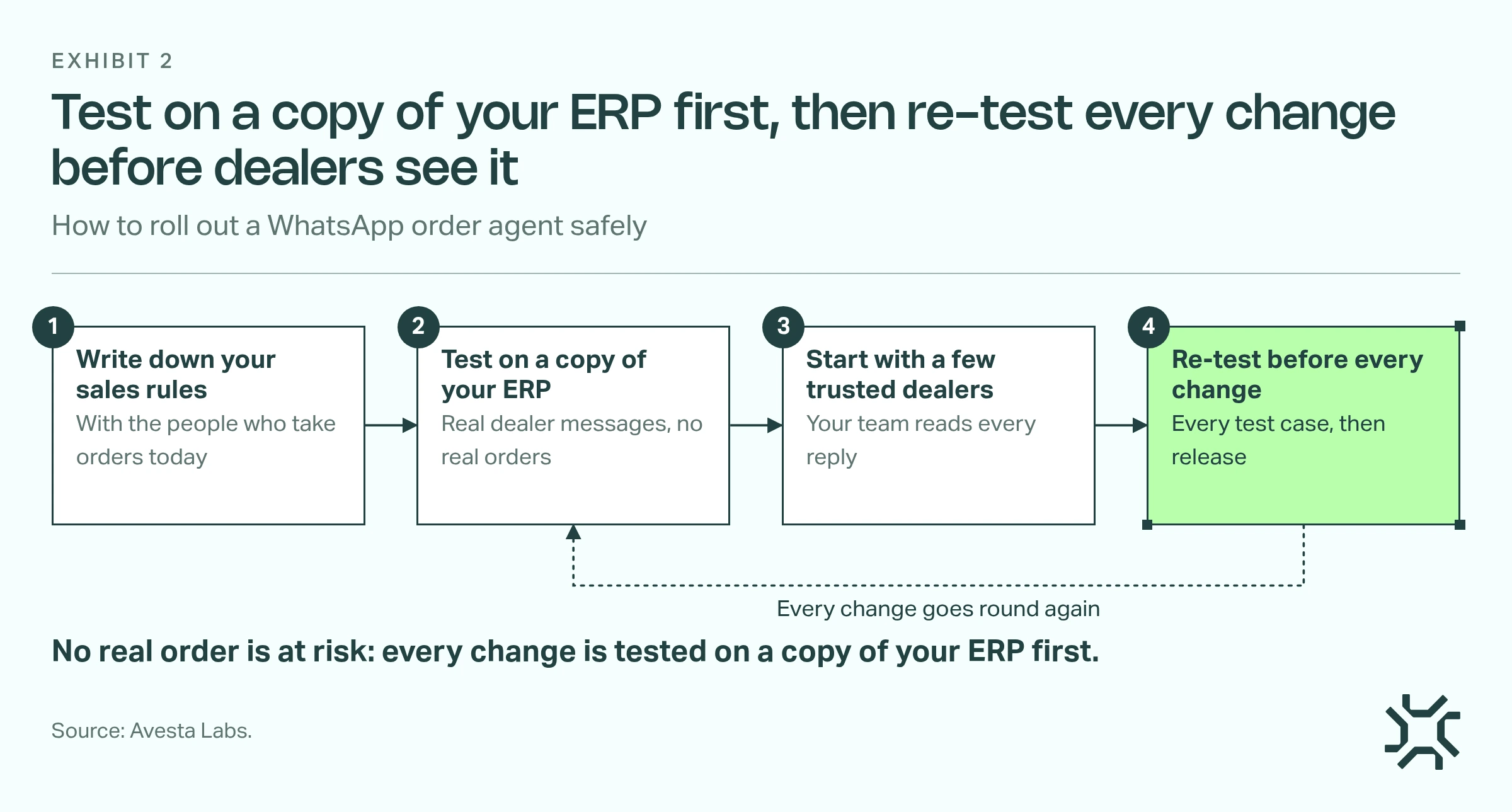
- Write down your sales rules. Most of them live in your team's heads: which account, which lot, what to promise when stock is short. Sit with them and write the rules down.
- Test on a copy of your ERP. Use real dealer messages as test cases, so no real order is at risk.
- Start with a few trusted dealers. Your team reads every reply and flags anything they would have said differently.
- Re-test before every change. Run every test case again before any change goes live.
What we learned building an order agent in Avesta AgentOS
We built this kind of agent on Avesta AgentOS for a textile manufacturer in India. Before it, their team read around 1,000 dealer WhatsApp groups by hand. The agent went from start to production in 5 to 6 weeks. It has been live since 21 September 2026 and handles 500 to 1,000 orders a day (as of October 2026). Every change is re-tested on 147 test scenarios, and a person still handles every exception.
Three lessons you can use in your own rollout:
The message is easy. The rules your sales team carries in their heads are the real work.
- One phone number is not always one customer. A dealer's number can sit on several accounts, so the agent lists them and asks once.
- Don't turn away an out-of-stock order. The sales team asked us to take the order anyway, with a date. A refusal can send the dealer to another supplier.
- One reply, not two. The sales team asked us to stop re-confirming. The agent now asks every open question in one reply and places the order as soon as the dealer answers it.
What made it work was the rules, checks and hand-overs built around the AI model, the agent harness.
When is WhatsApp order automation not worth it?
It isn't right for every manufacturer. Hold off if:
- Your order volume is low. If one person handles every order comfortably, a product list on WhatsApp or a simple form may be enough.
- Your ERP stock isn't trusted. The agent promises what the ERP shows. If your team double-checks the shelf before answering, fix that first.
- Most orders are custom quotes. If nearly every order needs a person to price or design it, the agent would hand over almost everything.
- Your rules aren't settled. If two salespeople would answer the same order differently, agree the rules before you automate them.
The bottom line
This week, pick the orders your team answers the same way every time and write down how they answer them. Then ask your ERP partner one question: can outside software read our stock and create a sales order? Those two answers tell you whether you are ready.
To decide which orders should wait for a person, read our guide to AI agent human approval.
How many hours did your team spend retyping WhatsApp orders last week?
Want to see how an order agent would work with your ERP and your dealers? Look at our AI agents for manufacturing.
Get started: hello@avestalabs.ai
Frequently asked questions
- Does WhatsApp order automation work with Tally, SAP or other ERPs?
- It can, if your ERP lets outside software read stock and create sales orders. That connection is usually called an API (a door built for other software). Our own build runs on Business Central. The test is the same for any ERP: ask your ERP partner whether outside software can read your stock and create a sales order.
- What happens to WhatsApp orders that arrive at night or on Sunday?
- Without automation, they wait for the next working day, and a dealer with a customer in front of them may try another supplier. An AI agent can answer and place routine orders at any hour, including evenings and Sundays. Anything that needs a decision, such as a credit hold, goes to your team.
- Is WhatsApp order automation software in India different?
- The tools are the same. The difference we saw with an Indian textile manufacturer was how dealers write: free-text lists, item names the way they say them, codes without prefixes and photos of labels. Choose a setup that reads your ERP live and copes with how your dealers actually write, not only a fixed menu.
- How long does it take to set up WhatsApp order automation?
- It depends mostly on your rules and your data. It takes longer if your sales rules aren't written down, if items go by many names, if you sell through distributors who order for their own customers, or if there is no test copy of your ERP. Clean item records and written rules shorten it.
Share this article