AI Agent Knowledge Base Update: Avoid Outdated Answers
New York City's business chatbot gave the old minimum wage three months after it rose. Why AI agents keep giving the old answer after a rule changes, and how to catch it.
 Gaurav Soni
- 7 min read
Key takeaways
- When a rule changes on a date, the old answer was right until that day, so it can sit unnoticed in whatever the AI agent reads.
- Before the date, find every place the figure lives, write both rules with their dates, re-sync copies and test with reworded questions.
- A friendly wrong answer looks resolved. New York City's $15 answer surfaced in the press, not in any dashboard.
- After the date, ask one yes-or-no question of every conversation for two to four weeks, and fix the source behind each yes.
- Already past the date? Run the question over the conversations already in Metricsense from the change date; that run has an AI cost.
On 3 May 2023, New York's state budget set the New York City minimum wage at $16 an hour from 1 January 2024. In October 2023, the city launched the MyCity chatbot, an AI assistant for business owners. The new rate took effect on 1 January. On 5 April 2024, Entrepreneur reported that when it asked MyCity the minimum wage, the bot said "$15 per hour". A report that week from Reuters (republished by ThePrint) said it "still thinks the city's minimum wage is $15 per hour, though it was raised to $16 as of 2024". An owner who followed it would pay below the legal wage.
Mayor Eric Adams said: "It's wrong in some areas, and we've got to fix it."
The city added a disclaimer telling businesses to "not use its responses as legal or professional advice". On 30 January 2026, Adams's successor, Zohran Mamdani, announced the chatbot's removal, calling it "functionally unusable" (The Markup).
Your AI agent has the same exposure on any price, fee or policy with a start date, whether it runs on Intercom Fin, a Zendesk AI agent or your own build. The fix has two halves: update every copy before the date, and catch the old answer after it.
What goes wrong after an AI agent knowledge base update?
An AI agent knowledge base update is often forced by a rule that changes on a date: a price, a fee, a wage. Before that date the old answer is right; after it, wrong. If any copy still holds the old rule, the agent keeps giving it, the reply looks helpful, and nothing errors. Three months after New York's minimum wage rose, its chatbot still said $15.
An answer that was right until the date is the easiest kind to miss.
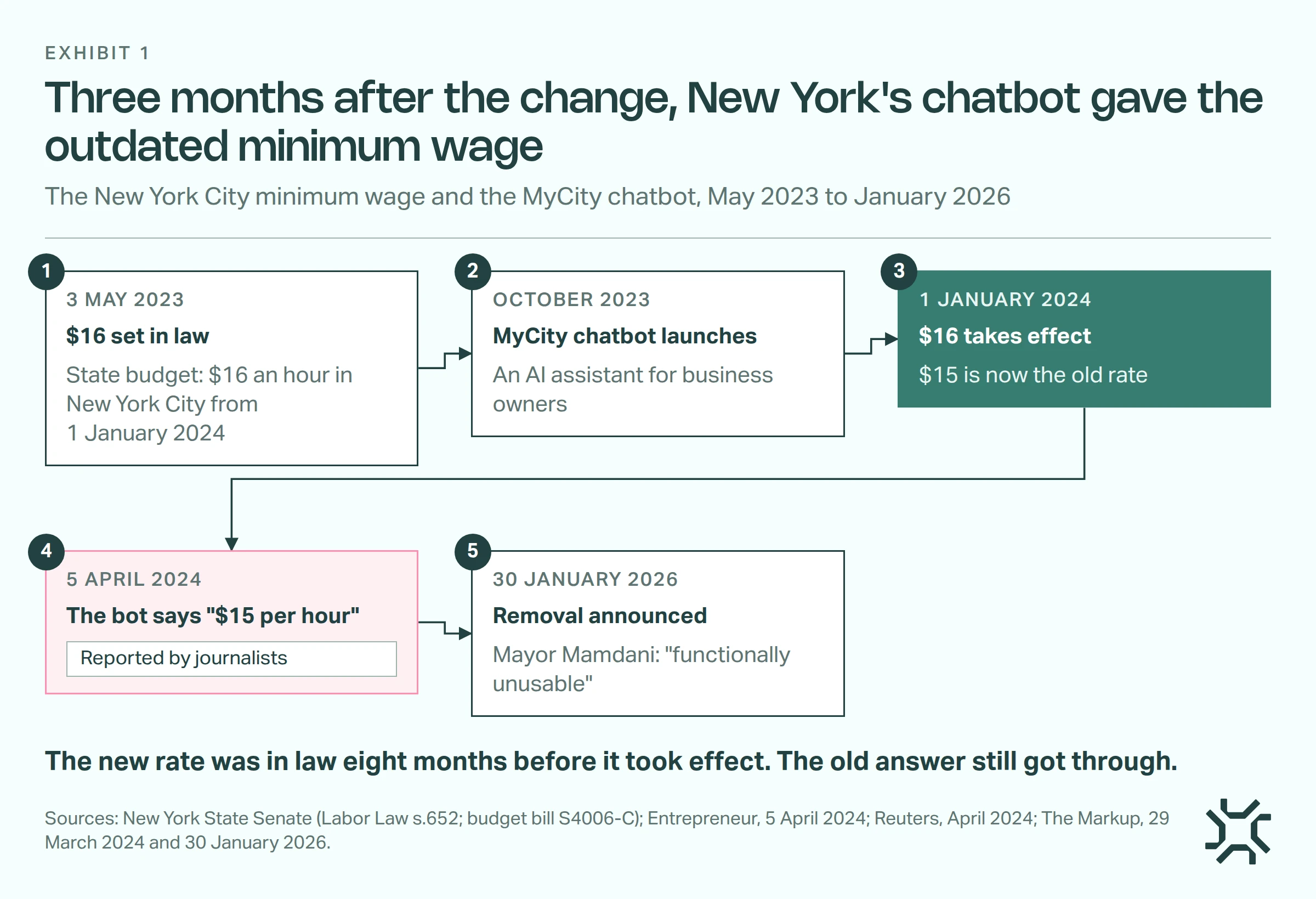
The date was known eight months ahead.
Why does an AI agent keep giving the old answer?
The city didn't say why MyCity gave $15, and we don't know. Many of its other wrong answers, about tips and housing vouchers, were simply wrong, not out of date. The minimum wage answer is different: it matches the rate in force before 1 January 2024.
Vendors' own documentation describes three common ways it happens:
- It reads a copy that refreshes on a schedule. A Zendesk AI agent searches external sources as of "the last sync, which usually happens every 24 hours", though it searches the help centre itself live (Zendesk). For Fin, Intercom says "Website re-syncs usually happen weekly" (Intercom) and "Changes made to PDF files aren't synced" (Intercom). A missed sync costs days; a PDF nobody re-added can cost months.
- Old and new versions both stay live. Intercom warns that Fin "may choose inconsistent sources at different times", and advises "one definitive version per topic" (Intercom).
- The old figure sits outside the articles you updated: a snippet in Fin (Intercom), an instruction in a Zendesk AI agent (Zendesk), or the system prompt in a custom agent.
How do you update an AI agent's knowledge base when a rule changes on a date?
The support lead runs this list:
- List every place the figure lives that the agent reads: articles and their translations, files, website pages it reads, snippets and instructions, and, in a custom agent, the system prompt. Search each for the old figure and its wordings, such as "$15" and "fifteen dollars".
- Write both rules with their dates: "$16 an hour from 1 January 2024; $15 before". Dated wording can go live before the date, and answers about earlier periods stay right. In Fin, a snippet can carry a start and end date, so an old-rate snippet can switch off on the day (Intercom).
- Before the date, publish the dated wording, re-sync every copy and test. In Fin, remove and re-add any changed PDF. On the day, test again with reworded questions, such as "can I pay my new hire $15?" or "what's the wage for a cashier in Queens?".
- Separately, update the macros and saved replies your human team reuses.
Why won't your reports show the old answer?
The agent answered, didn't hand over, and the user said thanks, so it counts as resolved. MyCity's $15 answer was found by journalists testing it.
A friendly wrong answer looks like a resolved one.
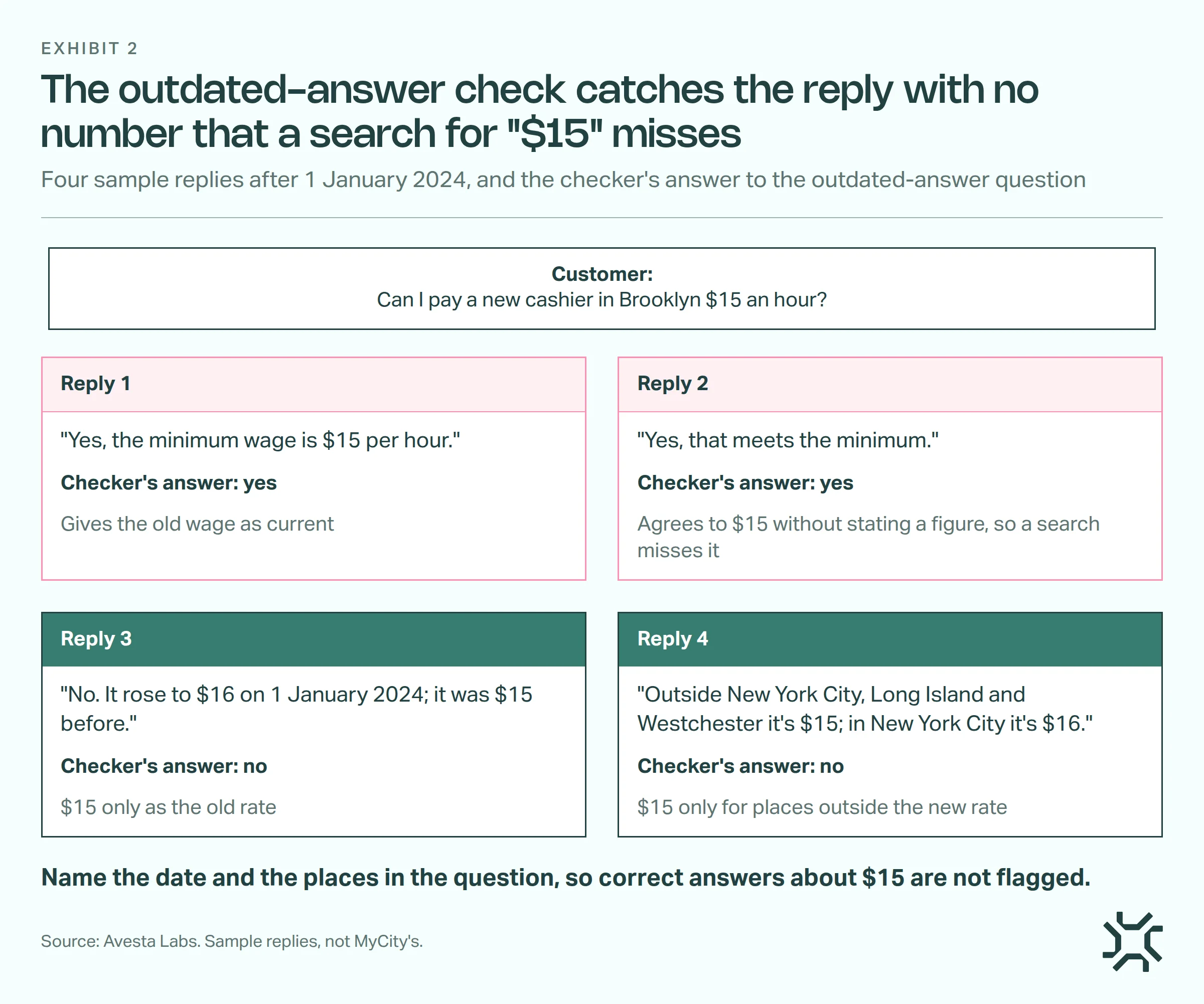
Searching transcripts for "$15" finds some old answers. It misses a reply with no number in it. Asked "can I pay $15?", the agent says "Yes, that meets the minimum."
How do you catch the old answer after the change?
You need the agent's conversations, exported from its platform, and a checker AI: a second AI that reads each conversation and answers a question you write about it. Here is the check as it runs in Metricsense, the AI agent analytics product we built at Avesta Labs.
- Write a change record: what changed, the old value, the new value, and the date it takes effect.
- Turn it into one yes-or-no question in plain English, which Metricsense calls an insight. Using the real case: "From 1 January 2024 the New York City minimum wage is $16 an hour; before that it was $15. In a conversation on or after 1 January 2024, did the assistant state or accept $15 an hour as the current minimum wage in New York City? Answer no if $15 is given only as the old rate, for work done before 1 January 2024, or for places outside New York City, Nassau, Suffolk and Westchester." Long Island and Westchester rose to $16 on the same day, so the question names them. The checker sees each conversation's date, so the question can turn on it.
- Metricsense reads every conversation you send it, answers yes or no, and cites the reply it relied on, with a reason. Conversations sent through our Ingest API are checked every hour; a CSV import is checked when you run "Analyze". A bar chart counts the yes answers by day. Read them daily for two to four weeks, then switch the insight off with its Active switch.
- Open the flagged conversations. A click on the chart lists the conversations behind it; set the dashboard's date range to a single day to see that day's. Opening one shows the agent's reply with an "Analysis Insight" card under the line it cites, with the answer and the reason. A person confirms the reply is wrong.
- Find the source and fix it. Metricsense doesn't know which source a reply came from, so open the sources the agent's platform lists for that answer where it shows them. In Fin, the "Improve answer" view shows content Fin "found relevant to the customer's question" (Intercom). Check snippets and instructions too. After the fix, a new yes means another copy still says $15.
- Decide whether to contact the people flagged: they were given the old figure.
If you write the question after the date, it checks new conversations from then on. To check the ones already sent, run "Analyze" on it over a date range from the change date; that run has an AI cost. Conversations sent later with their original dates land on their own day on a chart of conversations by date.
Without Metricsense, export the transcripts with their dates, ask an AI the question for each, keep each yes with the reply it quotes, and count them by day.
A check like this, running from 1 January, could have flagged a $15 answer soon after it was given, instead of in the press three months later.
Where Metricsense fits in Avesta AgentOS
Metricsense is part of Avesta AgentOS, and works with any AI agent, Fin or a Zendesk AI agent included, whose conversations can be sent through our API or a CSV upload.
If your agent runs on Avesta AgentOS, its files are uploaded, not synced on a schedule. An old figure can still sit in a file attached to the agent, or in its instructions, so search both.
Metricsense doesn't read your knowledge base; your question tells it what changed.
When is a dated-change check more than you need?
- A rule nobody asks the agent about. Do the checklist and skip the ongoing check.
- A brand-new rule with no old version. There is no old answer to catch, so for two weeks a person reads a sample of the conversations that ask about it.
The bottom line
A dated rule change gives you the easiest check to write, because you know the old answer and the day it turns wrong. For answers that get worse with no change at all, see AI agent performance degradation.
Pick the next price, fee or policy with a start date, and write its check before that date.
Want your next knowledge base update checked on every conversation?
See how Metricsense checks every conversation your AI agent has
Get started: hello@avestalabs.ai
Frequently asked questions
- What if we run several AI agents?
- Run one check across all their conversations, as long as they are all sent to the same Metricsense workspace. The rule changes on the same date whichever agent the customer used, so one question covers them all.
- How much work is checking an AI agent knowledge base update?
- Sending the conversations is set up once. Each dated change then needs a change record, one yes-or-no question, and a daily read of the flagged conversations for two to four weeks.
- Who owns what in an AI agent knowledge base update?
- Whoever owns the rule signs off the old and new wording. The support lead runs the checklist, writes the question and reads the flagged conversations. Whoever maintains each source, from articles to snippets and instructions, fixes it.
- Can the agent keep giving the old answer after every source is fixed?
- It can, if the agent stores answers somewhere else, such as a custom agent's cache or memory. Clear it on the day of the update. The daily count shows whether the old answer has stopped.
Share this article