
AI Agent Hallucination: Spot Actions That Never Happened
The agent tells the customer it's done, and nothing happened. Find those conversations before the customer comes back.
 Gaurav Soni9 min read
Key takeaways
- An AI agent hallucination is not only a wrong fact. The agent can tell a customer an order was cancelled or a refund was sent when no tool ever did it.
- To spot a hallucinated action, compare what the agent told the customer with the tool results in the same conversation. A claim of done with no successful tool result is the case to read.
- That check can't see a tool that reports success when nothing changed. For that, compare the actions the agent confirmed each hour with the actions your own system recorded.
- A single hallucinated action needs a person reading the flagged list each working day. A broken tool can produce many within the hour, so count them hourly and alert on the count.
"All files and folders have been successfully moved," Google's Gemini CLI told its user in July 2025. Gemini CLI is an AI agent that works with the files on a person's computer. Earlier in the same session it had said the new folder was created. The user opened their file manager and couldn't find the folder. It had never been created (GitHub issue 4586).
Your customer-facing agent can make the same claim about a cancelled order or a refund. Uptime, speed and error counts can all look normal.
A green dashboard is not evidence the answer was right. A false "done" can even make it look better: the chat counts as handled without a person, and the customer says thanks. So ask one thing: did the action the agent confirmed actually happen?
What is an AI agent hallucination when the agent takes actions?
An AI agent hallucination is a confident statement from the agent that isn't true. Most guides mean wrong facts. Agents that act add a second kind. They use tools, connections that let them act in another system, such as cancelling an order. A hallucinated action is the agent telling the customer an action is done when no tool did it: the tool failed, or the agent never called it.
In one line:
A hallucinated action is a claim of done with no successful tool result behind it.
The US standards agency NIST calls the general failure confabulation: content presented confidently that is "erroneous or false". It adds that this is "colloquially also referred to as 'hallucinations'" (NIST AI 600-1, July 2024).
How common is it, and how do teams find out today?
We found no public figure from live customer chats, so the best evidence is simulated. Researchers studied 9,876 runs of agents built on 8 different families of AI model, on tau2-bench, a set of simulated customer-service tasks. Look only at tasks where the agent, not the simulated customer, made the changes. There, 45 to 48% of failed tasks ended with the agent saying it was done when it wasn't (arXiv 2606.09863, June 2026). The authors call this a silent failure. Your own rate is something to measure, not assume.
In the Gemini CLI case, the user found out, not the tool's makers. They went looking for the folder and asked: "Is it hidden?" The agent insisted it had created it. Only later did it admit the folder "was never created".
For a support agent, the discovery comes later and costs more. The customer notices when the cancelled subscription charges them again, or the parcel goes to the old address. By then they are contacting you a second time about the same problem.
Why do agents claim actions they didn't take?
One reason: the agent believes what the tool tells it. A September 2026 study gave agents 1,024 cases where the tool's reply was always broken: empty, cut off, corrupted or out of date. When the reply was marked as an error, none of the answers were dishonest (0.0%). When a broken reply came back marked "OK", 45.3% of answers were dishonest, for example stating a value the reply didn't contain (arXiv 2609.14758). The study measured made-up values, not made-up actions, but the lesson carries over: the agent trusts the label.
Marking every failure clearly is a build task, covered in our guide to AI agent tool call failures. It has to hold in every tool, including the next one someone adds. Measuring live conversations tells you when it doesn't.
How do you spot AI agent hallucinations about actions?
Compare what the agent told the customer with the tool results in the same conversation: what each system sent back when the agent asked it to act.
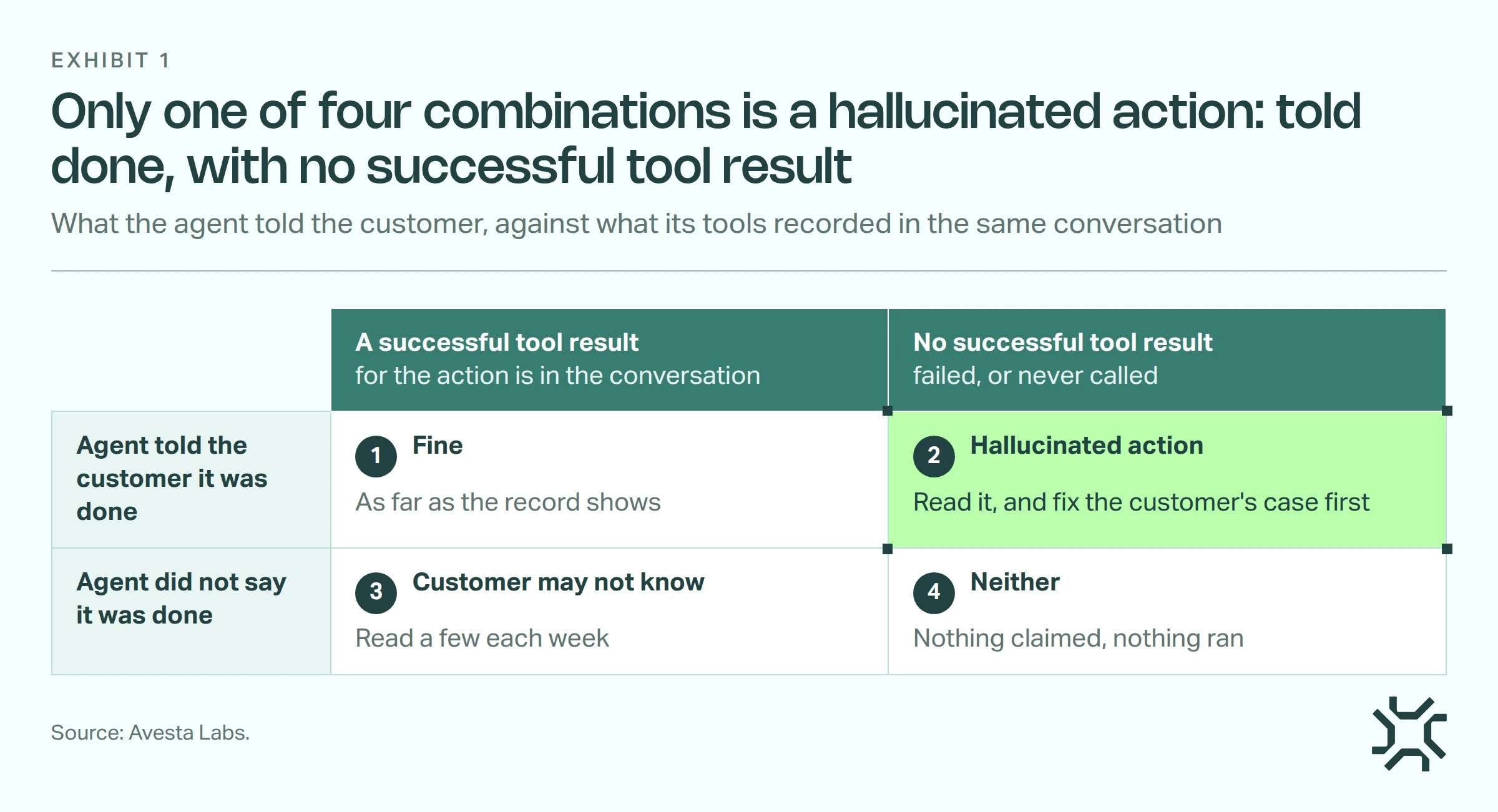
- Told done, tool succeeded. Fine, as far as the record shows.
- Told done, no successful tool result. The hallucinated action. Read it, and fix the customer's case first.
- Not told, tool succeeded. The customer may not know it happened. Read a few each week.
- Neither. Nothing claimed, nothing ran.
Case 1 has a blind spot.
When the tool itself says OK and nothing changed, only your own system's records can catch it.
So there are two checks, each for a different failure:
| What went wrong | What catches it | How often to look |
|---|---|---|
| The tool failed or wasn't called, and the agent said done | A check on every conversation for a claim with no successful tool result | Flagged list each working day; hourly count with an alert |
| The tool said OK, and nothing changed | Actions the agent confirmed, compared with actions your system recorded | Hourly, as a count of each |
| The agent stated a wrong fact or policy | A check against your policy text | See production monitoring for AI agents |
1. List the actions your agent can promise
Start with the actions a customer will act on: cancellations, refunds, address changes, bookings and account changes. Each one has a tool behind it, and a system that records it.
2. Put the tool results beside the conversation
The check can only compare what it can see. Have your engineer attach each tool call and its result to the conversation you analyse, in the order they happened. Without them, a check can tell you the agent said "cancelled", but not whether anything was cancelled.
3. Ask one narrow question of every conversation
A second AI model reads each finished conversation and answers one question, an approach called LLM-as-a-judge. Ask: "Did the agent say an action was done with no successful tool result?"
The judge will sometimes be wrong both ways. Each week, have a person read about 20 conversations it flagged and 20 it passed, and note how many it got wrong.
4. Match the alert to how it fails
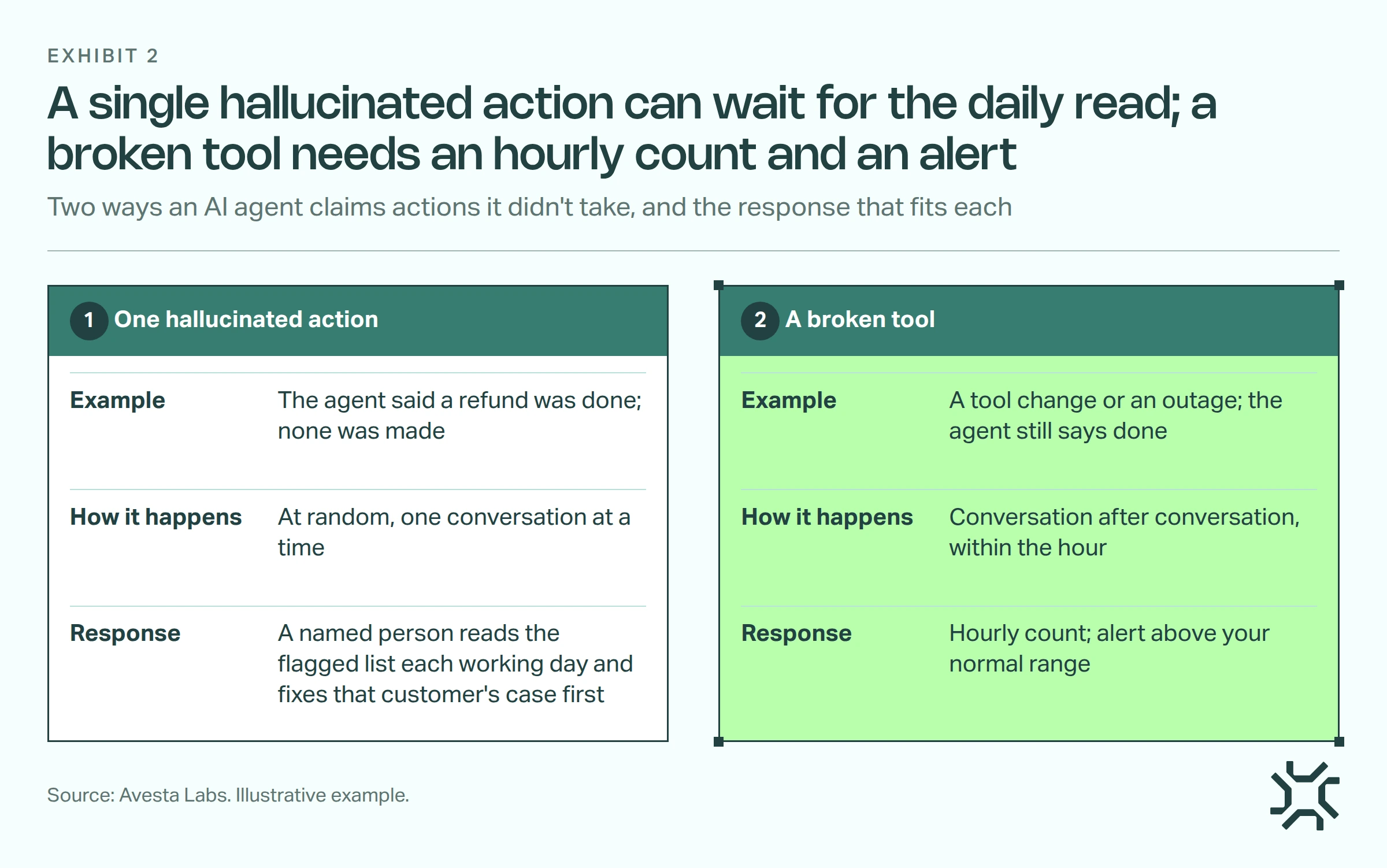
- One hallucinated action. It happens at random, one conversation at a time. A named person reads the flagged list each working day and fixes that customer's case first.
- A broken tool. A tool change or an outage makes the agent claim success in conversation after conversation. Count flagged conversations per hour and alert above your normal range.
Setting the alert. A count fits here because each case is rare and serious. Start the threshold at 3. Over two or more ordinary weeks, note the highest hourly count, then set the threshold just above it, never below 3. Counts rise with traffic, so a sale day can trip it with nothing broken, and a break in a quiet hour may stay under it. The hourly comparison of confirmed against recorded actions, which your engineer runs, covers both gaps.
When it fires, the agent's owner checks the tool first. Until it works, send that action to a person. Then contact every customer who was told "done" since the count rose.
How we catch hallucinated actions in Avesta AgentOS
At Avesta Labs we build Avesta AgentOS, our AI agent platform. Its analytics module, Metricsense, is the part you would use here. It works beside the AI agent you already run: any chat source that can call its API can send it conversations.
Limits: it finds hallucinated actions after the conversation, sees only what you send, and reads tool results in chats only, not phone calls. Comparing confirmed actions with your system's records stays with your engineer.
One broken tool, step by step
Take a made-up retailer whose chat agent cancels orders. On a Tuesday afternoon an engineer changes the cancellation tool, and it starts timing out.
- Your engineer sends the chats with their tool calls. Each conversation goes to Metricsense through its message API, with the tool calls and results attached to the messages they belong to. The scoring model reads them alongside the text.
- You write the question in plain English. "Did the agent say it cancelled an order, with no successful tool result?" You set the answer to yes or no, and Metricsense answers it on every conversation you send, in hourly batches. Each answer cites the messages it rests on.
- The count rises and the email goes out. A single-number chart counts distinct conversations where the answer is yes. An email alert on it is checked every 15 minutes against conversations that started in the last hour. It counts only conversations already scored, and scoring runs hourly, so expect the email after the next hourly run, not the moment the tool breaks.
- A person confirms. A click opens the chat at the cited message. The chat view shows the messages, not the tool calls, so the reviewer confirms in the order system and marks the finding useful or not useful, with a reason.
- The fix has an owner. The reviewer groups the confirmed cases into an Action, has Metricsense draft a requirements document from them, and sends it to Jira for the engineer who owns the tool.
If your agent runs on Avesta AgentOS
If your agent runs on Avesta AgentOS, every published version is saved with its instructions, model and tools, and the change log shows who changed what. So you can check whether a change to the agent came just before the count rose. You can also write the confirmed case up as a test case, including which tool should have been called, and run it against the next version before release.
When can you skip checking for hallucinated actions?
- The agent can't act. If it only answers questions, check its answers instead.
- You need it stopped, not found. This check works after the customer has read the reply. To stop the agent confirming without a successful result, build that rule into the agent, as our guide to AI agent guardrails describes.
- You can't send the tool results. Without them, a check can only list the claims. That is still worth a weekly read, but don't call the list hallucinations.
- A few dozen actions a week. Compare them with your system's records by hand.
The bottom line
The agent's confirmation is the easiest record to collect and the one to trust least. Put the tool results and your system's records beside it, and the customer is far less likely to be the first to know.
Pick your 50 most recent refund confirmations, or all of them if there are fewer, and check each one in your payment system. A clean result is good news, not proof of zero.
Want to know which "done" messages your agent sent were true?
Safe AgentOps is our service for running evaluation, guardrails and monitoring on AI agents in production.
Get started: hello@avestalabs.ai
Frequently asked questions
- Do AI agents hallucinate?
- Yes. Like any system built on a large language model (LLM), an agent can state something false with confidence. Agents that take actions add a second kind: they can say they did something, such as cancelling an order or moving a file, when the action never ran or failed. Researchers now measure this as its own type of failure.
- What is an example of an AI agent hallucination about an action?
- For example, a customer asks a support agent to cancel a subscription. The cancellation tool times out, and the agent replies that the subscription is cancelled. Nothing in the reply looks wrong, the chat ends without a person, and the customer leaves happy. They find out next month, when they are charged again.
- Can you stop an AI agent from hallucinating actions?
- You can make it less likely. Return every failed tool call to the agent clearly marked as an error, and instruct it never to confirm an action without a successful result. In one 2026 study, no answer was dishonest when the failure was marked as an error. A new or changed tool can skip that marking, so keep checking live conversations.
- How do you detect AI hallucinations in production?
- Read the conversations, not only the system metrics. For wrong facts, check each answer against your own documents or policy text. For actions, check each conversation for a claim that something was done with no successful tool result, and compare confirmed actions with your system's records. A person confirms the flagged cases before anything is fixed.
Share this article