
AI Agent Resolution Rate: Confirmed vs Assumed Resolutions
Your AI agent's report says resolved, but your phone queue disagrees. Split the rate into confirmed and assumed resolutions, then check the assumed ones.
 Gaurav Soni10 min read
Key takeaways
- AI agent resolution rate is the conversations an AI agent resolved without a human agent, divided by the conversations it handled. What counts as resolved varies by tool.
- A confirmed resolution has a signal from the customer. An assumed resolution has none: the agent answered and the customer left.
- Treat the confirmed rate as a working floor and the reported rate as the ceiling. Checking the assumed resolutions narrows the gap.
- Audit assumed resolutions with three checks: how the conversation ended, repeat contacts on any channel, and the human queue for that topic.
- Do not make the confirmed rate a target. A customer who got the answer has no reason to say so, and an agent pushed to collect thanks will annoy them.
A resolution can be counted in two ways. The customer confirms the answer helped, or the customer leaves without asking for more. Intercom, for one, names them in its help centre: a confirmed resolution and an assumed resolution, as of November 2026.
Your AI agent's resolution rate is the share of conversations it counts as resolved without a person. That rate can add the two kinds together without saying so, and you may be paying for each one.
Some of the customers who left were helped. Others gave up and rang your team instead.
What is AI agent resolution rate, and what counts as resolved?
AI agent resolution rate is the number of conversations an AI agent resolved without a human agent, divided by the number it handled, times 100. The sum is easy. What counts as resolved varies by tool: some resolutions are confirmed by the customer, and the rest are assumed when the customer leaves without asking for more.
A resolution is confirmed only when something in the conversation shows it. Every other resolution is an assumption to check.
Zendesk's automated resolutions platform takes a different route. A language model reads each conversation that was not handed over and decides whether the request was resolved.
Both vendors' rules are billing definitions. They decide what you pay for, and they feed the rate you are shown. Neither is your own check that customers were helped.
How do teams find out a resolution rate is overstated?
The closest public case is Australian. It is about call volumes, not a resolution rate, but it shows who noticed first: the staff.
In July 2025 Commonwealth Bank of Australia announced it would cut 45 customer service roles after bringing in an AI voice bot. According to the Finance Sector Union, the bank claimed the bot was reducing call volumes. The union said its members saw the opposite: "call volumes were rising", with overtime on offer and team leaders pulled onto the phones.
The union says the dispute went to Australia's Fair Work Commission. On 21 August 2025 it reported that the bank had admitted it got it wrong and reversed the cuts.
That is the union's account.
What is inside one resolution rate?
Leave out spam and customers who left before the agent replied. Almost every other conversation that did not reach a human agent ends in one of three ways. The third, an unresolved exit, is a customer who leaves with the problem still open.
| What the conversation shows | Kind | Might your tool count it as resolved? | Was the customer helped? |
|---|---|---|---|
| The customer says the problem is solved, or finishes the task and says so | Confirmed resolution | Yes | Very likely. A thanked wrong answer still lands here |
| The agent answers and the customer leaves | Assumed resolution | Yes | Unknown until checked |
| The customer repeats the question or says they will ring instead, then leaves | Unresolved exit | Yes | No |
Here is a made-up week. An AI agent handles 1,000 conversations and hands 300 to the team. Its tool counts every conversation with no handover as resolved, so the report says 700: a 70% resolution rate. That figure is really a containment rate, the share of conversations that ended without a handover. Your vendor's rule may be stricter, so ask which one it uses.
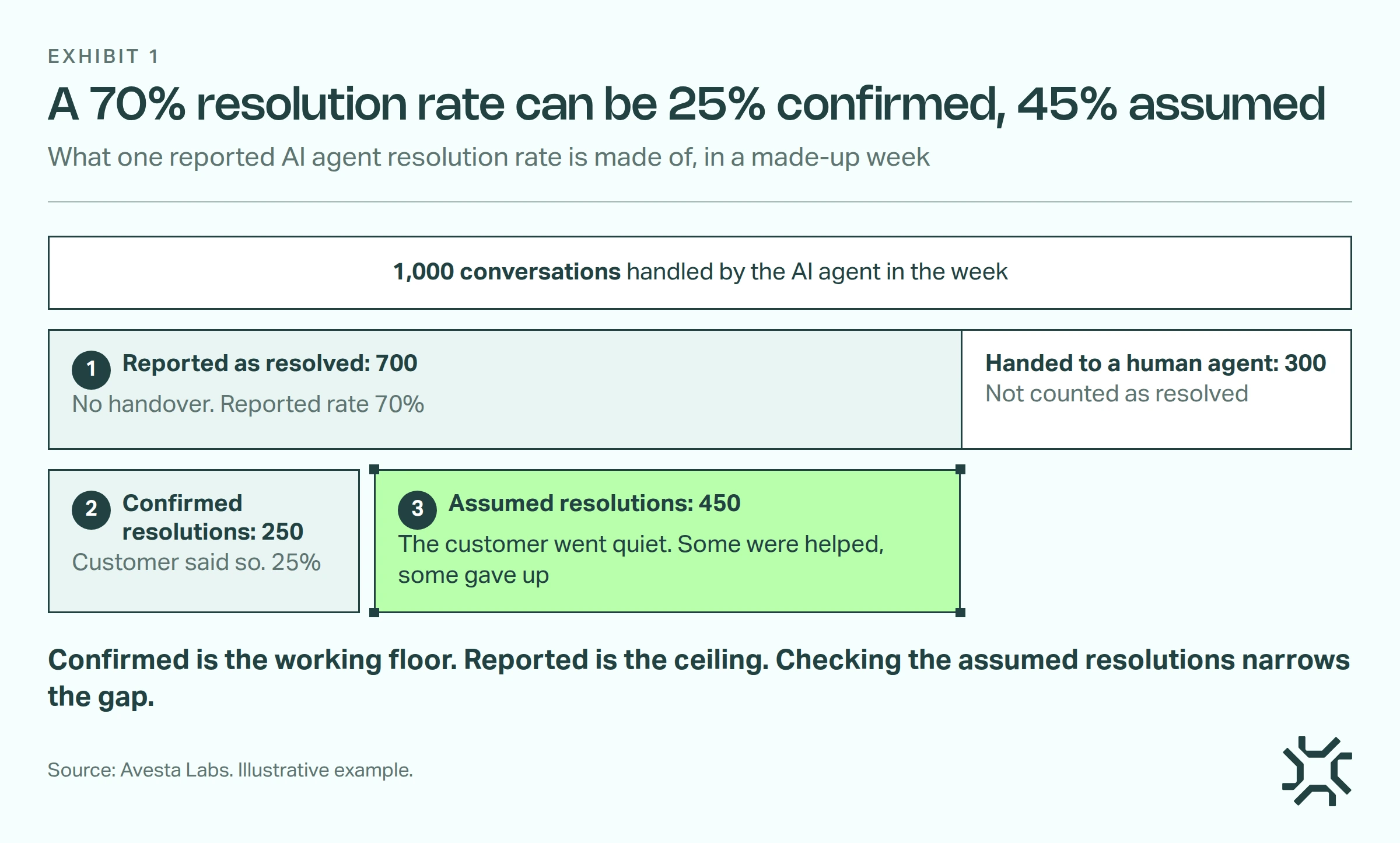
- Reported as resolved: 700. The ceiling, 70%.
- Confirmed resolutions: 250. The working floor, 25%.
- Assumed resolutions: 450. Some were helped, some gave up: the unresolved exits are in here, uncounted.
So the true figure sits somewhere between 25% and 70%, and the checks below narrow it.
How do you audit assumed resolutions?
Run three checks, cheapest first. Checks 1 and 2 move conversations from resolved to unresolved. Check 3 tells you which topics to distrust.
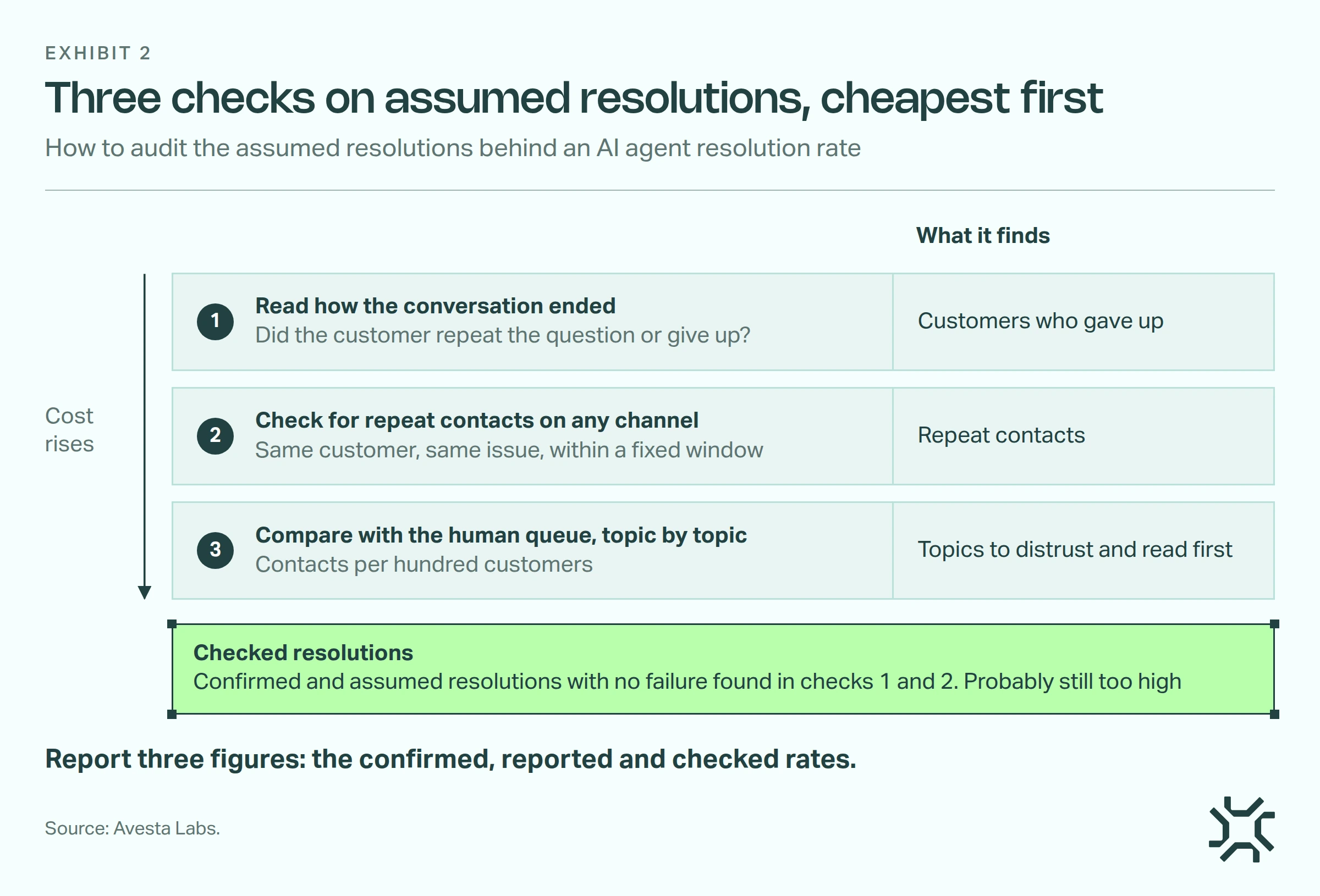
1. Read how the conversation ended
Write down what counts as unresolved before you start, so two readers mark alike. Then read the first customer message and the last few turns of each assumed resolution (a turn is one message from either side). Was the customer's last message the first question again, or "forget it"? Those are unresolved exits.
This check finds customers who gave up. It cannot tell you the answer was correct, so treat its result as a minimum.
By hand, read 100 picked at random. That gives you a rough failure rate overall, but not one by topic. A topic needs about 100 of its own. Beyond a few topics, that is more than a team can read each month. That is where scoring every conversation with an AI scorer checked against human-marked conversations pays off.
Zendesk's rule already includes a reading step. Do your own anyway: its reader works to a definition you did not write.
In the made-up week, if 30 of the 100 fail, roughly 135 of the 450 are unresolved. The checked rate after this check is then about 56%: 250 confirmed plus about 315 assumed that passed, out of 1,000. It is give or take a few points, because you read a sample.
2. Check for repeat contacts on any channel
A customer who contacts you again about the same issue was probably not resolved the first time. Pick a window that fits the issue, seven days for a password reset and a full billing cycle for a bill, and keep it fixed. The figure is not final until the window has passed. Run it on confirmed resolutions too, because a customer who said thanks can still ring back.
Check every channel. Intercom, for instance, does not charge for a resolution if the customer returns to the same conversation. A rule tied to one conversation cannot see a customer who rings instead.
Only your helpdesk or customer record can join chat to phone, and the join is never complete: an anonymous chat will not match a phone number. Report the share you could match, and treat the rest as unknown.
Run the same count on your human team's conversations for the same topics. Their repeat contact rate is the bar the AI agent has to beat.
3. Compare with the human queue, topic by topic
If the resolutions are real, those customers should not turn up again in the human queue.
This is the kind of check that tests a claim like the bank's. If the agent's resolved count for password resets climbs, your team's password reset contacts should fall. Measure them per hundred customers and against the same weeks last year, so growth and season do not hide the answer.
Where the agent's count rises and the team's does not fall, rule out the calendar first: a billing run, an outage, a launch. Then rule out new demand, meaning people asking the agent things they would never have rung about. If neither explains it, read that topic's assumed resolutions first.
What to report
Report three figures each month: the confirmed rate, the reported rate and the checked rate (confirmed and assumed resolutions with no failure found in checks 1 and 2). The checked rate is probably still too high. A customer who gave up quietly, got a wrong answer or rang from a number you could not match still passes. If you sampled, say so.
Split the reported and confirmed rates by agent version, or by your vendor's release date if you cannot see versions. Say someone edits the agent's instructions so it stops offering a handover. If your tool counts every conversation without a handover as resolved, that lifts the reported rate while the confirmed rate stays flat and repeat contacts rise.
How do we score resolutions in Avesta AgentOS?
We are Avesta Labs. Avesta AgentOS is our AI agent platform, and Metricsense, its analytics module, is the part you would use here. Metricsense also works on its own, beside the AI agent you already have. Any source with an API can send it conversations, with details such as topic and release attached. It does check 1 for you; checks 2 and 3 still need your helpdesk, because it does not join a later phone call to an earlier chat.
One question, three answers. You write the definition once, in plain English: "Confirmed: the customer says it worked. Assumed: the agent answered and the customer left. Unresolved: the customer repeated the question or said they would ring." Metricsense scores each conversation against it, about once an hour. Each score cites the messages it rests on.
A table by topic and release. A table counts confirmed, assumed and unresolved for each topic and release, one row per combination. A click lists the conversations behind a number, and each reason opens the conversation at the message it cites. Your reviewer marks each result useful or not, with a reason for "not useful". That is how you check the scorer.
A change, caught. Here is a made-up example. A new release shortens the agent's refund answer. Next morning, the refunds rows show more assumed resolutions and more unresolved exits, while other topics hold still. You group a few of those conversations, generate a write-up and raise a Jira ticket from it for whoever owns the agent.
If the agent runs on Avesta AgentOS, you can also see who changed what, and switch the channel back to the previous version. The failed conversations can become test cases. You write each one up as an input and the expected answer, then run them against the next version before you switch to it.
What it does not do. It reads transcripts, so it cannot tell that an answer was correct. If your helpdesk flags repeat contacts, send that flag with each conversation and show it in the table beside the answers.
When is the vendor's resolution rate good enough?
Use the reported rate as it stands when little can go wrong. For an agent that only gives out opening hours or a returns policy, a spot check each month is enough. At a few dozen conversations a week, skip the tooling and read them all.
A customer who got the answer has no reason to say so, so the confirmed rate tends to understate the truth. If you make it a target, the agent ends every chat by asking for thanks, and customers lose time to your metric.
The bottom line
Use the vendor's figure to check the invoice. Use the human queue count from check 3 for staffing. Use the confirmed and checked rates to decide what the agent should handle next. For the wider set of measures to watch, see our guide to monitoring AI agents in production.
Ask your vendor for last month's resolutions split into confirmed and assumed. If the tool cannot give you that, pull 100 it counted as resolved and sort them into the three rows above.
Want to know how many of your AI agent's resolutions hold up when someone reads them?
See how we monitor live AI agents
Get started: hello@avestalabs.ai
Frequently asked questions
- What is the formula for AI agent resolution rate?
- Resolved conversations divided by handled conversations, times 100. Before you compare two figures, ask what the bottom number is. It may be every conversation, only those the AI agent took part in, or only those the tool classes as eligible. The same agent can show a different rate under each choice.
- What is a good AI agent resolution rate?
- There is no benchmark you can safely compare across tools, because tools define a resolution differently. A rate that includes assumed resolutions will sit above one built only on confirmed resolutions for the same conversations. Compare your own agent with itself over time, under one written definition, and with your human team on the same topics.
- What is the difference between resolution rate and containment rate?
- Containment rate counts conversations that ended without a handover to a human agent. Resolution rate is meant to count conversations where the problem was solved. When a tool treats every conversation without a handover as resolved, the two numbers become the same thing under different names.
- Is AI resolution rate the same as first contact resolution?
- No. First contact resolution asks whether the customer's issue was solved in one contact, across your AI and human agents together, with no follow-up. AI resolution rate looks only at the AI agent's conversations. A conversation can count as an AI resolution and still fail first contact resolution if the customer rings back.
- Does a high AI resolution rate mean customers are satisfied?
- Not on its own. A survey hears only from customers who choose to answer, and an assumed resolution has no customer signal at all. Read the resolution rate beside repeat contacts and the tone of the conversations themselves before you rely on it.
Share this article