AI Automation in Manufacturing: Examples by Department
Nine office teams, the repetitive work AI can take on, and the decisions that stay with your people.

Key takeaways
- Your ERP can flag low stock. Someone still checks the supplier, prepares the order and chases the approval. That's where AI fits.
- Look for the work people repeat, not a department to automate: reading, checking, drafting and chasing.
- AI can't follow a rule that lives only in someone's head. Writing your rules down is step one.
- AI takes the boring part. Your people keep every decision about money, contracts and suppliers, and get time back for the problems only they can solve.
A customer asks where their order is. Customer care checks the ERP (the system that runs orders, stock and invoices), messages production, writes an update and logs the complaint. Meanwhile, purchase is chasing a new supplier for a missing certificate, and logistics is checking a packing list against an invoice, line by line.
The information already exists. People still spend hours finding it, checking it and passing it along.
Most talk about AI in manufacturing is about robots, sensors and machines that predict their own breakdowns. That matters, but much of the repetitive work in a mid-sized manufacturer sits in the office departments around the plant.
What does AI automation in manufacturing look like, department by department?
AI automation in manufacturing means handing the repetitive steps of each department's work to AI: checking stock, reading documents, drafting orders and reminders, and answering questions about the business. A person stays in charge of anything that commits money, a contract or a new supplier.
The AI does this through AI co-workers. Think of a junior colleague who knows one process very well and does only that. It reads the right records, prepares the next step and brings unusual cases to the right person.
Traditional, AI-assisted or agentic?
- Traditional automation: fixed rules you set once, such as copying an order from email into the ERP. It breaks when the input changes.
- AI-assisted automation: AI does one step, such as reading an invoice or drafting an email. A person still runs the process and moves the work along.
- Agentic AI automation: AI co-workers run the whole workflow. They read messy inputs, decide the next step, act in your systems and pause for a person at the points you choose.
The examples below are the third kind.
A four-question framework for AI automation in manufacturing
To find the work worth handing over, we developed a simple framework from first principles and from conversations with manufacturers in different parts of the world. Take any department and ask these four questions, one by one:
- What repeats? The task people do every day or every week.
- Where is the information? The ERP, accounting software, email or a shared file.
- What rule decides the next step? The reorder level, the discount limit, the document checklist.
- When must a person act? The approval, the exception or the decision that stays with your team.
If you can answer all four, that task is ready for an AI co-worker. Every department example below follows the same four questions.
Why start in the office, not on the shop floor?
A mid-sized manufacturer usually has systems of record already: an ERP for orders and stock, accounting software such as Xero or QuickBooks, customer records, and files in email and shared drives. Each holds part of the business. People connect the parts every day by:
- copying details from one system into another
- checking whether two documents agree
- preparing standard messages and forms
- chasing missing information
- gathering facts for a manager to review
An AI co-worker doesn't replace these systems. It connects to them, reads what it needs and updates the record when a step is done.
AI in manufacturing examples: what does each department hand over?
| Department | Repetitive work the AI takes on | What your team can focus on |
|---|---|---|
| Stores and inventory | Watching stock, preparing purchase orders | Approving purchases, better stock planning |
| Purchase | Checking supplier documents, chasing missing ones | Assessing and approving new suppliers |
| Logistics and import | Comparing shipping documents, flagging differences | Fixing exceptions before they cause delays |
| Legal | Finding clauses that break company policy | Deciding which terms to accept |
| Production | Gathering plant updates into one view | Fixing bottlenecks, improving output |
| Owner's office | Pulling numbers from several systems | Setting priorities with a clear view |
| Customer care | Finding order status, updating customers | Solving why orders run late |
| Sales | Checking discount requests against policy | Managing the relationship, approving offers |
| Accounts | Matching unpaid invoices, sending reminders | Disputes and accounts that need a call |
1. Stores and inventory
When an item hits its reorder point, the AI checks stock across warehouses, the preferred supplier and the current price, and drafts the purchase order. The purchase manager approves it before it goes to the supplier.
Rule to write down: the reorder point, preferred supplier and approver for each item.
2. Purchase
Supplier onboarding often stalls on a missing or expired document. The AI checks each document against your supplier checklist, scores supplier risk on financial and security grounds and drafts the standard agreement. When something is missing, it drafts the email chasing it. The purchase team approves the supplier.
Rule to write down: the documents every supplier must send, the risk score you won't accept and who approves a new supplier.
3. Logistics and import
The AI collects the invoice, packing list and bill of lading (the carrier's receipt for the goods) from email. It compares them with the purchase order: item codes, quantities, units, prices and currency. It chases suppliers for missing papers and sends every difference to the logistics team.
Rule to write down: which fields must match exactly, how an approved part-shipment is recorded and what rounding difference finance allows. Anything unexplained goes to a person.
4. Legal
Your legal team or company lawyer rarely has time to read every supplier and customer contract closely. The AI flags liability and termination clauses that break your contract policy and drafts changes. Nothing goes to the other side until your legal team approves it.
Rule to write down: the terms you accept on liability and termination, and who can approve an exception.
5. Production
Production figures already sit in the ERP, production reports and maintenance logs. Ask for a dashboard and the AI builds one, flags raw-material shortfalls and maintenance status, and recommends next steps. The production manager stops chasing status and works on the bottleneck.
Rule to write down: which system holds the true figures, and how you define output and delay.
6. The owner's office
Often the owner's view of the business is a round of phone calls. The AI business analyst pulls orders, stock, sales and accounts into dashboards and answers questions about them. Leadership uses that view to set priorities.
Rule to write down: which records the AI may read and who may see the results.
7. Customer care
A customer asks where their order is. The AI checks who they are, finds the real reason for the delay, gives a straight update and logs a complaint card for the team. Customer care stops gathering the same status details all day and works on why orders are late.
Rule to write down: what a customer may be told, and which complaints go to a person.
8. Sales
When a customer asks for a discount, the AI checks the request against your discount rules and prepares the details for the sales manager. The manager decides what to offer. The AI never offers a discount on its own.
Rule to write down: the discount limits, who approves an offer and when a request goes higher.
9. Accounts
The AI pulls unpaid invoices from the accounting system and sends polite payment reminders with the invoice attached on your schedule. It skips customers who have already paid. The accounts team focuses on disputes and the customers who need a conversation.
Rule to write down: the reminder schedule, where payment is confirmed and which customers get a call instead.
Step one: write the rules down
Read the rule lines together. In a mid-sized manufacturer, some of these rules sit in the ERP. The rest sit with department heads: the sales head knows the discount limit, the stores head knows the reorder levels.
Writing your rules down is the first project, before any AI.
It also makes most teams rethink how the process should run.
Where does a person still approve the work?
Approval follows what the action does, not which department it sits in.
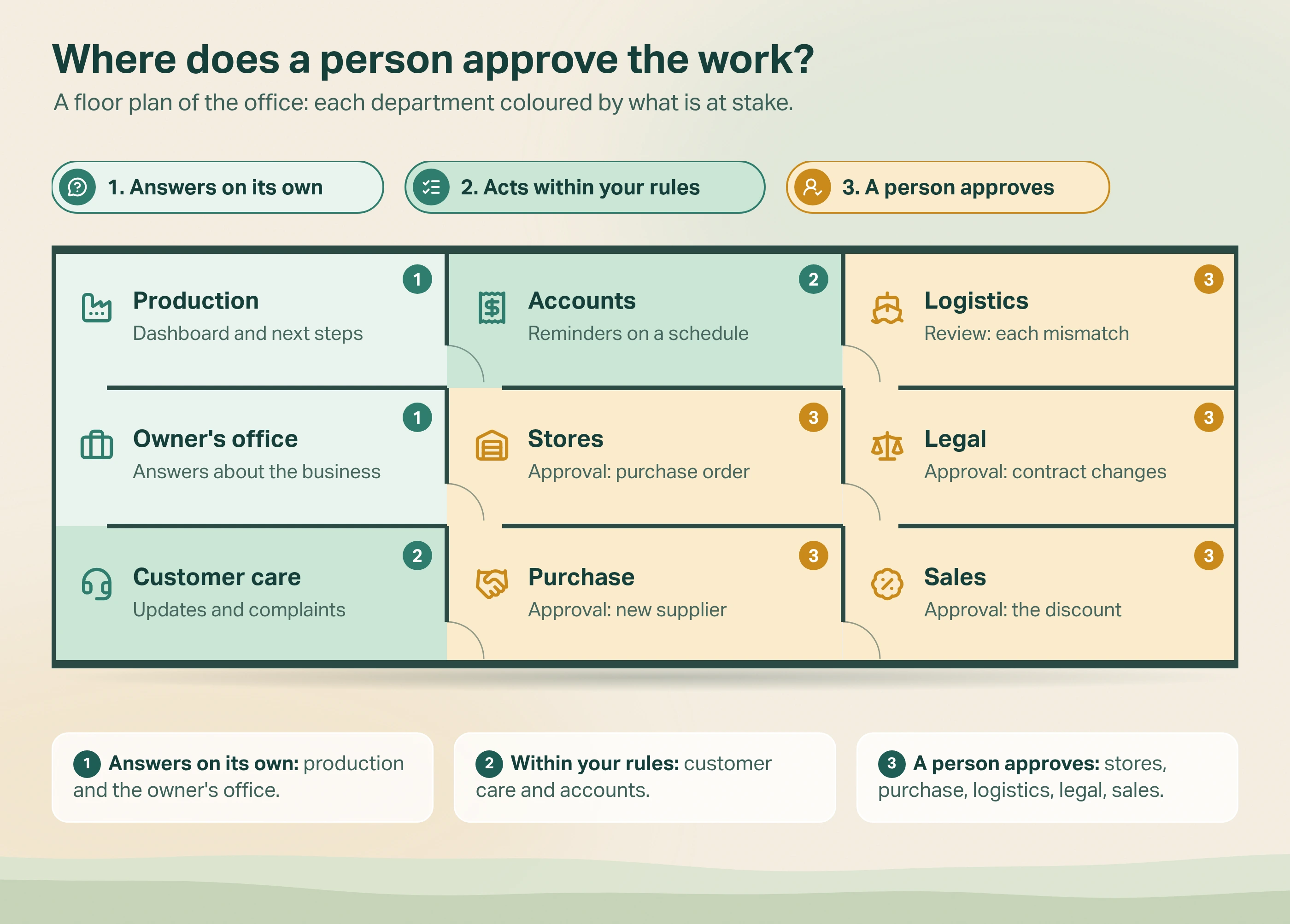
- Reports and insights: the AI gathers the facts for a production manager or the owner. They decide what to do.
- Routine actions within rules: the AI sends order updates and payment reminders the policy allows. Staff watch the work and handle exceptions.
- Decisions that need approval: a person approves a purchase order, a new supplier, a contract change or a discount.
Name that person and that approval point when you write the workflow down. The US NIST AI Risk Management Framework asks for the same: "Processes for human oversight are defined, assessed, and documented". For which actions need approval, read our guide to AI agent human approval.
What we learned mapping a factory's departments
Every manufacturer runs its workflows a little differently. The ones above are the basics we found again and again. Your own workflows, even the more complex ones, can be handed to AI co-workers the same way. Two patterns came out of the mapping.
Some jobs move through steps. A supplier document arrives, someone checks it, the missing one is chased, and a manager approves. An AI co-worker moves that job along and shows everyone where it stands. Seven of the nine departments work like this.
Other jobs start with a question. A production manager asks what is holding up output. The owner asks which orders need attention. Here the AI finds and presents the facts so a person can act.
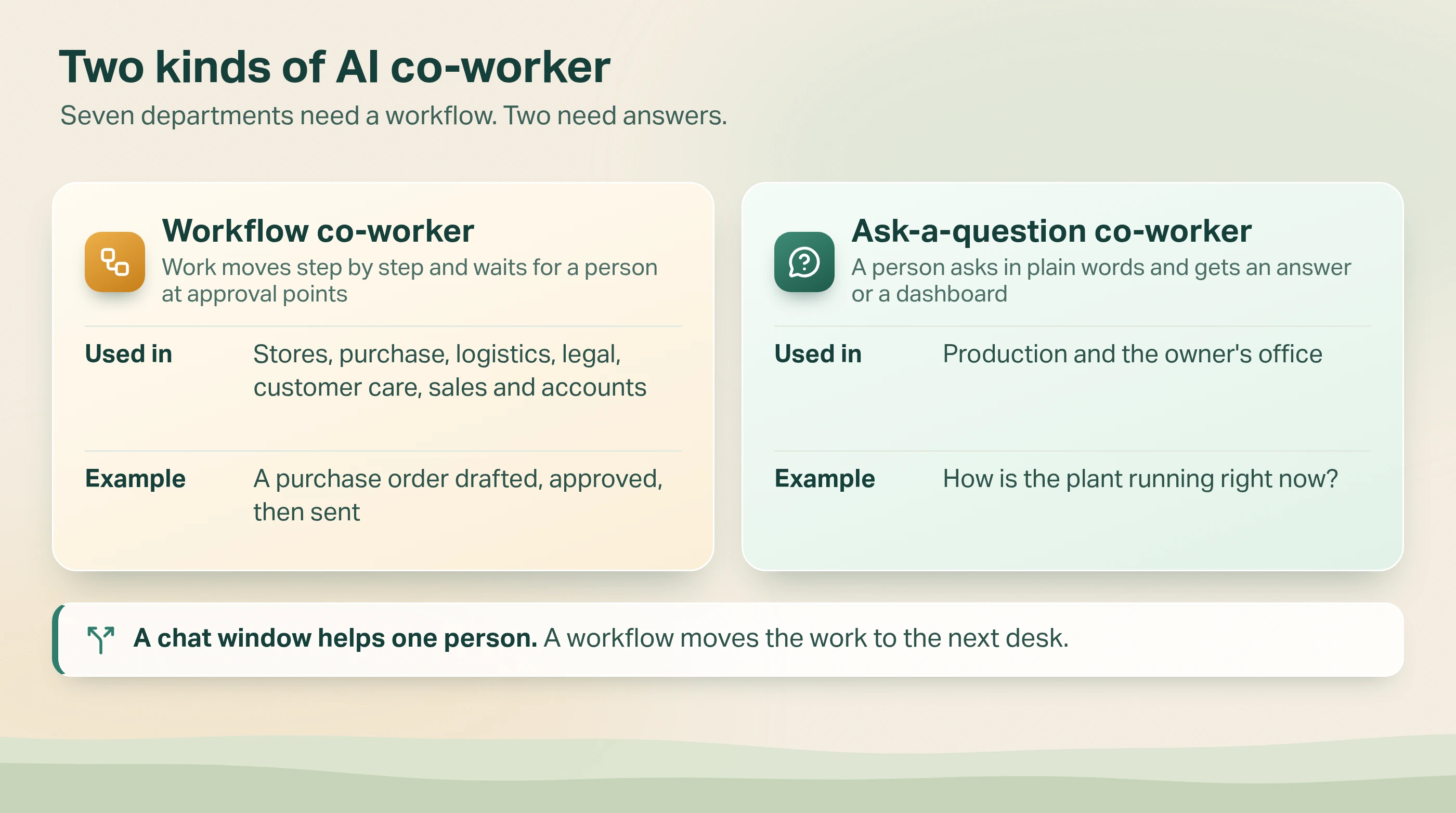
This split matters when you choose. A chat assistant helps one person find an answer. A workflow co-worker also tracks the job, applies your rules and brings in the right person at the right step. In Avesta AgentOS, that is the job of Relay: inquiries, orders and invoices reach the right co-worker or person, and everyone can see where each one stands.
You can see each of these co-workers at work in our AI automation for manufacturing playlist on the Avesta Labs YouTube channel.
When is AI automation the wrong fit for a department?
- The task rarely happens. If stores raise two purchase orders a month, a calendar reminder is enough.
- The rule keeps changing. If every discount is a fresh decision, agree the policy before asking AI to apply it.
- The work is mostly relationships. A person should lead a hard supplier negotiation or a difficult customer call. The AI can prepare the facts.
The bottom line
AI automation in manufacturing is not only about robots. For most manufacturers, the bigger win is the office work around the plant.
Pick one task your team repeats often. Ask the people who do it four things: which records they use, the rule they follow, the exceptions they meet and who approves the result. That gives your systems team or an implementation partner a real workflow to pilot alongside your team, checked against real cases before it runs on its own.
Your staff don't need to build the AI. They need to explain how the work should be done.
Which recurring task in your business keeps pulling people away from the problems they are best placed to solve?
Want to see which of your departments an AI co-worker could take on first?
See how AI co-workers work in manufacturing.
Get started: hello@avestalabs.ai
Frequently asked questions
- How can AI be used in the manufacturing industry?
- On the shop floor, AI is used for predictive maintenance, quality inspection and robotics. In the office, it can check stock, process supplier documents, compare shipping papers, review contracts, update customers and follow up unpaid invoices. People approve purchases, discounts and contract changes.
- Which AI is best for a manufacturing business?
- It depends on the job, not the brand. If managers need answers from business records, look for a tool that can find and explain those records. If work passes through several steps and people, look for a workflow co-worker that connects to your ERP, accounting software and documents. Either way, check that your team can see what it did, correct mistakes and approve actions before they happen.
- Does AI automation replace staff in a manufacturing office?
- In the workflows described here, no. The AI takes the reading, checking, drafting and chasing. People keep the decisions about suppliers, contracts, discounts and exceptions. With the repetitive work gone, they can focus on fixing why orders run late and improving how the work is done.
- Do we need clean data before starting AI automation?
- Not across the whole business. The workflow you start with needs one trusted source for each fact it uses. If two systems disagree about whether an invoice was paid, your team decides which one counts before the AI starts.
- What is the difference between traditional automation, AI automation and agentic AI?
- Traditional automation follows fixed rules you set once, such as copying an order from email into the ERP. It breaks when the input changes. AI-assisted automation uses AI for one step, such as reading an invoice or drafting an email, while a person runs the process and moves the work along. Agentic AI automation hands the whole workflow to AI co-workers: they read messy inputs, decide the next step, act in your systems and pause for a person at the points you choose.
Share this article