AI Readiness Checklist for Manufacturers: Data and ERP
Seven checks on the item, customer, vendor and finance data your first AI agent will read, each with a test your team can run this week.
 Kishan Chandravadia11 min read
Key takeaways
- AI readiness for a manufacturer is not a company-wide data project. It is whether the data one process reads is right, easy to find and reachable.
- Seven checks cover most of it: the item master, the customer and vendor master, the live figures the agent quotes, dates, where rules live, access to your ERP, and a test copy with real examples.
- For an order agent, the stock figure it quotes must be free stock: what is on the shelf minus what is already promised. Physical stock alone leads to promises the warehouse can't keep.
- Find the record that wins for each rule. In Microsoft's Business Central ERP, for example, the warehouse record overrides the item card, so an agent reading the item card can quote the wrong minimum.
- An afternoon on checks 1 to 3, using 20 recent records from your first process, tells you whether your data is ready or needs fixing first.
An AI agent is software that reads a customer's message, checks your systems and acts. It quotes whatever your data shows it. We learned how much that matters while building one to take dealer orders for a textile manufacturer in India.
Their ERP (the system that holds stock, customers and orders) showed a minimum order of zero on every item. The real minimums sat on a separate record for each warehouse, and nothing on the main item record pointed there. When an order needed stock bought in, an agent reading the main item record would have accepted quantities below the real minimum.
AI readiness usually comes down to this: the data exists, but not where the agent will look. In a 2024 survey by Gartner, a research firm, 63% of organisations either lacked the right data practices for AI or weren't sure. Gartner also predicted that through 2026, organisations would abandon 60% of AI projects without AI-ready data.
What is an AI readiness checklist for manufacturers?
An AI readiness checklist for manufacturers tests whether the data one process depends on can be trusted by an AI agent. It covers seven things. Four are about the data: the item master, the customer and vendor master, the live figures the agent quotes, and dates. Three are about using it: where rules live, access to your ERP, and a test copy with real examples.
The rule we use:
Ready for AI means the data one process reads is right, easy to find and reachable.
You don't need every record in the business clean. Gartner's own advice points the same way: AI-ready data must be representative of the use case, errors and odd cases included.
What goes on an AI data readiness checklist?
Here are the seven checks. Each has a test your own team can run, with no AI involved. For checks 1 to 3, take 20 recent records from the process you start with: dealer orders, supplier order confirmations or overdue invoices.
| # | Check | What ready looks like | Quick test |
|---|---|---|---|
| 1 | Item master (item names and codes) | The names and codes customers and suppliers use all lead to one item | Search the ERP for each item in the 20 records, using only the words in the message or document. Count the misses |
| 2 | Customer and vendor master (phone numbers, emails, GST numbers) | Each phone number, email and GST number leads to the right customer or vendor account | Look up the customer or supplier on each of the 20 records by the phone number, email or GST number on it. Note any that is missing, or that leads to two accounts |
| 3 | Live figures the agent quotes | The ERP figure matches what your team would say today | For each of the 20 records, compare the ERP figure with what the person who does the job would tell the customer or supplier |
| 4 | Dates and lead times | Each date has one meaning everyone agrees on | Ask two people what the expected date on an open purchase order means. Do they agree? |
| 5 | Where rules live | Minimums, credit limits, blocked items and lead times sit in the record that wins | For five items or accounts, find the rule that applies (minimum order, lead time or credit limit). Write down every place you looked |
| 6 | ERP access | The agent can read every field it needs through a supported connection | List the fields from checks 1 to 5. Ask your ERP partner which ones the standard connection shows |
| 7 | Test copy and examples | A copy of the ERP, plus real past cases with the right answer | Can you get a test copy this month? Can you collect 50 past cases from that process, each with what your team did, to test the agent against? |
Mark each check ready or fix first. A check fails when the agent would tell a customer or supplier something untrue. Don't let the agent talk to them until every check passes.
What do checks 1 to 3 look at, by process?
| Check | Dealer orders | Supplier order confirmations | Overdue invoices |
|---|---|---|---|
| 1. Item master | Item names dealers type in an order | Supplier part numbers on an order confirmation | Usually little: invoices carry your own codes |
| 2. Customer and vendor master | The dealer's phone number or email | The supplier's email and contact person | The customer's billing contact and GST number |
| 3. Live figures | Free stock (shelf minus already promised) | Open purchase order quantity and promised date | Outstanding balance, credit limit and payments received |
Do your item, customer and vendor masters match how people write to you?
Your item master is the list of everything you sell and buy, with its codes and names. Customers don't order the way it is written. A dealer types a name the way they say it, drops the prefix from a code, or uses last year's name.
If the ERP only knows the official code, the agent can't find the item. It has to ask the dealer again or hand the order to a person.
The customer master, your list of customer accounts and their contact details, fails in a quieter way. One phone number can belong to more than one account. A number may sit in a separate contact list rather than on the customer record.
The vendor master, your list of suppliers and their contact details, fails the same way. A supplier's confirmation arrives from a sales rep's email that isn't on the vendor record, or quotes the supplier's own part number instead of yours.
The agent has to know who is writing before it can quote a price, chase a date or check credit.
The fix is usually cheap. Add the names and part numbers customers and suppliers really use as search names on the item. Keep one list of contacts per account, and give someone the job of keeping it current.
Is your stock figure the stock you can promise?
For an order agent, check 3 comes down to stock. Physical stock is what is on the shelf. Free stock is what you can still promise: the shelf, minus what earlier orders have already claimed.
A person on your order desk does that sum in their head. An agent only knows what the data tells it.
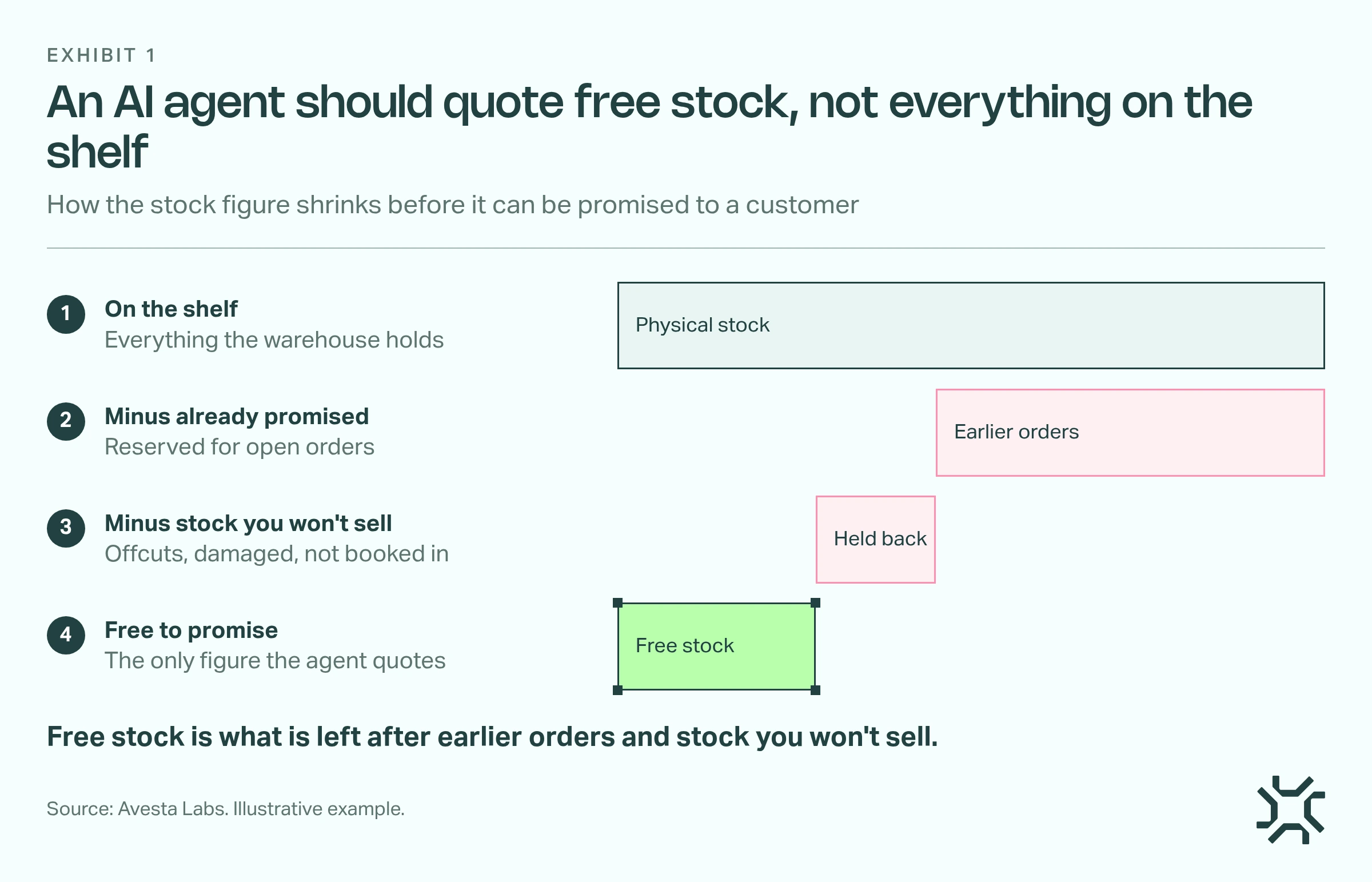
- On the shelf. Start from what the warehouse physically holds.
- Minus already promised. Take off stock reserved for open orders.
- Minus stock you won't sell. Take off offcuts, damaged goods and stock not yet booked into the ERP.
- Free to promise. What is left is the only figure the agent should quote.
Do your dates mean one thing?
An expected date on a purchase order might mean when goods leave the supplier, reach your warehouse or reach the customer.
Agree on one meaning for each date, then let the agent add delivery time on top.
Where do your business rules actually live?
Most ERPs let you hold a rule in more than one place. In Microsoft Dynamics 365 Business Central, a stockkeeping unit is a record for one item at one warehouse. Microsoft's guide says the stockkeeping unit card has priority over the item card. Other ERPs have their own version, so ask your ERP partner which record overrides the item.
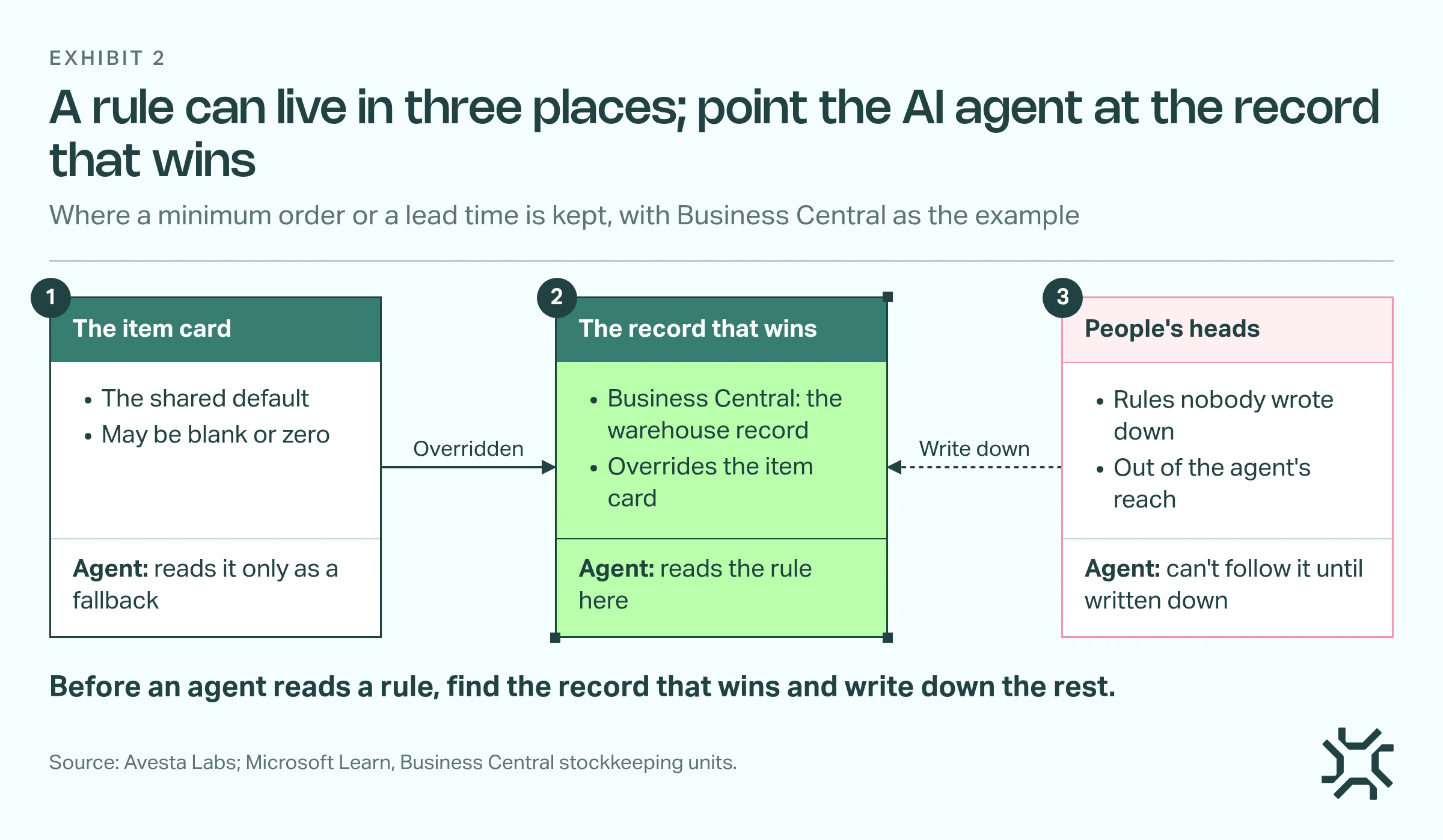
- The item card. The shared default. It may be blank or zero.
- The record that wins. In Business Central, the warehouse record. In your ERP, ask which record overrides the item card. The agent reads the rule here.
- People's heads. Rules nobody wrote down. Write them down first.
Watch for custom fields too. A business may mark items "blocked" in a field it added itself, separate from the ERP's own blocked tick-box. Your agent needs to know which one your team actually uses.
Can an AI agent reach your ERP data safely?
An agent reads your ERP through an API, a door that lets other software read and write ERP data with permission. Fields your business added itself often don't come through the standard door. In Business Central, Microsoft's API reference says adding fields to the standard APIs isn't currently possible.
The answer is a custom API: a second door your ERP partner builds that carries exactly the fields the agent needs. Whichever ERP you run, ask your partner the same question: can the agent read every field it needs? Start with read-only access on a test copy of the ERP (often called a sandbox), so no real order is at risk.
What we learned building an order agent in Avesta AgentOS
We built the textile manufacturer's order agent in Avesta AgentOS. It went live on 21 September 2026 and has taken 500–1,000 dealer orders a day on WhatsApp and email since then (as of 31 October 2026). A person still handles every exception. Three data lessons carry over to any manufacturer.
1. Ask which record is the truth on day one
The zero minimum was one case of a pattern. The lead time the agent quotes also comes from the warehouse record, not the item card. We now ask, for each rule, which record is the truth before writing a single instruction for the agent.
2. Promise free stock, and name each date
An early version checked whether one piece was long enough before subtracting what earlier orders had claimed. We switched it to free stock. A date field that looked like a delivery date really meant the day goods reach the warehouse. We renamed it, and the agent now adds delivery time to that date before quoting it to a dealer.
3. Let real cases find the data problems
We write test scenarios from real dealer situations, 147 of them by October 2026. Before a change goes live, we run the scenarios it touches in Avesta AgentOS against a test copy of Business Central. Data problems like these now show up as failed scenarios before a dealer sees them. The full order flow is in our guide to WhatsApp order automation.
When should you fix your data before building an AI agent?
Fix first when check 3 fails across most records. If stock or payments aren't booked into the ERP the same day, or your team already doesn't trust the figures, an agent will repeat the wrong number faster.
Fix first, too, if nobody owns item names or contact numbers. The full checklist is more than you need for a smaller job. An agent that only drafts replies for a person to check and send needs checks 1, 2 and 6. The person catches the rest.
The bottom line
Most failed checks are fixed by the people who already keep your ERP: a search name added, a contact number moved, a date given one meaning. The rest tell you what to fix before an agent talks to a customer or supplier.
Pull 20 recent records from your first process and run checks 1 to 3 before you commit to any AI project. When the data passes, our guide on how to test an AI agent before go-live covers the next step.
A check failed and you're not sure whether to fix it or build around it? An AI Kickoff starts with a 3-day workshop to choose the first process. A 4-week pilot built on your own data follows.
Get started: hello@avestalabs.ai
Frequently asked questions
- What is data readiness for AI?
- Data readiness for AI means the data one AI use depends on is correct, complete enough, easy to find and reachable by the software. It is not a one-off clean-up. Gartner describes AI-ready data as a practice that needs looking after, because each new use of AI reads different data and finds different gaps.
- What is an AI readiness assessment, and how is it different from a checklist?
- An AI readiness assessment is a broad review of a business: its goals, people, processes, systems and data, often scored by an outside team. A checklist is narrower. It tests whether one chosen process has the data and access an AI agent needs. Most manufacturers learn more, faster, from running the checklist on their first process.
- How long does it take to get manufacturing data ready for an AI agent?
- Checks 1, 2 and 5 are usually days of work for the people who already maintain your ERP. Check 6 depends on your ERP partner's diary. Check 3 is the slow one when it fails, because booking stock or payments in on time is a change to how the team works, not a data edit.
- Can an AI agent follow rules that live in Excel sheets?
- Only if it can read them. Either move the rule into your ERP, where it sits next to the item or customer it belongs to, or give the agent read access to the sheet. Whichever you choose, name one person who keeps it current. A sheet that drifts out of date gives the agent a wrong rule.
- Who should own AI readiness in a manufacturing business?
- Split it by check. The head of the process, such as sales or purchasing, owns the business rules. Whoever maintains your item, customer and vendor masters owns names and contact details. Your ERP partner owns access. The owner or operations head decides which process goes first and signs off when all seven checks pass.
Share this article