Purchase Order Follow Up Automation for Manufacturers
An AI agent sends every supplier reminder on time and tracks each reply. Your buyers decide what to do about the orders at risk.
 Kishan Chandravadia11 min read
Key takeaways
- Purchase order follow up automation means an AI agent watches every open purchase order, reminds the supplier on a schedule, reads the reply and updates the expected delivery date. Your buyer handles only the orders at risk.
- Tie each reminder to the supplier's own lead time: a status check at the halfway point, a firm dispatch plan at three-quarters, and an overdue escalation on the due date.
- Keep every delivery date the supplier has promised, not just the latest one. A date that keeps moving is the earliest warning that an order will be late.
- The agent can find a purchase order that may be ready to short close. A person confirms the leftover quantity isn't needed and approves the closure.
Say your factory needs 2,000 metres of fabric by the 15th to start a customer order. The supplier said yes three weeks ago. Since then, nobody has asked.
On the 14th, the buyer calls. The material hasn't left the supplier's mill. Now the production plan slips, and so does your promise to the customer.
This happens because one buyer can't ask about every open order every week.
The fix is purchase order follow up automation. An AI agent, software that reads messages and acts within rules you set, does the asking. Below: when to ask, what to keep, and when a person steps in.
What is purchase order follow up automation?
Purchase order follow up automation means software watches every open purchase order and reminds the supplier at set points before the delivery date. An AI agent sends each reminder and reads the supplier's reply. It updates the expected date in your ERP (the business software that holds your orders and stock) and hands late or changing orders to a buyer.
Put simply:
The agent asks every supplier, every time. Your buyer decides what to do about the answers.
Why follow-ups slip today
Busy buyers tend to follow up the orders they are worried about. The rest wait. Three things make it worse:
- Too many open lines. Every purchase order (PO) can have several items, each with its own delivery date. Fifty POs can mean a few hundred dates to watch.
- Answers live in inboxes and chats. A supplier writes "dispatch next week" on WhatsApp. Nobody types it into the ERP.
- Only the latest date is kept. When a supplier moves the date, the new one replaces the old one. Nobody sees that this is the third change.
The purchase order follow up process, often called the supplier follow up process, exists on paper. In practice, it runs on memory.
What are your options for purchase order follow-ups?
You have three realistic choices. The right one depends on how many open orders you have and how your suppliers reply.
| Option | What it does | What stays with your buyers | Fits when |
|---|---|---|---|
| Shared tracker and phone calls | A spreadsheet of open POs; buyers call or message suppliers | Everything: asking, recording, deciding | A few suppliers and orders that one buyer can call each week |
| Your ERP's own follow-up feature | Finds unconfirmed or late POs and drafts emails for the buyer | Sending, reading replies, updating dates, anything on WhatsApp or phone | Suppliers reply by email, and your ERP has the feature |
| An AI agent | Sends reminders on schedule, reads replies by email or WhatsApp, updates dates, keeps the history | Decisions: what to do about late orders, changing suppliers, approving a short close | Open orders have outgrown your buyers' time |
Microsoft has started to build the second option into its own ERP. As of September 2026, its Procurement Agent for Dynamics 365 Supply Chain Management finds purchase orders a supplier hasn't confirmed, or whose delivery is late. It drafts an email to the supplier for each one.
When should each supplier reminder go out?
Tie the reminders to the supplier's own lead time, the number of days they agreed to deliver in. Fixed weekly reminders treat a 7-day order and a 60-day order the same way. That annoys fast suppliers and leaves slow ones unchecked.
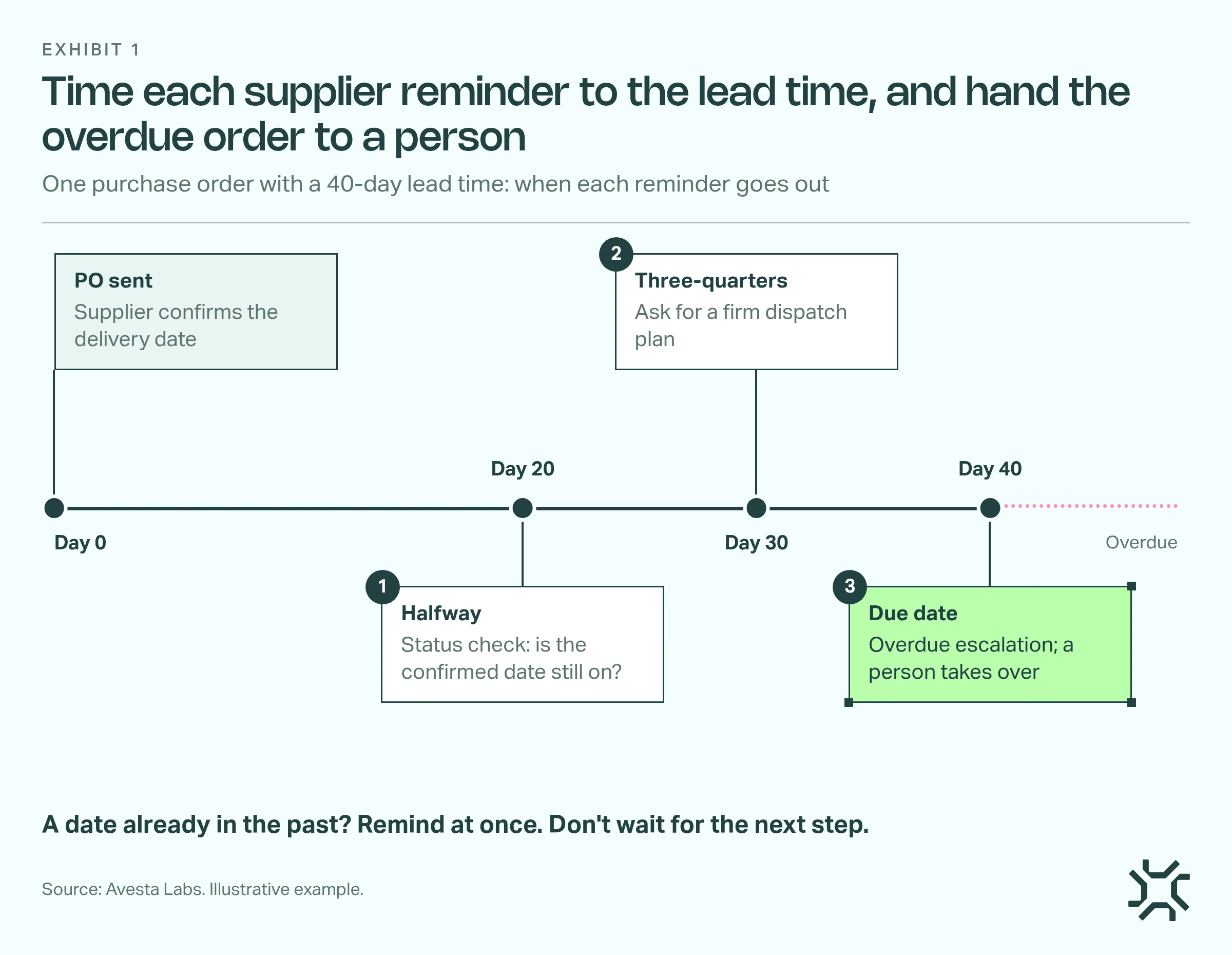
- Halfway through the lead time: a status check. Ask whether the confirmed delivery date still holds. On a 40-day lead time, that is day 20.
- At three-quarters: a firm dispatch plan. Ask for the dispatch date, transport details and any risk. That is day 30.
- On the due date: an overdue escalation. Ask for a revised date and copy the purchasing manager. From here, a person takes over.
- A date already in the past: remind at once. If the date was past when the PO was raised, don't wait for the next step.
Every message names the purchase order, the item, the quantity and the date you need. Here is an example of the halfway reminder:
Hello. This is a status check on PO 4512, line 2: 2,000 metres of fabric, confirmed for dispatch on the 5th. Is that date still on? If anything has changed, please reply with the new dispatch date and the reason.
A one-line question gets a one-line answer, and that is a reply the agent can read and record.
What the agent owns, and what stays with the buyer
The split follows one rule: the agent asks and records; a person decides anything that costs money or changes a commitment.
| Event | What the agent does | Who decides |
|---|---|---|
| Supplier hasn't confirmed the PO | Asks for confirmation and a delivery date | Agent, until the buyer's deadline |
| Supplier gives a new date | Records it below every earlier date | Buyer, if the date has moved before or now misses production |
| Due date passes, or the supplier goes quiet | Sends the escalation, then hands over with the full history | Buyer or purchasing manager |
| Part delivery arrives | Updates the leftover quantity and keeps following it up | Buyer, if the rest is in doubt |
A reminder sent a day early costs nothing. A changed supplier or a closed order is hard to undo. We cover how to draw that line for any agent in AI agent human approval.
What happens when a supplier keeps moving the delivery date?
A tracker usually has one date column per line. An agent can keep every date the supplier has promised, with the reason they gave.
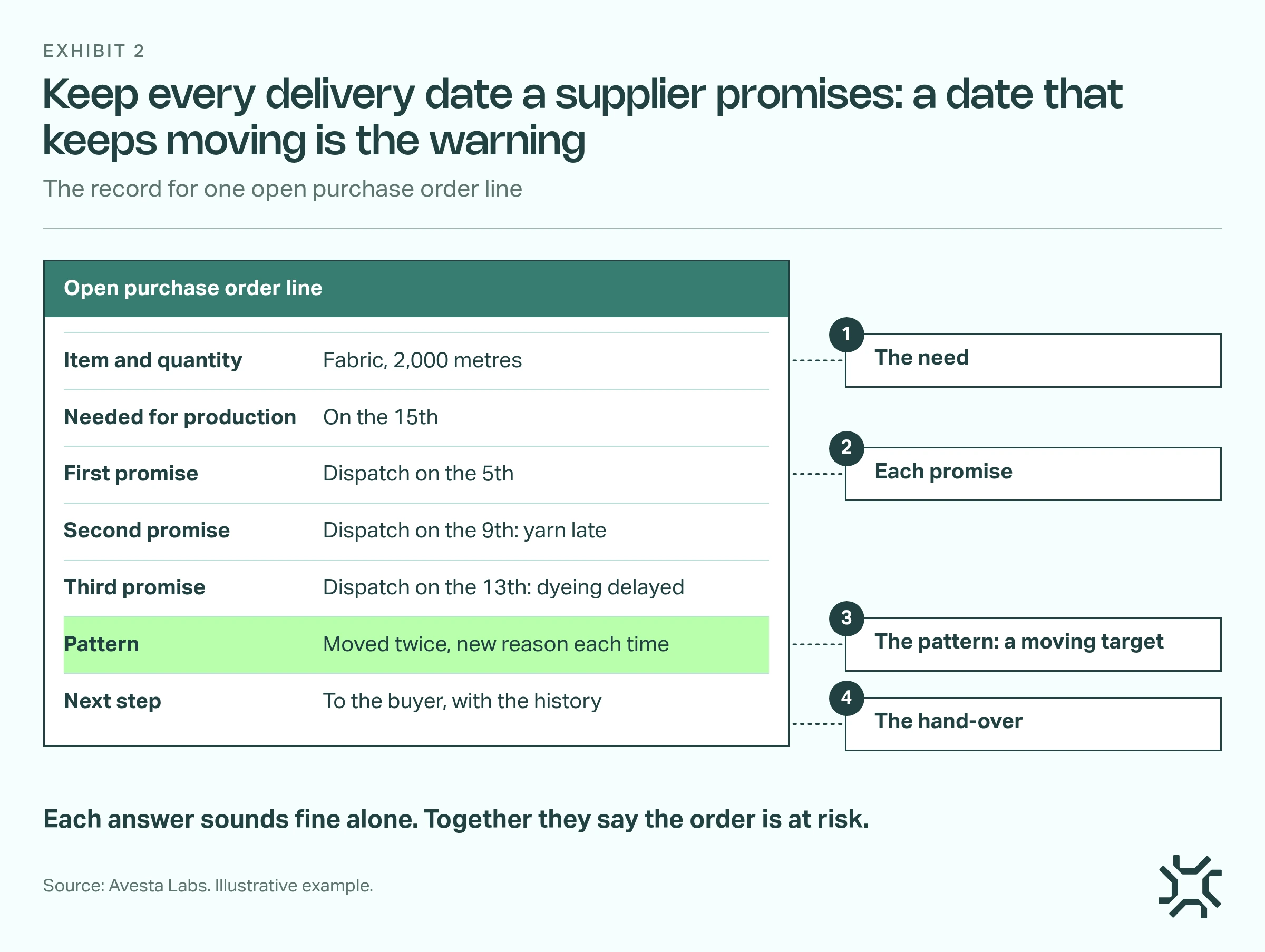
- The need. The quantity, and the date production needs it.
- Each promise. Every new date is added below the last one, never written over it, with the supplier's own reason.
- The pattern. A date that has moved twice, with a new reason each time, is a moving target.
- The hand-over. The buyer gets the order and its history before the due date, not after it.
The agent records a date only when the supplier states one. It never guesses a date from a vague reply like "soon". Our AI agent audit log checklist covers what else that record should hold.
One late date is news. A date that keeps moving is a pattern.
When should you short close a purchase order?
Many purchase orders end with a small leftover. You ordered 2,000 metres and 1,960 arrived. The supplier won't send the last 40, and you may not need them.
To short close a purchase order is to formally close that unreceived balance. Your ERP keeps it open until you do. In Microsoft Dynamics 365 Business Central, for example, a partial receipt leaves the received quantity lower than the ordered quantity. Left alone, these balances clutter every open-PO report, and the agent keeps reminding suppliers about goods nobody wants.
Five rules make it safe:
- Set a limit for each type of order. Some types, like goods bought for one customer order, are never short closed.
- Confirm nobody needs the balance for a customer order, production plan or project.
- Check for open issues: an advance payment, an open invoice or a quality claim keeps the order open.
- A person approves. The agent finds the POs that meet the rule and shows the numbers. A named owner approves each one.
- Record the reason for the next audit.
Short closing is not a way to make the open-PO report look tidy. Close a balance only when it is truly no longer needed.
How do you roll out purchase order follow up automation safely?
Start small, and let your buyers see the agent's work before it writes to suppliers on its own.
- List your open POs and confirmed dates. If the confirmed delivery dates aren't in the ERP today, fix that habit first. The agent needs a date to count from.
- Write the rules down. The reminder schedule, who gets each hand-over, and your short-close limits.
- Start with drafts. The agent prepares each reminder and the buyer sends it. Switch to automatic sending once the drafts are consistently right.
- Review the at-risk list each week. Moving targets and overdue orders are where the buyer's time now goes.
It isn't worth it everywhere. If one buyer can phone every supplier each week, a shared tracker is enough. If most suppliers only update by phone, get dates confirmed in writing first.
What we learned building order and supply agents in Avesta AgentOS
For a textile manufacturer in India, we built an order agent on Avesta AgentOS that places dealer orders in its ERP. It has handled 500 to 1,000 orders a day since it went live on 21 September 2026 (as of October 2026). A purchase-order follow-up agent for the same manufacturer is being built now, also in Avesta AgentOS. It is not yet running.
The design in this post also draws on a packaging manufacturer's live agent. It chases late sales orders rather than purchase orders. The problem has the same shape: find out why something is late, and get it to the person who can fix it.
Three lessons carry over:
- Write the procedure before the agent. We started the supply agent from two written procedures, one for follow-ups and one for short closing, not from code. They settled questions the agent would otherwise guess at, such as whether a lead time counts calendar or working days.
- Ask the people who know, then route the answer. Each week the packaging team uploads its ERP report of late orders. The agent asks Production why each order is late, then sends it to the team that has to act, Purchase included. Management is added only by set triggers, such as a promised date that has passed or a cause that has changed, never just because an order is old. For purchase orders, the supplier is the person who knows, and the buyer is the one who acts.
- Never invent a date. That agent takes a dispatch date only from what someone said that week, never from an estimate. Every comment and decision stays with the order, so next week's question starts from last week's answer. We apply the same rules to supplier replies.
The bottom line
Purchase order follow up automation is not about sending more emails. It is about asking every supplier at the right time, keeping every answer, and putting the risky orders in front of a buyer before production waits.
Start with your open purchase orders and the dates your suppliers confirmed. Then decide what the agent should record about each one, using our AI agent audit log checklist.
How many of your open purchase orders could you call "on track" today, with a supplier's written date to prove it?
Want every open purchase order followed up without adding buyers? See how our AI co-workers for manufacturing work alongside your purchasing team, with your team approving anything above your limit.
Get started: hello@avestalabs.ai
Frequently asked questions
- How do you follow up on a purchase order with a supplier?
- Start from the delivery date the supplier confirmed. Ask for a status update partway through the lead time, ask for a firm dispatch plan as the due date gets close, and escalate if the date passes. Each message should name the purchase order, the item and the date you need. Record the supplier's answer against the order.
- Can AI automate supplier follow-ups?
- Yes, for the routine part. An AI agent can find open purchase orders, send reminders on schedule, read replies written in the supplier's own words and update the tracker. It should not change suppliers, agree new prices or close orders on its own. Those decisions stay with your purchasing team.
- Does purchase order follow up automation need a new ERP?
- No. The automation works alongside the ERP you already have. It needs two things from it: the list of open purchase orders with their confirmed dates, and a place to record the updated dates. If the ERP can't be connected yet, an agent can start from an exported open purchase order report, uploaded each week.
- What should the agent do when a supplier doesn't reply?
- Send the overdue escalation on the supplier's usual channel, then hand the order to the buyer with the full history: when each reminder went out, the last date promised and how close the production date is. Silence close to the due date should reach a person, not trigger more automatic messages.
Share this article