AI Requirements Document: What to Keep, Check and Park
More businesses now write up what they want AI to do, with AI's help, before they talk to a partner like us. Here's how we read those documents.
 Vinay Bhinde
- 7 min read
Key takeaways
- An AI requirements document is a strong first draft, not the final word. The vision usually comes through clearly; the details need checking.
- Keep the goal, pain points and systems named. Check volumes, business rules, exceptions and integrations. Park generic best-practice sections and future features.
- Check each number and rule with the people who do the work, using real examples. When the document and a real example disagree, the example wins.
- The person who wrote the document often isn't the person who runs the process every day, so have the doers read it before you send it.
A year or two ago, a new client would tell us what they needed in a call. Today, many send us a document before we've even met: the problems, the goals, the systems involved and often a full list of features. Most of the time, they wrote it with the help of AI.
A requirements document describes the work you want AI to take on. It's what a partner like us reads before planning anything. And AI has made writing one much easier, which is mostly good news.
But a well-written requirements document and an accurate one aren't always the same thing. Some parts you can trust as they are. Some need checking with your team. Some can wait.
How should you review an AI requirements document?
Treat an AI requirements document as a strong first draft. Keep the goal, the pain points and the systems it names: the leader knows these best. Check every volume, business rule, exception and integration with the people who do the work, using real examples. Park generic "best practice" sections and future features for later.
Keep what the leader knows. Check what AI guessed. Park what can wait.
What got better when clients started writing requirements with AI?
AI has made it much easier for business leaders to put their needs into words. We see three clear improvements.
- The vision comes through clearly. We can usually tell what the business wants to achieve from the first page. That used to take a couple of calls.
- More detail arrives earlier. Processes, systems, unusual cases and goals arrive written down and organised. Questions we used to ask on a follow-up call are often already answered.
- Leaders discover what they didn't know. This is the part we like most. When a leader talks a problem through with AI, it asks questions they hadn't considered. What happens when an order is cancelled? Who approves an exception? Which system holds the real number?
So the document covers ground the leader might never have raised in a first meeting. We spend less time on the basics and more on the parts that are actually hard.
Where do AI-generated requirements go wrong?
A document that's easy to write is also easy to make long. And the more polished it reads, the easier it is to forget that parts of it were never checked.
One client sent us a 60-page requirements document. Our team studied it carefully before the first build meeting. In that meeting, the client's own team told us to set it aside. Senior management had produced it with AI, and nobody who did the day-to-day work had reviewed it.
The vision in that document was right. The details weren't. Some features in it were never built, because nobody needed them. Other things were built that the document never mentioned, because they only came up once we sat with the people doing the work.
That project went well, but only because we found out early. The same four patterns show up in many AI-assisted documents:
- Length. 60 to 80 pages is now common. Reading it all closely takes days, and the important parts can be buried.
- Assumptions written as facts. AI fills gaps with sensible-sounding guesses. In the document, a guess about order volume looks exactly like a measured number. NIST calls this confabulation: AI content that is "confidently stated but erroneous or false". As Thoughtworks puts it, "specific doesn't mean validated".
- Features nobody asked for. AI tends to add "best practice" extras. They read well, but nobody on the team is waiting for them.
- The writer isn't the doer. The person who wrote the document often isn't the person who runs the process every day. Their picture of the work can be quite different from what actually happens.
A polished requirements document can still be wrong in the details that decide what gets built.
None of this is a reason to stop using AI to write requirements. It's a reason to read the result as a first draft.
What do we keep, check and park in a requirements document?
When a document like this arrives, we sort what's in it into three groups. Here, an AI co-worker means AI that does one job in your business alongside your team.
| Group | What goes here | Why |
|---|---|---|
| Keep | The goal, the pain points, the systems named | This is what the leader knows best, and AI rarely gets it wrong. It's the foundation for everything else. |
| Check | Volumes, business rules, exceptions, integrations | These are the details AI is most likely to guess. A wrong number or a missed exception changes what gets built. |
| Park | Generic "best practice" sections, future features | Useful later, maybe. Not where the first AI co-worker should start. |
The Check group is where most of the work is. We confirm each item with the people who do the work, using real examples: last week's orders, a typical invoice, the exception that came up yesterday. If the document says one thing and the real example shows another, the example wins.
Parking isn't the same as throwing away. Those ideas often come back once the first AI co-worker is running and the team can see what else is possible. Our guide to choosing your first AI project covers how to pick where it starts.
How can you make your AI requirements document more useful?
If you're writing up your needs with AI before talking to a partner, keep doing it. A few small steps make the document far more useful.
- Have the people who do the work read it. Ask them one question: "Is this how it really happens?" Their corrections are worth more than another ten pages.
- Mark what's checked and what's assumed. A simple note next to each number or rule is enough. It tells your partner where to dig.
- Attach real examples. A few actual orders, emails or reports show more than any description. Remove anything sensitive first.
- Put the one-page summary first. What's the problem, what does success look like and what would you fix first? If that page is clear, the rest can be long.
- Ask AI to challenge you, not just write for you. Prompts like "What am I assuming here?" or "What would my operations team disagree with?" bring out the gaps before anyone builds on them.
When does a requirements document need less checking?
If the people who run the process have already read it, and each number and rule is marked checked or assumed, the Check group is small. Steps 1 and 2 above do most of the checking for us. The sort still happens; it just takes far less time.
How does an AI Kickoff use your requirements document?
In an AI Kickoff, we read your document first and spend the discovery checking it with your team.
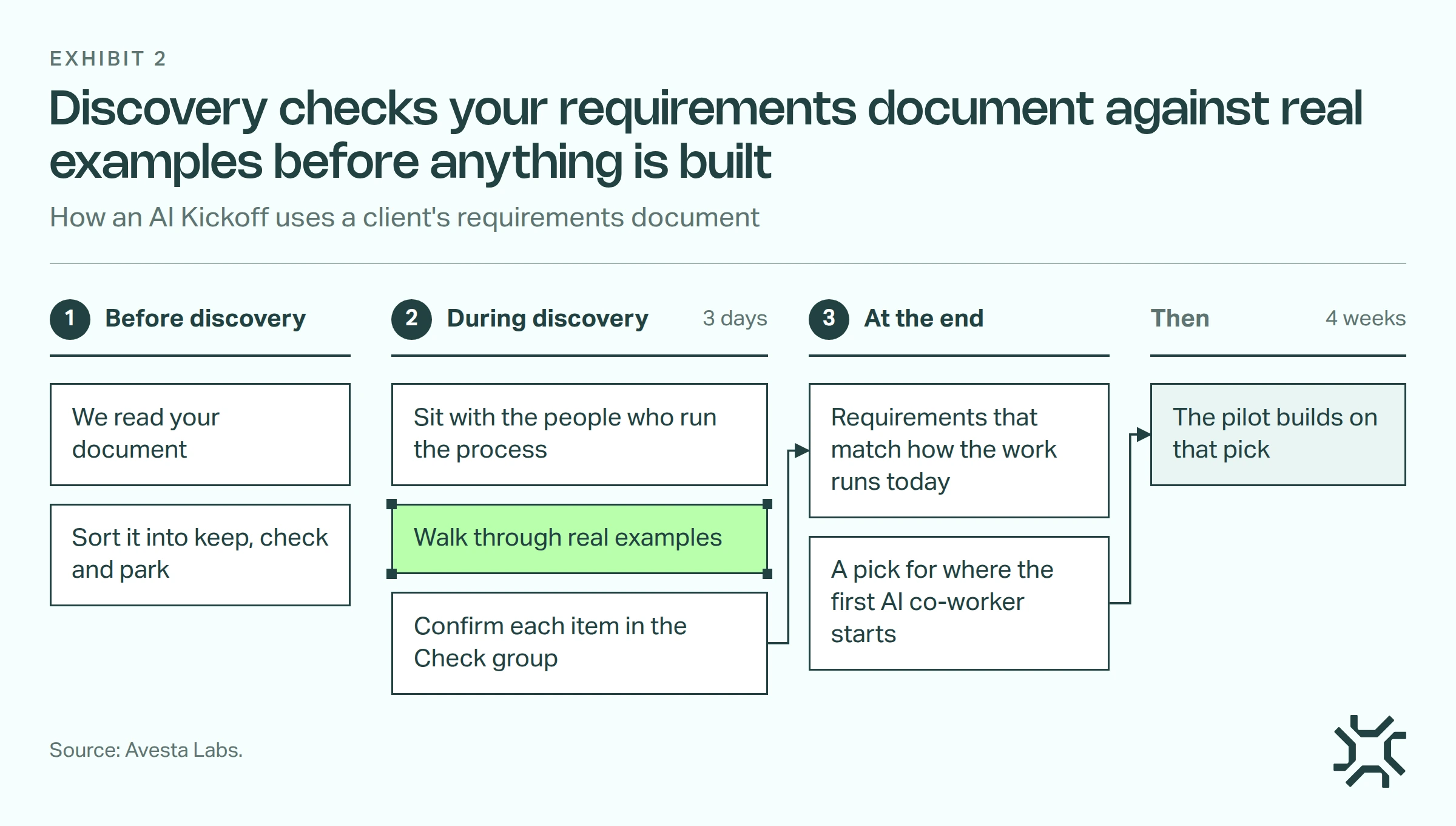
- Before the 3-day discovery, we read your document and sort it into keep, check and park.
- During discovery, we spend time with the people who run the process every day. We walk through real examples and confirm the items in the Check group one by one.
- At the end, you get a version of your requirements that reflects how the work actually runs today, and a clear pick for where your first AI co-worker should start. The 4-week pilot then builds on checked facts, not guesses.
Before customers see the AI co-worker, it gets tested. Our guide to testing an AI agent before go-live shows how.
The bottom line
AI has made most requirements documents clearer, and the vision usually comes through early. The numbers, rules and exceptions are where the guesses hide, and the people who do the work are the ones who can tell which is which.
Has the person who runs the process your document describes read it yet?
Already have a requirements document, written with AI or without? Talk to us about an AI Kickoff, and bring it along.
Get started: hello@avestalabs.ai
Frequently asked questions
- What should an AI requirements document include?
- Start with a one-page summary: the problem, what success looks like and what you'd fix first. Then cover the goal, the pain points and the systems involved, followed by volumes, business rules, exceptions and integrations. Mark each number and rule as checked or assumed, and attach a few real examples, such as last week's orders.
- Should I use AI to write my business requirements document?
- Yes. Talking a problem through with AI helps you organise your thinking and raises cases you might have missed. The value comes from what you do next: the people who run the process correct it, and each number and rule gets a label saying whether it was checked or assumed. Then a partner knows which parts to trust.
- How long should a requirements document be?
- There's no right length, but length has a cost. Every extra page is something your partner has to read and check, and the parts that matter most can get lost among generic sections. A clear summary on the first page lets a long document work, because everyone knows what the rest is for.
- Can a partner build straight from an AI-generated requirements document?
- They can plan from it, but building straight from it is risky. Numbers, rules and exceptions that AI guessed can change what gets built, and some features may turn out to be ones nobody needs. A short discovery with your team, using real examples, finds those gaps before anyone builds on them.
- Is a project requirements document from AI good enough for a quote?
- It's a good starting point for a rough idea of scope, because the goal and the systems involved are usually clear. The cost of a build depends on the details AI is most likely to guess: how many orders, which exceptions, which systems connect. Expect a partner to check those before giving a firm number.
Share this article