Inventory Reorder Automation: From Alert to Purchase Order
The work between a low-stock alert and a purchase order a buyer can approve, whether your stock lives in Excel or your business software.
 Yash Vekaria7 min read
Key takeaways
- A low-stock alert can arrive on time while the purchase order still goes out late. The work between those two moments is where a reorder can stall, and it is the part worth automating.
- Check what is already on order before drafting a new one. A stale count or a missed open order produces a purchase order that looks right and isn't.
- The reorder point tells you when to buy, not how many. Keep the order quantity as its own rule, or one big job turns into a pile of excess stock.
- If your ERP already turns current data into usable order suggestions, a plain rule may be all you need. AI earns its place when each order means piecing records together.
A mid-sized manufacturer tracks its stock in Excel. The stock room notices that a component has fallen below its minimum level, its reorder point. Purchasing still has to check whether another purchase order is already on its way, confirm the supplier's price and prepare the new order. A manufacturer on an ERP (the system that runs orders, stock and invoices) often faces the same handoff, even when the system raises the low-stock alert by itself.
The stock room may spot the shortage quickly. Turning that shortage into an order can take much longer, and if the supplier needs two weeks, every day of waiting brings a stockout closer.
That handoff is typical, and the manual check behind it is real. When we mapped a manufacturing client's departments, tracking minimum stock by hand in the stock room stood out as a pain point.
What is inventory reorder automation, and where does AI fit?
Inventory reorder automation starts a purchase when available stock falls to a set level, the reorder point. A basic setup only sends an alert. A complete workflow also checks what is already on order, prepares the purchase order (the written order you send a supplier) and gets a buyer to approve it. AI helps with that middle work.
In one line:
The alert says an item is low. The workflow turns it into an order the buyer can approve in one look.
The AI inventory co-worker, from low stock to an approved order.
The threshold check is simple arithmetic, and inventory software such as Zoho Inventory and Business Central already does it. What is left is the assembly: pulling the stock figure, the open orders and the supplier's price together into one draft. That is the work an AI co-worker takes on. An AI co-worker is an AI agent that carries out a task inside your systems, step by step.
What has to be in place before you automate?
An AI can't guess your rules. For each item, someone has to write down seven facts. Here they are for one component.
| For each item, write down | Example for one component |
|---|---|
| Reorder point | 170 units: order when stock falls to this level |
| Lead time | 14 days from placing the order to receiving it |
| Safety stock | 30 units kept spare for busy weeks |
| Order quantity | How many you order each time, such as a month's use |
| Open orders | Any purchase order already on its way, and when it lands |
| Usual supplier | The supplier you normally buy this component from |
| Supplier price | The current price on that supplier's list |
Some manufacturers keep these in their ERP, others in an Excel sheet, and a few usually live only in the buyer's head. Either system can feed the workflow. What matters is one agreed stock record per item, with a named owner and an update schedule.
Unless it knows the update schedule, an AI treats Friday's stock count as today's. It will draft a confident order from whatever number it is given.
So record when each count is due. If one hasn't been updated on schedule, the workflow should flag it for a person rather than use it.
Whole stock or each warehouse?
With more than one warehouse, decide what the reorder point counts. The total across all warehouses avoids ordering when one is low and another is full. A per-location count protects a warehouse that feeds its own production line. Pick one rule per item and write it down.
How do you set the reorder point and safety stock, and how much should you order?
Take the demand you expect while you wait for the supplier, then add a buffer.
A component that production uses at about 10 units a day, from a supplier that takes 14 days to deliver, needs 10 × 14 = 140 units to cover the wait. Add 30 units of safety stock for busy weeks, and the reorder point is 170. When available stock falls to 170, buying starts. Software differs on whether the reorder point field should already include the buffer, so check your system's guide before you enter both numbers.
The reorder point tells you when to buy. It doesn't tell you how many. The order quantity depends on expected demand, stock already on order, supplier minimums and how much stock you want to hold. Microsoft's guidance for Business Central describes the reorder point as demand during lead time, and its planning checks whether supply is already ordered before it suggests more.
How does an AI inventory co-worker handle a reorder?
The workflow has five steps. It starts with a stock count the team trusts and ends only after a buyer approves the order.
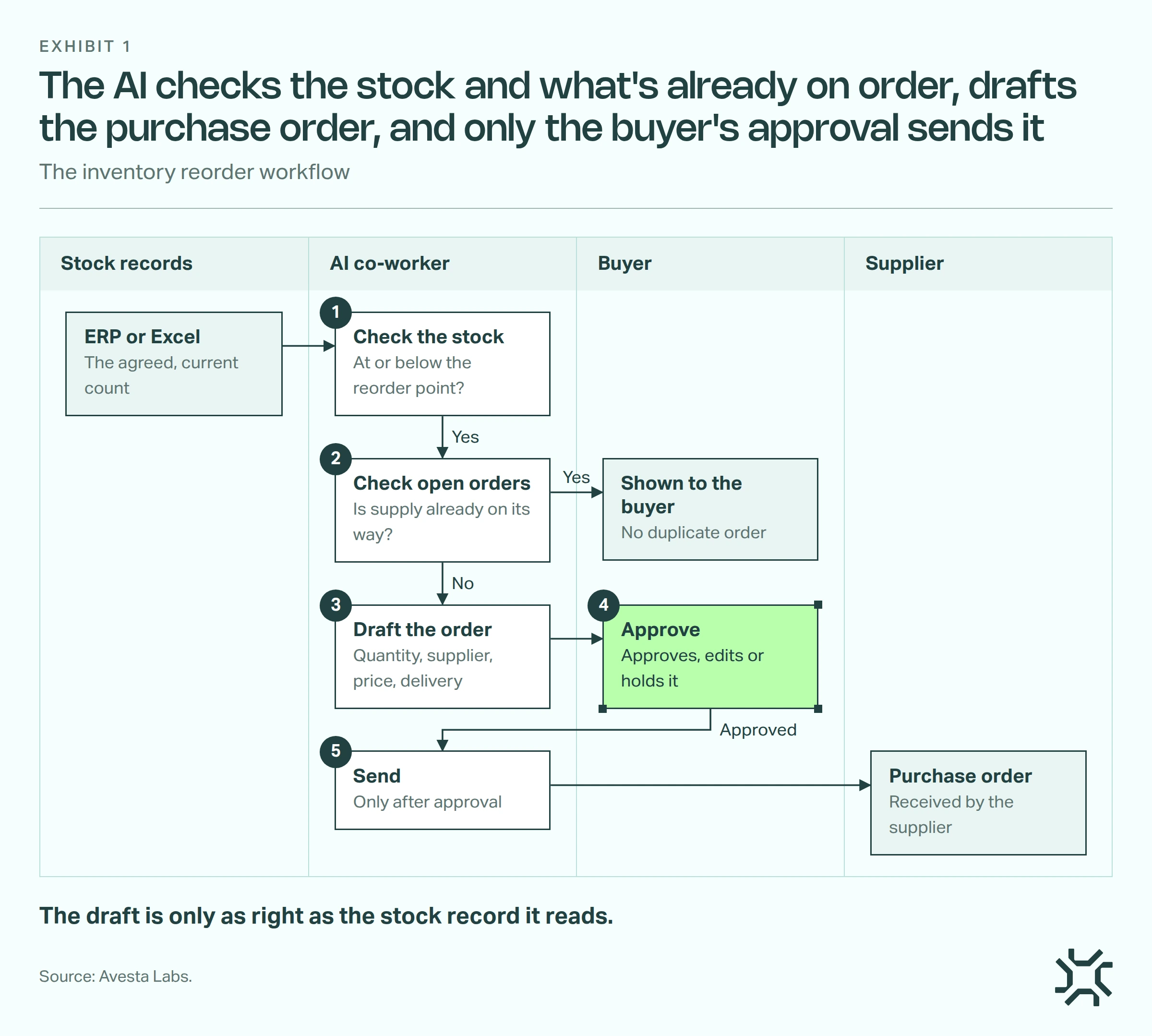
- Check the stock. The AI reads the agreed stock record, including when it was last updated, and compares the available quantity with the reorder point.
- Check what's already coming. It looks for open purchase orders and their arrival dates. If supply is due in time, it shows the buyer that instead of preparing a duplicate.
- Prepare the purchase order. It drafts the order with the item, proposed quantity, usual supplier, recorded price, expected delivery date and the stock figures that triggered it. A missing price or count is flagged, not guessed.
- Approve. The buyer checks the draft, then approves, edits or holds it.
- Send. Only the approved order goes to the supplier.
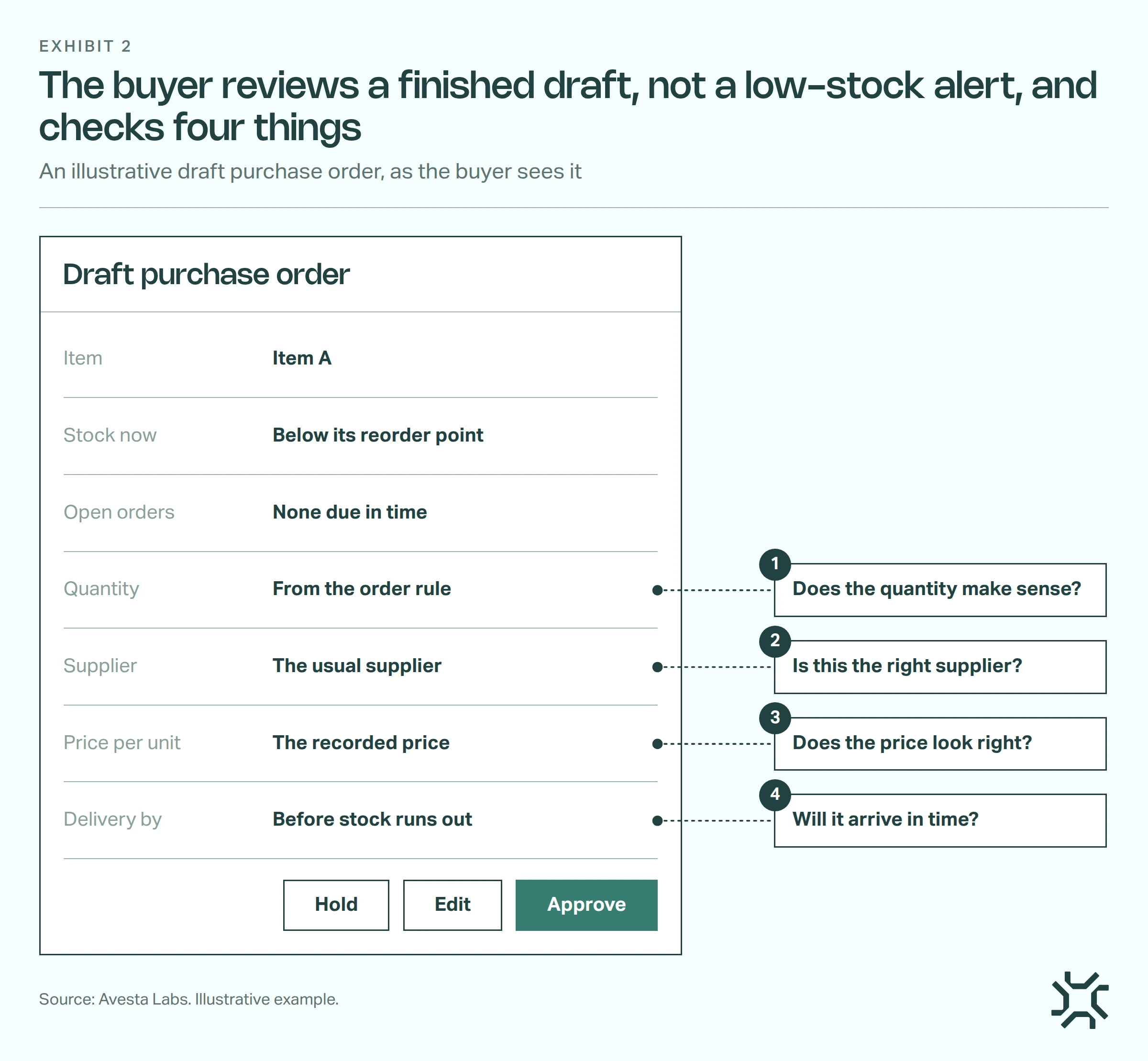
A good draft shows its working: the stock and open orders it counted, and where the quantity, supplier, price and delivery date came from.
What should the buyer check before approving?
The buyer owns the spending decision, because an order commits money. Before it goes out, they confirm four things:
- Quantity. Does it reflect normal demand and open orders? One large job should not trigger a large reorder.
- Supplier. Is the usual supplier still right for this item and this delivery date?
- Price. Is the recorded price current, or does it need a new quote?
- Delivery. Will the order arrive before stock is expected to run out?
A missing price, an out-of-date count or an unusually large order should pause the workflow for the buyer. Those are exceptions to surface, not gaps for the system to fill. For a wider rule on which actions need a person, see our guide to AI agent human approval.
How is this different from the reorder rules in your ERP?
Your inventory or ERP software may already have reorder rules. The difference is what happens at the reorder point, as of November 2026.
| At the reorder point | The next step | |
|---|---|---|
| Zoho Inventory | You are notified that the item reached its reorder level | You create the purchase order |
| Business Central | The planning system suggests a supply order | You act on the suggestion |
| AI co-worker | It drafts the order from your stock, open orders and supplier price | The buyer approves, then it is sent |
If your ERP already has current stock, supplier and price data and produces usable suggestions, start there.
When is inventory reorder automation the wrong fit?
- Your items are steady and your ERP's suggestions already work. Adding AI there only gives you one more thing to maintain.
- Your stock counts are unreliable. The AI would draft orders from wrong numbers. Fix the counts first.
- You mostly buy for custom projects or rare, high-value items. Those orders depend on the job, not a stock level, so keep the buyer planning them.
- Nobody can state the rule. If the reorder point changes with the owner's mood, settle it first.
Where should you start?
Pick a small group of components you buy again and again. For each one, fill in the seven facts from the table above. Name the stock record you trust and the person who approves the purchase. Then let the workflow prepare drafts while the buyer still reviews every order.
Watch two numbers as you expand: how often buyers correct a draft, and how long a low-stock item takes to become an approved purchase order. Together they show whether the workflow is removing the real delay.
The bottom line
Inventory reorder automation earns its keep when it hands the buyer a complete, checkable order at the moment stock needs attention. Start with dependable counts and a clear buying rule. Let the system assemble the draft, and let the buyer make the purchase decision.
Start with the last component that ran low. Trace who noticed it, where the stock number came from, and what the buyer still had to find before placing the order.
Want to see which of your stock items an AI co-worker could take on first?
See how AI co-workers built on Avesta AgentOS work in manufacturing.
Get started: hello@avestalabs.ai
Frequently asked questions
- Can automated reordering work if we use Excel instead of an ERP?
- Yes. An Excel sheet can supply the stock count if someone updates it on a fixed schedule and the workflow can read it. The same rule applies to an ERP: the number has to be current. In either case, check open purchase orders before preparing another one, so you don't order the same stock twice.
- Does inventory reorder automation prevent stockouts?
- It targets one cause: the order that goes out late because nobody turned the alert into a purchase order. It does not fix a wrong stock count, a supplier who delivers late or a jump in demand the reorder point never allowed for. We have not measured this workflow's effect on stockouts, so treat it as a faster, more complete way to order, not a guarantee.
- Is a reorder point the same as a minimum stock level?
- Often, but not always. Some teams say minimum stock for the level at which they order again, which is the reorder point. Others mean the buffer they never want to dip into, which is safety stock. Business Central, for one, treats the reorder point as demand during lead time and watches safety stock separately. Check which meaning your system and stock room use.
- Can AI send purchase orders without approval?
- It can be set up to, but we don't recommend it for most manufacturers. A purchase order commits money, and a wrong quantity, supplier or price can disrupt production and is hard to undo once the supplier has it. In the workflow here, the AI prepares the draft and the buyer decides whether it goes out.
Share this article