
First AI Project: Where Should AI Start in Your Business?
Four steps and eight yes-or-no questions to pick the process AI should take on first, from the discovery work we do with clients.
 Vinay Bhinde10 min read
Key takeaways
- Your first AI project has two jobs: save real time or money, and convince your team that AI is worth their effort.
- Map how one process runs today before listing AI project ideas. Retyping, copy-paste and late hand-offs are often the best place to start.
- Score each process on eight yes-or-no questions. Seven or eight yeses make a strong first candidate; four or fewer can wait for a later project.
- Start where your own team sees the output first. Customer-facing work can come first too, if it moves from drafts to a small group of customers to everyone.
- Write down how long the process takes today before you start, or you can't prove the AI made it faster.
Most business leaders we speak to know AI should become part of how their company runs. Where they get stuck is the first step.
Some arrive with a long list of ideas: invoices, customer emails, month-end reports, chasing suppliers. Others aren't sure where AI fits in their business at all. Both end up facing the same question: which part of the business should AI take on first?
Get this right, and your team sees real hours saved within weeks. Get it wrong, and you spend months on something nobody uses, and everyone quietly decides AI "isn't for us yet".
We answer this question with clients in four steps. None of them needs a technical background, and you can use the same thinking in your own business.
How do you choose your first AI project?
To choose your first AI project, map how one process runs today, from first email to final invoice. Sort each task into plain automation, AI work or a people decision. Score each AI candidate on eight yes-or-no questions about value, fit and safety. Then start where a mistake is cheap to fix.
Pick the process that clearly pays back and that your own team checks first.
Why does your first AI project matter most?
Your first AI project does two jobs. It has to save time or money. And it has to convince your team that AI is worth their effort.
The second job is the one people forget. If the first project stalls, the next one gets twice the pushback. If it works, people start bringing you ideas.
Andrew Ng made the same point in Harvard Business Review: the first pilots are only partly about value, because their success is what persuades people to invest in more.
The first one is also the slowest. Your team is learning how to work with AI, and the AI is learning how your business works.
In our experience, the first AI co-worker (AI that does one job in your business alongside your team) takes about four weeks to get right. Later ones take two to three. So it pays to spend that first month on something that will clearly pay back.
Which process should you automate with AI first?
We work through four steps. Each one narrows the options until one process clearly stands out.
Step 1: Map how the process runs today
You don't need a list of AI ideas to begin. You need a clear picture of how work actually flows. We sit with the people who do the work and walk through one process at a time, from the first email to the final invoice.
This almost always turns up problems nobody had listed: information retyped from one system into another, updates copied and pasted by hand, details reaching the next team too late. These small leaks are often the best place to start. Nobody enjoys doing them, and the time they take is easy to count.
Step 2: Sort out what needs an AI co-worker
An AI co-worker is AI trained on how your business does a specific job. It works alongside your team, inside the systems you already use, and hands the important decisions to a person. Not every task needs one, so we sort each task into three groups.
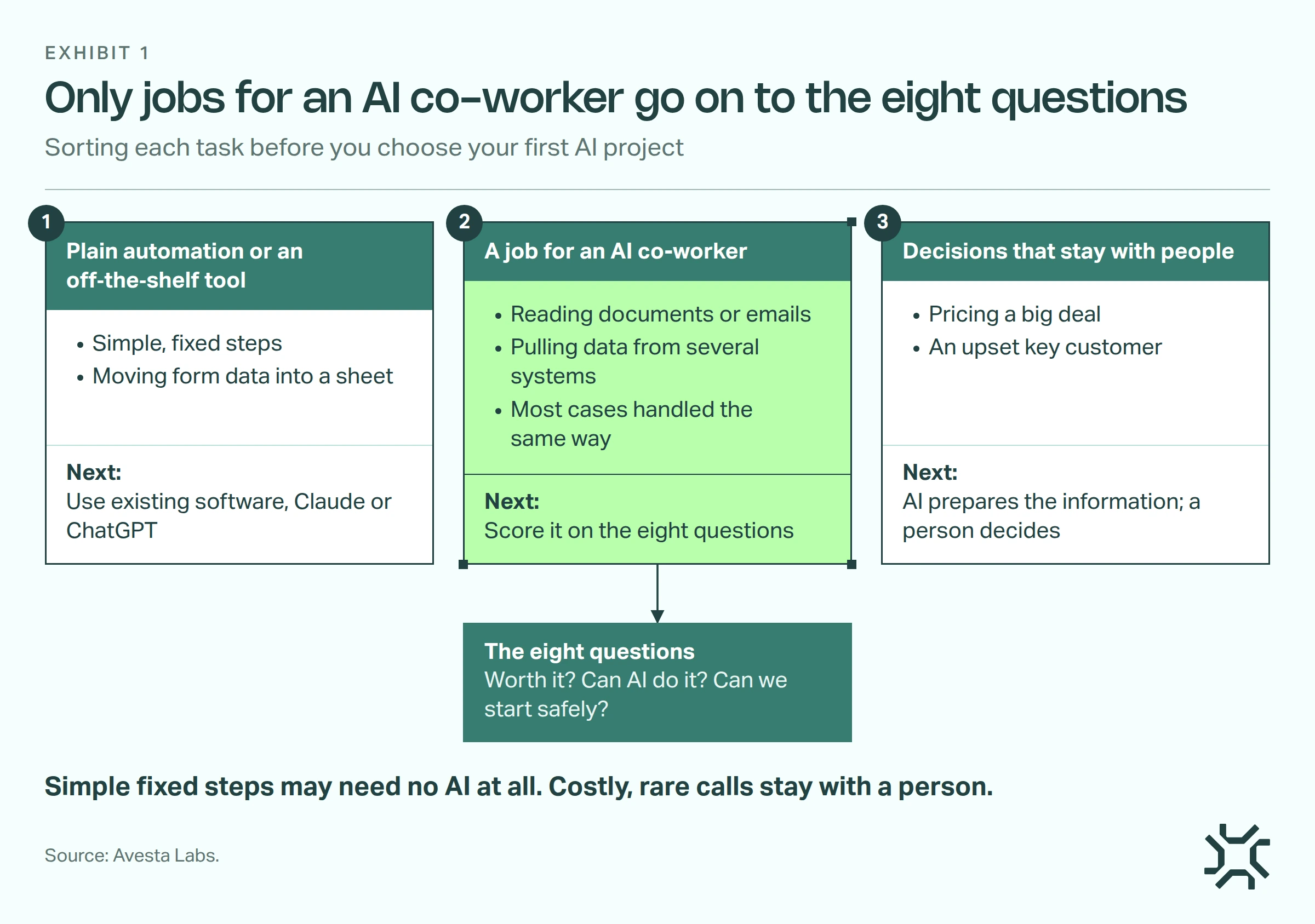
- Plain automation or an off-the-shelf tool. Simple, fixed steps, like moving data from a form into a sheet. Your existing software, or a tool like Claude or ChatGPT, may already handle it.
- A job for an AI co-worker. Work that needs some judgement: reading documents or emails, pulling information from several systems, and handling most cases the same broad way.
- Decisions that stay with people. Pricing a big deal, handling an upset key customer, anything rare where a wrong call is costly. AI can prepare the information. A person decides.
Only the tasks in group 2 move on to the next step, grouped by the process they belong to.
Step 3: Score each process on eight questions
For every process left on the list, we ask the same eight questions with the client's team. Each "yes" counts as a point. It isn't a precise formula. It's a way to compare options honestly instead of going with whichever idea sounds most exciting.
| Group | Question | What a "yes" looks like |
|---|---|---|
| Is it worth it? | 1. Does it happen often, or touch a lot of money? | Done daily or weekly, or it decides invoices, orders or payments |
| Is it worth it? | 2. Can you measure the pain today? | "Month-end takes our finance team around 10 hours" |
| Can AI do it? | 3. Does it follow a pattern? | Not identical every time, but most cases are handled the same way, and odd ones can go to a person |
| Can AI do it? | 4. Do people waste time pulling information together? | Copying from emails into your main business system (ERP), or retyping WhatsApp notes into Excel |
| Can we start safely? | 5. Is a mistake cheap to fix? | Your own team sees the output first, not your customers |
| Can we start safely? | 6. Is there someone who knows it inside out and can give it time? | A process owner who can spend 8 to 10 hours a week during the pilot |
| Can we start safely? | 7. Do you have examples of the work done by hand? | Last quarter's reports, past quotes, completed checklists |
| Can we start safely? | 8. Can we get to the data? | System access, or even just regular exports to Excel or CSV |
As a rough guide:
- 7 or 8 yeses: a strong first candidate.
- 5 or 6: workable. We look at the "no" answers and ask whether they can be fixed in a week or two.
- 4 or fewer: park it for now. It may be a great second or third project.
Step 4: Weigh the cost of a mistake
One question matters more than the rest: if the AI co-worker gets something wrong, who sees it first? If your team catches an error, they're annoyed but keep going. If a customer catches it, you lose trust, and trust is far harder to win back.
Australia's National AI Centre draws the same line in its Guidance for AI adoption (May 2026).
A chatbot answering simple questions in business hours, watched by a staff member, is low-risk. The same chatbot answering harder questions around the clock with no one watching carries more risk.
So we usually recommend starting with work your own team checks. That doesn't rule out customer-facing work. When the most pressing pain is customer-facing, such as slow replies or missed enquiries, we start there, but slower.
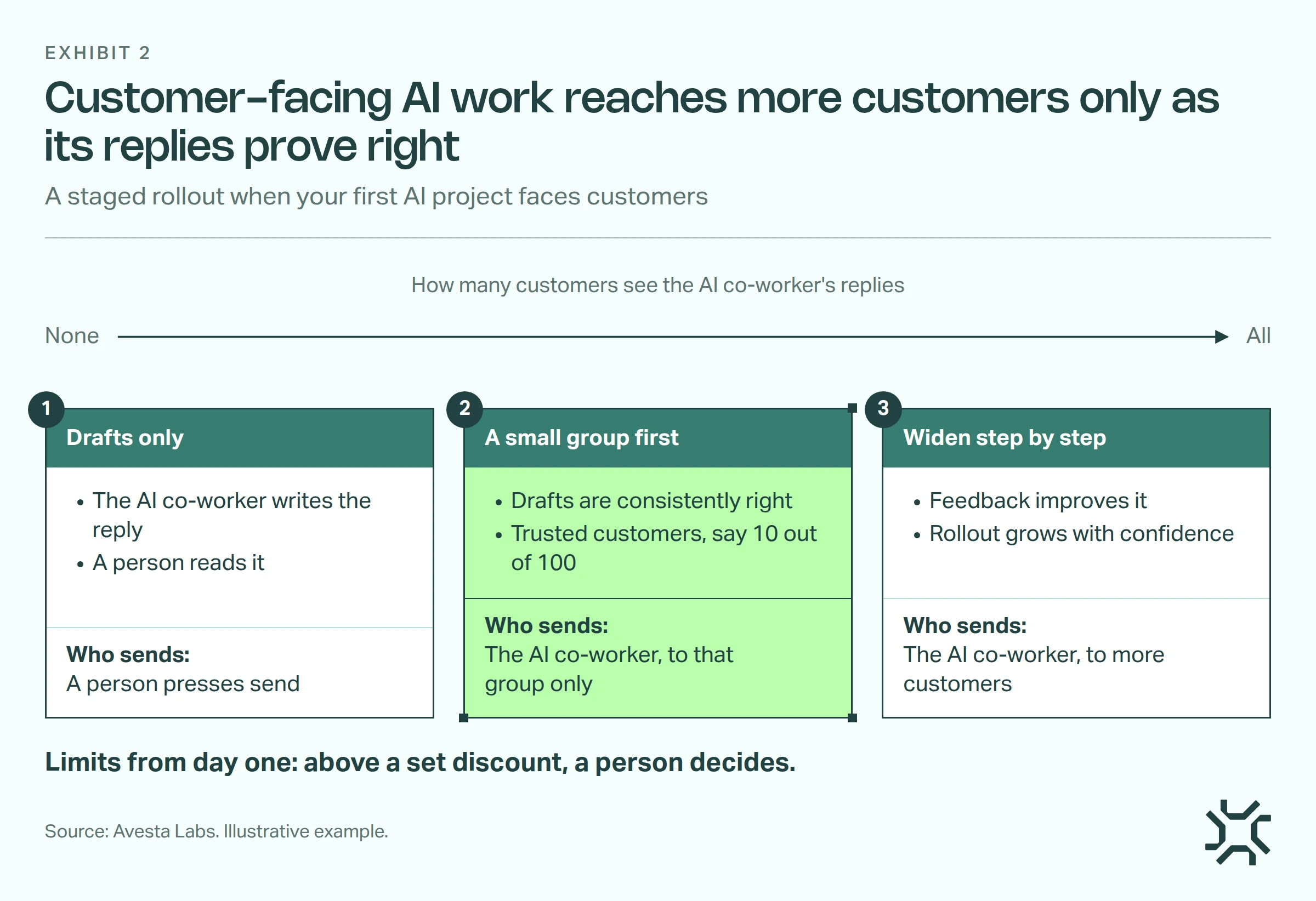
- Drafts only. The AI co-worker writes the reply. A person reads it and presses send.
- A small group first. Once the drafts are consistently right, it replies directly to a small slice of trusted customers, say 10 out of 100.
- Widen step by step. Their feedback improves it, and the rollout grows as confidence grows.
We also set clear limits from day one. For example, it can offer a discount up to a set amount; anything above that goes to a person. And the bar is higher: work customers see needs to be right more often than work only your team sees.
The trade-off is time. A staged rollout means more testing and a longer wait for the full benefit. Some businesses accept that on purpose, because learning from real customers early is worth it to them. That's a fair choice, as long as it's made knowingly.
What makes a good first AI project? A real example
A small business selling custom merchandise to corporate buyers came to us wanting an AI co-worker to answer enquiries on their website.
In Step 1, we walked through one order from start to finish: enquiry, design, revisions, invoice, payment, production, delivery. We found small gaps nobody had listed as a problem. Payment receipts were sent by hand after the payment email arrived. Tracking numbers were copied from the factory and pasted into customer emails. Delivery addresses sometimes reached the factory late.
Here's how the two ideas compared on the eight questions:
| Candidate | Yeses | Why |
|---|---|---|
| AI co-worker answering website enquiries | 4 of 8 | Only a few dozen orders a month, each lead was expensive to win, so a wrong answer could lose one, and their corporate buyers preferred talking to a person. A wrong answer would land on a customer. |
| AI co-worker handling invoices, receipts and tracking updates | 7 of 8 | Touches every invoice and payment, the copy-paste time was easy to count, the steps follow a clear pattern, and staff could check each message before it went out. |
The website idea was what they walked in with. The back-office work was the better place to start: cheaper to get wrong, quicker to prove, and it freed up the people who were busy answering those enquiries.
What mistakes do businesses make with their first AI project?
- Picking the most impressive idea, not the most useful one. A chatbot on the website looks good in a board meeting. Saving your finance team two days every month is usually worth more.
- Starting with the whole thing. Get one AI co-worker working well on one slice of the work, then extend it. For a report-writing pilot, that might mean outlining the full report but only doing three sections in detail.
- Choosing the tool before the problem. Buying an AI platform first and then hunting for something to use it on usually ends in a forced fit.
- No "before" number. If you don't know how long the work takes today, you can't prove the AI made it faster. Write it down before you start.
When is "not yet" the right answer?
Sometimes the honest answer from discovery is "not yet". The process needs fixing first, or the data isn't there. That's a useful answer too.
It's far cheaper to learn "not yet" in three days than three months into a build.
The same goes for tasks that landed in group 1. If your existing software or an off-the-shelf tool already does the job, use it, and save the AI co-worker for the work that needs judgement.
How we run this in an AI Kickoff
In an AI Kickoff, we work through these four steps with you over a 3-day discovery. At the end, you get:
- A map of the work: how the chosen process flows today, step by step.
- A recommended first process, with its pros and cons.
- A rough estimate of what it will cost to build and run, and what it should save.
Then comes a 4-week pilot on that one process, run alongside your real work, so you judge it on real results rather than a demo. It's also where the team's questions come up, such as whether AI will replace their jobs, and it helps to have an answer ready.
The bottom line
The idea you walk in with often isn't the right first AI project. Mapping the work and scoring each process on the eight questions shows that quickly, usually in favour of something less impressive and more useful.
When you have a candidate, test it properly before customers see it. Our guide to testing an AI agent before go-live covers how.
Choose one process, time it, then score it on the eight questions above.
Want help working out where AI should start in your business? Talk to us about an AI Kickoff.
Get started: hello@avestalabs.ai
Frequently asked questions
- How long does a first AI pilot project take?
- In our experience, the first AI co-worker takes about four weeks to get right, because your team is learning to work with AI and the AI is learning how your business works. Later ones take two to three weeks. In an AI Kickoff, that is a 3-day discovery followed by a 4-week pilot on one process.
- Do I need clean data before starting an AI project?
- Not perfect data, but you need access to it and examples of the work done by hand. Regular exports to Excel or CSV can be enough to start. If the data isn't there at all, it's better to fix that first than to build on guesswork. Finding that out in a short discovery is far cheaper than finding it mid-build.
- Is a tool like ChatGPT or Claude enough for my first AI project?
- Sometimes, yes. If a task is simple fixed steps, like moving data from a form into a spreadsheet, your existing software or an off-the-shelf tool may already handle it. An AI co-worker earns its cost on work that needs some judgement, pulls information from several systems and runs inside the tools your team already uses.
- Who should own an AI pilot inside the business?
- The person who knows the process inside out, not the most senior person or the IT team. They explain how odd cases are handled, check the AI's early work and decide when it's good enough. Plan for 8 to 10 hours a week from them during the pilot. Without that person, even a well-chosen process stalls.
Share this article