
Claude vs ChatGPT vs Copilot for Business: Which to Use?
A job-by-job guide for firms of 20 to 200 people, and the point where a business process needs more than an AI assistant.
 Chirag Hindocha8 min read
Key takeaways
- Choose by where your work lives: Microsoft 365 Copilot if your firm runs on Outlook, Word and Teams; ChatGPT or Claude if your work is spread across Google Drive, Slack and other apps.
- By November 2026 each vendor had added an agent for longer, multi-step tasks: ChatGPT Work, Cowork inside Claude, and Copilot Cowork inside Microsoft 365.
- Writing quality shifts with every model release, so test all three on five of your own documents before you standardise.
- A job becomes a process when it must follow your firm's fixed steps, in your own business systems, and be tested before every change. That's the point to look at an AI agent platform.
For most firms, the answer to Claude vs ChatGPT vs Copilot is less about which is smartest and more about where your work already lives. If your people spend the day in Outlook, Word and Teams, start with Microsoft 365 Copilot. If the work is spread across Google Drive, Slack and other apps, ChatGPT or Claude will fit better.
One kind of work is different. Some of it isn't a task at all, but a business process: the same steps, every time, in your own systems. An assistant isn't designed to run that for you, and it pays to know where that line sits before you buy.
Claude vs ChatGPT vs Copilot for business: which should you use?
For Claude vs ChatGPT vs Copilot for business, match the tool to where your work happens. Microsoft 365 Copilot works inside Outlook, Word and Teams. ChatGPT connects to many apps through plugins, and lets a team share agents it builds once. Claude handles quick answers and longer scheduled tasks in one app, and asks before it acts by default. Each helps a person get a job done.
We build with both Anthropic and OpenAI models: we have been an OpenAI Select Partner since July 2026 and a Claude Select Services Partner since October 2026. We also sell an AI agent platform, so weigh our view on that last part with that in mind.
What changed in 2026?
Many comparisons on Google's first page predate this year's changes, or only partly cover them. The three products now overlap far more than they did a year ago.
| Date (2026) | Change | What it means for you |
|---|---|---|
| 22 April | OpenAI released workspace agents in early release (research preview), calling them "an evolution of GPTs" | Team agents that can run on a schedule, and ask permission before acting |
| 16 June | Microsoft made Copilot Cowork generally available | Copilot can run long, multi-step tasks inside Microsoft 365, on Anthropic's models |
| 9 July | OpenAI launched ChatGPT Work; ChatGPT agent has since been retired | ChatGPT can act across your apps and files and stay with a task for hours |
| 16 September | Anthropic merged Claude chat and Cowork into one Claude, generally available on the Team plan from 12 November | One Claude app handles quick answers and longer tasks you can schedule |
Sources: OpenAI's ChatGPT Work announcement and workspace agents announcement, Microsoft's Copilot Cowork announcement, and Anthropic's note on the merged Claude.
The practical result: every one of them now lets you hand over a longer task, watch it and step in. Anthropic says that "by default, Claude asks before taking an action". OpenAI says you can "approve important actions" in ChatGPT Work.
Which AI is best for which business job?
Think of AI use in a firm as three levels. The tools differ less than you'd expect at the first two.
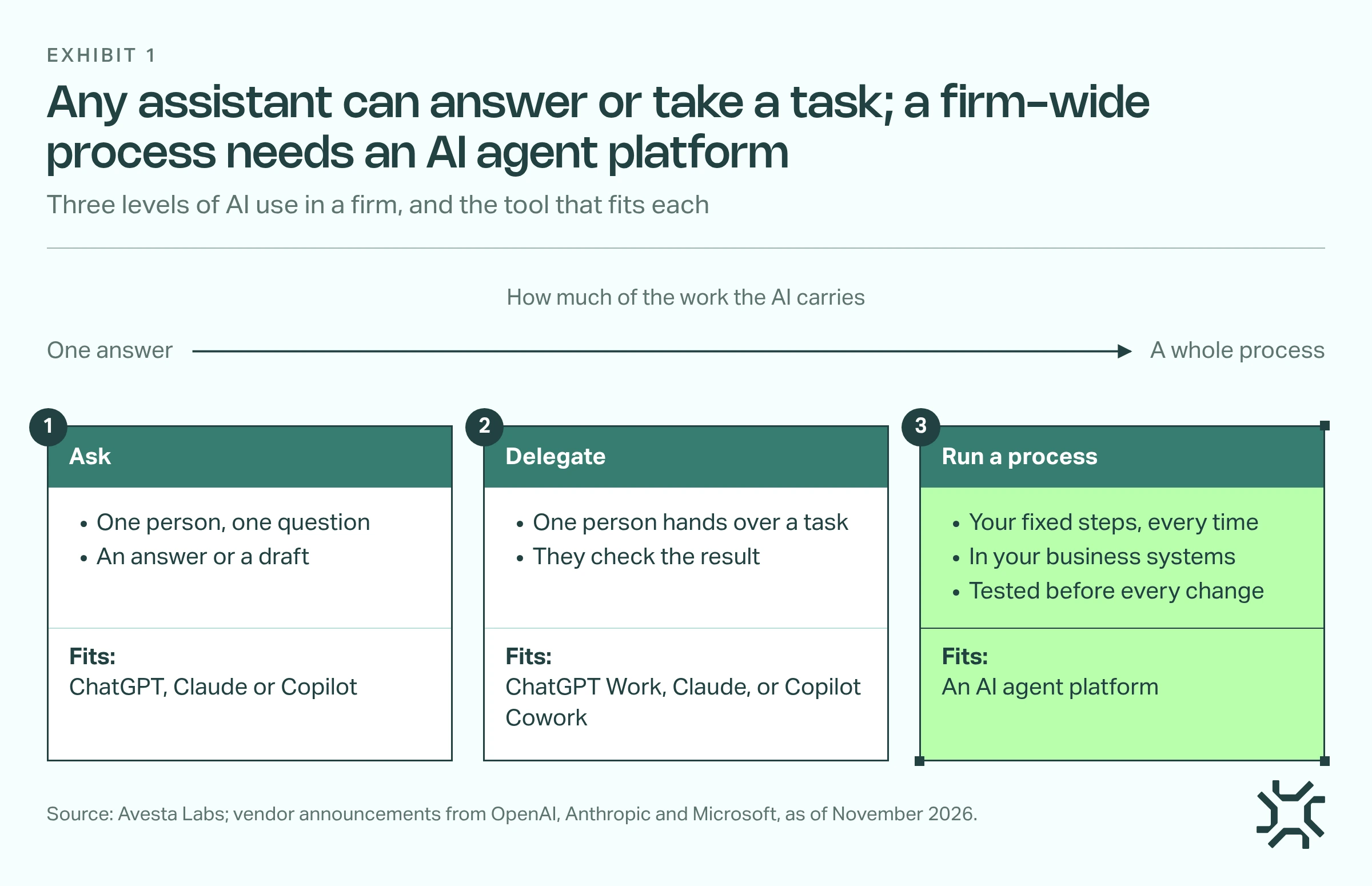
- Ask. One person asks for an answer or a draft. All three do this well.
- Delegate. One person hands over a multi-step task, such as a research pack, and checks the result. The 2026 agents are built for this.
- Run a process. The firm needs its own fixed steps done every time, in its own business systems, and tested before anything changes. In our view, assistants aren't designed to own this.
For the first two levels, here is what each vendor documents, as of November 2026:
| Job | Microsoft 365 Copilot | ChatGPT | Claude |
|---|---|---|---|
| Drafting in Outlook and Word | Works inside the apps | Outside the apps; plugins to Teams and SharePoint | Mainly outside the apps |
| Research across your files | Cowork works across your Microsoft 365 files | Plugins to Google Drive, SharePoint, Slack, CRMs | Uses the connectors you set up |
| A long task handed over | Copilot Cowork, end to end | Workspace agents, also on a schedule | Cowork in Claude, also on a schedule |
| Asking before it acts | Steer the task as it runs | Agents can be set to ask permission | Asks before acting, by default |
| Controls for the firm | Cowork inherits your sensitivity labels | Admins control who can use, build and share agents | Owners switch features such as scheduled tasks on or off |
What the table can't tell you is quality. Rankings for writing and reasoning shift with each model release.
Before you standardise, give each tool the same five real documents, with client names removed.
Then compare the results with the people who do that work every day.
Copilot or ChatGPT for business if you already pay for Microsoft 365?
This is a common case for firms of 20 to 200 people, and the habit is sound: if your firm lives in Microsoft 365, start with Copilot. It works where your people already are. Microsoft's June 2026 announcement says Copilot Cowork inherits your sensitivity labels, and Microsoft's audit log and eDiscovery (searching records for legal matters) cover its work.
Two points from the same announcement are worth budgeting for. Copilot Cowork needs the Microsoft 365 Copilot licence, and is then billed by usage. It also runs on Anthropic's models, so choosing Copilot doesn't shut you out of the models behind Claude.
Add ChatGPT or Claude for one team when its work sits mostly outside Microsoft 365. A research team that lives in Google Drive and Slack is a typical case.
Where do ChatGPT, Claude and Copilot stop?
They stop at the process. All three can now take on long tasks and give admins some controls, inside their own apps. A business process asks for more than that.
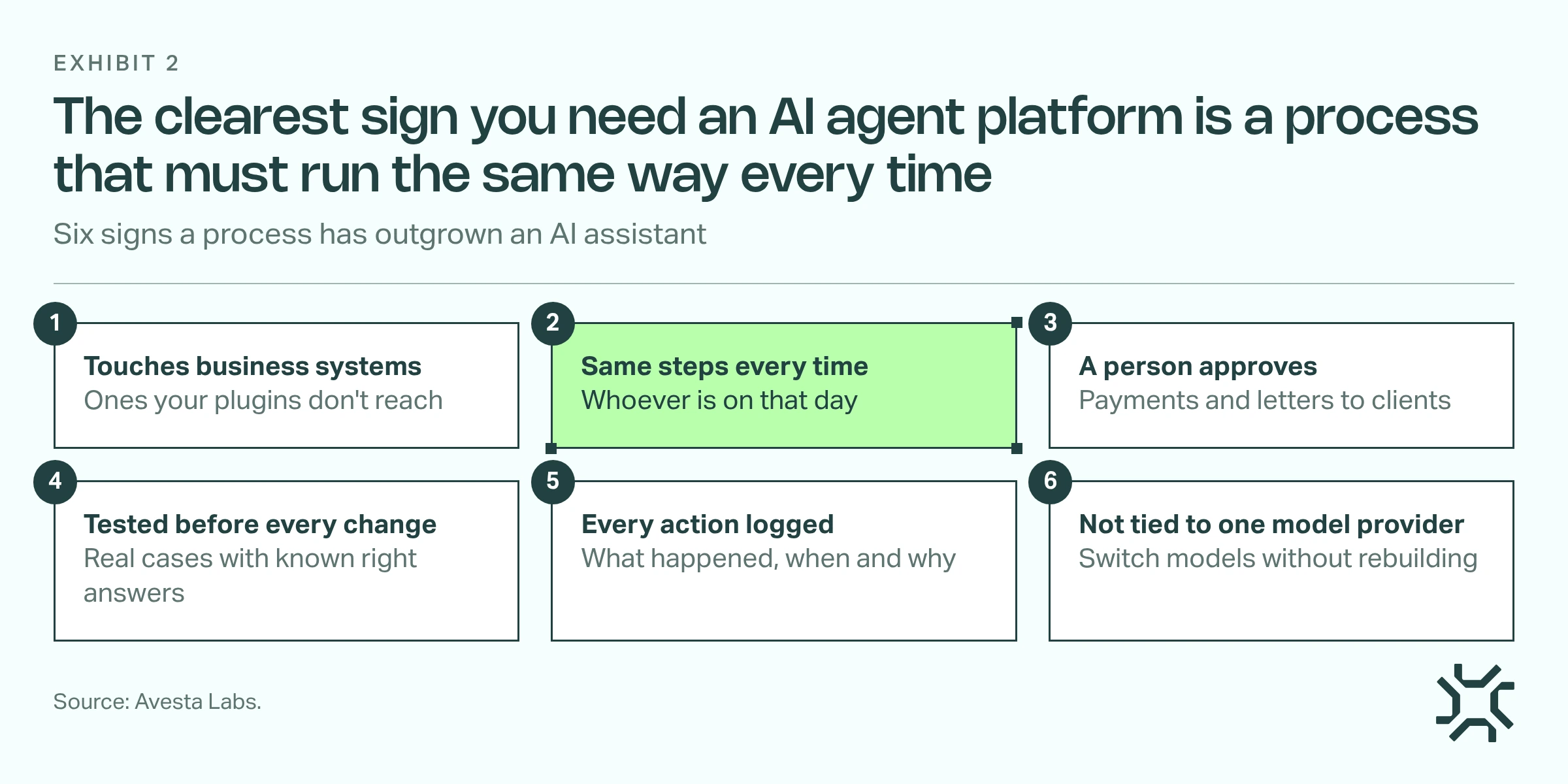
A process needs an AI agent platform, software that runs a business process with AI agents under your rules, when:
- It touches business systems the assistant's plugins don't reach, such as the practice management system or the broker platform.
- It must follow the same steps every time, the steps your firm wrote down, whoever is on that day.
- A person approves what matters, such as a payment or a letter to a client, inside that process.
- It is tested before every change, against real cases with known right answers.
- Every action is logged across the whole process, not only inside one vendor's app.
- It doesn't depend on one model provider, so a better model next year doesn't mean a rebuild.
Parts of signs 3 and 5 already exist inside the vendors' own apps: ChatGPT and Claude can ask before they act, and Microsoft's audit log covers Copilot Cowork. In our experience, signs 1, 2, 4 and 6 are where firms outgrow an assistant.
Sign 2 is the one people miss. A scheduled task in an assistant repeats a request, and the assistant works out its steps afresh on each run. A process runs the steps your firm wrote down, in the same order, every time.
A scheduled task repeats a request. A process repeats your steps.
How we decide this with clients in Avesta AgentOS
We start every conversation with which process, not which tool. If a firm already uses one of these assistants for drafting, research and meeting notes, we tell it to keep it. We build in Avesta AgentOS only when a job has become a process.
Three rules from our client work apply to any firm, whatever tools it picks.
1. Decide in advance which steps need a person
In Avesta AgentOS, the firm decides what runs on its own and what waits for a person, and agents pause for approval on anything that matters. Write your own list before you switch any agent on: which steps are cheap to undo, and which aren't.
2. Test on your own real questions
India Avenue's investor support assistant passed 50 real questions that India Avenue supplied and marked (October 2026), and every change still runs against them. You can do a small version with any assistant: keep ten questions with known right answers, and re-run them when the vendor changes the model.
3. Keep a record of every action
In Avesta AgentOS, every action an agent takes is logged: what happened, when and why. For a task one person checks, that matters less. For a process that runs every day, it's how you catch a problem in the first week.
Do you need an AI agent platform at all?
Often not yet. If the work is one person drafting, summarising or researching, an assistant is cheaper, quicker to roll out and good enough. Work that changes shape every time doesn't belong in a fixed process.
A platform pays its way when the process is frequent, follows rules you can write down, and costs real staff time today. Enquiries, renewals, document checks and follow-ups are common examples. If you can't describe the process to a colleague in one sentence, write it down first and buy software later.
The bottom line
For most firms of 20 to 200 people, one assistant for everyone is the right start, plus a second for a team with a clear need. The bigger decision comes later, when a weekly job turns out to be a process that the firm depends on. For more on that shift, read what separates AI-assisted work from agentic AI.
How many of your weekly jobs follow the same steps every time?
Found a process that takes staff time every week? We can map it with you.
See how Avesta AgentOS runs processes with your team
Get started: hello@avestalabs.ai
Frequently asked questions
- Is Copilot or ChatGPT better for business?
- Neither is better everywhere. Microsoft 365 Copilot fits a firm whose email, documents and meetings already live in Microsoft 365, because it works inside those apps. ChatGPT fits teams whose work is spread across Google Drive, Slack and other tools, which its plugins connect to. Give both the same real tasks for a fortnight before you buy seats for everyone.
- Can I use Claude inside Microsoft Copilot?
- Partly. Microsoft's June 2026 announcement says Copilot Cowork, its agent for long, multi-step tasks in Microsoft 365, runs on Anthropic's models, the models behind Claude. You get those models inside Microsoft's apps and controls, but not the Claude app itself, with its own projects and scheduled tasks.
- How is pricing different for ChatGPT, Claude and Copilot?
- The models differ more than the headline numbers. Microsoft said in June 2026 that Copilot Cowork needs a Microsoft 365 Copilot licence per user and is then billed by usage. OpenAI moved workspace agents to credit-based pricing from May 2026. Seat prices change often, so check each vendor's pricing page on the day you decide.
- Is ChatGPT agent still available?
- No. As of November 2026, OpenAI's help centre says ChatGPT agent is no longer available and points users to ChatGPT Work for longer, multi-step tasks. OpenAI launched ChatGPT Work on 9 July 2026. It acts across your apps and files, and you can approve important actions as it works.
- Should a small firm pay for more than one AI tool?
- Usually not at first. Most firms of 20 to 200 people do better with one tool for everyone, chosen by where their work lives, plus a second tool for one team with a clear need. Paying for two tools everywhere splits habits and doubles the admin, and it rarely doubles the value.
Share this article