RAG Data Freshness: Keep a Knowledge Base Up to Date
An AI agent answers from a copy of your documents, called its knowledge base. Here is how to keep that copy up to date when the documents change.
 Jeet Adeshara9 min read
Key takeaways
- RAG data freshness is how quickly a change in your source documents reaches an AI agent's answers. The agent is only as up to date as its last successful sync.
- Sync each source at least as often as it changes, and more often where a stale answer is costly. Data that changes by the minute, such as stock levels, should be looked up live, not copied into a knowledge base.
- An incremental sync gives each document one of five outcomes: add it if new, re-index it and remove its old passages if edited, skip it if unchanged, remove it if deleted, and retry it if it failed.
- Stale data never shows up as an error. Watch the time of the last successful sync for every source, and alert when it's older than the schedule allows.
AI agents that answer from your documents don't read the documents themselves. They read a copy, kept in a searchable store called a knowledge base. Technical teams call this setup RAG (retrieval-augmented generation: the agent retrieves matching passages from the copy, then answers from them).
That copy only changes when it's synced: when the system checks the documents again and updates the store. Between syncs, an edited policy or a withdrawn price list stays in the copy exactly as it was. The agent then quotes it with full confidence.
So when an agent gives last month's answer, look at the sync before you blame the model.
What is RAG data freshness?
RAG data freshness is how quickly a change in your source documents shows up in an AI agent's answers. The agent only searches its own copy of those documents, its knowledge base. Freshness depends on how often you sync that copy, whether each sync catches edits and deletions, and whether anyone notices when a sync fails.
An agent is only as up to date as its last successful sync.
The time between a document changing and the agent using the new version is the freshness gap. It's the wait for the next sync, plus the time the sync takes to read, split and index the document. In this made-up example, HR replaces the travel policy on a Monday, and the knowledge base syncs once a week, on Sunday night.
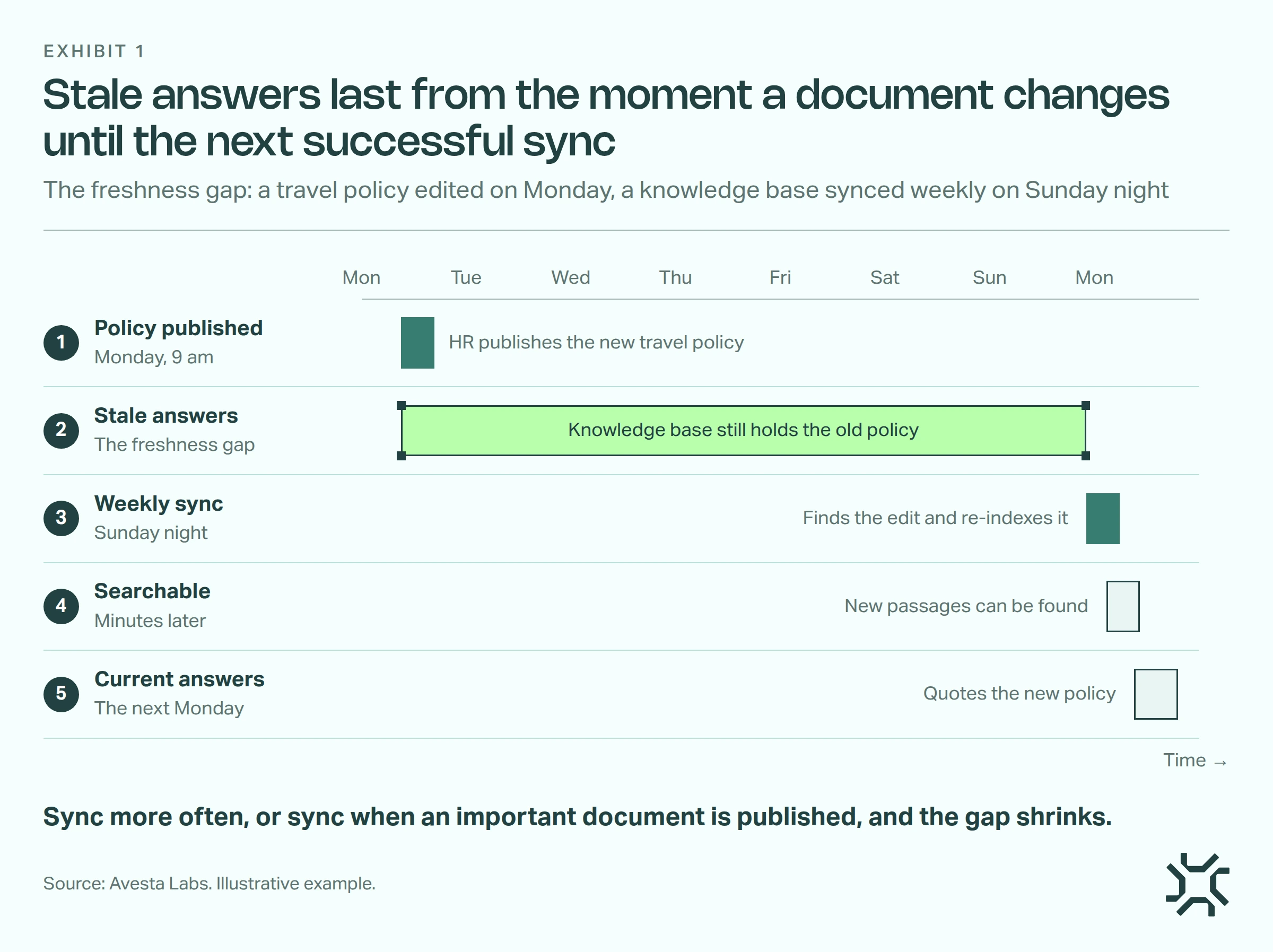
- Monday, 9 am. HR publishes the new travel policy in the source folder.
- Monday to Sunday. The knowledge base still holds the old policy, so every answer about travel claims is stale. This is the freshness gap.
- Sunday night. The weekly sync finds the edited document and re-indexes it.
- Minutes later. The new passages become searchable.
- The next Monday. The assistant quotes the new policy.
Why does a RAG knowledge base go stale?
A knowledge base goes stale when the source changes and the copy doesn't. That happens in four ways:
- The sync runs less often than the documents change. A weekly sync can't keep up with a price list that changes every day.
- The sync adds new files but misses edits. Some loaders only look for documents they haven't seen before. An edited file keeps its old passages.
- Old copies stay searchable. A withdrawn policy stays in the knowledge base unless the sync removes it. The same happens when someone uploads a new version as a separate file and leaves the old one beside it. Search can then find either.
- A sync fails and nobody hears about it. A file that fails to download or read stays at its old version. If the sync records progress anyway, that file may never be tried again.
Only the first cause is about timing. A faster schedule doesn't fix the other three.
How often should you sync a RAG knowledge base?
The rule we use: sync each source at least as often as it changes, and more often where a stale answer is costly. Then add a manual sync for the moments that matter, such as the day a new policy is published.
| Source | How often it changes | Cost of a stale answer | Sync it |
|---|---|---|---|
| Stock levels, account balances, order status | Every minute | High: wrong orders or promises | Don't copy it. Give the agent a tool that looks it up live |
| Price lists, rosters, opening hours | Daily | High: wrong quotes | Daily, plus a manual sync when they change |
| Policies, procedures, product documents | Weekly to monthly | Medium to high: wrong advice | Daily, plus a manual sync on publish |
| Help-centre articles and FAQs | Weekly | Medium | Daily |
| Archives, past reports, old product manuals | Rarely | Low | Weekly or monthly |
The first row matters most. Data that changes by the minute doesn't belong in a knowledge base. By the time it's copied and indexed, it may already be wrong. A live lookup (a tool call: the agent asking another system for the current value) is fresher than any sync.
A sync triggered by every change, sometimes called streaming or real-time sync, shortens the gap further. It still has to handle edits, deletions and failures correctly, so get those right first.
How can RAG be updated with new knowledge?
Through an incremental sync: each run looks only at what changed since the last run, instead of re-reading everything. Amazon's documentation for Bedrock knowledge bases puts it plainly: syncing is incremental, so Bedrock processes only documents "added, modified, or deleted" since the last sync (AWS).
Each document in a run gets one of five outcomes:
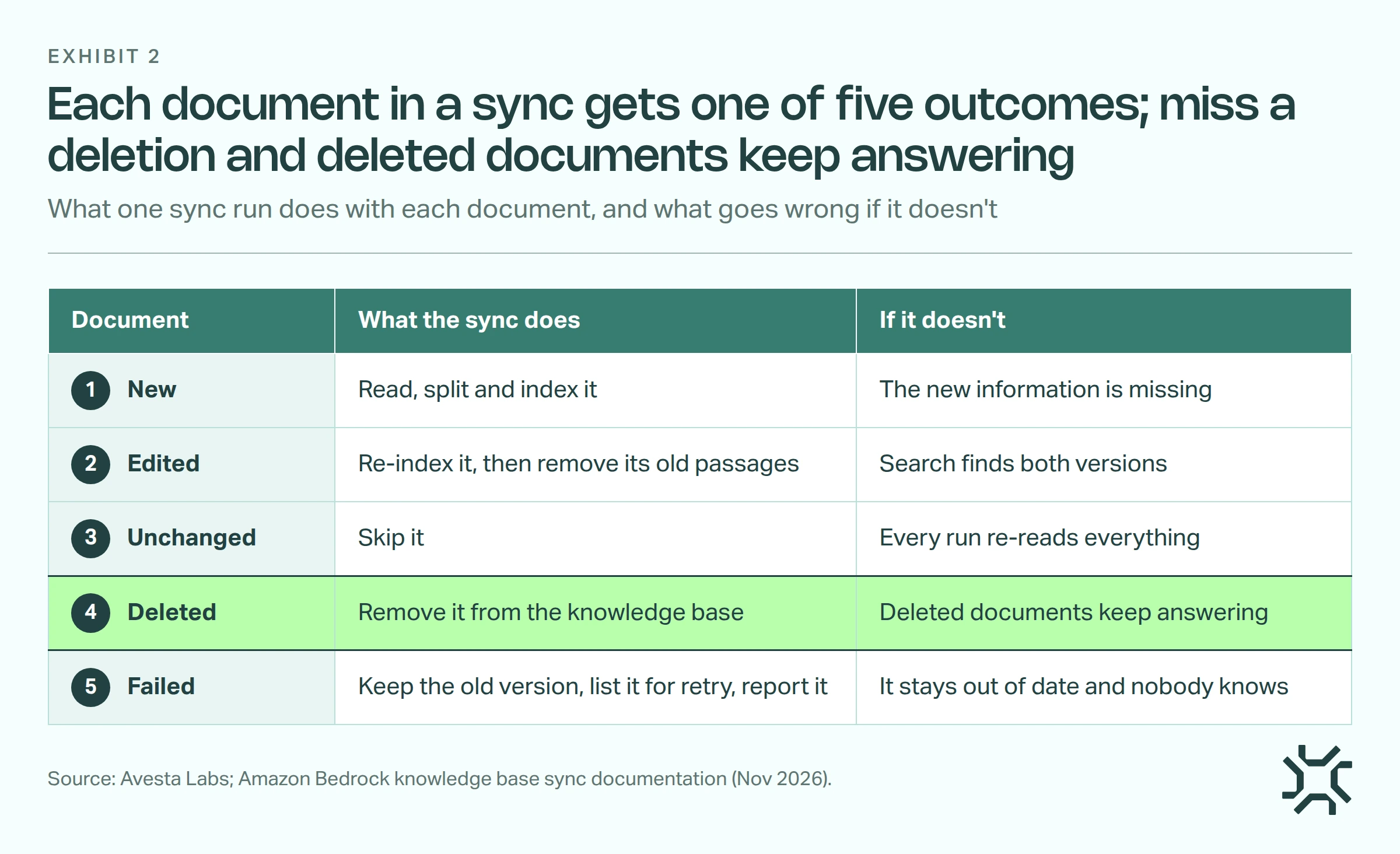
- New document. Read it, split it into passages and index it.
- Edited document. Re-index it, then remove its old passages, so search can't find both versions.
- Unchanged document. Skip it. This keeps the sync fast and cheap.
- Deleted document. Remove it from the knowledge base. Skip this, and withdrawn documents keep turning up in answers.
- Failed document. Keep the old version, put it on a retry list and report it.
Some search tools can also rank newer passages above older ones. That helps when two versions sit side by side, but it hides a missed edit or deletion rather than fixing it.
How does an incremental sync know what changed?
There are three common ways. In our experience, the first is the most reliable and the last the least:
- A change feed. Some systems keep a list of changes and give you a bookmark (Microsoft calls it a delta link) to ask for "everything since last time". Microsoft's API for SharePoint and OneDrive works this way. It marks deleted items, which "should be removed from your local state" (Microsoft). If the bookmark is too old, the service says so, and you start a full scan from scratch.
- A version tag or last-modified date per file. Compare it with the one you stored last time. Track each document by a stable ID, not its file name, so a renamed file isn't treated as new.
- A website's sitemap date. A sitemap can list when each page last changed. Google says it uses that date if it's consistently and verifiably accurate (Google Search Central). Treat it as a hint, and re-read important pages on a schedule anyway.
How do you know stale data is reaching answers?
You won't see stale data in an error log. Watch these four signals instead:
- Last successful sync, per source. Alert when it's older than the schedule allows.
- The counts from every run. New, changed, unchanged, deleted and failed. A busy folder that shows zero changes for weeks usually means the sync is looking in the wrong place. A file that fails again on its retry needs a person to look at it.
- A test question for every important change. When a policy changes, add one test question whose answer depends on the new wording to your RAG chatbot test set. Check it after the next sync.
- The source and its last updated date in every answer. Record which document each answer used, and when that document last changed. Then a stale answer can be traced in minutes, as in AI agent tracing.
Test sets are worth keeping even when nothing changes. As of October 2026, India Avenue's investor assistant runs against 50 real questions the client marked, on every change to the assistant.
How we sync SharePoint documents in Avesta AgentOS
In Avesta AgentOS, IngestIQ is the knowledge layer: the part that reads a business's documents and keeps the searchable copy. Since 31 August 2026, it can sync from SharePoint on a daily, weekly or monthly schedule, following the five outcomes above. Our website sync is simpler today: it adds pages it hasn't seen before, and doesn't yet re-read pages that were edited. Three design choices in the SharePoint sync are worth copying.
1. The sync doesn't depend on one person's login
A sync that runs under an employee's account stops working when that person leaves or their access changes. IngestIQ connects to SharePoint as an application instead, with read-only access approved once by the organisation's Microsoft administrator. No employee account stays connected, and the scheduled sync keeps running after the administrator who approved it has moved on.
2. A failed file is never skipped for good
The bookmark moves forward only together with the list of files that failed. A failed file is fetched again on the next run, even if it hasn't changed since. Never move a bookmark past a file you didn't finish.
Otherwise one network error leaves a document at its old version until someone happens to edit it again.
3. Find duplicate sections across pages
Old content often survives because it was copied, not because a sync missed it.
Since 18 November 2026, IngestIQ can find sections that repeat, with the same or similar meaning, across different pages of a knowledge base. It compares the stored embeddings (number patterns that capture what each passage means), with no AI model call. That's the first step of a content review: the team then decides which copy is current and retires the rest.
When is a nightly full re-index good enough?
When the knowledge base is small and changes rarely. If it holds only a small set of documents, re-reading all of them every night is simple.
A rebuild that starts from an empty index also removes deleted documents automatically, because the copy holds only what's there today.
It stops being good enough as the knowledge base grows. Re-reading every document costs time and AI processing on every run, most of it spent on documents that didn't change.
The bottom line
The model can't tell you its copy is out of date. Only the sync can. Give each source a schedule that matches how fast it changes, and treat a late or failed sync as an incident, like any other outage. For answers that are wrong for other reasons, see RAG hallucination detection.
Edit one line in a test document your agent can search, then time how long the agent takes to give the new answer.
Want your agent's knowledge base synced from SharePoint on a schedule, with edits, deletions and failed files handled? See how Avesta AgentOS runs the knowledge layer for production agents.
Get started: hello@avestalabs.ai
Frequently asked questions
- What is the difference between data freshness and data accuracy in RAG?
- Accuracy asks whether the agent's answer matches the documents it found. Freshness asks whether those documents are the current version. An agent can quote a passage perfectly and still be wrong, because the passage was replaced last week. You need both: answer checks for accuracy, and sync monitoring for freshness.
- Does the AI model need retraining when my documents change?
- No. In a RAG system, the passages that match each question are found in the knowledge base and added to the prompt at the moment it's asked. As of November 2026, Amazon's Bedrock documentation notes that this removes the need to keep retraining the model on your private data. When a document changes, sync the knowledge base. The model stays the same.
- How long after a sync can the agent use the new content?
- Usually soon, but not always at once. As of November 2026, Amazon's documentation for Bedrock knowledge bases says it can take a few minutes after a sync finishes before new content can be searched, for vector stores other than Amazon Aurora. Check your own store's behaviour, and test a changed document after each sync.
- Should a RAG agent show when its source was last updated?
- Yes, wherever the answer depends on a document that changes. Showing the source's name and its last updated date lets the reader judge the answer, and spot a stale one before acting on it. It also helps your team: a reader who sees an old date can report it, which is often the first sign a sync has stopped.
Share this article