
AI Agent Cost per Task: How to Calculate and Measure It
Cost per token (the price of each chunk of text an AI model reads or writes) is not the cost of a finished piece of work.
 Jeet Adeshara8 min read
Key takeaways
- AI agent cost per task is everything you spent to get tasks done, divided by the tasks actually finished. The cost per token is only one input to it.
- Count three costs: model tokens (including retries and failed runs), per-use tool fees, and a person's time on hand-offs. Then divide by the tasks actually finished.
- Give every model call the ID of the task it belongs to, so a retry or a hand-off stays attached to the same task.
- Providers count cached tokens differently. Anthropic's input count leaves them out and OpenAI's includes them, so check each provider's usage fields before you add them up.
- When people finish the tasks the agent hands off, their time can be the largest cost. Raising the share the agent finishes can matter more than a cheaper model.
Last week an AI agent worked through 1,000 supplier invoices, and the AI model's bill came to $50. That's five cents an invoice. The finance lead puts the real cost at sixty-five cents an invoice. Both numbers describe the same made-up week, and they disagree because they count different things.
The model's bill counts tokens (the small chunks of text an AI model reads and writes), and each one has a price. The finance lead also counts the 100 invoices the agent passed to a person, who spent six minutes on each.
The second number is the one that tells you whether the agent pays for itself. It's called cost per task, and you can measure it from records you mostly keep already.
What is AI agent cost per task, and how do you calculate it?
AI agent cost per task is everything you spent to get tasks done in a period, divided by the tasks actually finished in that period. Count every model call's tokens at their own prices, including retries and failed runs. Add per-use tool fees and a person's time on hand-offs. The cost per token is only one input.
Cost per task = everything you spent to finish the work ÷ the tasks actually finished.
A task is one piece of work a person would recognise as done: an invoice matched, a refund paid, a question answered. One task usually takes several model calls, because the agent reads, calls a tool, reads the result and decides again.
Why is cost per token the wrong number to watch?
Two agents on the same model, at the same price per token, can have very different costs per task. One cost is the price of a brick; the other is the price of the wall.
Three things widen that gap:
- Steps. An agent that takes twelve model calls to finish a job costs roughly four times as much as one that takes three. Often it costs more, because each later call resends a longer conversation.
- Resent text. Every step sends the instructions, the tool descriptions and the conversation so far again. By step ten, much of the bill is text the model has already read nine times.
- Failures. A run that fails at step eight and starts again pays for those eight steps twice.
None of these show up in a price table. They only show up when you add the cost of every call that belonged to one task.
What goes into the cost of one task?
Some of it is counted in tokens and some of it isn't. Then you divide by the work that got done.
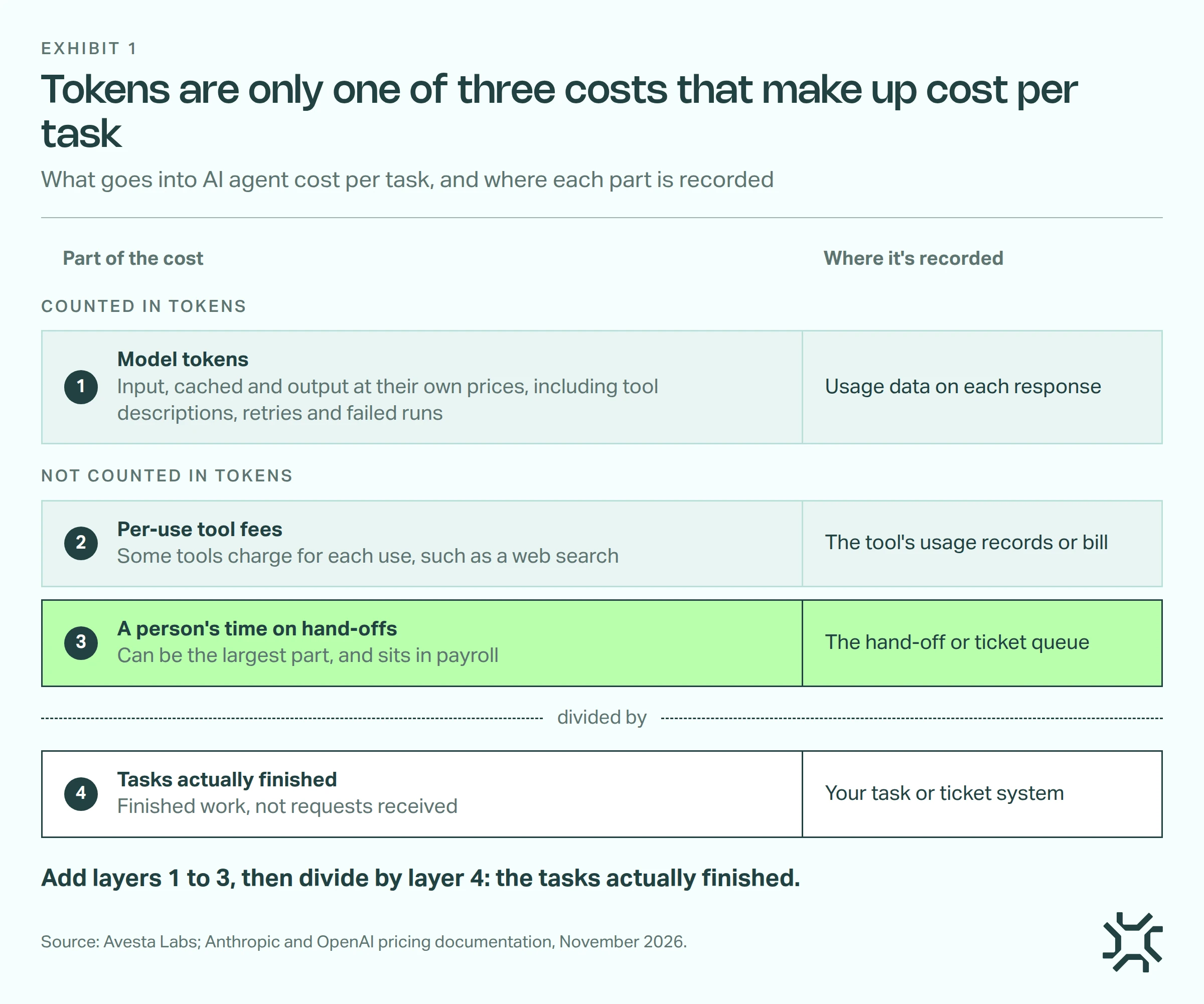
- Model tokens. Input, cached input and output tokens, each at its own price. This already includes three things that are easy to forget. The descriptions of the agent's tools are sent as input on every call, and Anthropic prices tool use on all input tokens, including the tool definitions. OpenAI bills reasoning tokens, the thinking you never see, as output tokens. Retries and failed runs used tokens too, so keep them when you add up a task.
- Per-use tool fees. Some tools charge for each use, on top of tokens. Anthropic's pricing page gives web search, which charges per search, as an example. Find these in the tool's usage records or bill.
- A person's time on hand-offs. When the agent passes a task to a person, their minutes are part of the cost of finishing it. Count the hand-offs in your hand-off or ticket queue; the cost itself sits in payroll, not the AI budget.
- Tasks actually finished. This is the number you divide by. Take it from your task or ticket system, and count finished tasks, not requests received.
How do you measure LLM cost per task in production?
Before any maths, make sure every model call carries the ID of the task it belongs to. A retry or a hand-off is a new attempt at the same task, so it keeps the same ID. AI agent tracing is the usual way to get this, because a trace already groups the calls of one run.
1. Record token counts by type on every call
Each model response comes with usage data: how many input, cached and output tokens it used. Store those counts against the task ID, not just a dollar figure. If a price was entered wrong, the counts are still right, and you can work the cost out again.
2. Price each kind of token at its own rate
Cached tokens cost far less than ordinary input. Our post on prompt caching explains how to keep the cache working. Providers also count input differently, and treating them the same way means you either count cached tokens twice or miss them.
| As of November 2026 | Anthropic | OpenAI (GPT-5.6 and later) |
|---|---|---|
| Does the input count include cached tokens? | No. Input tokens are only those not read from or written to the cache | Yes. In OpenAI's usage example, you subtract cached tokens and cache writes to get ordinary input |
| Price of a cached token | 0.1 times the input price on most models; less on some newer ones | 0.1 times ordinary input on most models; 0.05 times on some |
| Price of writing to the cache | 1.25 times input for five minutes, 2 times for one hour | 1.25 times for 30 minutes, 2.5 times for 12 hours (Responses API only) |
3. Add retries and failed runs
Keep failed, cancelled and timed-out runs in the same records, with their token counts. Their spend goes into the total. Their task only goes into the number you divide by once someone finishes it.
4. Divide by finished tasks, per kind of task
A task is finished when the work is done in your system of record: the invoice matched, the refund paid. Track cost per task separately for each kind of work, weekly, and watch the trend rather than one number.
Worked example: what does one week of tasks really cost?
Here is the made-up week from the opening, step by step. An AI agent receives 1,000 supplier invoices to match against purchase orders.
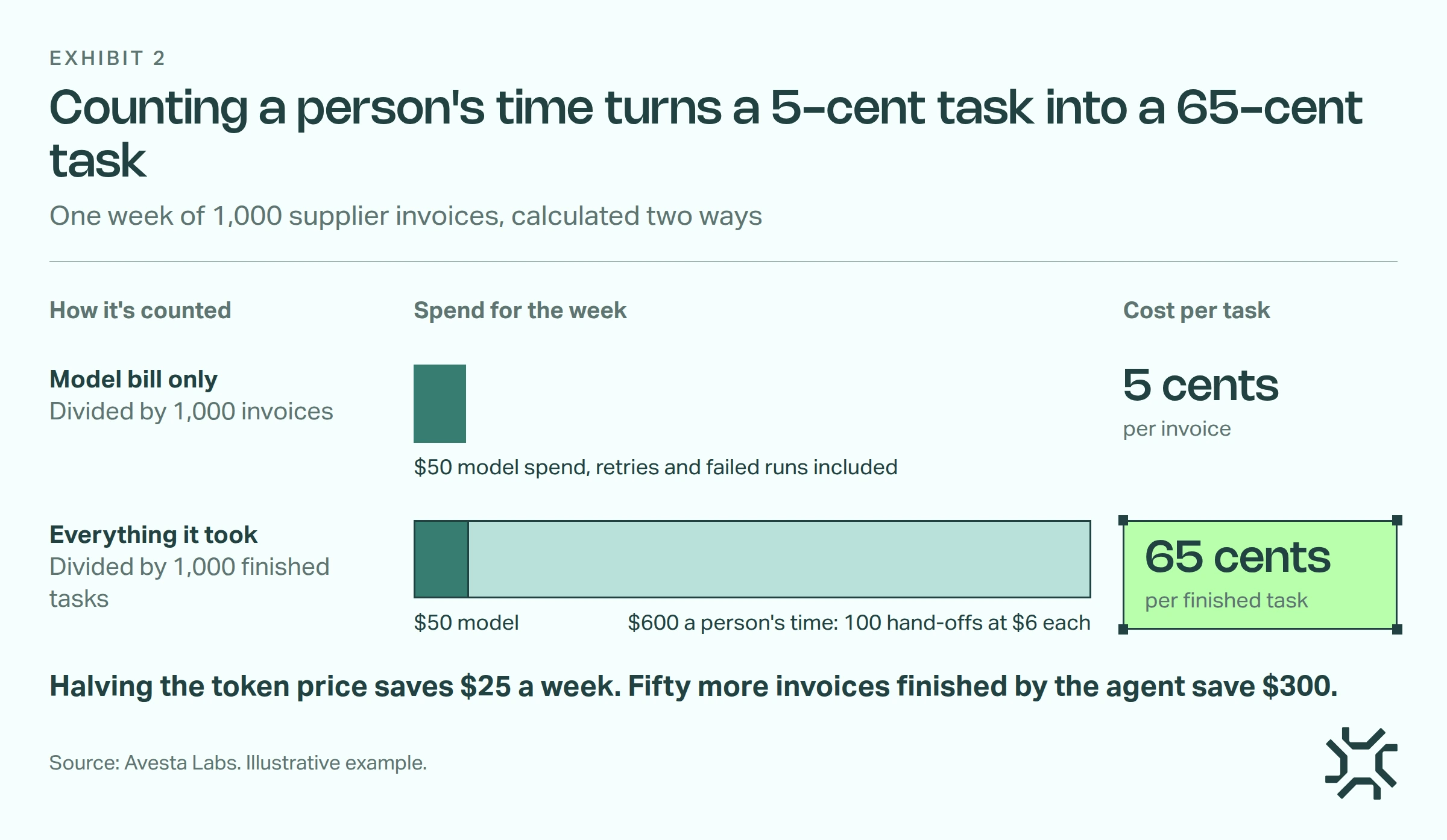
- Model spend for the week is $50. That covers every run, including the retries and the runs that failed.
- The agent finishes 900 invoices on its own. It hands the other 100 to a person in accounts.
- Each hand-off takes a person 6 minutes. At $60 an hour, that's $6 each, or $600 for the week.
- All 1,000 invoices get done, so the total of $650 divides into 65 cents per finished task.
In this example, the person's time costs twelve times the model bill.
That changes what's worth fixing. Halving the token price saves $25 a week. Getting the agent to finish 50 more invoices on its own saves $300.
How we track cost on every run in Avesta AgentOS
In Avesta AgentOS, each finished agent run records its own token counts, step count and cost. These choices made the numbers trustworthy.
We price each kind of token separately. A run's cost is its ordinary input tokens at the model's input price, plus its cached tokens at the cached price, plus its output tokens at the output price. The software library we use to call models reports cached tokens inside the input total, so Avesta AgentOS subtracts them first. Without that step, each cached token would be charged once at the full input price and again at the cached price.
A tool that calls a different model is priced at that model's rate. When an agent uses an image tool, the image model's tokens are recorded on the same run and priced at the image model's own rates. Then they're added to the run's total. Pricing them at the main model's rate would make the run look cheaper or dearer than it was.
We keep the raw counts, not only the dollars. The prices sit in each model's settings, and the token counts stay on the run. If a price was entered wrong, the counts needed to work the cost out again are still there.
Avesta AgentOS also counts the steps in each run and how often a run hits its step limit (the cap on how many steps one run may take). A rise in either can be an early sign that cost per task is about to climb.
When is the monthly invoice enough?
Skip the full method while an agent is a prototype handling a few dozen tasks a week. At that volume, the monthly invoice divided by a rough task count is close enough, and your time is better spent on whether the answers are right.
It also matters less when you pay a flat subscription per seat rather than per token. The same goes when every task is one short call with no tools and no hand-offs. Start measuring properly once volume grows, once tasks take several steps, or once someone asks whether the agent is cheaper than the team it supports.
The bottom line
A business case needs cost per task, because it's the number you can set beside what the work is worth. Cost per token can't tell you that on its own.
If tool output is what fills your prompts, our post on cutting input tokens with context compaction is a good next read.
Add last month's hand-off time to last month's model bill, divide by every task that got finished, and set the result beside the bill-only figure.
Want token counts and cost recorded on every agent run, without building the tracking yourself?
See how Avesta AgentOS tracks spend and performance
Get started: hello@avestalabs.ai
Frequently asked questions
- How much does an AI agent cost per task?
- There is no standard figure. It depends on how many model calls a task takes, how long the prompts are, how often runs fail and how much work goes to a person. A short question answered in one call can cost a fraction of a cent; a long task with many tool calls can cost dollars. Your own figure comes from your records.
- Should failed tasks count in AI agent cost per task?
- Their spend should, and the task itself only once it's finished. The tokens a failed run used go into the total; the task goes into the number you divide by only when someone, agent or person, completes it. If you leave failures out of the spend, the agent looks cheapest exactly when it is failing most.
- How do you estimate AI agent cost per month?
- Multiply the tasks you expect in a month by your measured cost per task for each kind of task, then add any fixed fees. Use a few weeks of real records rather than a demo, because retries, long conversations and hand-offs only show up at real volume. Re-check it whenever the prompt, the model or the tools change.
- Do reasoning tokens count toward LLM cost per task?
- Yes. Reasoning models think in tokens you never see in the reply, and OpenAI bills those reasoning tokens as output tokens. Output tokens usually cost several times more than input tokens, so a task that needs a lot of reasoning can cost more than its short answer suggests. Check the usage data on each response.
- Does prompt caching lower AI agent cost per task?
- Often, yes. When the start of a prompt repeats, providers bill those cached tokens at a fraction of the ordinary input price: a tenth or less on current Anthropic and OpenAI models as of November 2026. Agents resend the same instructions on every step, so caching helps most on tasks with many steps.
Share this article