AI Agent Permissions: Least Privilege for Tools and Data
A rule for how tight each tool's permissions should be, and where to enforce them so instructions can't override them.
 Jeet Adeshara9 min read
Key takeaways
- AI agent permissions are four limits: which tools the agent may call, what each tool may do, whose data it can see, and where that data lives.
- Least privilege means each limit is as small as the job allows. A tool that only needs to read should have no way to change or delete anything.
- Enforce permissions outside the model. OWASP says not to rely on the model to decide whether an action is allowed.
- The more a tool can change, the tighter its permissions should be: read-only access for lookups, a fixed place for writes, a person's approval for anything hard to undo.
- An agent acting for one person should use that person's access, never a shared account that can see every customer's data.
A support agent needs to look up orders, so someone gives it the login the developers use for the customer database. It's the quickest way to get the agent working. That login can also change prices, refund orders and delete customers.
The agent's instructions say "only look things up". But instructions are a request. If a customer's message confuses the agent, or a hidden instruction in an email fools it, the database will do whatever that login allows.
So the limit has to sit outside the agent. Decide what each of its tools should be able to do, then make the system itself refuse the rest. A tool is a connection the agent uses to reach one of your systems, such as the database or the inbox.
What are AI agent permissions?
AI agent permissions are the limits on what an agent can reach. They cover which tools it may call, what each tool may do (read, create, change or delete), whose data it can see, and where that data lives. Least privilege keeps each limit as small as the job allows, enforced by the systems the agent calls.
An agent can do whatever its access allows, not whatever its instructions say.
Why can't an agent's instructions set its permissions?
Because the model can be wrong, or fooled. When the agent decides to use a tool, ordinary software makes the request, using whatever credentials that tool was given: the login or key it signs in with.
OWASP, the nonprofit open-source security foundation, calls the risk excessive agency. Its guidance for AI applications names three causes: excessive functionality, excessive permissions and excessive autonomy. Its example is close to our opening scene: a tool meant only to read data, connected with a login that can also update, insert and delete.
OWASP's fix is blunt. "Implement authorization in downstream systems rather than relying on an LLM to decide if an action is allowed or not." The downstream system is the one the tool talks to: the database, the file store, the email service.
The check that counts sits outside the model: in the software that runs the agent, or in the system it calls.
Our post on prompt injection in AI agents shows what happens when an agent is fooled. Permissions decide what a fooled agent can still reach.
How do you implement least privilege for AI agents?
Set four limits, from the outside in. Each answers one question, and each is enforced somewhere other than the prompt.
| Limit | The question | Narrow version | Where it's enforced |
|---|---|---|---|
| 1. Tools | Which tools can this agent call? | Only the tools its job needs; nothing else is offered | The software that runs the agent |
| 2. Actions | What can each tool do? | Read, create, change and delete granted separately | The tool, and the credentials it uses |
| 3. Data | Whose records can it see? | Only the person's or the customer's own records | The query, using an identity the agent can't change |
| 4. Location | Where do the data and the model run? | Inside the customer's own cloud account, when they need it | The cloud account itself |
Three primary sources make the first three limits concrete.
- Ask for narrow access first. The Model Context Protocol is a common standard for connecting tools to agents. Its security guidance has a client ask only for "low-risk discovery/read operations" at first, and for more only when a riskier action is attempted. It warns against broad catch-all access ("wildcard or omnibus scopes").
- Grant actions on specific things. AWS's IAM best practices define least privilege as granting "only the permissions required to perform a task". That means specific actions, on specific resources, under specific conditions.
- Act as the user, not as an administrator. OWASP warns against a tool that works for one person but reaches its systems with "a generic high-privileged identity". That is one login that can see every user's files.
Role-based access control, often shortened to RBAC, decides access by a person's role, such as "support team". It belongs to limits 2 and 3, and works best when the role belongs to the person the agent works for.
How tight should each tool's permissions be?
The more a tool can change, the tighter its permissions should be. A lookup that goes wrong shows the wrong answer. A deletion that goes wrong can't be taken back.
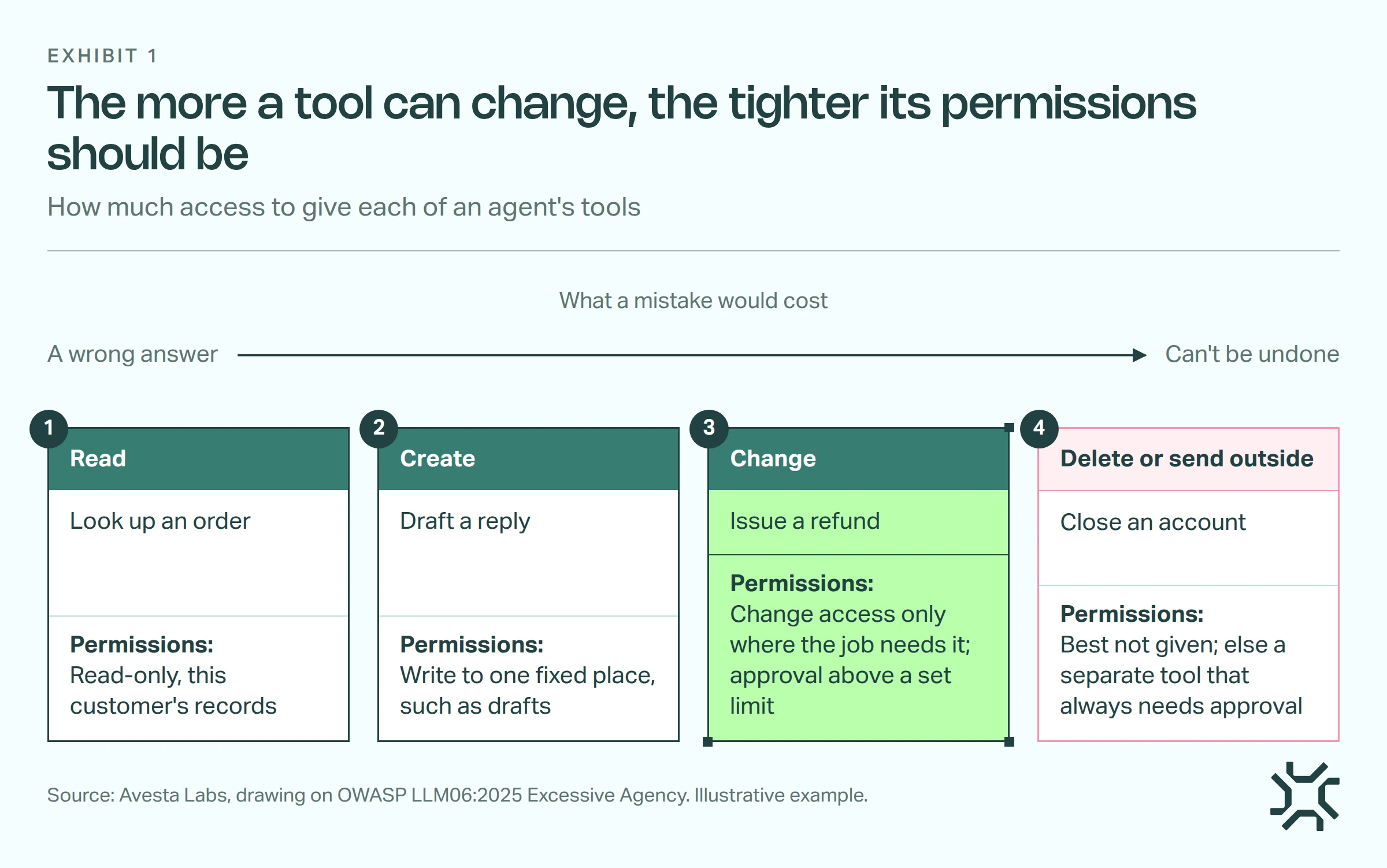
- Read. Lookups get read-only access, limited to the records this request is about.
- Create. New records go to one fixed place, such as a drafts folder, never anywhere the agent chooses.
- Change. This step needs the most thought. Give change access only where the job needs it, and ask for a person's approval above a set limit.
- Delete or send outside. Leave these out if you can. If the job needs one, make it a separate tool that always needs approval.
Our prompt injection post sorts tools by the harm a fooled agent could do. This scale decides how much access each one gets.
A worked example (an illustration, not a client). A support agent needs four things. "Find order" gets read-only access to the signed-in customer's orders. "Draft reply" writes to drafts only. "Issue refund" can change one order's status, and refunds over $200 wait for a person. "Close account" isn't given to it at all: closures go to the team.
How we set AI agent permissions in Avesta AgentOS
Here are three permissions management patterns from Avesta AgentOS, the platform we build and run our AI co-workers on. Each is something you could copy in your own agent.
1. Read, write, update and delete are separate permissions
When an agent is given a table of data, it gets four separate permissions: read, write, update and delete. A table tool is only created for a permission that is on. With only read on, the agent is offered a single "get rows" tool for that table. The tools to add, change or delete its rows don't exist for it, so no instruction can call them.
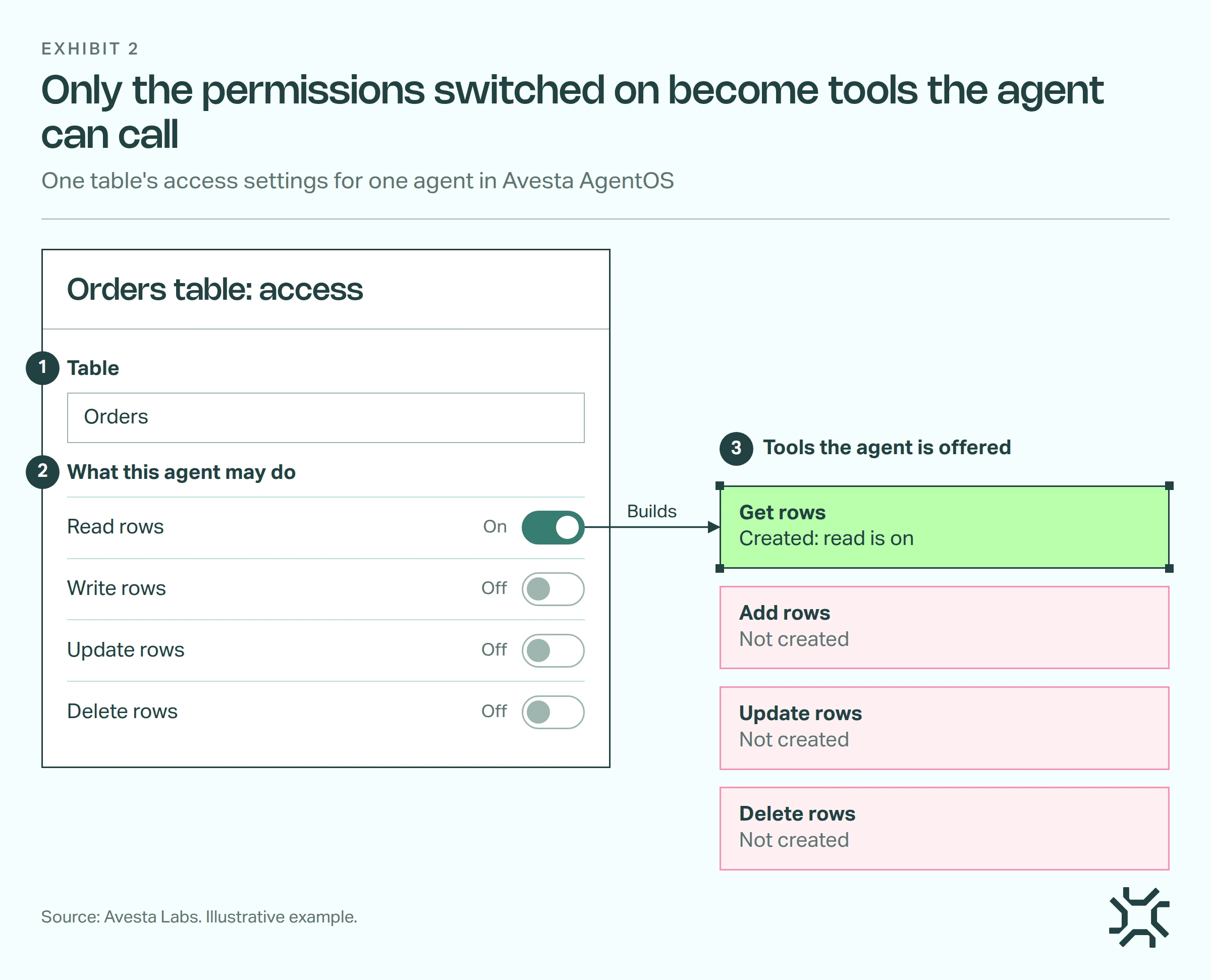
- The person setting up the agent picks the table. The table is fixed inside each tool, so the agent can't point it at a different one.
- They turn on only the actions the job needs. Here, read.
- Only those tools are built. The agent sees "get rows" and nothing else.
This sets limit 2, the actions. It doesn't decide which rows each person may see: that is limit 3, a separate check.
Files work in a similar way. An agent can create or edit files only where a folder or file is marked writable for it, and each write is checked again against that setting when it runs.
2. Whose data is set by the platform, not by the model
The agent never says which organisation it works for. That comes from how the agent is set up on the platform, never from anything the model writes. When the agent lists or reads its files, the database query itself filters by that organisation.
When an agent uses a connected service that needs a sign-in, each call uses that person's own access for that service. For example, if a sales manager asks the agent to check a calendar service, it uses the manager's own sign-in. It sees what the manager could see, and no more.
3. Trim each connected tool list, then guard the risky few
A connected tool server, such as one built on the Model Context Protocol, offers all its tools to an agent unless some are excluded. So for each agent, exclude the tools its job doesn't need. Then switch on role checks or approvals for the few that change or send. In Avesta AgentOS, both are set per agent and per tool, so a read-only lookup with no approval rule runs without waiting for a person.
Sometimes the strongest limit is the cloud account itself. For CHAIRS Global, we built AskCHAIRS, a members' assistant that runs entirely inside the client's own AWS account, with the model on AWS Bedrock in that same account.
When is per-tool least privilege overkill?
Match the effort to what the agent can reach.
- A read-only agent over public documents. If it can only search your published help pages, a short tool list is enough. You don't need per-person data rules.
- A prototype on test data. AWS itself says you "might start with broad permissions" while you explore, then narrow them "as your use case matures". In our view, that only holds while the data is test data.
- One internal user, one task. A single analyst's reporting agent can use that analyst's own read access, and nothing more elaborate.
The full set earns its cost when an agent serves many people, touches customer records or can change, pay or send. Those agents also need a record of every call, which our AI agent audit log checklist covers.
The bottom line
Start with the one tool that can change the most, and tighten its permissions first. That is where a confused agent could do the most harm. For the wider picture of checks around an agent, see our post on guardrails in AI agents.
What is the worst thing your agent's most powerful login allows, and does its job need that?
Want your AI agents to have only the access their jobs need? Safe AgentOps covers evals, guardrails, audits, testing and monitoring for agents in production.
Get started: hello@avestalabs.ai
Frequently asked questions
- What do AI agents have access to?
- Only what you connect them to. An agent can reach the tools you give it, such as a database, an inbox or a file store. Each tool can then do whatever its credentials allow, meaning the login it was given. That is why the credentials matter more than the instructions. Check what each login can do, not just what the agent is told to do.
- How do I secure AI agents?
- Start with an inventory. List every tool each agent holds and what its login can do. Find the one that can change, pay or send the most, and tighten that first. Then add a person's approval for risky actions, a record of every tool call, and defences against prompt injection. Permissions limit the damage when the other defences miss something.
- What is excessive agency in AI agents?
- It is OWASP's name for an agent that can do more damage than its job requires. OWASP lists three causes: excessive functionality, excessive permissions and excessive autonomy. In practice that looks like a reading tool that can also delete, a login that can change data it only needs to read, or high-impact actions with no person checking them.
- What is least privilege in cyber security?
- Least privilege means giving a person or a system only the access a task needs, and nothing more. AWS's guidance describes it as granting only the permissions required to perform a task, on specific resources under specific conditions. For AI agents the idea is the same, applied to each tool the agent can call and the data that tool can reach.
- Should an AI agent have its own account or use the user's?
- Both have a place. When an agent acts for one person, such as reading their email, it should use that person's own access, so it sees only what they could see. When an agent does a shared back-office job, give it its own account with narrow permissions. What to avoid is one powerful shared account that every agent and every user goes through.
Share this article