How to Redact PII Before LLM Prompts in an AI Agent
Redact names, numbers and addresses before the AI model reads them. Put them back only for people allowed to see them.
 Jeet Adeshara13 min read
Key takeaways
- To redact PII before an LLM sees it, find every place personal information enters the agent, drop what the job doesn't need, and replace the rest with numbered placeholders before the call.
- The user's message is only one way in. Retrieved documents, tool results and the agent's own logs carry personal information too.
- Numbered placeholders such as [Name 1] keep answers working. Software puts the real values back only for people allowed to see them.
- No PII redaction tool finds everything. The open-source tool Presidio and Amazon's call redaction both say so. Plan a second layer.
- If the redacted copy is late or missing, wait and retry. Never fall back to the original.
Say a customer emails your AI support agent: "Hi, this is Priya Shah. My new mobile is 0412 345 678. Please update my address to 14 King St, Parramatta. Policy 48213."
To answer, the agent sends that email to an AI model (a large language model, or LLM) run by another company. So the name, number, address and policy go too. They can end up in that company's systems, and in your own logs.
Redaction means taking those details out before the AI model reads them. This post shows where personal information (often called PII, short for personally identifiable information) gets into an agent. It covers what to remove, what breaks when you do, and how we handle it in the systems we run.
What does it mean to redact PII before LLM prompts?
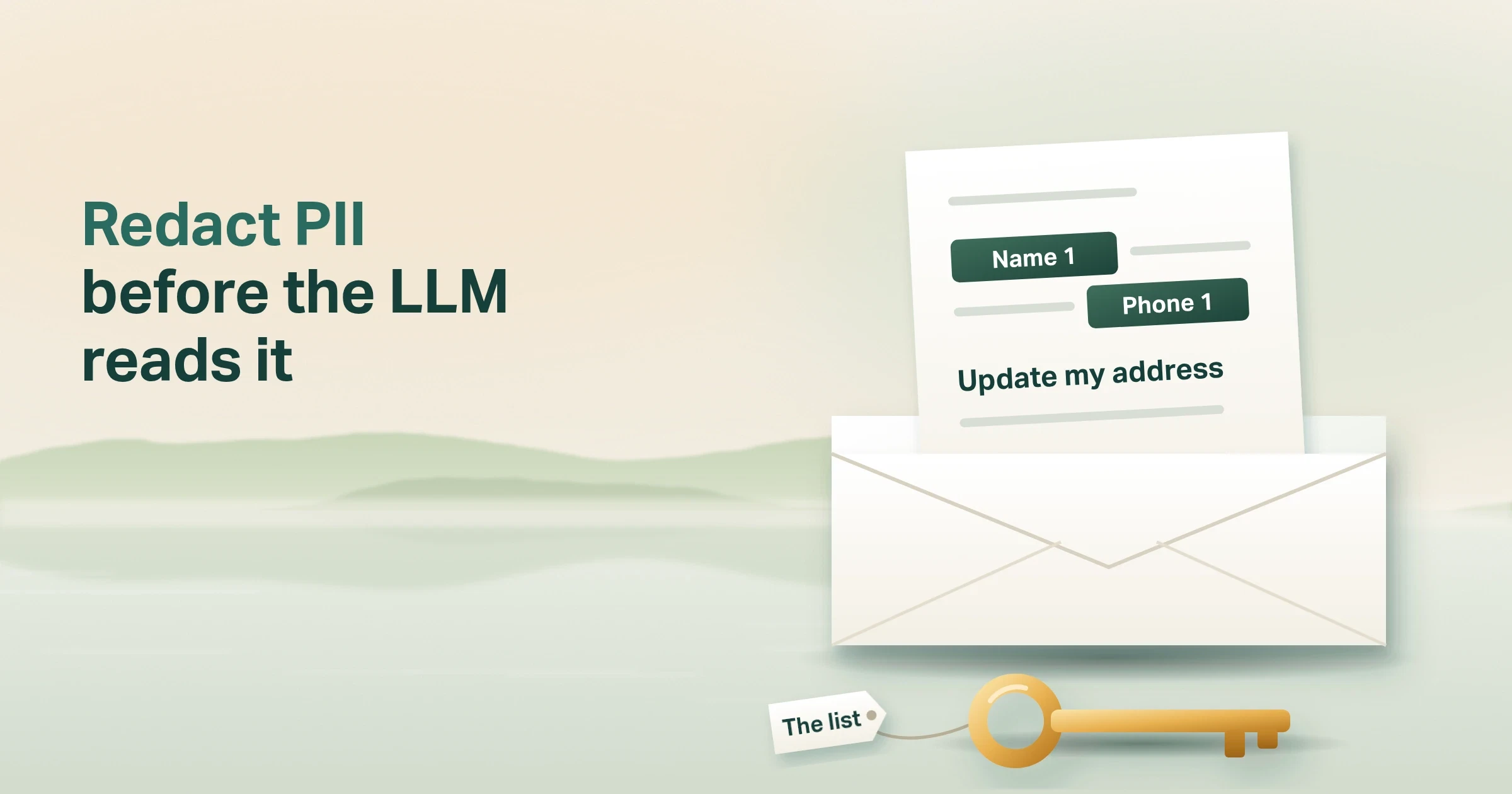
To redact PII before LLM prompts go out, find each piece of personal information before the model (the large language model that writes the answers) sees it. Remove what the task doesn't need, and swap the rest for a numbered placeholder. The model works with the placeholders. Software puts the real values back afterwards, only for people allowed to see them.
Put simply:
The model works with [Name 1]. Only your software knows who that is.
Think of it like a contractor reading a file with the names covered by numbered stickers. They can still do the work: "Write to person 1 about address 1." You keep the list that says who person 1 is. You fill in the letter before it goes out.
OWASP, the open security community, lists sensitive information disclosure second in its 2025 list for large language model apps. It warns that "personal identifiable information (PII) may be disclosed during interactions with the LLM". Its advice: "pattern matching can detect and redact confidential content before processing."
Where does personal information reach the model in an AI agent?
Most guides talk about the user's message. In an AI agent, that's one door of four. An agent also looks things up, calls other systems and writes records.
| Way in | Example | Who controls it |
|---|---|---|
| The user's message | "My mobile is 0412 345 678" | The user |
| Documents the agent retrieves | A claim form found by search | Your knowledge base |
| Tool results | A customer record returned by your CRM (the system that holds customer details) | Your systems |
| The agent's own logs | The full prompt saved for debugging | Your engineers |
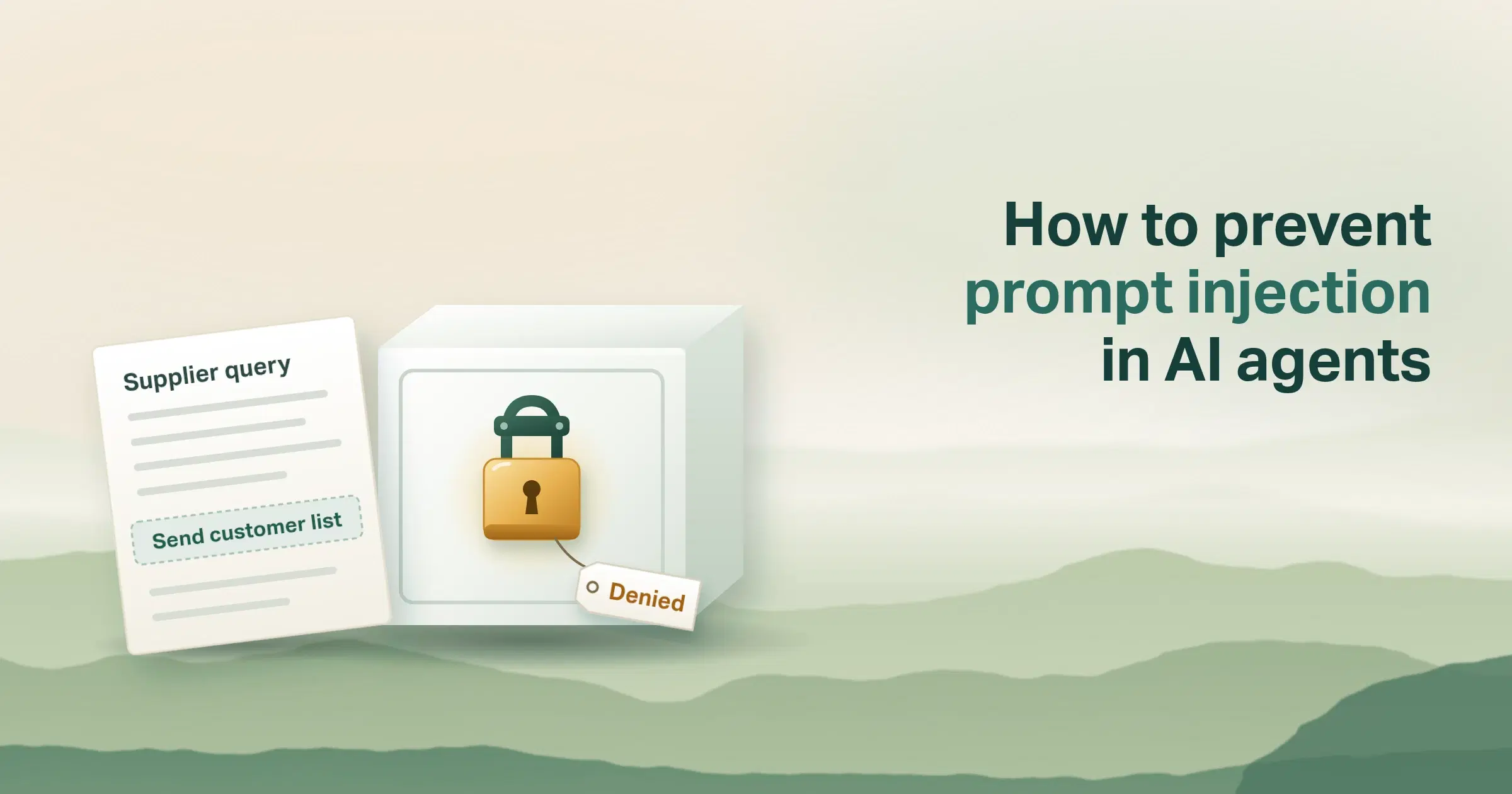
Tool results are the door people forget. Ask a customer system for "the order status" and it can send back the whole customer record. If the tool passes that straight on, the model reads every field.
Logs are the door that lasts longest. A redacted prompt is no help if the original was written to a log first. Our AI agent audit log checklist covers what to keep and where.
Redact at every door, not just the chat box.
How do you redact PII before LLM calls, step by step?
The order matters. Every redaction step runs in software you control, before or after the model that answers, not inside it.
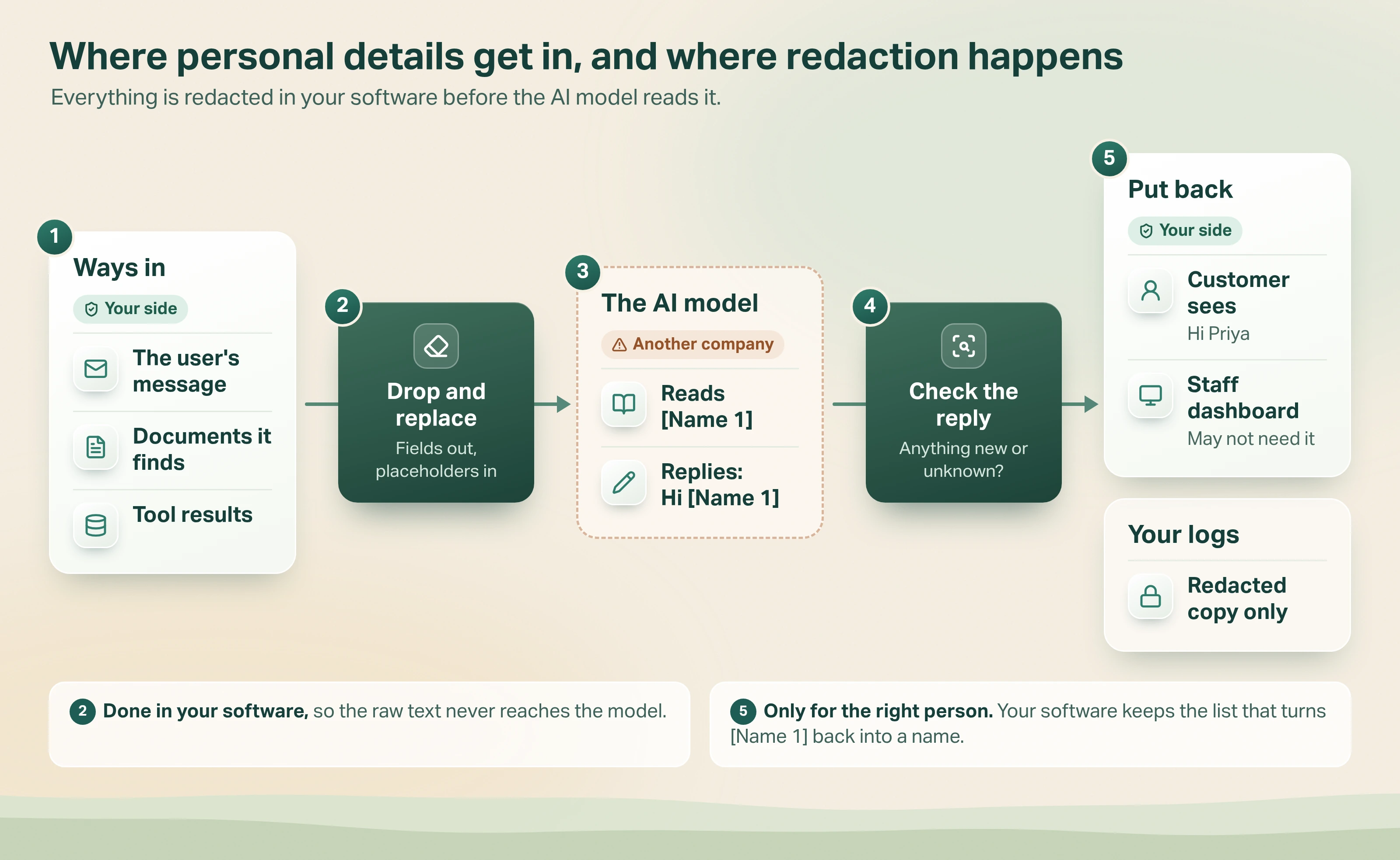
- Collect. A message, document or tool result arrives with personal details in it.
- Drop, then replace. If the task is "update an address", the date of birth stays out. The safest field is the one you never send. Then pattern rules catch phone numbers, emails and card numbers, and a name-recognition tool catches names and places. Each value left becomes a numbered placeholder, and the software keeps the list.
- Call the model. The model reads "[Name 1] wants address [Address 1] on policy [Policy 1]" and writes its reply with the same placeholders.
- Check the reply. Look for personal details the model added, and for placeholders that don't match the list.
- Put values back, for the right person. The customer sees their own name. A dashboard for staff might not need it at all. Your logs keep only the redacted copy.
Start with pattern rules
Pattern rules (regular expressions) catch values with a fixed shape: phone numbers, emails, card numbers, tax file numbers. They're fast and predictable. Add your own identifiers, such as policy or member numbers, because no off-the-shelf tool knows them.
Then a name-recognition tool
Names, places and free text need a name-recognition tool (named entity recognition, or NER): a small model trained to spot them.
Presidio, an open-source tool that started at Microsoft, combines "Named Entity Recognition, regular expressions, rule based logic and checksum". It runs inside your own environment, so the raw text doesn't leave.
Plan for what it misses
No PII redaction tool finds everything. Presidio's own README says "there is no guarantee that Presidio will find all sensitive information". Amazon Connect's redaction docs say the same: it "may not identify and remove all instances of sensitive data". So keep raw text out of logs, and check a sample of redacted prompts by hand each month.
Remove, mask or replace with a placeholder: which redaction method fits?
There are three ways to handle a value once you've found it. The right one depends on whether the model, or the reader, still needs it.
| Method | What the model sees | Use it when | Watch out for |
|---|---|---|---|
| Remove | Nothing | The task doesn't need the value at all | The model may not know something was there |
| Mask | A fixed mark, like [PII] or the last four digits | People need to see that a value existed | Two masked names look the same |
| Numbered placeholder | [Name 1], [Name 2], [Phone 1] | The model must tell people apart, or the reply needs the value back | The private list is now sensitive data too |
Amazon Connect's default, for example, replaces every value "with [PII] in the transcript". That's fine for scoring a call. It isn't enough for an agent that must reply to "Priya and her husband" as two different people.
Which method fits an agent that acts?
An agent that acts has to tell people apart and put values back, so numbered placeholders usually win.
This is sometimes called pseudonymisation: the value is swapped for a stand-in, and a private list links them. Presidio's anonymiser supports this, with operators to "replace, mask, redact, encrypt" and a reverse step to restore values.
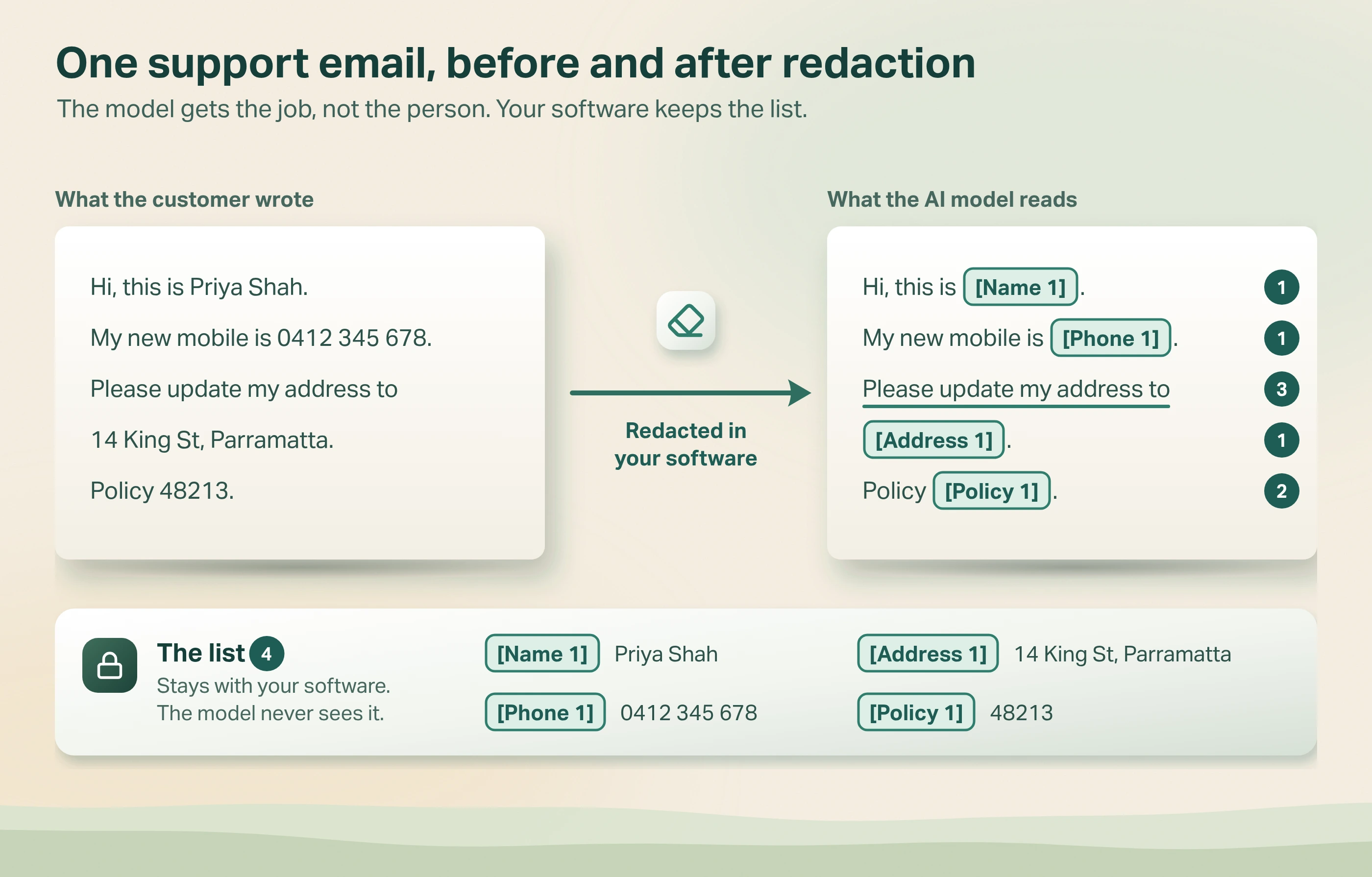
- Name, mobile and address become [Name 1], [Phone 1] and [Address 1]. The model can still write a full reply.
- The policy number becomes [Policy 1]. A tool looks up the real policy outside the model.
- The request stays as written. "Update my address" is the part the model needs to do the job.
- The list stays with your software. It links each placeholder to its real value, so it is sensitive data in its own right.
What breaks when you redact, and how do you fix it?
Redaction changes what the model reads. Plan for these four problems before launch.
1. The model can't greet the customer
Fix: let it write "Hi [Name 1]". The software fills in "Hi Priya" just before the email goes out. The model never needed the real name to write a polite reply.
2. The model mangles the placeholder
It might write "[name 1]", "Name 1" or drop the brackets. Fix: check every reply against the list. If a placeholder is missing or unknown, retry or send it to a person. Don't guess.
Keep [Name 1] meaning the same person for the whole conversation. Store the list with the same access controls as the original data, and delete it when the conversation's records are deleted.
3. The model needs a fact, not the value
An agent deciding whether a discount applies needs to know "over 65", not the date of birth. Fix: work out the fact in software and send that instead.
4. Search and lookups stop working
If the agent searches your records for "[Name 1]", it finds nothing. Fix: do lookups in the tool, with the real value, outside the model. The model asks "find the policy for [Name 1]". The tool swaps in the real name, searches, and returns only the fields the task needs.
What does the OAIC expect when personal information goes into AI?
Australia's privacy regulator, the OAIC, published guidance on using commercially available AI products in October 2024, updated January 2025. Three points matter here.
- Obligations follow the data in and out. "Privacy obligations will apply to any personal information input into an AI system, as well as the output data generated by AI".
- Keep prompts to what's necessary. The OAIC "expects organisations to consider what information is necessary". It suggests "privacy-preserving techniques" to reduce the personal information in a prompt.
- Be careful with public tools. As best practice, it recommends organisations "do not enter personal information, and particularly sensitive information, into publicly available generative AI tools".
The guidance also asks you to check whether the AI provider's terms let it access what you send. Redaction doesn't replace that check. It shrinks what's at stake if the answer is yes. This is a summary, not legal advice.
How we redact PII before the LLM in Avesta AgentOS and Metricsense
In plain terms: in Metricsense we never fall back to the original when the redacted copy is late. In Avesta AgentOS the rule for tool builders is to return only the fields a task needs.
On Amazon Connect, Metricsense reads only the redacted call
Metricsense, our call analytics product, scores customer calls with an AI model. Its public promise is that "personal information is removed before any transcript reaches the model".
For contact centres on Amazon Connect, the redaction happens before Metricsense touches the call.
Amazon Connect's conversational analytics (called Contact Lens in older docs) writes a redacted transcript and a redacted recording. For the call's content, Metricsense reads only the redacted transcript and the redacted recording. It never reads the original transcript.
What we learned: the redacted copy is sometimes late. The record that says a call ended can arrive before the redacted transcript is written. The tempting fix is to use the original "just this once". We don't. Metricsense waits and tries again, a few times, with a longer gap each time. If the redacted copy still isn't there, that call fails and the failure is logged.
If the redacted copy is missing, wait. Never fall back to the original.
Tools in Avesta AgentOS return only what the task needs
We write tools for our agents in Avesta AgentOS, following a written tool-security guide for builders.
Its section on personal information opens with one principle. It reads: "Return only the information the agent needs to answer the user's question." The rule is to pick fields one by one and never pass on a whole record.
| Field | What the tool returns |
|---|---|
| Card number | Never the full number; at most the last four digits |
| Email address | Only if the reply needs it |
| Phone number | Only if the reply needs it |
| Home address | Only if the question is about delivery |
| Passwords and keys | Never |
The same guide says not to log request bodies that contain personal information. It is a written rule for our builders, not an automatic filter. It closes the tool-results door from the table above, because the extra data never enters the conversation.
When is redaction the wrong answer?
Redaction isn't free. It adds a step that can fail, and placeholders can strip out meaning the model needs. Use the table to decide.
| Situation | Better answer |
|---|---|
| The task doesn't need the personal information | Don't send it. Pick fields in the tool, no redaction needed |
| The model needs a few values to tell people apart | Numbered placeholders, restored by software |
| Almost every sentence is personal, like case notes | Keep the model inside your own cloud account, with access controls, and redact the logs |
| You're testing with made-up data | Skip it while every input is made up. Add it before the first real record enters |
| Health records under health privacy rules | Get advice. Health information is sensitive information under the Privacy Act, and Amazon notes its call redaction doesn't meet US health de-identification rules |
The third row needs the most thought. When the meaning lives in the personal details, placeholders ruin the answer.
The better move is to bring the model to the data. One example of a model that stays with the data: AskCHAIRS, which we built for CHAIRS Global, runs entirely inside their own AWS account. Our guide to AI agent guardrails covers the checks that sit around it.
The bottom line
To redact PII before an LLM sees it, treat every door as a way in: messages, documents, tool results and logs. Drop what the task doesn't need. Swap the rest for numbered placeholders, check the reply, and put real values back only for the right person.
Think of the contractor again: cover the names with numbered stickers, and keep the list in your own drawer. No detector catches everything, so the strongest protection is the field you never sent. For how this fits with approvals, records and limits, read what an agent harness is.
Which of your agent's four doors lets personal information through today?
Want an outside check of where personal information reaches your AI agents?
Get started: hello@avestalabs.ai
Frequently asked questions
- What does PII stand for?
- PII stands for personally identifiable information. It means any detail that can be used to work out who a person is, alone or combined with other details. Common examples are a name, phone number, address, date of birth or account number. Australia's Privacy Act uses the term personal information instead, which covers information or an opinion that could identify someone.
- Should you redact PII before sending prompts to OpenAI, Claude or Gemini?
- Usually yes, unless the model runs inside your own cloud account under your own controls. Australia's privacy regulator, the OAIC, says privacy obligations apply to personal information put into an AI system and to what comes out. It asks organisations to keep personal information in prompts to what is necessary. Redacting before the call is the simplest way to show you did.
- Can an LLM find and remove PII by itself?
- It can help, but it shouldn't be the only check. A model that reads the raw text has already seen the personal information, so it can't be the step that keeps the data from a model. Use pattern rules and a name-recognition tool first, in software you control. Use a model only for unclear cases, and only one that runs inside your own environment.
- What is the difference between redaction and pseudonymisation?
- Redaction removes a value or covers it with a mask. The redacted copy itself has no way back to the original, whether or not the original is kept elsewhere. Pseudonymisation swaps each value for a stand-in, like [Name 1], and keeps a private list that maps stand-ins back to real values. For AI agents, the stand-in approach usually works better, because the model can still tell people apart and the reply can be filled back in.
- Which PII redaction tool should you use for LLM prompts?
- Start with what you already run. Presidio, an open-source tool that started at Microsoft, finds names, card numbers, phone numbers and more, and you can add your own rules. Amazon Connect can produce a redacted-only call transcript. Whichever you choose, add rules for your own identifiers, such as policy or member numbers, and test it on real samples.
- Is redacted data still personal information under the Privacy Act?
- It can be. If someone could work out who the person is from what is left, or from the private list that maps placeholders back, the data may still be personal information. The OAIC notes that data can be at risk of re-identification even when de-identified. Treat redacted prompts as sensitive, and get legal advice for your own case.
- What PII should you redact before an LLM call?
- Start with names, contact details, addresses, government identifiers such as tax file numbers, and card or bank numbers. OWASP's list of sensitive information for AI apps also names financial details and health records. Then add your own identifiers, such as policy, member or account numbers. Finally, drop any field the task doesn't need, even if it isn't on a list.
Share this article