Custom GPT vs AI Agent: Plugin, Project or Agent?
OpenAI plans to retire custom GPTs on 11 December 2026. Here is what replaces them, and how to tell which of yours should become an AI agent.
 Chirag Hindocha
- 8 min read
Key takeaways
- OpenAI schedules custom GPTs to retire on 11 December 2026 on every ChatGPT plan, or 28 February 2027 for some workspaces with an approved deferral. The replacement it documents is a plugin.
- Migration to a plugin carries a GPT's instructions, knowledge files and connected apps. Custom actions, the selected model and the sharing settings do not carry over (OpenAI, November 2026).
- A custom GPT answers when a person asks. An AI agent carries out a multi-step task across your apps, can start on a schedule and asks for approval when needed.
- Sort your GPTs into three groups: those that only answer, those that use a custom action, and those where people still do the work after the answer. Only the third group is a candidate for an agent.
- Before you migrate a GPT, save the real questions it handles and the answers you accept, then run them again on the replacement after every change.
A custom GPT, a version of ChatGPT set up with your firm's instructions and files, answers a question, and then the work still waits on a person. That gap is the real difference between a custom GPT and an AI agent, software that carries out the steps of a task itself. It matters more this month, because OpenAI plans to retire custom GPTs on 11 December 2026.
Every product fact below comes from OpenAI's own pages, read on 25 November 2026.
Custom GPT vs AI agent: what is the difference?
Custom GPT vs AI agent comes down to who carries the work. A custom GPT is ChatGPT set up with your instructions and files, and it answers when a person asks. An AI agent carries out a multi-step task across your apps, can start on a schedule, and asks a person for approval when needed.
The test: once the answer arrives, does a person still have to do the work?
The line was never perfectly clean. A custom GPT could reach another system through an action, a connection its builder sets up. Even then it worked inside a chat that a person had started.
What happens to custom GPTs on 11 December 2026?
On that date, the FAQ says, custom GPTs and their pages become inaccessible. Some workspaces, including Enterprise ones with an approved deferral, have until 28 February 2027. Your workspace notice gives the date that applies to you.
Until then, existing GPTs keep working. Creating new ones has already stopped for personal accounts and for affected Enterprise workspaces, according to OpenAI's guide to GPTs.
The replacement OpenAI documents is a plugin: a package of skills (reusable instructions for a task), reference files and connected apps. When migration is available for your account, each GPT you created shows a "Migrate to plugin" option. Not everything makes the trip.
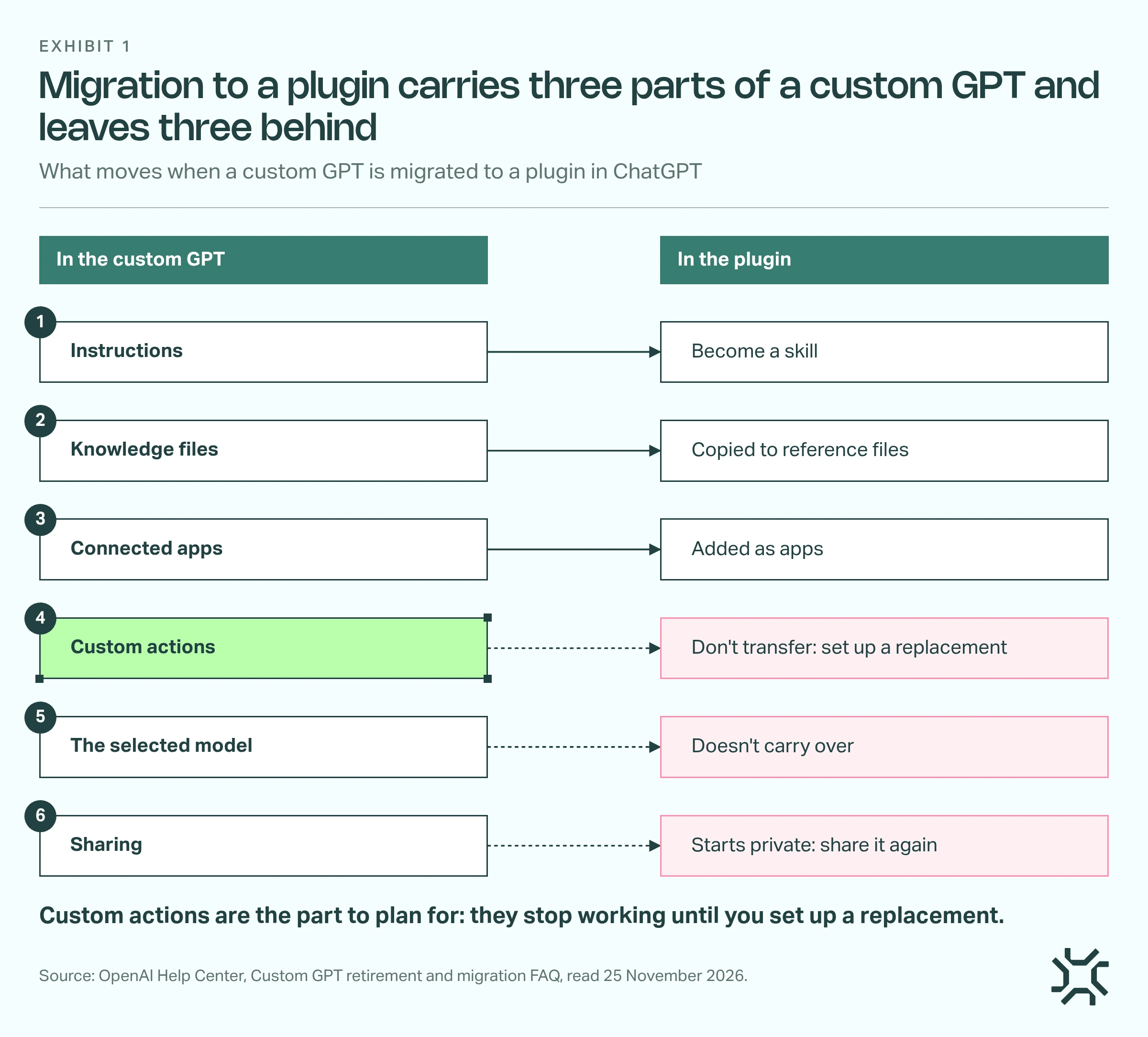
- Instructions become a skill inside the plugin.
- Knowledge files are copied into the plugin's reference files.
- Connected apps are added to the plugin as apps.
- Custom actions don't transfer. Anything that depended on one stops working until you set up a replacement.
- The selected model doesn't carry over.
- Sharing doesn't carry over. The plugin starts private, and you share it again.
OpenAI also says a migrated plugin "may respond differently", and advises comparing familiar requests, plus at least one harder case, before you rely on it.
Migration moves the instructions and the files. It doesn't move the work people do after the answer.
Custom GPT vs plugin, project or workspace agent: which replaces what?
Three OpenAI products can take over what a GPT did. The plugin is the like-for-like replacement. A project keeps related chats, files and instructions together for ongoing work. The workspace agent is the one built to do a job: OpenAI launched it in April 2026 and called it "an evolution of GPTs".
| Custom GPT | Plugin | Project | Workspace agent | |
|---|---|---|---|---|
| What it is | ChatGPT with your instructions and up to 20 knowledge files | Skills, reference files and connected apps bundled for a task | Related chats, files and instructions kept together | A shared agent for a repeatable task or workflow |
| How it starts | A person asks in a chat | A person mentions it, or ChatGPT uses it when it fits. It can also be used in an automated task | A person starts a chat in the project | A person, a schedule, a Slack message or a trigger from another system |
| Acting in other systems | Apps or custom actions, not both | Connected apps, each under its own approval settings | Doesn't bring a GPT's custom actions across | Connected apps, with changes set to "always ask" by default |
| After retirement | Inaccessible | The documented replacement | Suggested for ongoing work such as writing or research | Not mentioned in the retirement FAQ |
The rows come from OpenAI's help centre as of November 2026: the retirement FAQ and the pages on plugins and workspace agents.
One detail is easy to miss. At the April launch, OpenAI said converting GPTs into workspace agents would come soon. The retirement FAQ, as of November 2026, describes one built-in route, and it leads to a plugin. Turning a GPT's job into an agent is a decision you make. Migration won't make it for you.
How do you sort the custom GPTs your firm already has?
List the GPTs people rely on, and next to each one write what a person does after it answers. Then put each in one of three groups.
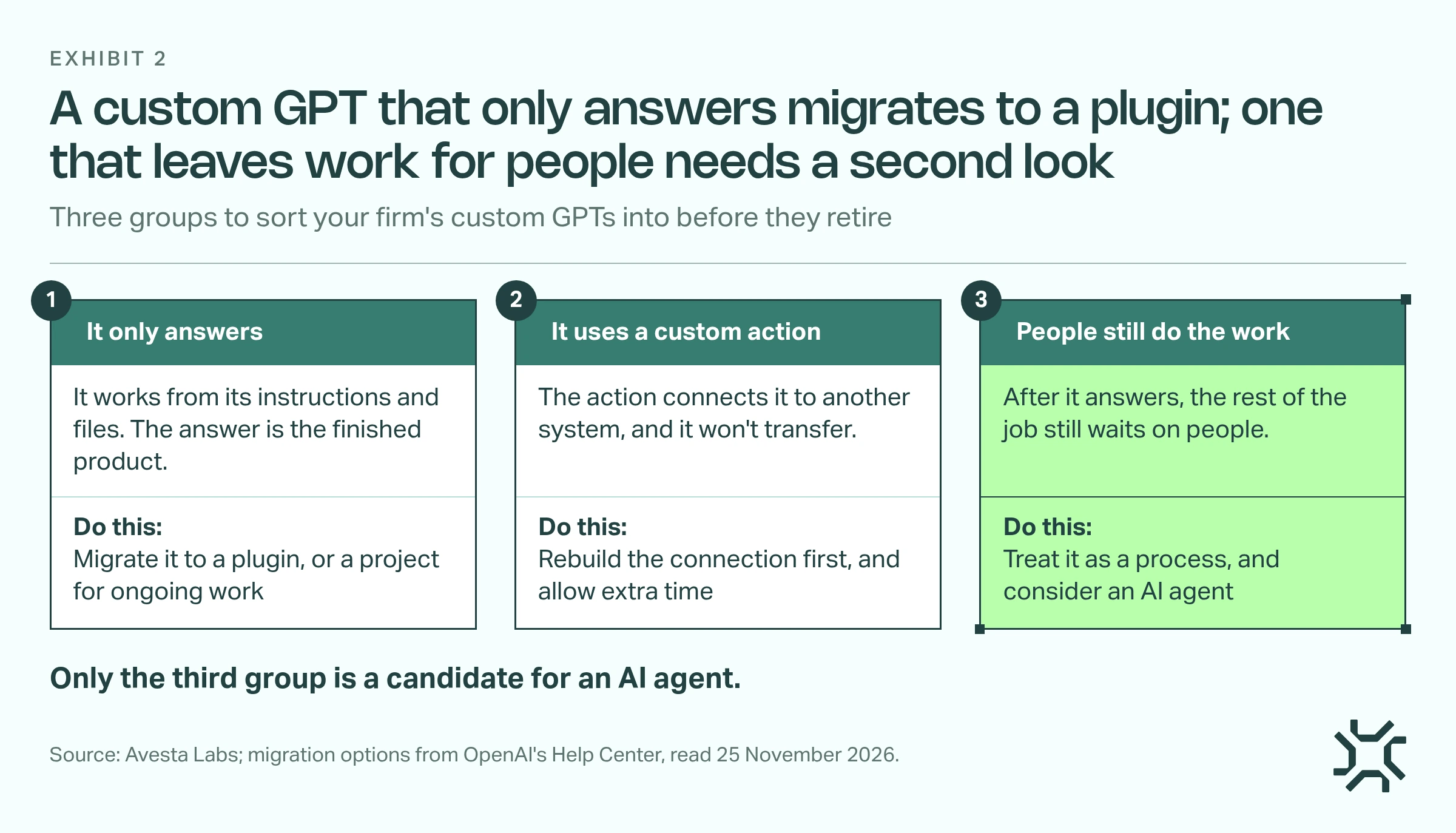
- It only answers. The GPT works from its instructions and files, and the answer is the finished product. Migrate it to a plugin, or a project for ongoing work.
- It uses a custom action. The action connects it to another system, and it won't transfer. Rebuild that connection before the retirement date. OpenAI says to allow extra time, and that a rebuilt connection may not do everything the old one did. The GPT's builder can check for actions in its configuration.
- People still do the work. After it answers, the rest of the job still waits on people. Treat it as a process, and consider an AI agent.
A typical group-three case is a GPT that drafts client proposals. The draft is good. Then someone pastes it into a document, looks up the fee schedule, emails a partner for approval and files the result. The GPT handled one step of five.
In our reading, a plugin with connected apps can cover a simpler job than that, with a person driving it in a chat. OpenAI's guide describes what a workspace agent adds. A team shares it. It can run on a schedule, be used in Slack or be triggered by another system. By default it asks before every change in a connected app, and a builder can limit it further, for example to sending email only to one domain. For a job that belongs to one person, see our comparison of Claude Cowork and ChatGPT Work.
What does a ChatGPT workspace agent leave to you?
A workspace agent is a fair place to start a group-three job. OpenAI's guide, as of November 2026, still leaves three things for your firm to check or do.
- Testing after a change. The guide describes previewing an agent with a sample request and keeping a version history. It doesn't describe a saved set of your own cases that runs again each time the agent changes. Keeping one is left to you.
- Connections to your own systems. An agent works through the apps enabled in your workspace, or a custom connection your team builds. If the job lives in a practice or policy system with no app, our reading is that someone has to build that connection first.
- A second AI provider. A builder chooses the agent's model. The guide doesn't describe running an agent on another provider's model, so ask before you build if that matters to you.
How we test before go-live in Avesta AgentOS
The FAQ's advice to compare familiar requests before and after is the habit most worth copying. We work the same way.
1. Saved test cases, run before go-live
In Avesta AgentOS, where AI co-workers (our name for agents) and your team work from one system, a co-worker has saved test cases. Each one is a real input with the output you expect. They can be run against a version before it goes live, and the result shows how many passed. Our guide to AI evaluation explains the idea in plain words.
2. Real questions, marked by the people who know
On a separate client project, we built an investor support assistant for India Avenue that answers only from the fund's documents. It passed 50 real questions that India Avenue supplied and marked, and every change still runs against them (case study, October 2026).
You can do the same before you migrate a GPT. Collect the real questions it handled last month, and beside each one write the answer your best person would accept. Run them again on the replacement after every edit to the instructions, every change of files and every change of model. Migration is one of those moments, because the GPT's selected model doesn't carry over.
3. The firm writes the steps
In Avesta AgentOS, the stages a task moves through are set for the team, in order, so every task takes the same route whoever picks it up. A step that needs approval goes to named reviewers, who can approve it, reject it or approve it with a change. For a group-three job, write those stages and approvals down before you choose any product.
When is a plugin or a project all you need?
In our view, most of the time. A GPT that answers questions from the staff handbook, drafts in the house tone or walks someone through a review checklist belongs in group one. Its answer is the product, and a plugin carries that across.
A project suits the GPT you kept returning to for one long piece of writing, research or planning, where the chats and files build up over weeks. A plugin suits the GPT you reach for briefly, from any chat.
Building an agent for either adds approvals to set, connections to maintain and runs to watch, for no gain. An agent earns its keep only when the work after the answer is the expensive part.
The bottom line
The December date decides when you act, and the work around each GPT decides what it should become. For what any agent needs around the model, read what an agent harness is.
Who in your firm knows how many custom GPTs people rely on today?
Found a GPT that was really a process? We can map it with you before the retirement date.
See how Avesta AgentOS runs a process with your team
Get started: hello@avestalabs.ai
Frequently asked questions
- Can ChatGPT make an AI agent?
- Yes. As of November 2026, OpenAI's help centre describes workspace agents for ChatGPT Business and Enterprise workspaces. You describe a task your team repeats, ChatGPT drafts the agent, and you connect the apps it needs. The agent can then be shared with teammates, used in Slack or run on a schedule. OpenAI's help centre says they were off by default at launch in Enterprise workspaces, where an admin can enable them.
- Custom GPT vs Projects: which should I use now?
- As of November 2026, OpenAI's retirement FAQ says a project can be a good fit if you used a GPT for ongoing work, such as writing, research or planning. A project keeps related chats, files and instructions together. Setting one up doesn't bring across a GPT's custom actions or its sharing settings, and old GPT chats can't be moved into it. Migration to a plugin is the route that carries a GPT's instructions, files and connected apps across.
- Will I lose my conversations when custom GPTs are retired?
- No. As of November 2026, OpenAI's retirement FAQ says existing conversations with custom GPTs stay accessible after retirement, and you don't need to do anything to keep them. What goes away on the retirement date is the GPT itself and its page. You can keep using the original GPT until then, though it becomes read-only once it has been migrated.
- Can I still create a new custom GPT?
- Mostly not. As of November 2026, OpenAI says personal accounts (Free, Go, Plus and Pro) can't create or publish new GPTs, and new GPT creation ended on 26 October 2026 for affected Enterprise workspaces. In Business and Edu workspaces it depends on your workspace notice and settings. Existing GPTs can still be used, and edited until they are migrated.
- Is a plugin in ChatGPT the same as an AI agent?
- No. As of November 2026, OpenAI's help centre describes a plugin as a package of skills (reusable instructions), reference files and connected apps that ChatGPT uses inside a conversation, either when you mention it or when it fits your request. A plugin can also be used in an automated task. A workspace agent is built for one repeatable task or workflow, is shared by a team under its own access and approval settings, and can be used in Slack, run on a schedule or triggered by another system.
Share this article