
Claude Cowork Use Cases for Business: Real Examples
The jobs each department can hand to Claude Cowork today, how to brief them, and the point where one person's job has become the firm's process.
 Chirag Hindocha8 min read
Key takeaways
- The best Claude Cowork use cases for business are jobs one person hands over and the same person checks: a research brief, meeting prep, a weekly report, draft replies, a comparison of proposals.
- Anthropic sampled 1.2 million Cowork sessions in May 2026. The largest group, 33.4%, was business process and operations work such as reports, checklists and spreadsheets.
- A good brief names five things: the result, the sources, the format, the limits and the person who checks.
- The limits of Claude Cowork for a firm, as of November 2026: Anthropic says a session can't be shared with other people. A job that a colleague must pick up, or a second person must approve, has become a process.
- Claude Cowork is built for one person's tasks. Automating a business process, which the firm owns and runs the same way every time, needs a platform.
One in three tasks handed to Claude Cowork is back-office work. Claude Cowork is the part of Claude, the AI assistant made by Anthropic, that carries out a whole task for you, where a chat only answers a question. Anthropic calls each task a session, and it sampled 1.2 million sessions in May 2026. The largest group, 33.4%, was business process and operations work, such as reports, checklists and spreadsheets.
Every department in a firm of 50 already has jobs like these. Someone writes the weekly report. Someone prepares for the client meeting, and someone compares five proposals.
Lists of these jobs are easy to find. Anthropic's own library held 71 Cowork use cases when we read it this week. Few of the lists we read say where Cowork's limits are for a firm. We have been a Claude Select Services Partner since October 2026. Every Claude Cowork fact below comes from Anthropic's pages, read on 24 November 2026.
What are the best Claude Cowork use cases for business?
The best Claude Cowork use cases for business are jobs one person can hand over and check. Good examples are a research brief, meeting prep, a weekly report, draft replies to an inbox and a comparison of proposals. Cowork works through the steps across your files and connected apps. It suits one person's task better than a firm's process.
A good Cowork job has one person who asks, and the same person checks the result.
Cowork is becoming part of Claude itself. Anthropic's Cowork guide says chat and Cowork are being combined into one Claude, plan by plan. Where the combined version is switched on, any conversation can take on a longer task. Cowork is available on paid plans only.
Which Claude Cowork use cases suit each department?
Each example below is one Anthropic documents in its product guide, its use case library or its help centre. Sorting them by department, and naming who asks and checks, is ours.
| Department | A job to hand over | What comes back | Who asks and checks |
|---|---|---|---|
| Partners and directors | Meeting prep from an email thread, chat messages and a shared document | A one-page prep document with links to the originals | The partner going to the meeting |
| Operations | The weekly report, from the same sources every week | A draft in your own template, ready each Friday | The manager who sends the report |
| Finance and admin | Compare five supplier proposals; turn a folder of receipts into an expense report | A spreadsheet with one row per option and a short recommendation | The person choosing the supplier |
| Client service | Research an account before a review | A one-page brief on what has changed | The account owner |
| Legal | Mark up a contract clause by clause | A rating for each clause, with suggested changes | The lawyer on the matter |
The last column matters as much as the first. Anthropic's own example is a lawyer who hands over document formatting and keeps the legal judgement.
Start with one row. Pick a job that already takes someone an hour every week, because a weekly job repays a good brief fastest.
What are the best tips for using Claude Cowork?
The tips in Anthropic's product guide are mostly about the brief, the request you write. A good brief has five parts. The made-up example here is an operations lead at an insurance broker, handing over the weekly renewals report.
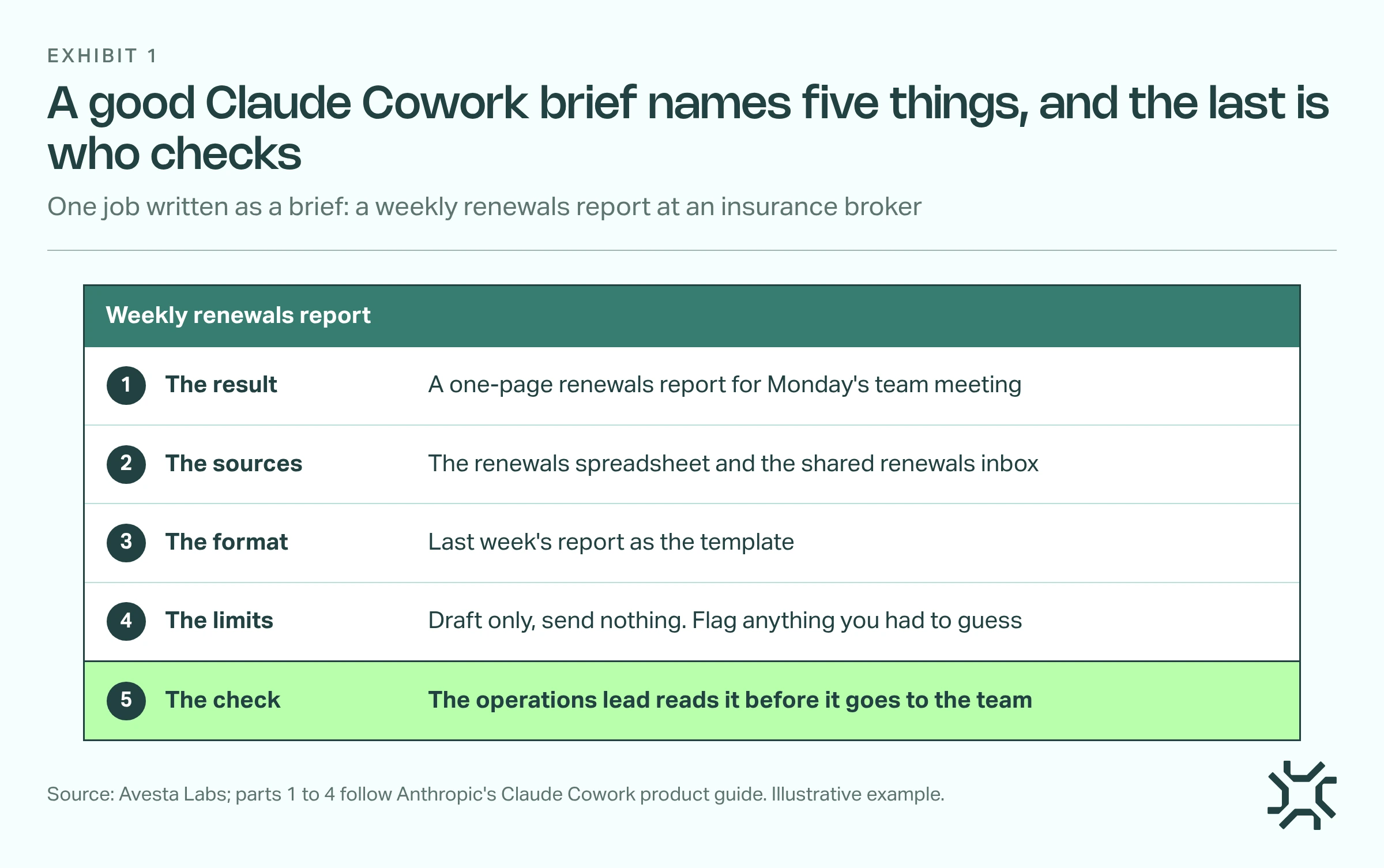
- The result. Name the reader and the decision. "A one-page renewals report for Monday's team meeting" beats "summarise renewals".
- The sources. Name each folder, spreadsheet and inbox. Cowork works from the folders and apps you have connected.
- The format. Point to last week's report as the template, and reuse it every week.
- The limits. Say "draft only, send nothing". Ask it to flag anything it had to guess.
- The check. Say who reads the result before it goes anywhere. Here it is the operations lead, who handed the job over.
Anthropic's scheduled tasks page says Claude saves your request as the task's instructions and runs it on the schedule you choose. A task that needs no folder on your computer runs in the cloud, so the report is waiting when you open your laptop. Each run is its own session, and you review it like any other task.
One setting is worth finding first. For a tool that sends email, Anthropic suggests the "Always ask" permission, which is rolling out gradually. Claude then stops for your approval each time. A scheduled task may then wait for your answer, or finish without that tool.
What are the limits of Claude Cowork for a business?
Cowork's limits start where one person's task becomes the firm's process. Four questions show the line, as of November 2026.
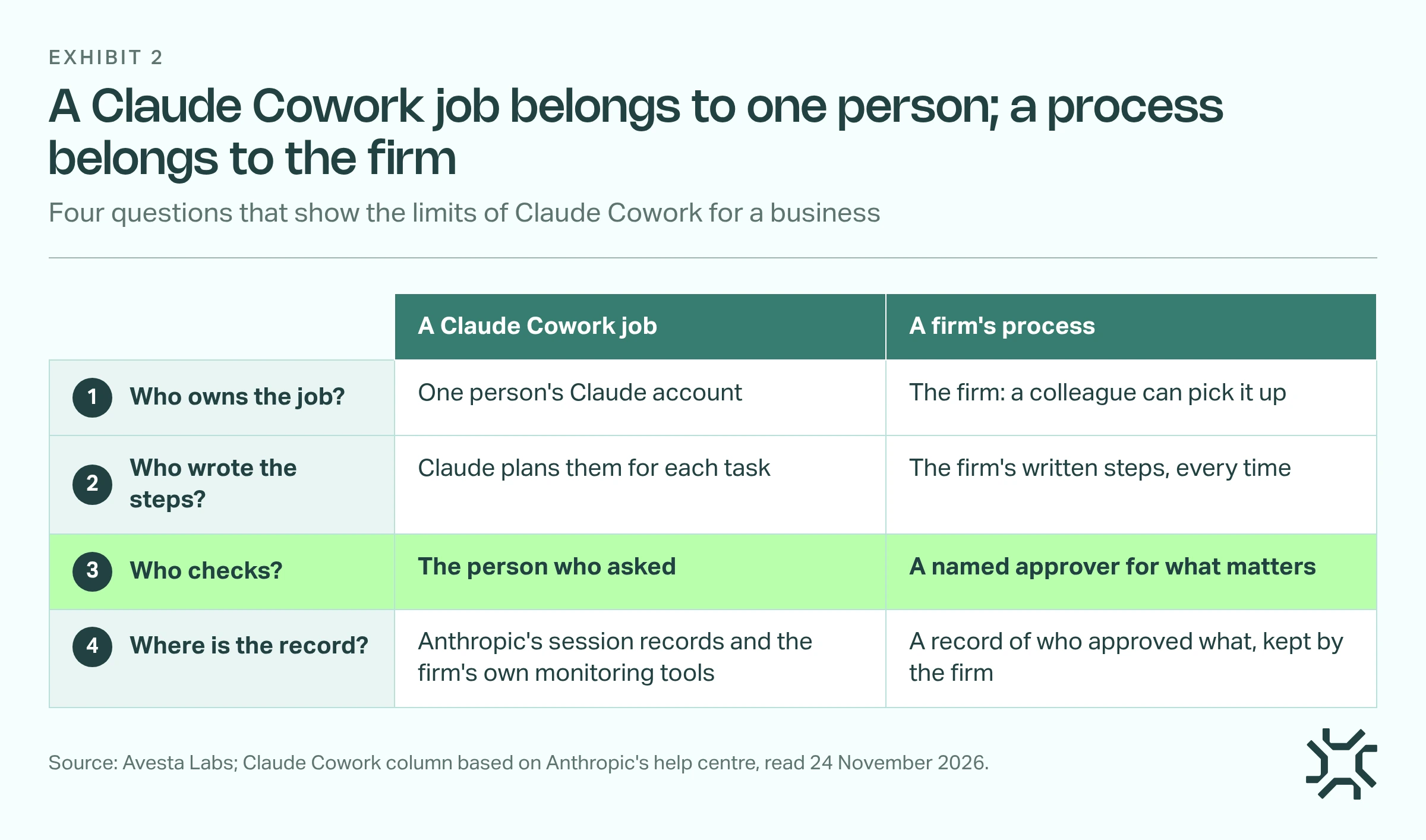
- Who owns the job? Anthropic says a Cowork session can't be shared with other people, though the files it produces can. Sessions are saved to the member's own Claude account. Our reading: when that person is on leave, a colleague can't pick up the half-finished job.
- Who wrote the steps? Claude plans the steps for each task. That suits a report. In our view it doesn't suit a renewal notice that must follow your written procedure every time.
- Who checks? The person who asked. Cowork also has an automatic mode, where Claude doesn't stop to ask before each action. An automated check reviews actions first, and Anthropic says it "can miss risky actions".
- Where is the record? Anthropic's admin guide says Cowork sessions are captured in its Compliance API, an interface for retrieving session records. Owners on Team and Enterprise plans can also send Cowork activity to their own monitoring tools. Anthropic says that feed "doesn't replace audit logging for compliance purposes". A process needs a record of who approved what, kept by the firm. Our guide to the AI agent audit log says what it should hold.
When a colleague must be able to pick the job up, or a second person must approve it, the job has become a process.
Our comparison of Claude, ChatGPT and Copilot for business lists six signs that a process has outgrown an assistant.
How we run shared work in Avesta AgentOS
When a job has become a process, we build it in Avesta AgentOS, where AI co-workers and your team work from one system. Two habits from that work, and one from a client project, can be copied in Cowork.
1. The job sits where the team can see it
In Avesta AgentOS, a task sits on a shared board. It moves across named stages and carries a status, such as in review.
You can copy this today. Cowork's scheduled page shows the tasks you created yourself. Keep one shared list for the firm: each scheduled task, its owner and where its result goes.
2. The reviewer has a name
In Avesta AgentOS, a review request goes to named reviewers. A reviewer can approve it, reject it or approve it with a modification.
In Cowork, the named reviewer is the person who asked: part five of the brief. Once a job needs a second person's approval, such as a letter that goes to a client without the asker reading it, treat it as a process. Our guide to AI agent human approval covers which actions need it.
3. A change is tested on real cases
On a separate client project, the investor support assistant we built for India Avenue passed 50 real questions that India Avenue supplied and marked. Every change still runs against them (case study, October 2026).
A scheduled task deserves a small version of this. Keep three past weeks of inputs and the reports you were happy with. When you edit the task's instructions, run it on those weeks and compare.
When does a business process need a platform, not Claude Cowork?
Claude Cowork is built for one person's tasks. Automating a business process needs a platform.
Every row of the department table is a personal task: one person asks, and the same person checks. Those jobs belong in Cowork. So does any job that changes shape every week, because it isn't a process yet.
A business process is different. It runs for the firm, the same way every time, and other people depend on it: a renewal notice, a client onboarding, an invoice approval. To automate one, the firm needs the four things from the limits above:
- an owner that is the firm, so a colleague can pick the job up;
- written steps, followed every time;
- a named approver for what matters;
- a record of who approved what, kept by the firm.
That is the job of a platform, not of one person's assistant.
For the tasks you keep in Cowork, stay close to any with real consequences. For money, messages sent in your name and important files, Anthropic's advice is to review what Claude does or switch back to manual approval, where Claude asks before it acts.
The bottom line
The jobs in the department table are where Claude Cowork fits, and the brief is where to spend your effort. A business process the firm has to own needs a platform. For what that platform must provide around the AI model, read what an agent harness is.
Pick one row of the table, and put a name beside it: who in your firm would ask, and who would check?
Found a job that more than one person has to own? We can map it with you.
See how Avesta AgentOS runs processes with your team
Get started: hello@avestalabs.ai
Frequently asked questions
- What is Claude Cowork used for most?
- Anthropic published a breakdown on 7 July 2026, from 1.2 million sampled sessions in May. Business process and operations led at 33.4%, followed by content creation and copywriting at 16.4%. Research and intelligence came to 6.4%, data analysis to 5.8%, and legal and compliance work to 1.3%. These are shares of a sample, sorted by an automated system.
- Is Claude Cowork available for business teams?
- Yes. As of November 2026, Anthropic lists Cowork on its paid plans, including Team and Enterprise. On those two plans it is on by default, and an organisation owner can switch it off. Anthropic describes switching it on for particular teams as an Enterprise feature that uses groups and custom roles.
- Why does Claude Cowork use so much usage?
- A Cowork job takes many steps, and Anthropic says each step uses up part of your plan's allowance. Running code, creating files and using connected apps all count. Its help centre suggests grouping related work into one task, starting a new conversation for unrelated work, and saying so when you only need a quick answer.
- Can Claude Cowork work with files on my computer?
- Yes, through the Claude desktop app. Anthropic says Claude reads and writes only in the folders you connect, and that the app must be open on that computer so Claude can reach them. The task itself runs in the cloud, so work that needs no local files carries on when the laptop is shut.
- How often can Claude Cowork scheduled tasks run?
- As of November 2026, Anthropic's help centre lists hourly, daily, weekly and weekday schedules, plus running a task on demand. Each run is its own session, and it runs in the cloud while your computer is asleep. A scheduled task tied to a folder on your computer runs only while that computer is awake.
Share this article