
Claude Cowork vs ChatGPT Work: Which Suits a Business Team?
Both take on long tasks across your apps and files. For a firm, what matters is whether the tool asks a person before it acts, and what an admin can control on your plan.
 Chirag Hindocha10 min read
Key takeaways
- Claude Cowork and ChatGPT Work are built for the same job: you describe a result, and an AI agent works through the steps across your connected apps and files. Both can run scheduled tasks while you're away.
- As of November 2026, Anthropic says automatic approval is rolling out as the default on Claude Team plans, while Enterprise plans still start in manual approval. A Team owner can keep manual approval as the starting mode.
- On Claude Team, Cowork and cloud sessions are on by default. In ChatGPT Business, apps are enabled by default. Both vendors describe finer control by team or role for their Enterprise plans.
- Set approval by what an action can do: let the agent read and draft, and have a person approve anything that others will see or that is hard to undo.
- Both agents plan a task's steps themselves and work for one person at a time. Once a job is done by many people and must follow the firm's steps every time, it needs one system around it.
The comparisons on page one of Google can't agree about Claude Cowork and ChatGPT Work. Some say the two work almost identically. Others say Claude checks in before it acts, while ChatGPT just gets on with the job.
If you work alone, the difference hardly matters. For a firm of 50, the useful differences sit where those comparisons rarely look: the admin controls. Who can switch the tool on, what it may touch and when it must ask a person first all depend on your plan.
We work with both vendors, OpenAI and Anthropic (the maker of Claude). Avesta Labs has been an OpenAI Select Partner since July 2026 and a Claude Select Services Partner since October 2026. Every product fact below comes from the vendors' own pages, read on 23 November 2026. These products change most months, so check again before you buy.
Claude Cowork vs ChatGPT Work: what is the difference?
Claude Cowork vs ChatGPT Work is a choice between two AI agents, software that carries out a multi-step task for you and doesn't only answer a question. Neither vendor's documents show a better agent. For a firm, they differ in when the agent asks for approval and in what an admin can control on your plan.
On paper, the agents are alike. The plan you buy decides how much control your firm gets.
What can Claude Cowork and ChatGPT Work do for a business team?
Both are built for the same kind of work. You hand over a weekly report, a research pack or a spreadsheet clean-up, step away, and come back to a finished document.
The names have moved this year. Anthropic began merging Cowork and chat into one Claude in September 2026. OpenAI began rolling out ChatGPT Work in July 2026.
| What matters to a firm | Claude Cowork | ChatGPT Work |
|---|---|---|
| What it can touch | Apps you link through connectors, a browser, and folders you connect on your computer | Apps you link through plugins (Slack, Teams, Google Drive, SharePoint, email, calendars), a browser, and local files in the desktop app |
| Where tasks run | In the cloud on Anthropic's servers. Team and Enterprise plans can also run sessions on the user's computer | In the cloud on web and mobile. The desktop app can also work on your computer |
| Scheduled tasks | Yes, in the cloud | Yes, on a schedule or when something happens in a connected app |
| Approval | Three modes: manual, automatic and skip | You approve important actions; an admin can set how often it asks before using a connected app |
| Record for the firm | Sessions are captured in Anthropic's Compliance API, an interface for retrieving session records; Team and Enterprise owners can also stream events to their own monitoring tools | OpenAI describes a Compliance API for Enterprise oversight of Work conversations and actions |
| AI models | Claude | OpenAI's models |
All rows are from each vendor's help centre and launch pages, as of November 2026: Anthropic's Cowork guide and OpenAI's Work guide.
How does approval work in each?
Approval is the moment the agent stops and asks a person before it acts. It matters most once an agent can send email or change a client record. The facts in this section are as of November 2026.
Claude Cowork: three approval modes
Claude Cowork has three modes. In manual mode, Claude pauses and asks before actions that need approval. In automatic mode, it keeps working and an automated check reviews its actions first. In skip mode, nothing checks. Anthropic says automatic mode is rolling out as the default on Team plans, while Enterprise plans still start in manual, outside its Chrome side panel. So the line that Claude always checks in first is going out of date for Team plans.
A Team owner isn't stuck with that default. Anthropic's admin guide describes two organisation settings: one keeps manual approval as the starting mode, and one removes automatic mode altogether. Members can still switch between the modes the owner allows.
ChatGPT Work: an approval setting for connected apps
ChatGPT Work lets you approve important actions as it goes. For actions in connected apps, OpenAI's admin page describes one workspace approval setting with three levels: always ask, allow read actions, or allow low-risk actions. The page covers Business, Enterprise and Edu workspaces.
Set approval by what the action can do
Neither default knows your firm, so set approval by what the action can do.
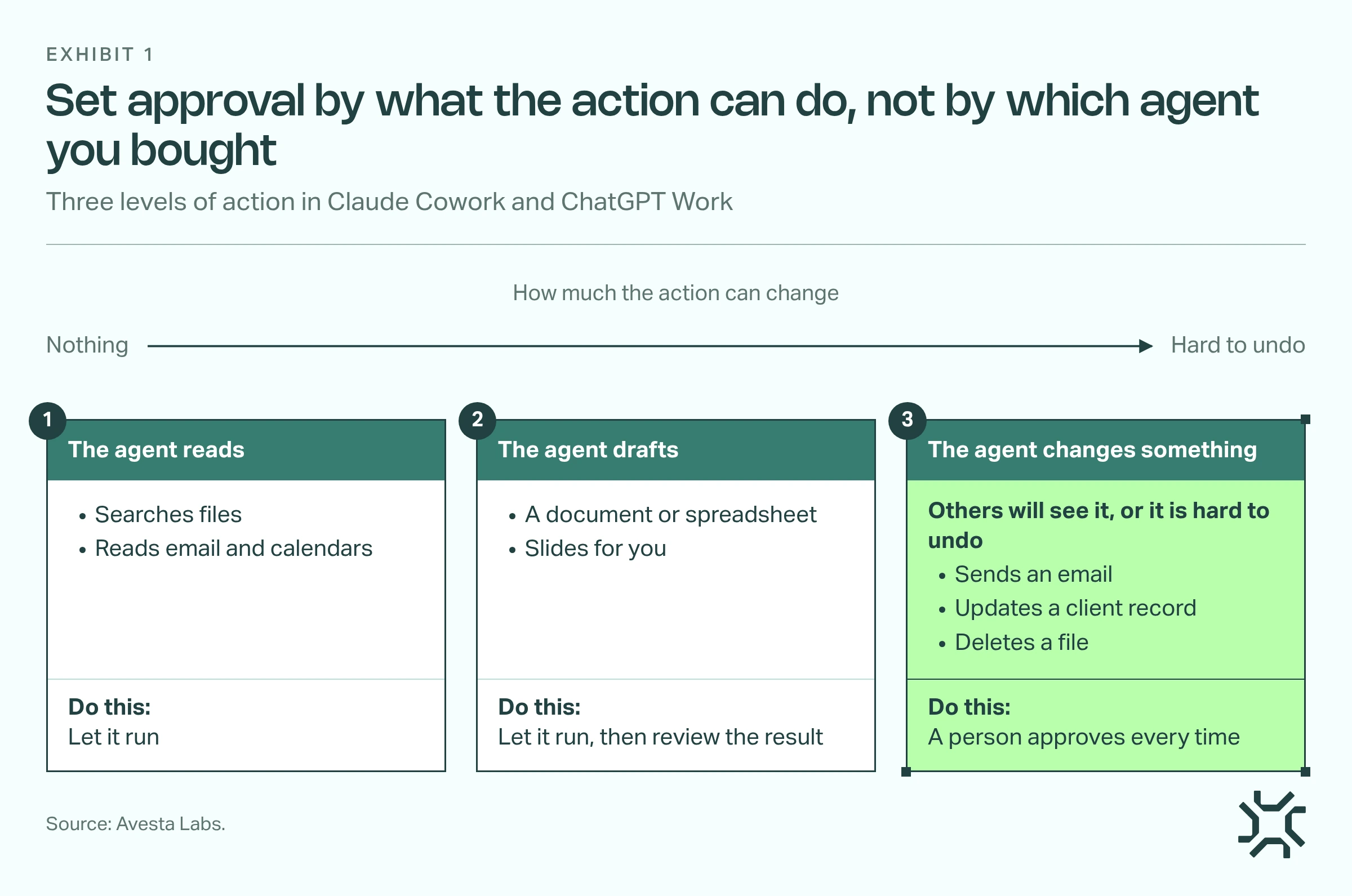
- The agent reads. Searching files, reading email and calendars. Let it run.
- The agent drafts. A document, spreadsheet or slides for you. Let it run, then review the result.
- The agent changes something others will see, or that is hard to undo. Sending an email, updating a client record, deleting a file. A person approves every time.
A typical case is a weekly follow-up on unpaid invoices. The agent reads the debtor list (level one) and drafts the reminder emails (level two). It stops before sending them (level three).
Both products can be set up this way. In Claude, set the tool that sends email to "always ask". Anthropic notes that a scheduled task may then wait for your answer, or finish without that tool. In ChatGPT, "allow read actions" lets it read a connected app without asking and makes it ask before changes.
What can an admin control on Team and Business plans?
This is the gap in most comparisons. They describe the Enterprise plans, and a smaller firm may well be looking at Claude Team or ChatGPT Business.
On Claude Team, Cowork is on by default, and so are cloud sessions. Anthropic describes switching Cowork on for particular teams as an Enterprise feature, using groups and custom roles.
In ChatGPT Business, apps are enabled by default and an admin switches each one on or off for the whole workspace. OpenAI describes access to an app by role for Enterprise workspaces.
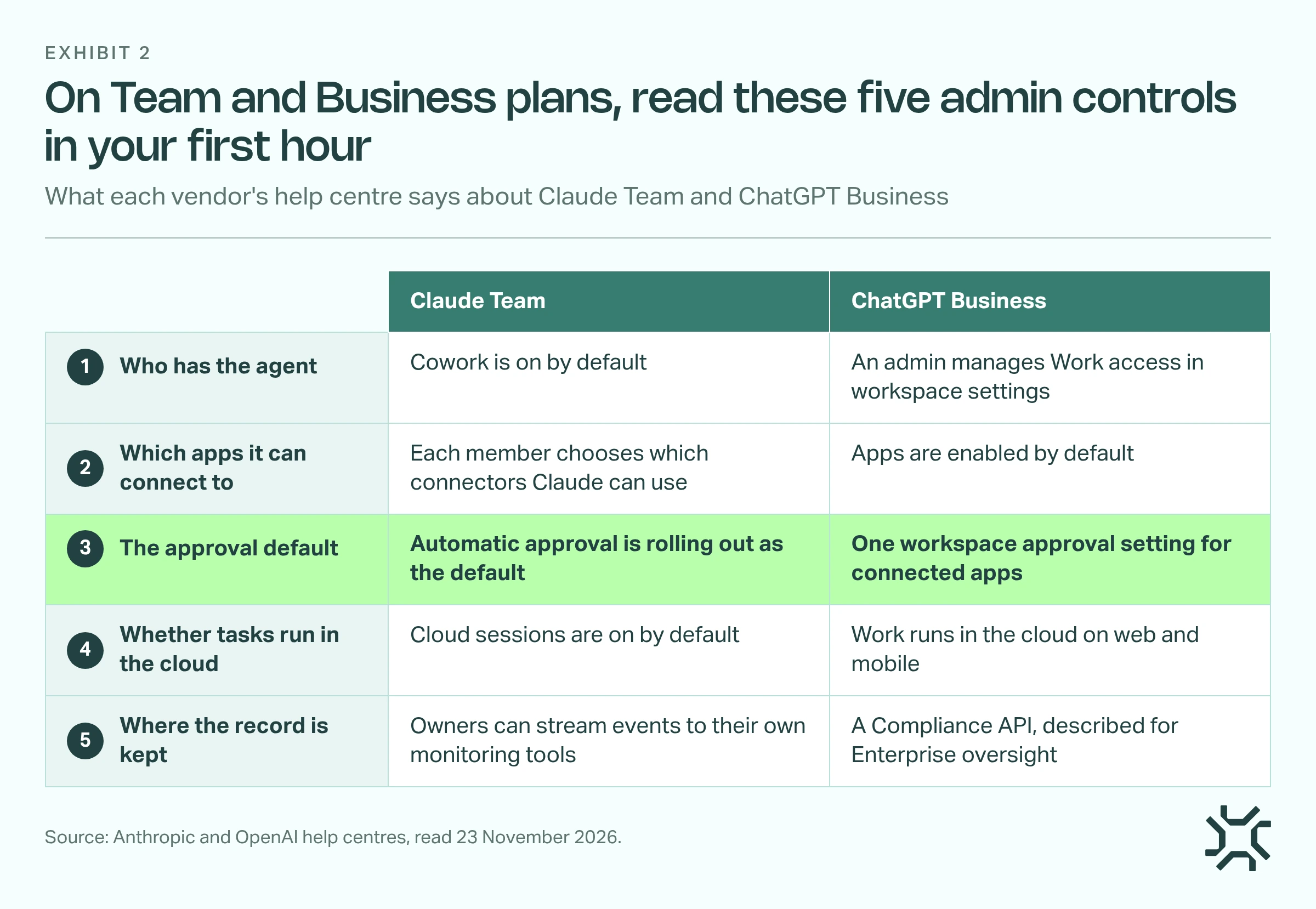
Read these five admin controls in your first hour, whichever product you choose:
- Who has the agent. It may already be on for everyone.
- Which apps it can connect to. Switch off the ones no task needs.
- The approval default. Choose it on purpose, using the three levels above.
- Whether tasks run in the cloud. Cloud tasks keep going when the laptop is shut.
- Where the record is kept. Find out who in the firm can read it.
For how tight each connection should be, see our guide to AI agent permissions.
Claude or ChatGPT for work: which should you choose?
We haven't run the two side by side on the same tasks, so we won't claim a winner. These rules settle most cases:
- Stay with the vendor your team already uses. Both vendors put the agent inside the app your team knows, next to its existing projects.
- Check the plan before the features. If different teams need different rules, read what your plan allows first. Anthropic describes that control for Enterprise.
- If your teams are split between the two, run a trial. Give both agents the same real tasks for a fortnight and compare the finished work.
If you're still choosing between the assistants themselves, start with our comparison of Claude, ChatGPT and Copilot for business.
Where do Claude Cowork and ChatGPT Work both stop?
They stop at your firm's process. As of November 2026, the vendors' own guides show where.
- The agent plans the steps. Anthropic's guide says Claude "analyzes your request and creates a plan" for each task. OpenAI says Work breaks a project "into smaller steps". That suits a report. It doesn't suit a renewal reminder that must follow your written procedure every time.
- The model can change underneath. OpenAI's guide describes new Work chats on the default model being upgraded in place. Our reading: a recurring task that relies on the default can end up on a newer model, and testing it again on your own cases is left to you.
- Each product comes from one model maker. Work's model picker lists OpenAI's models, and Cowork is part of Claude. A firm that wants a second provider needs a second product.
Ask of any recurring job: who wrote the steps, the agent or your firm?
What happens when everyone in the firm has an agent?
Cowork and Work are built around one person. You set the task, you approve its actions as it goes, and you read what comes back. That works well while one person owns the job. Give the same tools to 150 people and three things multiply:
- Approval settings. In Claude, members can switch approval mode in any session, so the firm has one rule only if all 150 happen to choose the same. In ChatGPT the setting for connected apps is workspace-wide, but someone still has to set it.
- Versions of the same job. Two people asking for the same client report get two different sets of steps, because each agent plans its own.
- Records. Each task's history sits with whoever ran it. Nobody can read across them to see what the agents did this week, or what it cost.
We ran into this in our own team. Once our engineers had coding agents, finished code arrived much faster, and the queue simply shifted to review: work waiting for a person to check it. Faster individuals didn't make a faster team until all our delivery work went through one shared pipeline, with the same steps for everyone and measures we could read.
Signs a job has outgrown one person's agent
- More than one person does it, each in their own way.
- The result goes to a client, or into a system the firm relies on.
- Someone other than the person who ran it has to check it.
- Your partners or board will ask what it returned.
- A mistake would surface weeks later, not the same afternoon.
A small firm can often live with personal agents: when everyone works within earshot, a mistake is spotted the same day. In our experience the problems start when the firm grows past the point where anyone can see every desk.
Ask of any recurring job: does it run once per person, or once for the whole firm?
How we handle approval and records in Avesta AgentOS
When a recurring job has become a process for the whole firm, we build it in Avesta AgentOS, where AI co-workers and your team work from one system. Its Relay module routes inquiries, orders and invoices to the right co-worker or person. Three habits from that work can be copied in Cowork or Work today.
1. Approval is a rule of the process
In Avesta AgentOS, the firm decides what runs on its own and what needs approval, and agents pause for approval on anything that matters. At Life Insurance Direct, Metricsense reads every sales call and scores it against 26 checks, and a person makes every decision (case study, October 2026). You can copy this now: write one list of actions that always need a person, and set your approval controls to match it.
2. A stuck agent asks a person
When we design a process, an agent that can't finish a step stops and hands the task to a person. We treat that as the process working, not failing. In a scheduled task, say what the agent should do when it's unsure, and who it should tell.
3. The record belongs to the firm
In Avesta AgentOS, every action an agent takes is logged: what happened, when and why. Before you rely on a scheduled task in either product, find its record and read one day of it.
The bottom line
For one person's tasks, the right agent is the one from the vendor the team already uses. Once a job runs for the whole firm, it needs one system around it. The decision that needs the managing director is the approval mode. For the parts every agent needs around the model, read what an agent harness is.
Ask your admin one question this week: which approval mode does a new task start in?
Found a recurring job that has turned into a process? We can map it with you.
See how Avesta AgentOS runs processes with your team
Get started: hello@avestalabs.ai
Frequently asked questions
- Is there a ChatGPT equivalent to Claude Cowork?
- Yes. ChatGPT Work is OpenAI's equivalent. OpenAI began rolling it out on 9 July 2026 as an agent that acts across your apps and files and can stay with a task for hours. It replaced the earlier ChatGPT agent, which OpenAI's help centre now lists as no longer available.
- Is Claude Cowork still a separate product?
- Less and less. On 16 September 2026 Anthropic began merging Cowork and chat into one Claude, so any conversation can take on a longer task. Anthropic made the merged version generally available for Enterprise on 23 October and for Team on 12 November. Where an organisation hasn't switched it on, Cowork still appears as its own option.
- Can Claude Cowork and ChatGPT Work run scheduled tasks?
- Yes, both can, as of November 2026. Anthropic says Cowork's scheduled tasks run in the cloud with no device online. OpenAI says ChatGPT Work can run a task once, repeat it on a schedule or start it when something happens in a connected app, such as a new email arriving.
- Can Claude Cowork or ChatGPT Work use files on my computer?
- Both can, through their desktop apps. Anthropic says Claude reads and writes only in the folders you connect, and needs its desktop app open to reach them. OpenAI says Work can use local files in the desktop app when your plan and workspace allow it, that Work on web and mobile can't reach your computer's files, and that task context may still be stored in the cloud.
- Do you need a paid plan for Claude Cowork or ChatGPT Work?
- For Claude Cowork, yes: Anthropic lists it on paid plans only. For ChatGPT Work, OpenAI says the web and mobile versions are for eligible paid plans, while the desktop app includes Work on every plan, including Free. Longer tasks use up more of a plan's included usage on both, so check each vendor's pricing page before you roll it out.
Share this article