
LLM Structured Output Validation: JSON Schema and Retries
Structured outputs make an AI model's reply follow your format. Validation checks what the reply says before your systems act on it.
 Jeet Adeshara8 min read
Key takeaways
- LLM structured output validation checks an AI model's JSON reply before another system uses it: a complete reply, the JSON schema, your business rules and your own records.
- Structured outputs from the model providers fix the format, not the facts. A reply can match the schema and still name a customer or product that doesn't exist.
- Even with structured outputs on, a refusal or a reply cut off at the length limit may not match the schema. Check for both before anything else.
- Retry only what the model can fix, with the exact error, once or twice. Send refusals, unusual orders and repeat failures to a person, and never act on a reply that failed.
- A side job, such as noting a user's preferences, can drop a failed reply quietly. A main task, such as booking an order, must stop and tell someone.
OpenAI and Anthropic, the companies behind ChatGPT and Claude, both offer a setting called structured outputs. It makes their AI models fill in a form with named fields, instead of writing free text. Anthropic's own documentation then lists the ways the form can still come back broken.
The form matters because other software reads it. A customer emails asking for 12 boxes of paper, and an AI agent copies the order into the form. If it writes the word "twelve" where your order system expects a number, the system rejects the order, and someone notices. If it writes 120, the order goes through.
That second mistake gets past structured outputs. The form is filled in correctly, and the answer in it is wrong. The AI model here is a large language model, or LLM: software that reads and writes text. Checking its filled-in form for both kinds of mistake, before anything is saved, is called LLM structured output validation.
What is LLM structured output validation?
LLM structured output validation checks the JSON an AI model returns before another system uses it. Four checks run in order: the reply is complete, it matches the JSON schema, its values obey your business rules, and every ID exists in your records. Fixable failures go back to the model with the error; the rest go to a person.
The JSON schema is the agreed list of fields and types, and business rules are the limits your business sets on the values. JSON is the plain-text format most software uses to pass data, with named fields like "quantity" and "product code". The model's filled-in JSON is its structured output.
The rule we use:
Nothing the model writes is saved until your own checks pass.
Don't structured outputs already guarantee valid JSON?
Mostly, yes. With structured outputs on, you send a JSON schema and the model's reply is held to it. Anthropic's structured outputs guide calls it "schema-compliant responses through constrained decoding."
The same guide lists the cases where "the output might not match your schema":
- A refusal. If the model declines for safety reasons, its refusal message "takes precedence over schema constraints." The request still returns a success code.
- A reply cut off at the length limit. The JSON may stop halfway through.
- Capital letters in fixed values. A value from your allowed list can come back with different capitals, "with no error."
None of these raises an error on its own. Your code has to look, starting with the stop reason: the field in every reply that says why the model stopped writing.
The bigger gap is the content. OpenAI's structured outputs guide tells you to "validate any business rules that the schema does not express." A schema can say the quantity is a whole number. It can't say 120 boxes is odd for a customer who always buys 12.
How do you validate LLM output before it reaches your systems?
Run four checks, cheapest first, and stop at the first one that fails. Each check catches a kind of mistake the one before it can't see.
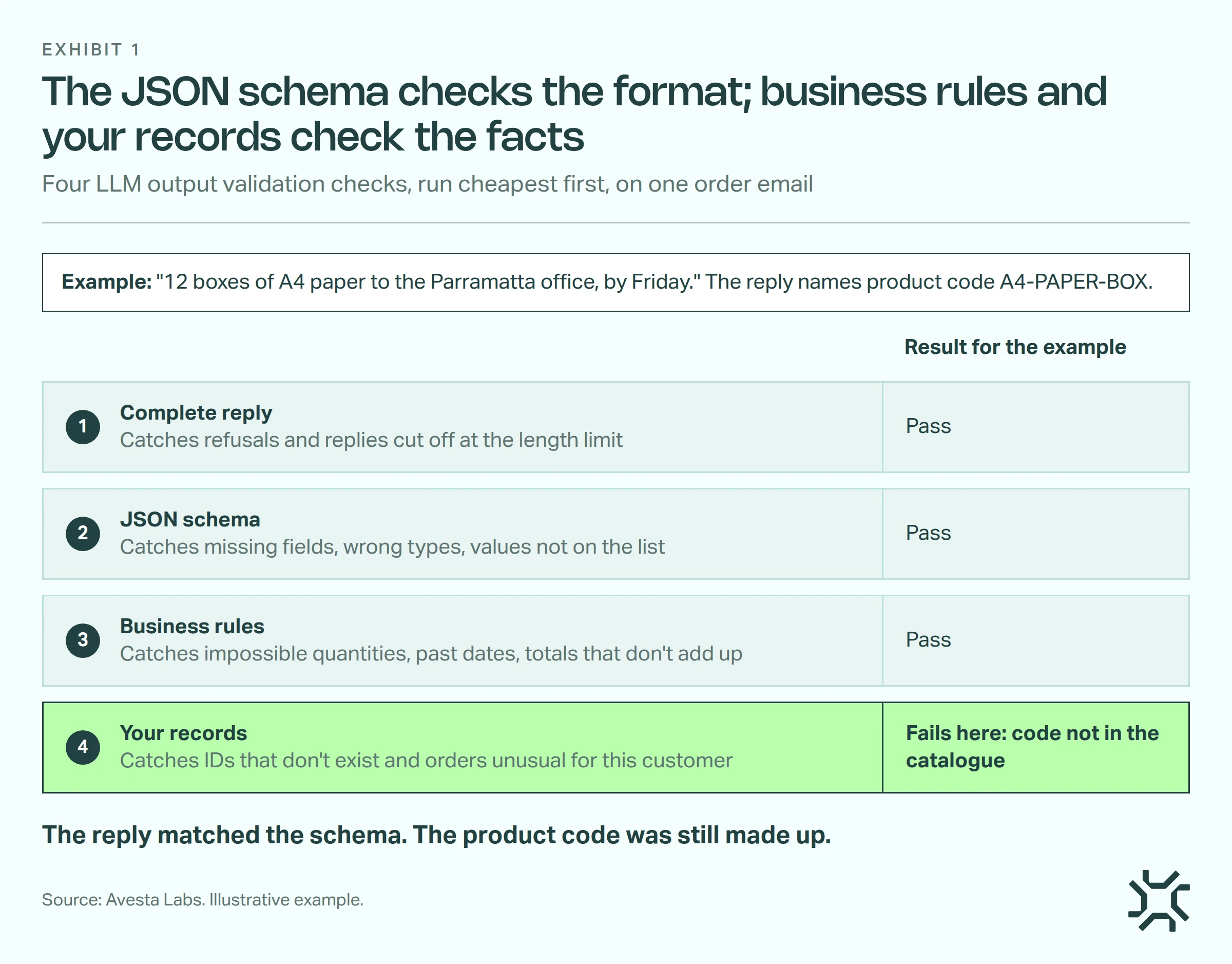
- Complete reply. Did the model finish, and did it answer rather than refuse? Read the stop reason before you read the JSON.
- JSON schema. Are all required fields there, with the right types and only allowed values? Compare fixed values without regard to capital letters.
- Business rules. Do the values make sense on their own? A quantity between 1 and 500, a delivery date that isn't in the past, line totals that add up to the order total.
- Your records. Does every customer, product and order the reply names exist in your own system? Does the order fit this customer's history?
In the made-up order in Exhibit 1, the reply passes the first three checks. Then check 4 finds that product code "A4-PAPER-BOX" isn't in the catalogue. The code looks right, and only your records know it isn't real. Our post on automating document processing found the same with vehicle numbers: a check against a rule or a record beats the model's own confidence.
What to do with each failure
Not every failure is worth a retry. The table shows what to do with each one.
| What the check finds | Caught by | What to do |
|---|---|---|
| The model refused | Check 1 | Send it to a person. The error won't change the model's mind |
| The reply was cut off | Check 1 | Retry with a higher length limit, as Anthropic's guide advises |
| A field is missing or the wrong type | Check 2 | Retry with the error |
| A fixed value has different capitals | Check 2 | Accept it, and compare without regard to capitals |
| A business rule fails | Check 3 | Retry with the rule that failed |
| An ID isn't in your records | Check 4 | Retry with the error and the valid options |
| The order is unusual for this customer | Check 4 | Send it to a person. Only they can tell whether the customer meant it |
A retry only helps when the error tells the model something it can fix.
What should happen when the output fails validation?
For the failures the table marks as fixable, send the model the exact error and let it try again, a small fixed number of times. Refusals and unusual orders go to a person. Never act on a reply that failed.
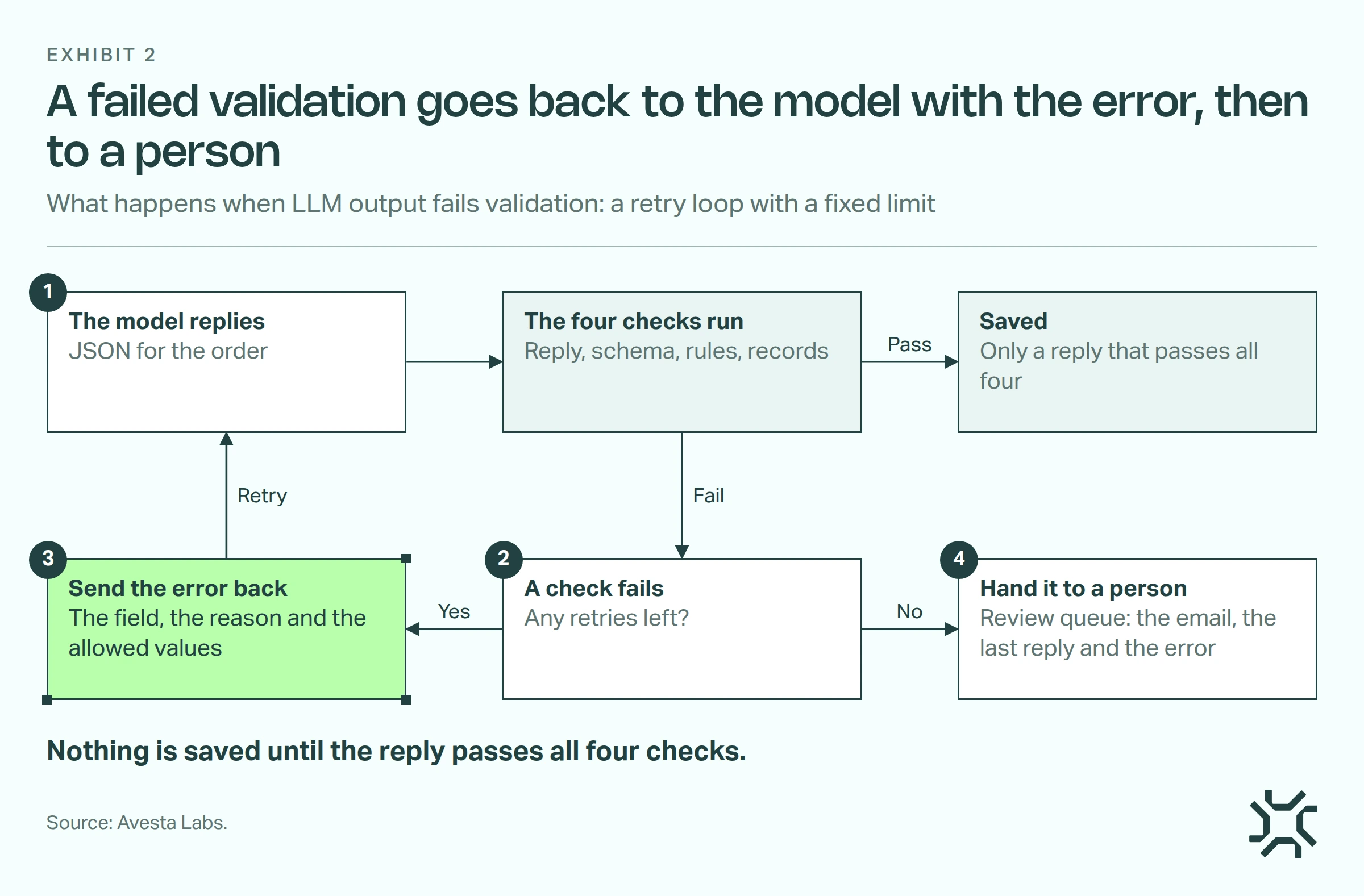
- The model replies. The reply goes through the four checks. Only a reply that passes all four is saved.
- A check fails. Note which field failed and why. If the table says to retry, ask whether any retries are left; if it says to send it to a person, go straight to step 4. Set a small fixed retry limit, such as one or two: each retry costs another model call and more waiting.
- Send the error back. If a retry is left, tell the model the field, the reason and the allowed values: "Product code A4-PAPER-BOX doesn't exist. Codes for A4 paper are PAP-A4-500 and PAP-A4-2500." The model replies again.
- Hand it to a person. If no retries are left, or the table says a person should decide, the item goes to a review queue. Include the original email, the last reply and the error, so they don't start from scratch.
A retry that only says "try again" gives the model nothing new to go on. Our post on AI agent tool call failures covers what to do when the action itself fails after a valid reply.
How we validate structured output in Avesta AgentOS
Avesta AgentOS is the platform we build and run our AI agents on. In an agent, much of the structured output is a tool call: the model asking another system to do something, with the details filled in as JSON. Three patterns from it are worth copying.
1. Repair once, then let the model read the error
A tool in Avesta AgentOS carries a JSON schema for its inputs, and the platform checks tool calls against it before the tool runs. When the inputs don't match, it makes one repair attempt. That is a separate request that sends the model the inputs it tried, the error and the tool's schema, and asks for fixed inputs. The repaired inputs are held to the same schema.
A call to a tool that doesn't exist isn't repaired. The model invented the name, so a fix would only be a guess. The Vercel AI SDK documentation agrees: "do not attempt to fix invalid tool names."
If the inputs are still invalid, the tool doesn't run. The conversation log keeps the attempted call followed by an error with the message. The model reads that error on its next step and can try again: a retry, its own new attempt. Each turn has a fixed limit on steps, so the retries can't go on forever.
2. Side jobs fail quietly
Some structured output isn't the main task. Avesta AgentOS can note facts a user mentions, such as a preference, so the agent remembers them next time. The model returns those facts as JSON against a fixed schema.
If that fails, the platform saves no facts and the conversation carries on. Nobody should wait on a note-taking job. In your own main tasks, do the opposite: stop, and hand the item to a person.
3. Rules first when testing answers
Metricsense, our call analytics product, has evaluation runs that test its AI answers. Where an answer is a number or a fixed choice, a code grader checks it field by field: required, type, minimum and maximum, allowed values. Each failed rule is listed by name. Metricsense is the product behind our Life Insurance Direct call checks.
If your agent returns scores or categories, write those rules once and use them in your tests and in production alike.
When can you skip business rules and record checks?
Not every reply needs all four checks. Checks 1 and 2 are cheap, so keep them everywhere. Checks 3 and 4 can go where a wrong value can't do harm.
- When a person reads it before anything happens. A draft email or a summary a person edits has a reviewer built in.
- When nothing is stored or acted on. A reply that only fills a chat window can't book a wrong order.
The bottom line
Structured outputs take care of most broken JSON. What's left is quieter: a reply that is well formed and wrong. Checks 3 and 4 are the ones only you can write, because no provider knows your catalogue or your customers. Our post on prompt injection in AI agents covers the other reason not to trust a reply: someone may have written it for the model.
Start with check 4: list every ID your agent writes, and the system that holds the real ones.
Want AI agents whose tool calls are checked against a schema before they run? See how Avesta AgentOS works.
Get started: hello@avestalabs.ai
Frequently asked questions
- What is the difference between JSON mode and structured outputs?
- JSON mode makes the model reply in valid JSON, but the fields can be anything. Structured outputs go further: the reply must follow the JSON schema you supply, with the fields, types and allowed values you listed. OpenAI's guide puts it this way: both produce valid JSON, but only structured outputs ensure schema adherence. Either way, you still validate the values.
- Is LLM output deterministic?
- No. Anthropic's documentation says that even with temperature set to 0, results will not be fully deterministic, and identical inputs might produce different outputs across calls. So a reply that passed your tests yesterday can come back different today. That's why validation runs on every reply in production, not only on the examples you tested before launch.
- Can an LLM validate its own output?
- Not reliably. In our document-processing work, the models said they were fully confident even about vehicle numbers they had misread. Use checks outside the model: a JSON schema, a rule such as a check digit, or a lookup in your own records. A second model can help with free text, but it shouldn't be the only check.
- Do structured outputs support every JSON Schema rule?
- No. As of November 2026, Anthropic's structured outputs don't support number limits such as a minimum or maximum, or string length limits. Most of its SDK helpers remove those rules before sending the schema, and the helpers that validate the reply enforce them in your code. So keep every rule in your own validation step, even the ones the provider can't enforce.
- Does output validation protect against prompt injection?
- Partly. OWASP's guidance for AI applications says to treat the model like any other user and validate its responses before they reach your backend systems. Validation stops a manipulated reply from writing a field it shouldn't or a value outside your rules. It doesn't stop the model being tricked in the first place, so you still need limits on what each tool can do.
Share this article