
AI Agent Infinite Loop: How to Detect and Prevent It
Why an AI agent gets stuck in a loop, the five limits that stop it, and what the person waiting should see when a limit ends the run.
 Jeet Adeshara
- 8 min read
Key takeaways
- An AI agent infinite loop is a run that keeps repeating the same step without getting closer to done. The run doesn't crash, so the first sign is often the bill.
- Most loops start with a tool that keeps failing, or with instructions that never tell the agent when it is finished.
- Five limits stop a loop: a step limit, loop detection, a spend cap, a time limit and a kill switch. Every agent that uses tools needs the step limit.
- Set the step limit at one and a half to two times your longest good run, not at a toolkit's default. LangGraph's default is 10,007 super-steps; Avesta AgentOS stops at 20 steps for each message.
- When a limit ends the run, the software should say so, show what the agent tried, and hand the case to a person. A jump in limit hits after a change usually means the change broke something.
In August 2025, a builder posted on the forum of n8n, a workflow automation tool. Their AI agent's job was to save a customer's details in HubSpot, their sales system. The agent's request to HubSpot worked the first time. It sent the same request again and again anyway, until the run ended with the message "agent stopped due to max iterations".
Nothing had crashed. The agent was stuck in a loop: repeating the same step without getting closer to done. Each step includes a paid call to the AI model, so a loop keeps costing money until something outside the agent stops it.
That something is a limit, usually a cap on the number of steps. So how many steps should an agent get, and what should the person waiting see when it uses them all?
What is an AI agent infinite loop?
An AI agent infinite loop is a run in which the agent keeps repeating the same step without getting closer to done. It usually starts with a tool that keeps failing or instructions that never say when the job is finished. Prevent it with a step limit and loop detection, and spot it by counting how often runs hit the limit.
A looping run keeps going until something outside the model ends it.
Anthropic's guide to building effective agents says it's "common to include stopping conditions (such as a maximum number of iterations) to maintain control". The work is in setting that limit well.
Why does an AI agent get stuck in a loop?
An agent works in a cycle: it decides on a step, calls a tool (another system it can use, like a CRM), reads the result and decides again. In that sense every agent is a loop. The trouble starts when the result never moves it forward. Three causes show up in public write-ups.
- A tool keeps failing. The tool returns an error that gives no hint of what to change, so the agent tries the same call again. Our guide to tool call failures covers how to make those errors useful.
- Nothing says the job is done. In the HubSpot case above, one line in the agent's instructions always said details were still missing. The agent never knew it had finished.
- Two agents hand work back and forth. A DEV Community write-up describes agents that "keep talking or delegating tasks back and forth". A limit on handovers, or on the whole conversation, ends it.
All three are fixed in the setup around the model, not in the model itself.
How do you prevent an AI agent infinite loop?
You stop a loop with limits that sit outside the model, so the agent can't talk its way past them. Each catches a different kind of loop, so stack them.
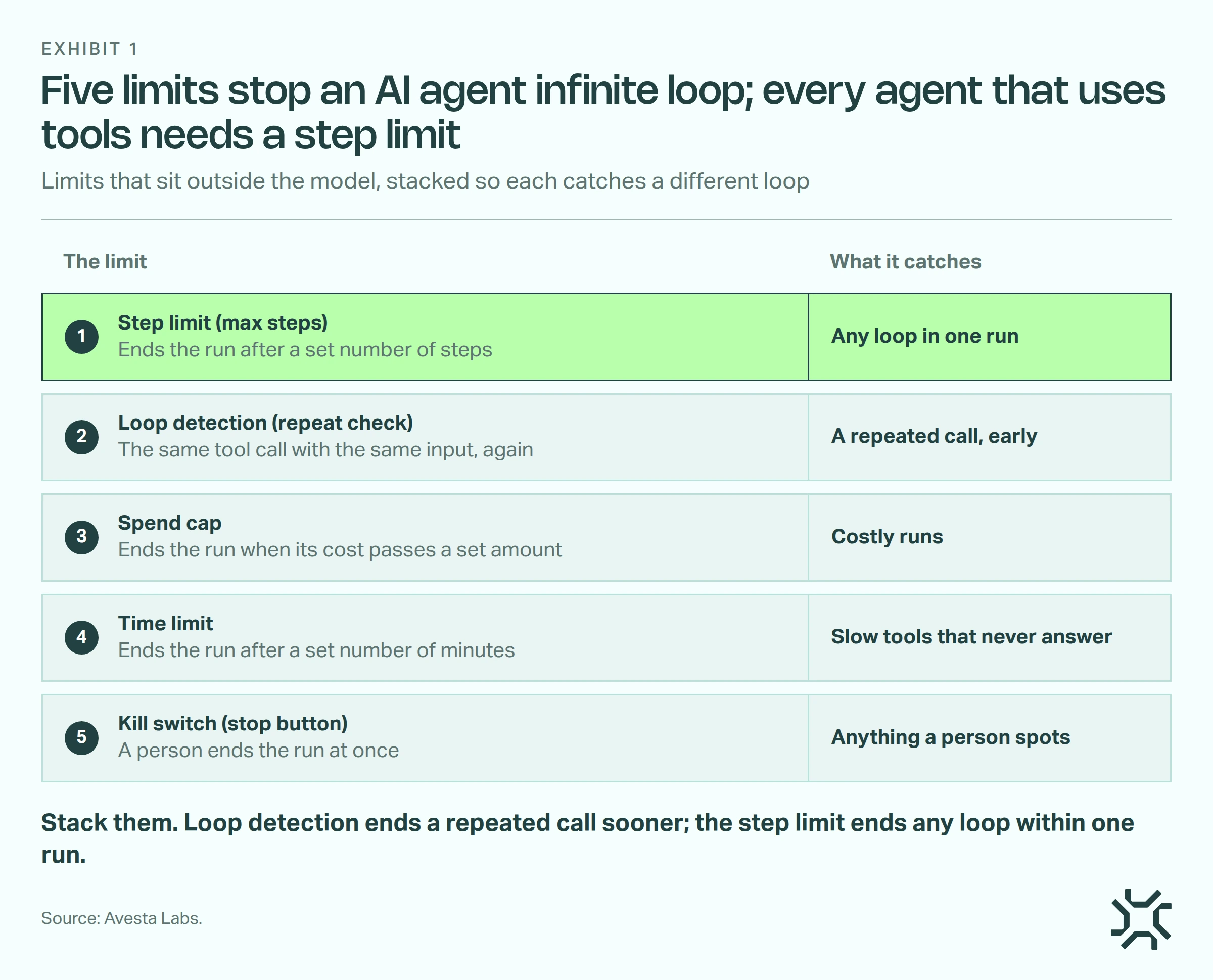
- Step limit (max steps). End the run after a set number of steps. It catches any loop inside one agent's run, however it started.
- Loop detection (a repeat check). Stop when the agent makes the same tool call with the same input two or three times in a row. It ends a loop before the step limit does.
- Spend cap. End the run when its cost passes a set amount. Runaway costs grow late in a run: each step costs more than the last, because the agent re-reads the whole conversation (OpenRouter's loop guide makes the same point).
- Time limit. End the run after a set number of minutes, for slow tools that never answer.
- Kill switch (a stop button). Let the person waiting, or an operator, end the run at once.
OWASP's Top 10 for LLM applications calls the wider problem unbounded consumption and advises teams to "set timeouts and throttle processing for resource-intensive operations". The spend cap and time limit are that advice, applied to one run.
How many steps should an AI agent be allowed?
Toolkits name the step limit differently and pick very different defaults, and they don't all count the same thing. As of November 2026:
| Toolkit | Setting | Default | When it's reached |
|---|---|---|---|
| LangGraph | Recursion limit | 10,007 super-steps (its own unit), from version 1.1.4 | Stops with a "recursion limit" error |
| OpenAI Agents SDK | Max turns | 10 turns, each one call to the model (in its code); can be turned off | Stops with a "max turns exceeded" error |
| Avesta AgentOS | Max steps | 20 steps for each message a person sends, set per agent | The run ends at the limit |
A toolkit default is a guess made for every agent at once. Yours should come from your own normal runs.
A simple rule for the number
Look at the step counts of a week of normal runs. Find the longest one that finished well, and set the limit at one and a half to two times that. An order-status agent whose longest good run is 4 steps might get 6 to 8. A research agent whose longest good run is 25 steps might get 40.
Set the step limit from your longest good run, then watch how often it's hit.
Review the number whenever you add a tool. More tools usually mean more steps on a normal run.
What should happen when the agent hits the step limit?
A limit that ends the run in silence is only half a fix. The person waiting sees nothing, or a vague error, and asks again. That starts the same loop.
Once the run is cut off, the model gets no further turn, so the software around it writes the message from the run's own record.
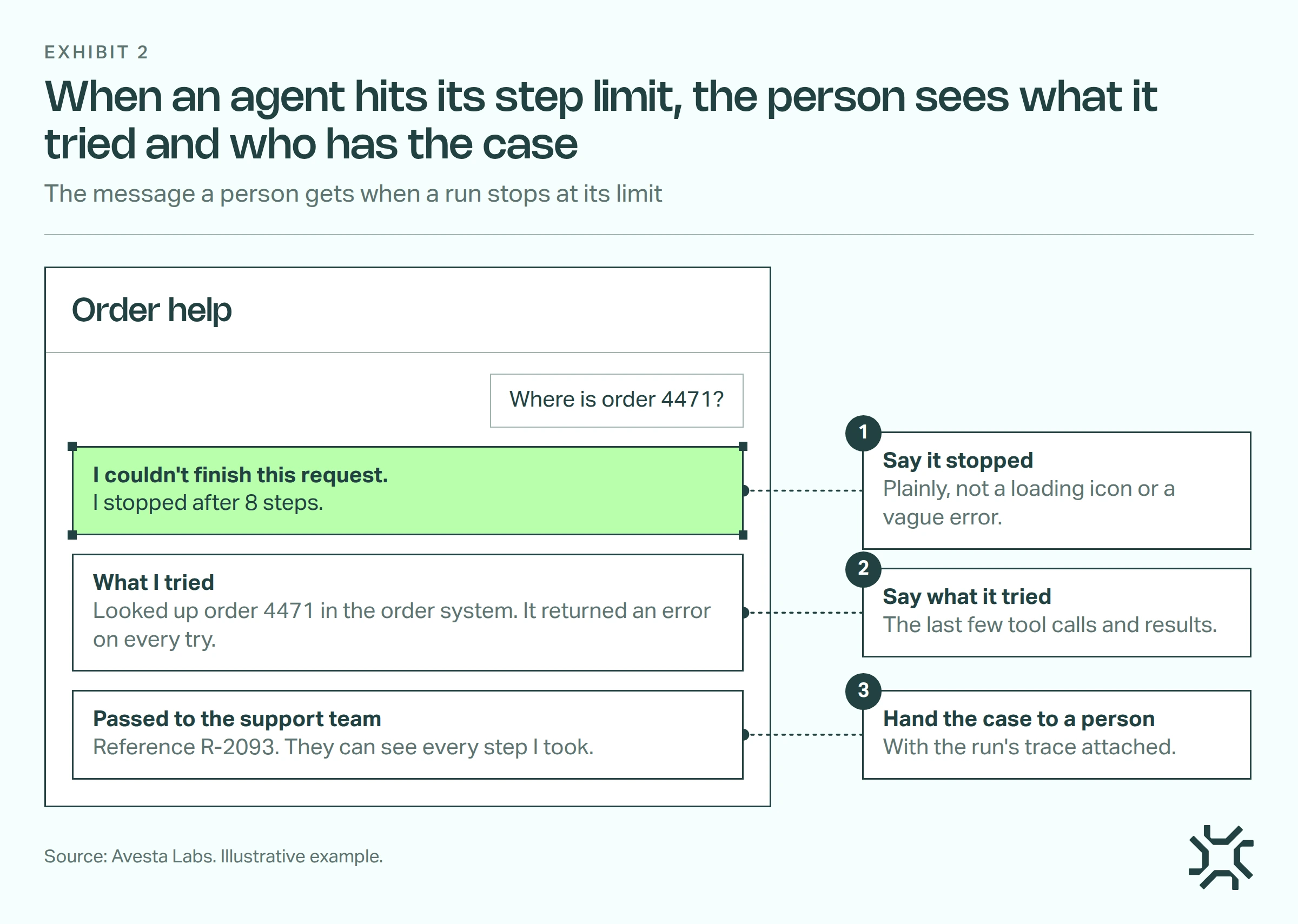
- Say it stopped, plainly. "I couldn't finish this" beats an endless loading icon or a generic error.
- Say what it tried. The last few tool calls and their results, so nobody starts from zero.
- Hand the case to a person. Route it to a queue with the run's trace (the record of every step it took) attached, the same way an approval request reaches a reviewer.
How do you detect loops in production?
Count limit hits. For each agent, record how many steps every run took and how often a run reached its limit. Two patterns are worth an alert.
- Hits jump after a change. A new prompt or tool that sends limit hits up overnight has usually broken something. Open a few of those runs in your agent traces and look for the repeated call.
- Normal runs creep toward the limit. If typical runs used 6 steps last month and use 14 now, the agent is working harder for the same answer. Fix that before it starts hitting the cap.
Put the same per-run cost next to it. Our cost per task guide shows why a few looping runs can move the average for a whole agent.
How we stop loops and runaway costs in Avesta AgentOS
Of the five limits, the step limit and the kill switch are built into every agent in Avesta AgentOS. Three patterns make them work, and each is something you could copy.
1. No agent runs without a step limit
Each agent has a max steps setting. If the builder leaves it empty, the run stops at 20 steps for each message. Each saved version of the agent keeps its own number, so you can see when the limit changed.
2. Limit hits are counted per agent and model
Every finished run records how many steps it took. A separate counter goes up each time a run reaches its limit, labelled with the agent and the model. We can compare the same agent before and after a change, or on two models. A loop then shows up as a rising line, not as a surprise on the invoice.
3. The kill switch reaches the work straight away
When a person presses stop, the signal goes directly to the process running that conversation. It doesn't wait for the browser connection to close. The run is recorded as cancelled by the user, separately from errors, so a stop never looks like a failure in the reports.
When does a low step limit do more harm than good?
A tight limit cuts off long jobs that are working. A research agent reading twenty sources, or a data agent paging through a large report, can legitimately need fifty steps. A limit of 20 turns those good runs into handovers.
For long jobs, lean on the spend cap and the time limit instead, and keep a generous step limit as the backstop. For a simple assistant that makes one call to the model and uses no tools, a step limit adds little: there is only one step.
The bottom line
An AI agent infinite loop is cheap to prevent and expensive to find late. Start with the step limit, because it ends any loop inside a run, and set it from your own runs rather than a default. Then count how often it's hit. A rise after a change is usually the earliest warning you will get.
For the next layer of protection, read what guardrails in AI agents are and why they matter.
What was your agent's longest good run last week, and how close is it to the limit?
Want step limits, a kill switch and run monitoring built into your agents from day one? See how we run safe AgentOps for production AI agents.
Get started: hello@avestalabs.ai
Frequently asked questions
- What does "agent stopped due to max iterations" mean?
- It means the agent reached its step limit before it finished the task, so the toolkit ended the run. The limit did its job. What you need to find out is why the agent needed so many steps. Open the run's trace and look for the same tool call repeated, or a tool that failed on every try.
- Is an infinite loop in an AI agent a security risk?
- It can become one. OWASP lists unbounded consumption among its top risks for LLM applications, including attacks that run up a provider bill, which it calls denial of wallet. A step limit, a spend cap and per-user rate limits keep a looping run, accidental or not, from using more than you planned.
- Do AI agents get stuck in loops with newer models?
- Yes. A stronger model can help, but a loop usually comes from the setup around the model: a broken tool, an error message that gives no hint, or a prompt that always says something is missing. A new model doesn't fix those. Keep the step limit and spend cap whichever model you use.
- Should an agent retry automatically after hitting its step limit?
- No. A run that hit its limit has already shown it can't finish the task as set up. Running it again usually repeats the same loop and pays for it a second time. Hand it to a person instead, and let them retry once they've fixed the input or the tool.
Share this article